Razer Huntsman V3 Pro 8KHz TKL: A Full Competitive Review
KeyboardsPerformance at a Glance
The Razer Huntsman V3 Pro 8KHz TKL occupies the technical ceiling of competitive gaming keyboards. Here is how it scores across the five categories that matter most to buyers at this price point.
- Form FactorTenkeyless (80%)
- SwitchAnalog Optical Gen-2
- Polling Rate8,000 Hz
- Switch FeelLinear
- Rapid TriggerYes
- Analog InputYes
- Hot-Swap SwitchesNo
- Weight719.5 g
- Warranty2 Years
Design and Build: Substance Before Style
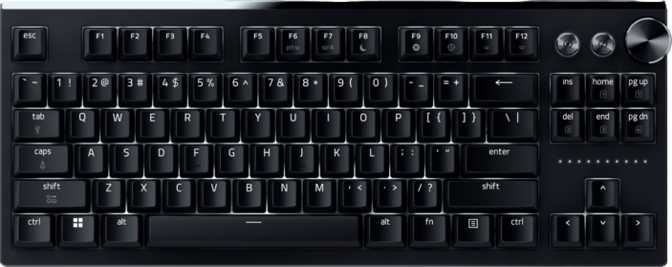
The Huntsman V3 Pro 8KHz TKL is built to feel like it costs what it does. The mounting plate and top frame are machined aluminum, giving the board genuine rigidity and a noticeably dense presence. On the desk during an intense session, it anchors in place — no shifting, no flex under hard keystrokes. For players who carry peripherals to LAN events, the weight is a practical consideration worth making before purchasing.
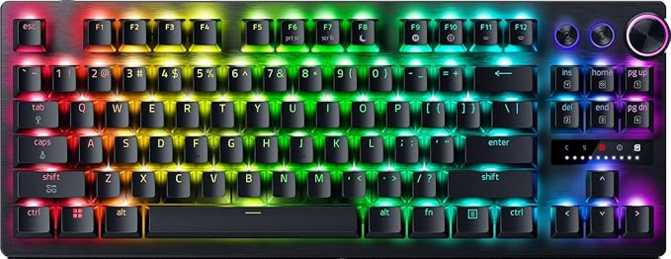
The chassis pairs that metal structure with a reinforced plastic enclosure — a hybrid approach that manages cost without sacrificing the premium feel where hands actually make contact. Two colorways are available: matte black for a traditional competitive setup and white for stream-facing builds. Both deliver per-key RGB backlighting through Razer Chroma with consistent, even illumination at any brightness level.
The tenkeyless form factor eliminates the numpad entirely. Compared to a full-size board, this reclaims considerable desk space to the right, giving the mouse room to move freely and reducing the shoulder extension that accumulates fatigue over long sessions. Three-stage adjustable feet let you dial in your preferred typing angle, and the braided cable detaches at the keyboard — a damaged cable becomes a simple swap, not a board-ending failure.
No USB Passthrough Port
This board does not include a USB passthrough port. Users who route a wired mouse or USB receiver through the keyboard will need to manage those connections directly at the PC.
Physical Profile
-
DIMENSIONS363 × 139 × 39 mm
-
WEIGHT719.5 gHeavier than most TKL alternatives
-
CONSTRUCTIONAluminum Case & PlateReinforced plastic frame
-
LIGHTINGPer-Key RGB (Chroma)Available in Black & White
-
ADJUSTABILITY3-Stage TiltWrist rest included
The 8,000 Hz Polling Rate: Separating Fact From Hype
Every keyboard constantly reports its state to your computer. Polling rate describes how frequently that happens. Standard gaming keyboards communicate 1,000 times per second — an interval that has been considered excellent for years. This keyboard communicates eight times faster than that baseline, and understanding what that actually means for real-world use is critical before paying a premium for it.
The category standard for years — entirely sufficient for the vast majority of players at every skill level.
Eight times the polling frequency — the keyboard's contribution to input latency reduced as close to zero as current USB connectivity allows.
When 8KHz Delivers a Measurable Edge
Elite competitive play where every other input variable is already optimized — high-refresh monitor, competitive tick rate, low-latency peripherals throughout. At that level, the polling rate advantage is measurable and meaningful.
When the Difference Barely Registers
For most players, the gap between 1,000Hz and 8,000Hz is smaller in practice than the numbers suggest. Monitor refresh rate, game engine tick rate, and biological reaction time are far larger variables in what you actually perceive during play.
Inside the Switches: How Optical Analog Technology Works
Most mechanical keyboard switches work through direct metal contact — press a key far enough, two metal components touch, the circuit closes, and the keypress registers. That physical contact introduces electrical noise that debounce filtering has to smooth out. That filtering adds latency. The Razer Analog Optical Gen-2 switches bypass this problem entirely.
Inside each switch, an infrared light beam runs across the travel path. When the switch stem descends and interrupts that beam at the correct depth, the keypress registers — no contact, no electrical noise, no debounce delay. The signal is clean at the hardware level from the first keystroke onward.
The word "analog" carries equal weight. Traditional switches report a binary state: pressed or not pressed. These switches report a continuous positional value across their entire travel range. From the first hint of downward movement through to complete bottom-out, the keyboard knows exactly where each switch sits at every moment. That positional awareness is what makes every advanced feature on this board possible.
Per-key adjustable from a near-surface touch to just before full bottom-out — the widest practical range available
Light-side-of-linear — responsive for gaming without being so hair-triggered that everyday typing becomes unreliable
Standard-height keycap travel — immediately familiar for any user moving from a conventional gaming keyboard
Switches Are Not Hot-Swappable
Unlike some competitors, there is no pull-and-replace mechanism on this board. If you ever want a different switch character, that means a new keyboard or desoldering work. For most buyers this is a non-issue. For enthusiasts who like to experiment with switch feel, it is a real constraint worth knowing upfront.
Advanced Features: The Capabilities That Define This Keyboard
Four features on this board go beyond what traditional keyboards can offer. Each one represents a genuine hardware capability, not a marketing checkbox. Understanding what they do — and for whom — is the most important part of making a confident purchase decision.
Every keyboard has two critical thresholds per key: the point at which a press registers, and the point at which the key resets for a re-press. On standard keyboards, the reset threshold is fixed slightly above the actuation point — a deliberate buffer that prevents noise from causing double-fires, but that also means you cannot re-trigger a key until it physically travels back past that buffer.
Rapid Trigger removes that fixed buffer entirely. The instant a key begins traveling upward, the keyboard registers a release. On the way back down, it can actuate again immediately. For competitive FPS players who counter-strafe — rapidly tapping movement keys to stop momentum and take accurate shots — this changes the mechanical reality of the technique. Instead of waiting for the key to clear a fixed threshold, the keyboard responds in sync with actual finger motion. The gap between intention and input narrows as much as hardware currently allows.
The actuation point — the depth at which a keypress fires — can be set independently for every key on the board, anywhere from a near-surface touch to just before full bottom-out. The adjustment range spans the entire practical spectrum the switch allows.
Set movement and action keys to the shallowest possible point for maximum input speed. Set keys you rest fingers on, or use only deliberately, to a deeper threshold to prevent accidental triggers. This is per-key mechanical customization that rewards time spent configuring it thoughtfully — not a single global adjustment applied uniformly to the whole board.
Each key can be programmed with two distinct actuation zones, each mapped to a different action. One key performs one function at a light press and a completely different function at a deeper press — no additional key binding, no extra hardware required.
The most immediately practical gaming application: bind walk to a shallow press and sprint to a deeper press of the same movement key. The concept is borrowed from controller trigger design and applied to flat keyboard switches. For players who think carefully about how their inputs are mapped, it genuinely earns its place in the feature set.
Because these switches report continuous positional data rather than a binary on/off state, games and applications with analog support can receive proportional signals based on exactly how deeply a key is pressed. Variable throttle in a flight simulator, proportional speed in a racing title, tiered ability states in an action game — these can respond to press depth rather than simple binary detection.
The audience for this feature is narrower than for rapid trigger or adjustable actuation, but for sim players without a dedicated controller, or for those who want finer mechanical nuance in specific genres, it provides something no traditional keyboard can offer.
Keycaps, Layout, and Typing Character
The keycaps are manufactured using a double-shot PBT process. Double-shot means the legends — the letters, numbers, and symbols on each key — are formed from a physically separate layer of plastic fused during molding, rather than printed or etched onto the surface. The legends are structurally part of the keycap itself: they cannot fade, chip, or wear off regardless of how many hours accumulate. PBT material also resists the reflective, greasy surface shine that cheaper keycap plastics develop over time.
The keycap profile is OEM — a gently sculpted, row-differentiated shape used widely across the industry. It is immediately familiar to the vast majority of keyboard users and comfortable for both gaming and general typing. The layout follows the standard US ANSI arrangement with conventional key sizing throughout. This matters practically: any standard aftermarket keycap set will be fully compatible without modification. If you plan to change the aesthetics later, your options remain completely open.
For typing feel: the linear optical switches are excellent for gaming and competent for general use. For sustained writing or coding where switch character matters, they are functional but do not deliver the tactile satisfaction that a quality tactile or clicky alternative provides. This is a keyboard built around input speed, and the switch personality reflects that priority without apology.
Keycap Breakdown
-
Double-Shot PBTLegends fused into the cap during manufacturing — cannot fade under any usage conditions
-
OEM ProfileRow-differentiated sculpted shape — widely familiar and comfortable from day one
-
Standard ANSI LayoutFull aftermarket keycap compatibility — change the look any time without fitment issues
-
Linear Switches OnlyNo tactile or clicky option available — buyers who prioritize switch character over speed should look elsewhere
Media Controls and Daily Usability
Despite its competitive focus, the Huntsman V3 Pro 8KHz TKL is a genuinely practical daily driver. Two features in particular lift it above the purely performance-focused category it might otherwise occupy.
Physical Volume Dial
A physical rotary dial provides direct volume control — adjust it mid-match, mid-stream, or mid-call without lifting your hand from the board or navigating software menus. For anyone managing game audio, voice chat, and music simultaneously, a physical knob quickly becomes something you notice the absence of on other boards.
Dedicated Media Keys
Dedicated media keys sit above the main layout and control playback without requiring function-layer combinations. No hunting for the Fn key, no memorizing which key doubles as pause — just direct, immediate control of playback state at the physical level.
Who This Keyboard Is Right For — and Who It Isn't
The Huntsman V3 Pro 8KHz TKL is a precision instrument built for a specific buyer. Before purchasing, be honest about which column describes you most accurately.
- Play competitive FPS or battle royale titles and treat your setup as a performance tool
- Already use rapid trigger and want to step up to the highest polling rate available
- Want analog key depth for sim or action games without adding a separate controller
- Rely on a physical volume dial and dedicated media keys in your daily workflow
- Are invested in the Razer Chroma ecosystem and want the top-tier model
- Primarily type long-form content and want a satisfying tactile or clicky switch character
- Use macOS — this board is designed for Windows and does not support Mac key layouts or conventions
- Want open-firmware customization via QMK, VIA, or ZMK — all configuration runs through Razer Synapse only
- Plan to swap switches at any point — hot-swap support is not available on this board
- Need a USB passthrough port to route a wired desk peripheral through the keyboard
How It Stacks Up: Competitive Comparison
The field of analog rapid-trigger keyboards with elite polling rates is genuinely small. These are the most meaningful direct comparisons currently available at this tier.
| Feature | Huntsman V3 Pro 8KHz TKL | Wooting 80HE | SteelSeries Apex Pro TKL |
|---|---|---|---|
| Switch Technology | Optical Analog | Hall Effect Magnetic | Hall Effect Magnetic |
| Rapid Trigger | Yes | Yes | Yes |
| Dual Actuation | Yes | No | No |
| Full Analog Input | Yes | Yes | No |
| Hot-Swap Switches | No | Yes | No |
| Open Firmware | No | VIA | No |
| Wrist Rest Included | Yes | No | No |
| Dedicated Media Keys | Yes | No | Yes |
| Physical Volume Control | Yes | No | Yes |
vs. Wooting 80HE
The Wooting is the most technically comparable rival, using Hall Effect magnetic switches — a different contact-free sensing approach with comparable precision. Its significant advantage is flexibility: hot-swappable switches and VIA firmware access give enthusiasts extensive hardware and software customization freedom that Razer's proprietary ecosystem does not offer. The Huntsman counters with dual actuation, full analog input, an included wrist rest, and dedicated media keys — practical advantages the Wooting lacks.
vs. SteelSeries Apex Pro TKL
The Apex Pro is a well-established competitive option with broad market recognition, but its adjustable actuation implementation is narrower in scope than what Razer provides here, and it offers no true analog input support. The Huntsman's dual actuation capability and full positional sensing are the primary differentiators for buyers deciding between the two.
Honest Assessment: Strengths and Compromises
The technical package here is genuinely impressive as a whole. But understanding where the board earns its price and where it asks for compromise is the difference between a confident purchase and eventual regret.
What It Gets Right
- The combination of 8,000Hz polling, optical analog sensing, rapid trigger, per-key adjustable actuation, dual actuation, and full analog input is not a padded feature list. Each element meaningfully expands what the keyboard can do compared to the category baseline.
- Double-shot PBT keycaps will outlast the competition on longevity alone — legends that cannot fade over any realistic period of use, and a texture that resists surface degradation.
- The included wrist rest and physical rotary dial make this a genuinely comfortable daily driver without requiring separate purchases — not guaranteed inclusions at any price.
- Aluminum construction and plate deliver desk-anchoring stability and a build quality you feel immediately. The board does not flex, does not rattle, and communicates a premium physical experience consistently.
- Two-year manufacturer warranty — consistent with premium peripherals in this tier and providing meaningful coverage for a significant hardware investment.
Where It Asks for Compromise
- Switches are fixed permanently. No hot-swap mechanism means no switch experimentation and no easy hardware-level repair for degraded switches over years of use. For enthusiasts who like to iterate, this is a real constraint.
- Open firmware is entirely off the table — no QMK, no VIA, no ZMK. Every advanced feature runs through Razer Synapse, which requires a Razer account and internet access for full unlocking. Some buyers find that arrangement objectionable on principle.
- At 719.5 grams, this is meaningfully heavier than most TKL alternatives. Excellent on a desk; a genuine consideration for players who transport peripherals regularly.
- No USB passthrough port — a recurring inconvenience for wired desk setups where routing a mouse or receiver through the keyboard is standard practice.
- Mac users are simply outside the intended audience. There is no Mac key layout accommodation and no convention support for macOS workflows.
Questions Real Buyers Are Asking
These are the questions that appear consistently from buyers evaluating this keyboard — answered directly based on the board's actual specifications and capabilities.
Built for Players Who Take Input Seriously
The Razer Huntsman V3 Pro 8KHz TKL is a precision instrument built for a specific buyer, and it delivers on that premise with genuine technical credibility. Competitive FPS and battle royale players who treat their setup as a performance tool — who care about input latency at the hardware level, practice counter-strafing mechanics, and want a keyboard that imposes no ceiling on their technique — will find very few alternatives that match its specification.
The optical analog switches, 8,000Hz polling, rapid trigger, per-key adjustable actuation, dual actuation, and analog input form a coherent, serious competitive package. The bundled wrist rest, dedicated media keys, and rotary dial extend that into a genuinely livable daily driver. But for everyone else — enthusiasts who want switch flexibility, typists who care about switch character, Mac users — the decision requires more nuance.
For the player this board was designed for — serious about competitive performance, building a setup around minimizing every variable they can control, and done compromising on hardware — the Huntsman V3 Pro 8KHz TKL earns its position at the top of the market.
Recommended for Competitive Players