Razer Huntsman V3 Pro 8KHz: Full Review for Competitive Gamers
KeyboardsReview at a Glance
Key Specifications
- Layout
- Full-Size (100%) ANSI
- Connection
- Wired USB, Detachable
- Polling Rate
- 8,000 Hz
- Switch
- Analog Optical Gen-2
- Actuation Range
- 0.1mm – 4.0mm
- Actuation Force
- 40g Linear
- Keycaps
- PBT Double-Shot, OEM
- Wrist Rest
- Included
- Hot-Swap
- Not Supported
- Warranty
- 2 Years
The Case for 8KHz in a 1KHz World
Most gaming keyboards communicate with your computer 1,000 times per second. That's already fast enough that any single polling cycle — one millisecond — passes faster than a human can consciously perceive. So when Razer puts "8KHz" in the product name, the reasonable question is: does that actually matter?
The honest answer is nuanced. At 8,000 transmissions per second, each input packet arrives at your system every 0.125 milliseconds. The gap between this and a standard 1,000Hz keyboard isn't something your nervous system registers — it's something the hardware registers. The benefit surfaces in competitive scenarios where the game engine, your display, and your inputs operate together at the highest possible precision: reduced input jitter during rapid keypresses, tighter motion data when tracking sequences of inputs, and a statistical edge in games where timing is measured at the frame level.
For tournament-level FPS play and competitive rhythm gaming, the difference is meaningful. For everything else, it's a margin so thin it sits beyond what human reaction time can capitalize on. The Razer Huntsman V3 Pro 8KHz isn't pretending to be a keyboard for everyone — it's a performance instrument for players who've already squeezed everything else out of their setup and are looking at firmware-level polling rates as the next measurable gain.
Build and Design: Aluminum Where It Counts
Construction
An aluminum internal plate sits beneath the switches, contributing structural rigidity where it matters most. A rigid, non-flexing plate transmits each keypress with firm directness — competitive gamers generally favor this decisiveness, since knowing exactly where your keypress sits in its travel matters when actuation points are programmable to fractions of a millimeter. The external chassis blends aluminum and plastic intelligently, achieving a premium feel without the full heft of an all-metal body.
Ergonomics
The keyboard ships with an included wrist rest — a practical decision at this profile height. Extended gaming sessions without wrist support become uncomfortable over time, and bundling the rest rather than selling it separately is the right call. Adjustable rear feet offer two additional height positions, letting you tailor the typing angle to your posture. The standard full-size footprint at 445mm wide fits any desk setup without rearrangement.
Cable & Connectivity
The detachable cable is the right choice for a keyboard that will travel to events. It simplifies transport and cable management, and future-proofs the connection if the cable wears. This is a wired-only keyboard — no wireless mode, no battery to manage, no charging interruptions — which is the correct priority for a device polling at 8,000Hz. There is no USB passthrough port, a minor omission for desks that rely on keyboard-integrated USB connections.
Physical Dimensions
The Gen-2 Analog Optical Switch: Rethinking What a Keypress Is
How Optical Switches Work
Standard mechanical switches use physical metal contacts — two conductors touch when the key is pressed, completing a circuit and registering the input. Optical switches replace that contact with a light beam. An infrared LED and sensor sit inside the switch housing, and the switch stem interrupts or permits that beam as the key travels. The result is a switch with no metal-on-metal contact, eliminating the brief electrical bounce that conventional switches generate.
The more important consequence: because the switch senses a light beam rather than a contact point, the key's position can be measured continuously along its entire travel — not just at a single fixed depth. This continuous sensing is the foundation for every adjustable feature the V3 Pro offers. Without it, rapid trigger, dual actuation, and analog input become impossible to implement at this level of precision.
Switch Feel and Actuation
The Gen-2 switches use a linear feel — no tactile bump, no audible click, smooth resistance from top to bottom. At 40 grams of actuation force, these sit on the lighter end of the gaming keyboard spectrum. Typists accustomed to heavier switches will notice the lighter touch immediately; those coming from membrane boards will find them decisively crisper and more intentional.
The fully adjustable actuation range spans from 0.1mm of travel — a barely perceptible depth — all the way to 4mm near the bottom of the keypress. The minimum setting is extraordinarily shallow, suited for functions where any touch should register immediately. Total travel distance of 4.5mm is consistent with standard full-height switches and feels familiar to most gamers.
Switch Specifications
No Hot-Swap Support
The Gen-2 Analog Optical switches are soldered in place. If linear switches don't suit your preference, the V3 Pro cannot accommodate a change. This is a deliberate engineering trade-off — the analog sensing system requires precise switch alignment — but it's a real limitation that buyers should weigh carefully before committing.
Four Features That Redefine Input
The analog optical sensing foundation enables a feature set that few full-size keyboards can match. Each capability is a direct extension of the same underlying sensing technology — not a separate system bolted on.
Rapid Trigger
Most Impactful FeatureTraditional switches reset only when lifted past a fixed point above actuation. Rapid Trigger removes that fixed reset. The switch resets the instant it reverses direction by a specified minimum distance — as little as 0.1mm. In competitive FPS play, this produces more consistent counter-strafing, faster alternating movement inputs, and a reduced dead zone between repeated keypresses. This is built directly into the optical sensing system, not approximated by firmware logic.
Dual Actuation
Unique to This KeyboardEach key can have two independently configured trigger depths, each mapped to a different action. A light press triggers one command; pressing deeper triggers a second, distinct command. Walk on a shallow press, sprint on a full one — without a separate key or button combination. This requires no game-side support, since the keyboard presents both signals as standard key inputs to any game or application.
Analog Input
Requires Game SupportIn games that natively support analog signals, each key's press depth maps to a proportional output — similar to how far you tilt a thumbstick. For racing games, this enables genuine proportional steering with WASD. The feature is genuinely innovative but niche: it requires specific game support that most competitive FPS titles don't implement. Most buyers will use rapid trigger daily; full analog input far less frequently.
N-Key Rollover
Expected at This TierEvery key is independently scanned and recognized simultaneously, with no limit on concurrent inputs. Press any combination of keys at once and each input registers without conflict or ghosting. This eliminates the dropped inputs that can occur with less capable scanning matrices — particularly relevant in situations involving three or more simultaneous keypresses. At this price tier, full NKRO is expected and it's confirmed here.
Keycaps, Layout, and Daily Usability
Keycap Quality
The keycaps are double-shot PBT — two of the most meaningful words in keycap quality. PBT plastic is harder and more heat-resistant than the ABS plastic used on most stock gaming keyboards. These keycaps won't develop the shiny, greasy surface that heavily used ABS keycaps acquire over months of play.
The double-shot manufacturing process molds the legends from a separate material fused into the keycap body, rather than printing or engraving them onto the surface. The legends cannot wear or fade regardless of how heavily the keyboard is used — because they exist as part of the plastic structure, not as a coating on top of it.
The keycap profile is OEM — a stepped, angled profile where each row sits at a slightly different height following the natural arc of resting fingers. It's the profile most people learn to type on. Replacement sets in OEM profile are widely available from multiple manufacturers for future customization.
Layout and Controls
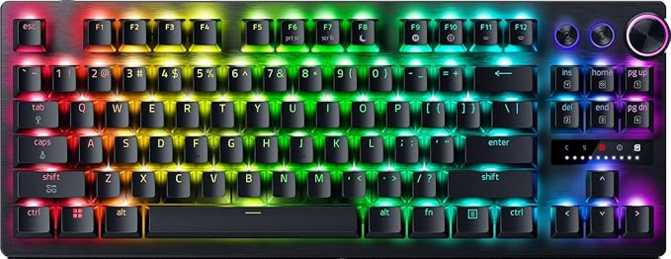
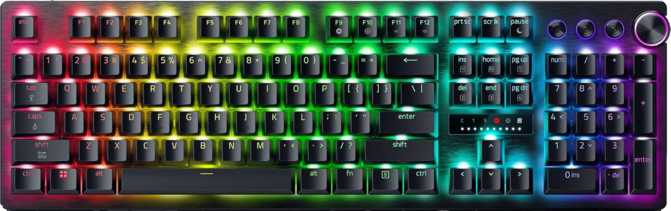
The full 100% ANSI layout preserves every key: numpad, full navigation cluster, function row, and all modifiers. For gamers who also work at their computer — spreadsheets, data entry, number-heavy tasks — the numpad serves both roles without compromise.
Dedicated media keys sit above the standard function row, meaning volume control, skip, and pause functions are always single-press operations without holding a modifier. The rotary dial complements this with analog volume adjustment — a continuous scroll input rather than discrete clicks. Both controls are available in every application without any configuration.
Who Should Buy the Razer Huntsman V3 Pro 8KHz?
Built For You If...
- You play competitive FPS or rhythm games seriously and want every measurable input advantage available in a single device.
- Counter-strafing consistency, rapid alternating movement inputs, and sub-millisecond response times matter in your games of choice.
- You're running Windows and comfortable with Razer Synapse as your configuration software and peripheral ecosystem hub.
- You already use or plan to build within the Razer ecosystem and value Chroma lighting integration across your peripherals.
- You use a numpad for productivity work alongside gaming and don't want to sacrifice layout for a smaller form factor.
Consider Other Options If...
- Open-source firmware (QMK, VIA, or ZMK) is important. The V3 Pro is locked entirely to Razer Synapse with no alternative path.
- You want hot-swappable switches — the ability to pull out and replace individual switches without soldering is not available here.
- Your gaming is casual or genre-varied. The performance-specific features here pay off only in specific competitive contexts.
- You primarily use macOS, where Synapse feature support is more limited and modifier behavior requires manual remapping.
- You depend on a USB passthrough port built into your keyboard for desk cable management and peripheral connectivity.
How It Compares to the Competition
The Huntsman V3 Pro 8KHz occupies a specific competitive slot: full-size keyboards with analog sensing, rapid trigger, and an ultra-high polling rate. The field is not crowded.
| Feature | Razer Huntsman V3 Pro 8KHz Reviewed |
Wooting Two HE | SteelSeries Apex Pro |
|---|---|---|---|
| Max Polling Rate | 8,000 Hz | Up to 1,000 Hz | Up to 1,000 Hz |
| Switch Technology | Analog Optical | Hall Effect Magnetic | Adjustable Mechanical |
| Rapid Trigger | |||
| Full Analog Key Input | |||
| Dual Actuation | |||
| Hot-Swap Switches | |||
| Stock Keycap Material | PBT Double-Shot | ABS | ABS |
| Wrist Rest Included |
vs. Wooting Two HE
The Wooting Two HE established adjustable actuation and rapid trigger as category expectations, using Hall Effect sensing — a different technology achieving similar positional measurement goals. Its software maturity and community support are genuine strengths, and its price often undercuts Razer's offering. The decisive gap: the Wooting tops out at 1,000Hz polling where the Huntsman V3 Pro begins. The Wooting also includes hot-swappable switches, which the Razer does not. For buyers who prioritize switch flexibility over extreme polling rate, the Wooting is the stronger choice.
vs. SteelSeries Apex Pro
The Apex Pro offers adjustable actuation without rapid trigger or analog input, targeting gamers who want per-key customization without the continuous position sensing the V3 Pro offers. It targets a partially overlapping audience — buyers who want some level of actuation flexibility — but operates at a fundamentally different capability ceiling. For buyers where polling rate supremacy and rapid trigger are the decisive requirements, the Apex Pro doesn't compete at this level.
Honest Assessment: Strengths and Limitations
Where It Excels
The performance feature stack — 8KHz polling, analog optical sensing, rapid trigger, dual actuation, and fully adjustable actuation points — is cohesive rather than additive. These aren't independent features assembled for spec-sheet appeal; each is an extension of the same underlying sensing technology, and each has a concrete use case that competitive gamers will recognize immediately. The whole is genuinely greater than the sum of its parts.
The inclusion of PBT double-shot keycaps shows Razer isn't cutting corners on material quality to fund the premium engineering. Stock keycaps that won't shine or fade are a meaningful advantage over most gaming keyboard competitors shipping ABS by default.
The bundled wrist rest, detachable cable, and rigid aluminum plate construction mean the build quality earns the price alongside the engineering. The keyboard is clearly designed with LAN events and serious competitive play in mind — and the physical design reflects that without compromise.
Where It Falls Short
No hot-swap support at this price tier is a genuine gap. The buyers most likely to purchase an 8KHz analog keyboard are enthusiasts — exactly the people who'd want switch flexibility. The absence is a deliberate engineering trade-off for analog sensing precision, but it remains a trade-off with real consequences for anyone who wants to experiment or change their switch feel later.
The Razer Synapse dependency means configuration is software-locked, feature access requires application installation, and the open-source firmware ecosystem — QMK, VIA, ZMK — is entirely off the table. For the customization community, this matters significantly and narrows the keyboard's appeal.
The single available colorway and the absence of a USB passthrough port are smaller but legitimate omissions. The full analog input feature, while innovative, requires game support that remains limited compared to how many titles this keyboard will actually be used for — most buyers will rely almost exclusively on rapid trigger and dual actuation in daily use.
Questions Buyers Ask Before Purchasing
Answers to the most common questions from buyers researching this keyboard.
The Verdict
Our final recommendation on the Razer Huntsman V3 Pro 8KHz
The Razer Huntsman V3 Pro 8KHz is a purpose-built performance keyboard for competitive gamers who want every measurable input advantage in a single full-size device. The combination of 8KHz polling, analog optical sensing, rapid trigger, and dual actuation makes it uniquely capable in the scenarios it was designed for. The gaps are real — no hot-swap, no open firmware — but narrowly drawn. For the player this keyboard was designed for, it represents the current ceiling of what a full-size wired gaming keyboard can offer in terms of input precision and response speed. That specificity is both its greatest strength and its sharpest limitation.
Buy It If You...
- Play competitive FPS or rhythm games at a serious level
- Need rapid trigger and 8KHz polling as primary requirements
- Are on Windows with a Razer-compatible peripheral setup
- Want a full 100% layout with zero performance compromise
Skip It If You...
- Need hot-swappable switches or open firmware (QMK/VIA)
- Game casually across varied genres without competitive focus
- Primarily use macOS or need a USB passthrough port
- Dislike proprietary software ecosystems for peripherals