Portronics Toad Ergo 4: A Full Ergonomic Productivity Mouse Review
MiceEverything You Need to Know Before You Buy
The Portronics Toad Ergo 4 is a full-size ergonomic wireless productivity mouse with dual connectivity and five programmable buttons — built for right-handed desk workers who want all-day comfort without paying premium-brand prices.
- Full ergonomic shape for all-day palm support
- 2.4GHz dongle and Bluetooth 5.3 in one device
- Five programmable buttons at an accessible price
- User-removable and field-replaceable battery
- Clean, RGB-free look for professional environments
- Right-handed only — no ambidextrous design
- Cannot be used while the battery is charging
- No onboard memory — profiles stay on one computer
- Heavier than most wireless productivity mice
- Only one year of warranty coverage
Overall Rating
out of 5.0
Best for right-handed office users seeking ergonomic comfort at an accessible price
What Kind of Mouse Is the Portronics Toad Ergo 4?
Office mice rarely get discussed until something goes wrong — a wrist that aches by mid-afternoon, a USB receiver hogging the only free port on a laptop, or a battery that dies with three hours of the workday still ahead. The Portronics Toad Ergo 4 is designed to address those exact frustrations.
This is not a gaming mouse. It is not a precision creative tool. It belongs firmly in the productivity category — built for the person who spends the majority of their day in documents, spreadsheets, email, and browser tabs, and who has started to notice that their current mouse works against the hand rather than with it.
Understanding This Context Changes How You Evaluate It
Specs that matter enormously to a gamer — like polling rate or maximum tracking speed — are largely irrelevant here. What counts is ergonomic shape, connection reliability, battery staying power, and a button layout that saves you clicks during a long working day. That lens governs this entire review.
Built for Right-Handed All-Day Use
Every physical design decision on the Toad Ergo 4 traces back to one goal: keeping your hand comfortable through hours of continuous desk work.
Ergonomic Shape
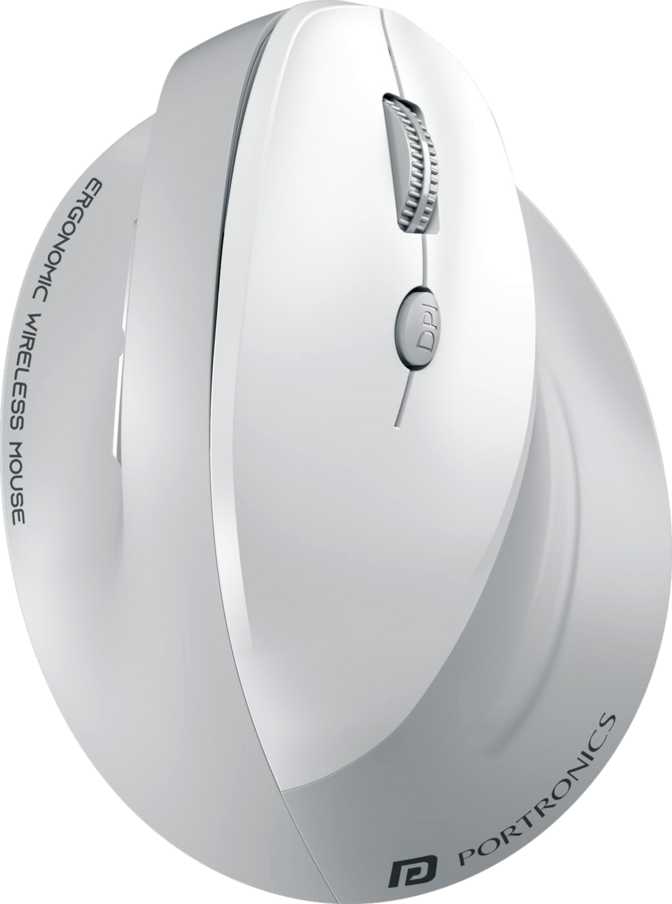
The Toad Ergo 4 is a full-size palm mouse with a pronounced arch and a notably wide body. Where most standard wireless mice are narrow enough to grip with the fingertips alone, this one is designed to support the entire hand — spreading the palm across a broader, gently elevated surface.
That shape encourages a more neutral wrist position during use. For people who spend four or more hours at a desk each day, the difference accumulates noticeably across a full working week.
Size & Weight
The body is sized for medium-to-large hands — wide enough to fill the palm and long enough to support the fingers comfortably. Users with smaller hands can use it, but the grip may need some adaptation. The design is exclusive to right-handed users with no symmetrical or left-hand variant.
The mouse sits at the heavier end of the productivity mouse spectrum — partly the ergonomic shell, partly the removable battery design. That mass is a reasonable trade-off, but worth knowing before purchase if you are coming from a lighter mouse.
Look & Finish
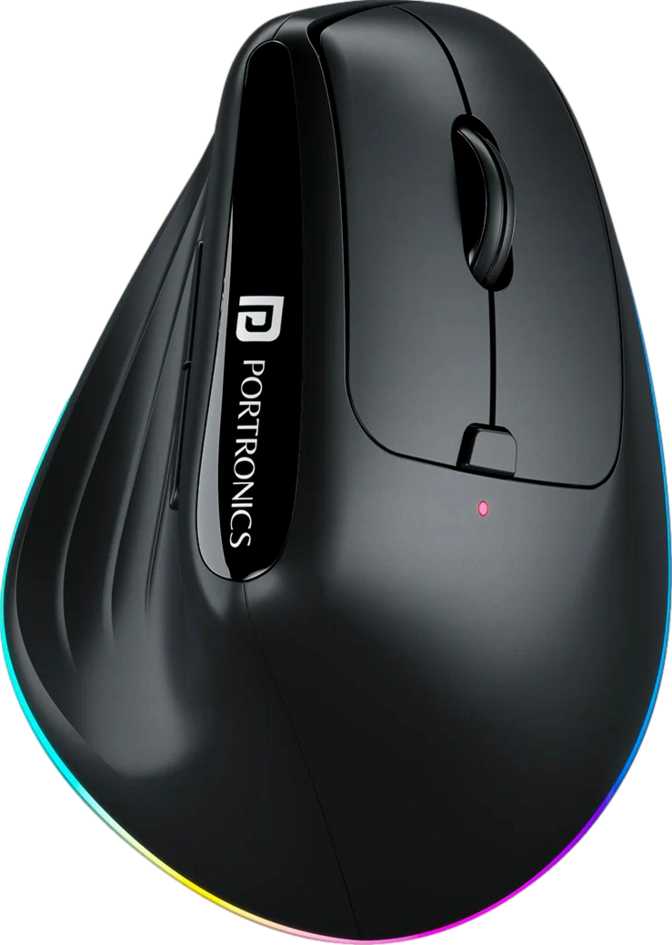
No RGB lighting, no decorative accents, nothing that would look out of place on a corporate desk or in a shared workspace. The finish is deliberately professional — suited to any office environment without the visual noise of gaming-oriented peripherals.
This is the correct call for the audience it targets. A clean design wastes no power on non-functional lighting and signals exactly what it is: a well-made productivity tool for serious desk workers.
The sculpted ergonomic shape is built specifically for the right hand. There is no ambidextrous variant and no workaround. Left-handed buyers should look at symmetrical designs or dedicated left-hand ergonomic options instead.
Two Ways to Go Wireless — One Mouse
The Toad Ergo 4 supports two distinct wireless modes. Knowing when to use each one matters for different desk setups and daily working habits.
2.4GHz Wireless
Connect via a compact USB receiver that plugs into any available port. This mode delivers the most stable, consistent signal of the two — the better choice for demanding document work, precision spreadsheet navigation, or any task where wireless reliability is non-negotiable.
- Most reliable connection for intensive office tasks
- Ideal for dedicated desktop setups with free USB ports
- Occupies one USB port at all times
Bluetooth 5.3
Connect wirelessly using your device's built-in Bluetooth — no hardware required. Bluetooth 5.3 is the current standard, bringing improved energy efficiency and a more stable connection than older versions. Ideal for laptops, tablets, or any setup where preserving USB ports matters.
- No dongle required — USB ports stay fully free
- BT 5.3 minimizes the wireless battery overhead
- Marginally less stable in high-interference environments
The Real-World Value of Having Both Modes
Users who work between a desktop and a laptop — a common hybrid-work reality — can connect via the USB receiver on the desktop and Bluetooth on the laptop. One mouse handles both setups. No second peripheral, no extra cost, no extra clutter. Single-mode mice force this compromise; the Toad Ergo 4 does not.
Built for Office Speeds, Not Gaming Benchmarks
Tracking performance on a productivity mouse should be evaluated against office tasks, not gaming metrics. Here is what the Toad Ergo 4's performance specifications actually mean in daily use.
DPI Range
800–4,000
Adjustable on the fly
Report Rate
125/sec
Smooth for office use
Connectivity
Dual Mode
2.4GHz + BT 5.3
Buttons
6 Total
5 Programmable
Sensitivity and Precision Across Screens
The Toad Ergo 4 offers adjustable tracking sensitivity ranging from a slow, high-precision setting all the way to a faster ceiling suited for large or high-resolution displays. A dedicated button on the top surface lets you switch between sensitivity steps on the fly — no software required for that change.
For a standard single-monitor setup, most productivity users will gravitate toward the lower part of the range, where cursor movement feels controlled and deliberate for clicking cells, selecting text, and navigating menus. The higher ceiling earns its place when navigating a large display or dual-monitor setup where the cursor needs to cover more ground.
Polling Rate: The Gaming Metric That Does Not Apply Here
The mouse communicates its position to your computer 125 times per second. In the context of office tasks — scrolling through documents, clicking spreadsheet cells, navigating browsers — this is completely smooth and responsive. The polling rate matters primarily in fast-paced gaming, where delays in position updates affect precision. In productivity use, you will never notice the gap.
The same applies to the mouse's maximum tracking speed and acceleration ratings — these figures are engineered for office use and will never be the limiting factor in any typical productivity workflow. If you are comparing these numbers to a gaming mouse, you are comparing products from entirely different categories.
Battery Life and Power Management
Roughly two working weeks between charges — plus a removable battery that extends the mouse's practical lifespan. Here is the full picture, including the one limitation you need to plan around.
Per charge at standard daily office use
Relative to the productivity wireless mouse category range
The Toad Ergo 4 is rated to run for roughly two full working weeks on a single charge, assuming a seven-to-eight-hour daily workday. In lighter use — three to four hours a day — that stretches considerably further. Among wireless productivity mice, this is a solid but not exceptional figure; some competitors claim longer endurance, though real-world results depend heavily on usage patterns.
The Removable Battery Advantage
Most modern wireless mice have sealed, built-in batteries that require the entire device to be plugged in for charging. The Toad Ergo 4's battery comes out.
In the short term, this means keeping a spare charged battery allows you to swap and keep working immediately. Over the long term, it means the battery can be replaced when it eventually degrades — extending the useful life of the mouse rather than forcing an early replacement because the sealed cell no longer holds adequate charge.
The Key Limitation
The mouse cannot be used while charging. If the battery runs flat during the workday, you are left waiting until it charges enough to continue — or reaching for a backup device.
Users who charge the mouse during evenings or over weekends will rarely encounter this problem. Those with unpredictable schedules or a tendency to let battery levels drift low should factor this limitation into their decision. It is a real and practical constraint, not a minor footnote.
Who the Toad Ergo 4 Is For — and Who It Isn't
The Right Fit
-
All-day desk workers with wrist or hand fatigueThe ergonomic shape addresses the root cause of that fatigue — not just during use, but cumulatively over a full working week.
-
Users who work across a desktop and a laptopDual connectivity means one mouse serves both setups — 2.4GHz on the desktop, Bluetooth on the laptop — without a second peripheral.
-
Analysts, writers, and project managers with repetitive workflowsFive programmable buttons reduce repetitive click sequences and keyboard trips across applications — a real time-saver at scale.
-
Budget-conscious buyers who want more than basicsErgonomic design, dual wireless, and five programmable buttons in one mouse — a feature combination rarely available at this price tier.
Who Should Look Elsewhere
-
Left-handed usersThe asymmetric sculpting is non-negotiable. This mouse simply does not work for left-hand use.
-
Gamers — even casual onesThe polling rate, tracking ceiling, and button structure are calibrated for productivity. Fast-paced gaming will expose these limits immediately.
-
Multi-monitor power users who sweep the cursor quicklyThe weight and tracking ceiling can feel constraining when navigating very large or multiple high-resolution displays at speed.
-
Multi-machine workers needing consistent button profilesWithout onboard memory, custom button assignments don't follow the mouse between computers.
-
Users who rely on gesture controls or scroll tiltNeither feature is present. Premium competitors offer both at a higher price, and for some workflows they are genuinely necessary.
How It Compares to the Alternatives
The Toad Ergo 4's value proposition is clearest when set against what comparable budgets actually buy in the productivity mouse market.
| Feature | Portronics Toad Ergo 4 | Standard Wireless Mouse | Premium Ergonomic Mouse |
|---|---|---|---|
| Ergonomic Shape | Full palm sculpting | Minimal or none | Full palm sculpting |
| Wireless Options | 2.4GHz + BT 5.3 | 2.4GHz only | Both modes |
| Battery Duration | ~2 working weeks | Varies widely | Often 2–6+ weeks |
| Programmable Buttons | 5 | 0–2 | 4–8 |
| Onboard Profile Memory | Often present | ||
| Use While Charging | Usually N/A | ||
| Scroll Wheel Tilt | Rarely | Often present | |
| Gesture Support | Sometimes | ||
| Warranty Coverage | 1 year | 1 year | 1–3 years |
The Toad Ergo 4's competitive advantage is stacking ergonomic shape, dual wireless, and five programmable buttons at a price point where most alternatives deliver at most two of these three. Stepping up to a premium ergonomic mouse adds meaningful extras — scroll tilt, charging-while-in-use, onboard memory, and longer warranties — but those extras come at a noticeably higher price. Whether the gap is justified depends on which of those missing features actually appear in your daily workflow.
Where It Wins and Where It Falls Short
Where It Wins
The Toad Ergo 4's clearest strengths are structural. An ergonomic shape that supports all-day use without demanding the user adapt their posture to the mouse — rather than the other way around — is the headline benefit, and it delivers. Paired with a dual wireless setup that covers both dongle and Bluetooth scenarios without compromise, it has real versatility for the type of user it targets.
Five programmable buttons at this price tier is a meaningful differentiator. Most comparably priced competitors ask you to accept the default layout or limit reprogramming to one or two secondary buttons. The DPI on-the-fly switching is a small but practical touch that productivity users come to rely on quickly.
The removable battery is a thoughtful design choice that extends the mouse's useful life beyond the typical sealed-battery lifespan, and the clean, no-RGB aesthetic fits professional environments without requiring any compromise.
Where It Falls Short
The weaknesses here are real, not invented for balance. The inability to use the mouse while charging is a tangible inconvenience that will affect any user who has ever found themselves with a dead input device at a critical moment. The lack of internal profile storage means customizations stay tethered to a single computer — a limitation that grows more pronounced the more portable your working style becomes.
The weight, while not excessive, sits noticeably above many competing wireless mice and will be felt differently depending on desk space, monitor size, and how aggressively users move the mouse. Users coming from significantly lighter options may take time to adjust.
For a product designed for extended daily use, a one-year warranty window is conservative. Products from larger brands competing for the same buyer often carry two years of coverage, placing slightly more of the long-term risk on the buyer's side here.
Frequently Asked Questions
Answers to the questions real buyers search before purchasing the Portronics Toad Ergo 4.
Portronics Toad Ergo 4
An honest assessment for the buyer who needs to decide today.
Recommended For
- Right-handed desk workers dealing with hand or wrist fatigue during long sessions
- Anyone working across a desktop and a laptop who wants a single mouse for both
- Productivity users with repetitive workflows who want programmable button shortcuts
- Budget-conscious buyers who want ergonomics and dual connectivity without a flagship price
Not Recommended For
- Left-handed users — the ergonomic shape cannot be adapted
- Gamers of any level — performance specs are designed for productivity, not gaming
- Multi-machine workers who need button profiles to follow the mouse between computers
- Users who rely on gesture navigation or tilting scroll wheel in their daily workflow
The Portronics Toad Ergo 4 delivers on its core promise: a full-size ergonomic wireless mouse with real connectivity flexibility and more customization than the price typically allows. For right-handed office workers dealing with hand fatigue, for users tired of choosing between a dongle and Bluetooth, and for anyone who has wished for more programmable buttons without paying flagship prices — this mouse answers those needs directly. The limitations are real and worth knowing in advance, but for the right buyer, the total package represents strong value in its category.
Verdict
Recommended — Single-Computer Productivity Users