Portronics ToadPlay Football Review: Built for Travel, Not the Desk
Mice50g
Body Weight
240hr
Per Charge
BT5 + 2.4GHz
Dual Wireless
3
Total Buttons
Most wireless mice are designed for desks. The Portronics ToadPlay Football is designed for everything else — meetings, flights, coffee shops, hotel rooms, anywhere you want a real mouse without the bulk of a full-size peripheral. At a weight most mice forget to achieve and a battery life that makes charging feel like a rare event, it occupies a very specific and well-defined role. The question is not whether it is a great mouse in absolute terms. The question is whether it is the right mouse for how you actually work.
Design and Physical Experience
A Shape That Earns Its Name
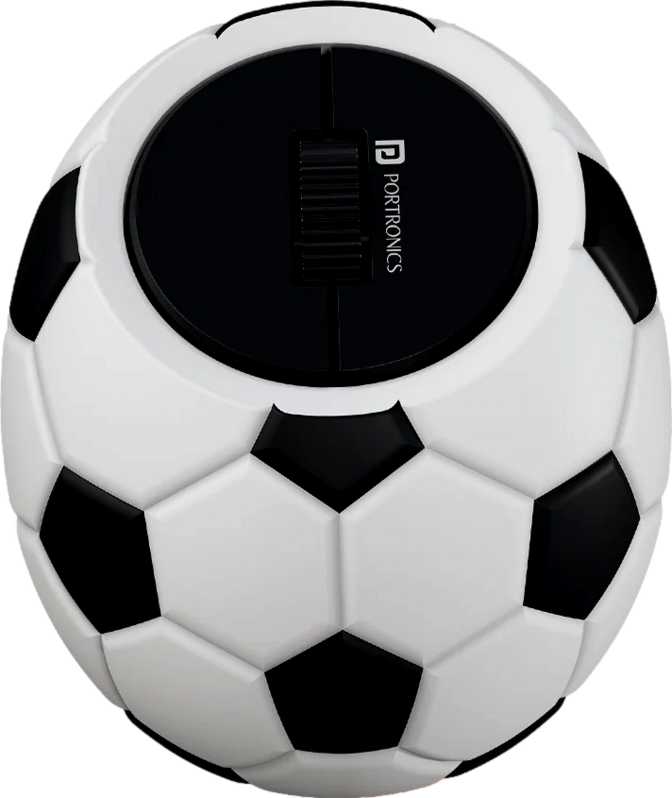
The ToadPlay Football takes its name seriously. With equal width and thickness measurements of 34mm and a body length of 63mm, this mouse has a nearly symmetrical cross-section — compact, rounded, and close to the proportions of a small egg or a flattened ball. Its total volume barely clears 73 cubic centimeters, placing it roughly in the same size class as a large walnut shell. Place it in your palm and your fingers curl naturally over the top without reaching for anything. The entire mouse fits within one hand without deliberate positioning.
Physical Dimensions at a Glance
- Length
- 63 mm
- Width
- 34 mm
- Height
- 34 mm
- Volume
- ~73 cm³
- Weight
- 50 g
At 50 grams, the weight is where this mouse makes its strongest physical impression. Most standard office mice weigh two to three times as much, and even many compact travel options hover around 70 to 90 grams. This one disappears in your hand — or in your pocket.
Ambidextrous by Design
The mouse is fully symmetrical and ambidextrous, making no assumptions about which hand you use. Left-handed users — often forced to choose from a small selection of dedicated options or tolerate a right-handed design — will find the ToadPlay Football a welcome inclusion. The three-button layout is evenly distributed so neither hand is at a disadvantage. The trade-off of this symmetry is that there are no side buttons and no sculpted thumb rest. Users who rely on back and forward buttons for web browsing or file navigation will notice their absence immediately.
No Lighting, No Drama
There is no RGB lighting here — no glowing logo, no underglow, no lighting modes to configure. For productivity users who find RGB entirely unnecessary, this is a clean positive. The mouse looks professional on a boardroom table and understated on a minimal desk setup.
Wireless Connectivity: Two Modes, One Mouse
The ToadPlay Football connects over two separate wireless technologies. Understanding the difference between them helps you get the most from either mode.
Bluetooth 5
Requires no physical accessory. Any Bluetooth-capable device — a laptop, tablet, or modern smartphone — pairs directly with this mouse. Bluetooth 5 offers stronger stability and longer range than older versions of the standard, translating to fewer dropped connections and a more consistent feel in daily use.
For travel and multi-device users who need dongle-free pairing, Bluetooth mode is the more flexible option.
2.4GHz Wireless
Uses a small USB receiver that creates a dedicated wireless link between mouse and computer. This mode typically delivers tighter, lower-latency response than Bluetooth — especially in offices and environments with heavy wireless traffic.
If you use this mouse primarily at one fixed workstation, the 2.4GHz connection is likely the better daily driver.
Someone who switches between a personal laptop and a work desktop can dedicate one wireless mode to each machine — no re-pairing routines, no second mouse needed.
Battery Life: The Number That Changes How You Think
Rated Battery Life
240
Hours
At six active hours per working day, a full charge lasts roughly eight weeks before you need to plug in. Most compact rechargeable mice need charging every two to four weeks under similar conditions. This one asks for the cable roughly once every two months.
Endurance vs. Typical Compact Rechargeable Mice
The battery is built into the body, keeping the design clean and the weight low. There is no replaceable cell to source. The one-meter charging cable handles top-ups from any standard USB power source.
Use while charging is fully supported. If the battery runs down mid-session, connecting the cable does not put the mouse out of action — you keep working with no interruption.
Performance: Calibrated for Productivity, Not Competition
Sensitivity and Precision
The ToadPlay Football operates at a fixed sensitivity setting. Unlike mice with a dedicated button to step between DPI levels on the fly, this one locks its tracking at a single point within a range suited to everyday computing. There is no on-the-fly adjustment available during use.
For web browsing, document work, email, and general navigation on a standard display, this works without issue. Most users who never consciously change their sensitivity during the day will not notice the absence of that option.
Polling Rate and Response
The mouse reports its position 125 times per second — a rate that covers the full range of productivity tasks this mouse is designed for. Web browsing, document work, and general navigation feel smooth with no perceptible lag during normal use.
Gaming peripherals operate at rates four to sixteen times higher. Anyone moving from a gaming mouse and expecting the same immediacy of response will notice the difference. For all productivity scenarios, the polling rate is entirely appropriate to the task.
Simplicity as a Feature: The Three-Button Experience
Three buttons. That is it.
Left click, right click, scroll wheel click. No side buttons for forward and back navigation. No DPI toggle. No profile-switching button. No onboard memory for storing configurations.
For some readers, that list of absences disqualifies the mouse immediately. For others — particularly those who have spent time accidentally triggering side buttons, or managing software for a mouse they just want to point and click with — it feels liberating.
There is no companion software to install, no profiles to configure, no macros to build. Pair over Bluetooth or insert the 2.4GHz receiver and the mouse works — immediately, completely, with no further interaction required. The experience is identical on day one as it is six months later.
Button Layout
- Left Click
- Right Click
- Scroll Wheel Click
- No Side Buttons
- No DPI Toggle
- No Programmable Keys
Real-World Usage: Who This Mouse Is Built For
The Right Match
- Frequent travelers and remote workersPocket-sized body, instant connectivity, and months between charges.
- Minimalist and clean-desk usersNo lighting, no cables during use, a genuinely small footprint on any surface.
- Left-handed usersFully symmetric — works identically for either hand with no adjustment needed.
- Multi-device usersDedicate each wireless mode to a different device — no re-pairing routines.
- Casual laptop upgrade usersA practical step up from a trackpad without the bulk of a full-size mouse.
Not the Right Tool For
- GamersPolling rate and fixed sensitivity make this entirely unsuitable — even for casual gaming.
- Power users relying on side buttonsNo back or forward buttons — a real daily constraint for frequent browser or file navigation.
- Users with large handsAt 63mm long and 34mm wide, extended sessions may cause fatigue for medium-to-large hands.
- Creative professionals needing DPI controlFixed sensitivity limits precision control — a mouse with adjustable DPI serves creative work better.
Competitive Positioning
The ToadPlay Football competes in the compact wireless productivity segment. Here is how its key specifications compare to two well-known alternatives in the same category.
| Feature | ToadPlay Football | Logitech Pebble Series | Microsoft Arc Mouse |
|---|---|---|---|
| Wireless Modes | BT5 + 2.4GHz | BT + 2.4GHz | Bluetooth only |
| Battery Type | Built-in rechargeable | Replaceable AA | Replaceable AAA |
| Battery Endurance | ~240 hours/charge | ~18 months/battery | ~6 months/battery |
| DPI Adjustable | No | No | No |
| Side Buttons | None | None | None |
| Ambidextrous | |||
| Use While Charging | Not rechargeable | Not rechargeable | |
| RGB Lighting | None | None | None |
Competitor information based on publicly available manufacturer specifications.
Honest Assessment: Where It Gets It Right and Where It Doesn't
Where It Wins
The battery life is genuinely exceptional for a rechargeable mouse this compact. Two months of typical use on a single charge removes one of the most persistent annoyances of wireless peripherals. Combined with the ability to keep using the mouse while it charges, the power story here is nearly without complaint.
The dual wireless modes add real utility that not every compact mouse provides. Bluetooth 5 for dongle-free pairing and 2.4GHz for tighter desktop connectivity gives users flexibility without forcing a compromise on either front.
The 50-gram body is a legitimate achievement. Mice this light are rare below a premium price point, and the ToadPlay Football delivers that weight in a package that fits comfortably in a jacket pocket.
Where It Falls Short
The fixed DPI is the most significant concession. Sensitivity customization is not a niche desire — it is a routine preference for many users, and its absence will be felt daily by anyone who cares about it.
The three-button layout is a principled choice for its intended audience, but it has clear downstream effects. Users who reach for side buttons dozens of times per day will experience constant navigation friction that does not go away with time.
The compact form factor is a travel strength but a usability limitation for extended sessions. Users with medium-to-large hands may notice fatigue after several hours in ways they would not with a full-size mouse. This is a travel and convenience mouse first — not a full-day workstation peripheral.
Questions Real Buyers Ask Before Purchasing
Final Verdict
The Portronics ToadPlay Football is a mouse that knows exactly what it is and makes no apologies for what it is not. If your priority list includes pocket-sized portability, multi-device wireless flexibility, and a battery that lasts long enough to become an afterthought — this mouse delivers all three with unusual efficiency for its size category. The limitations are real, predictable, and entirely tied to the choices that make the strengths possible.
Buy It If
- You travel frequently or work across multiple locations
- You switch daily between two or more devices
- You want a genuine left-hand-friendly wireless option
- Charging once every two months sounds ideal to you
Pass On It If
- You depend on side buttons for daily navigation
- You need to adjust sensitivity for different tasks
- You game, even casually
- You spend long continuous hours at a fixed workstation