Portronics Toad Ergo 3 Review: Built for Multi-Device Productivity
MiceAt a Glance
Key numbers before the full analysis
50 hrs
Battery Life
3 Modes
Connectivity
800–2400
DPI Range
5 of 6
Programmable
BT 5.3
Bluetooth
1 Year
Warranty
Overview
The wireless productivity mouse market has a comfortable, well-established hierarchy — a handful of premium brands occupy the top shelf, and most buyers assume anything outside that circle involves compromise. The Portronics Toad Ergo 3 pushes back on that assumption. With tri-mode wireless connectivity, a purpose-built ergonomic arch, five programmable buttons, and a removable rechargeable battery, it targets working professionals who want genuine multi-device flexibility without paying a flagship premium.
This is not a gaming mouse, and it makes no effort to pretend otherwise. It is engineered entirely around what office workers, remote professionals, and students actually need: comfort across long sessions, the ability to move between devices without owning separate peripherals, and enough button control to build a functional daily workflow. Whether it delivers on all of that is what this review addresses.
Design and Build
What "ergonomic" actually delivers in this form factor
Shape, Arch, and the Right-Hand Form Factor
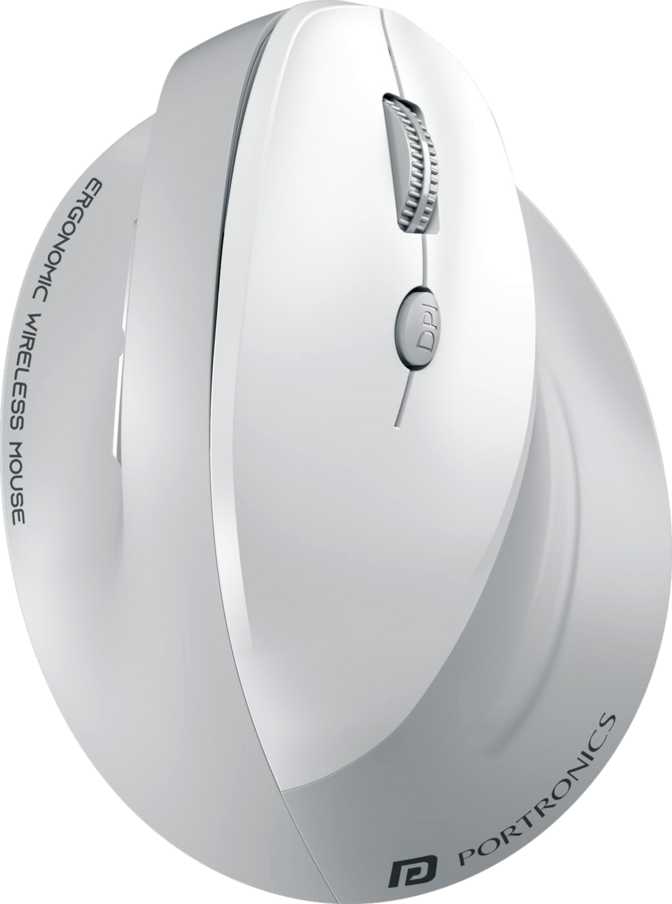
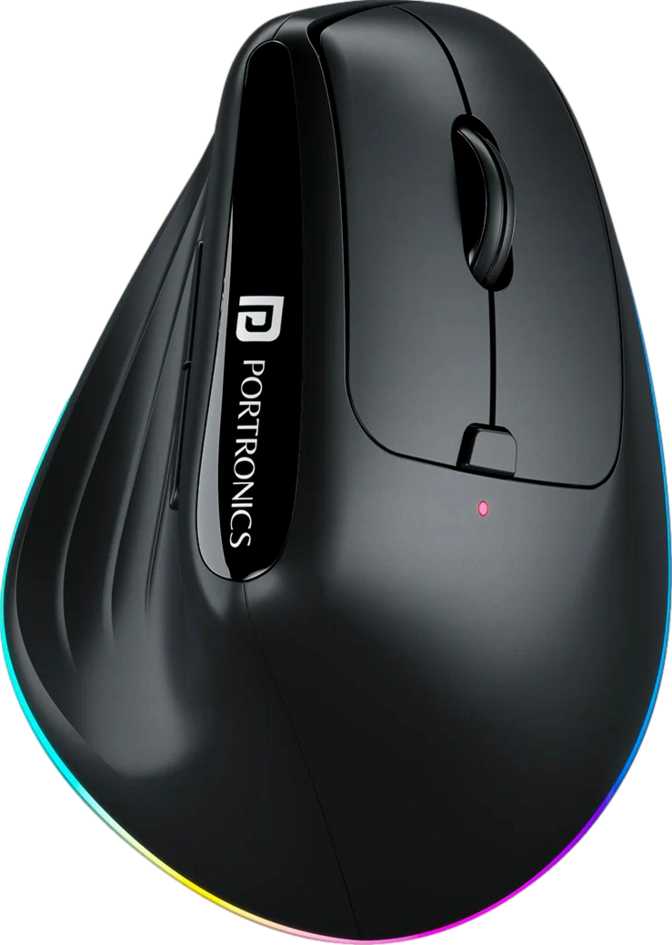
The Toad Ergo 3 is built exclusively for right-handed users, and that single design decision shapes everything about the physical experience. The mouse features a pronounced high arch — rising 75mm from the desk surface to the peak of the palm rest. This is not a low-profile mouse you pinch at the fingertips; it fills the entire hand. The palm rests elevated, the fingers drape naturally over the buttons, and the thumb sits comfortably against the side button cluster.
That arch serves a functional purpose. Compared to flat or ambidextrous mice, the elevated profile reduces how much your forearm has to pronate — the inward rotation of the wrist — during extended use. For anyone spending four or more hours daily at a computer, the cumulative effect on wrist comfort is meaningful. Users managing early fatigue or those who have experienced discomfort from flatter mice will feel the difference within a few sessions.
The footprint spans 118mm from front to back and 81mm across — comfortably medium-to-large. Users with average or larger hands will find this accommodating for both palm-grip and claw-grip styles. Smaller hands may find the stretch to the upper buttons slightly extended and would be wise to handle the mouse before committing.
Weight and the Office Use Case
At 148 grams, the Toad Ergo 3 lands on the heavier side for a wireless productivity mouse. For desk-bound office use, moderate weight often feels more controlled and deliberate. Precise text selection, file navigation, and clicking small UI targets benefit from a mouse that does not skitter underfoot. The weight anchors each movement. Where this matters most is portability — frequent travelers packing a mouse alongside a laptop will notice 148 grams far more than a user whose mouse never leaves their desk.
RGB Lighting on a Productivity Mouse
RGB lighting is present — an unexpected feature for a mouse in this category. It adds visual personality and suits a cohesive lit desk setup, but contributes nothing to performance and serves no functional indicator role based on the specification profile. If you work in a dimly lit environment and find glowing peripherals distracting, factor this in before purchasing. Otherwise, treat it as a design bonus.
- Length
- 118 mm
- Width
- 81 mm
- Arch height
- 75 mm
- Weight
- 148 g
- Orientation
- Right-handed only
- Grip styles
- Palm, claw
- RGB lighting
- Yes
- Warranty
- 1 year
Three Ways to Connect
The feature that separates the Toad Ergo 3 from most mice in its price range
2.4GHz Receiver
Most Responsive ModeThe dedicated wireless receiver delivers the most consistent experience this mouse offers. Cursor position updates 125 times per second — entirely adequate for every productivity task including document work, multi-tab browsing, and video calls. Plug the receiver into your primary workstation and leave it permanently; no pairing ritual, no interference issues from Bluetooth crowding.
Bluetooth 5.3
Second Device ModeBuilt on current-generation Bluetooth 5.3, which delivers meaningful stability improvements over older 4.x versions — particularly in environments with crowded wireless signals. Pairs with a laptop, tablet, iPad, or any Bluetooth-enabled machine at typical working distances. Anyone who has experienced Bluetooth 4.0 or 4.2 dropouts will notice the improvement immediately.
Wired USB
Fallback ModeThe USB connection acts as a reliable fallback when the battery runs down or an absolutely guaranteed connection is needed for a specific task. It is complementary rather than a primary use case — and it comes with one important caveat that defines a key purchase consideration covered directly below.
Cannot Operate While Charging
Connecting via USB does not enable use while the battery recharges. When the battery is fully depleted, the mouse is offline until it recovers sufficient charge — no wired fallback, no pass-through operation. The 50-hour rated runtime provides clear advance warning, making overnight charging a reliable prevention strategy. When a dead battery does occur, the experience is binary: fully functional or completely offline.
Multi-Device Switching in Practice
The three-mode setup turns this mouse into a shared peripheral for two machines. Keep the 2.4GHz receiver in your desktop, pair via Bluetooth with your laptop, and reserve USB as an emergency fallback. A dedicated button on the mouse body handles mode switching, with a reconnection pause of roughly one to two seconds rather than an instant transition. For daily productivity workflows, that brief pause is entirely acceptable and quickly becomes routine.
Performance Analysis
Calibrated for office work — a deliberate design choice, not a compromise
DPI Range and Real-World Meaning
Four DPI settings span from a precise, deliberate low end to a ceiling that handles standard display setups comfortably. At the minimum setting, cursor movement is careful and controlled — ideal for precise text selection, zoomed-in document work, or targeting small UI elements. At the maximum setting, the cursor sweeps a 1080p or 1440p monitor quickly with minimal physical movement.
Where the ceiling becomes relevant is on larger configurations. Users working with 4K monitors or wide multi-monitor setups may occasionally want more headroom than the top DPI level provides. For the majority of productivity work at standard resolutions, the full range is entirely sufficient.
No Software Required for DPI Switching
Cycling through the four DPI levels requires no driver installation. The dedicated hardware button handles it on any connected device — accessible immediately out of the box with no setup steps.
Polling Rate and Cursor Feel
The mouse reports its position 125 times per second. For competitive gaming — where mice poll at eight to sixteen times this rate — that figure would be a constraint. For productivity, it is invisible as a limitation. Browsing, document editing, spreadsheet navigation, and multi-tab workflows produce no perceptible lag or jitter at this rate. Cursor movement feels immediate and natural.
The sensor handles fast physical movements accurately within its designed category. Sweeping quickly in a broad arc across a large mouse pad, tracking remains consistent. In everyday office use, you will never approach the movement threshold where the sensor struggles.
125 Hz
Update Rate
30 IPS
Max Tracking Speed
Battery Life and Power
Endurance that outlasts the work week — and a design decision that extends the mouse's useful life for years
50-Hour Endurance in Real Terms
Rated for 50 hours of active wireless use on a full charge, the Toad Ergo 3 delivers just over a week of continuous work time at an eight-hour daily workload before needing a recharge. Lighter users — those who step away for meetings, work shorter sessions, or take regular breaks — can comfortably stretch to two weeks between charges.
This is a strong figure for a mouse at this price. The practical effect is that charging becomes something you do on a weekend out of habit, not an emergency response to a battery warning mid-morning.
Battery Endurance vs. Category Alternatives
Based on typical category performance at each price tier. Individual results vary by usage pattern and wireless mode in use.
The Removable Battery Advantage
Most mice in this space use sealed internal batteries that slowly degrade over charge cycles — the gradual decline that eventually makes the whole mouse feel inadequate and drives replacement. The Toad Ergo 3 takes a more practical position: the rechargeable cell is physically removable.
This creates two real-world advantages. If you carry a spare charged cell, a depleted battery does not mean stopping work — swap it and continue immediately. When the cell eventually reaches the end of its useful lifespan (typically several years of regular use), you replace only the cell rather than the entire mouse. Over a multi-year ownership horizon, this is a cost and sustainability advantage that sealed-battery competitors simply cannot match.
Battery Quick Reference
- Rechargeable and removable cell
- Approximately 50 active hours per charge
- Carry a spare cell — instant swap, zero downtime
- Replace only the cell at end of useful life
- Cannot operate during charging
- No wired pass-through operation mode
Who This Mouse Is Built For
The multi-device professional
Someone who splits their day between a desktop and a laptop gets immediate, tangible value. Three connection modes and one button press to switch — no second mouse, no cable swapping, no re-pairing rituals between machines.
The comfort-first office worker
Users managing wrist fatigue or early repetitive strain symptoms. The ergonomic arch promotes a more natural forearm position — and that geometry matters more, not less, as session lengths accumulate over years of daily use.
The home office user on a mid-budget
Genuine tri-mode connectivity without the flagship price. Battery life reduces daily charging anxiety, and five programmable buttons add real workflow flexibility. The connectivity is fully implemented — not a half-measure feature.
The student or light daily user
Working primarily on a single device without needing advanced profile portability? The standard feature set covers every need comfortably, and the ergonomic design prevents long-term discomfort from accumulating across years of regular use.
Long-term investment buyers
The removable rechargeable battery extends useful life well beyond sealed-battery competitors. When the cell degrades years down the line, you replace only the cell — not the entire mouse.
A gamer — even a casual one
The polling rate, DPI ceiling, and six-button count are designed for productivity. Any game that rewards fast reflexes, precision aiming, or complex button macros will quickly reveal the hard limits of this mouse's design intent.
Left-handed users
This is a contoured right-hand-only design with no left-handed variant. Ambidextrous alternatives are the appropriate category — there is no workaround for this physical constraint.
Frequent business travelers
The ergonomic arch and resulting weight make this a desk mouse. Compact flat travel mice exist at a fraction of the weight, and that difference is felt across airport terminals and hotel desks.
Users requiring onboard profile portability
If consistent custom button behavior across multiple computers at different locations is a workflow requirement, the absence of onboard memory is a fixed limitation. This is not a software-updatable gap — no other feature compensates for it.
4K and wide multi-monitor users
The DPI maximum is adequate at standard resolutions but provides limited headroom for very large or high-resolution display configurations where long-distance cursor travel in a single physical sweep is a daily need.
How It Compares
Positioned against logical alternatives at each price tier in the wireless productivity category
| Feature | Portronics Toad Ergo 3 This Product | Budget Single-Mode Wireless | Premium Multi-Device Ergonomic |
|---|---|---|---|
| Connection modes | 3 — 2.4GHz, BT 5.3, USB | 1 (typically 2.4GHz) | 3 — 2.4GHz, BT, USB |
| Bluetooth version | 5.3 — current generation | Not applicable | 5.0–5.2 (varies) |
| Ergonomic contouring | High arch, right-hand | Usually flat / ambidextrous | Yes |
| Battery endurance | ~50 active hours | 10–30 hrs typical | 40–70 hrs (varies) |
| Programmable buttons | 5 of 6 | 0–2 | 4–7 |
| Onboard profile memory | None | None | 1–5 profiles |
| RGB lighting | Yes | Rarely included | Rarely included |
| Removable battery | Yes | No — sealed or AA | Typically no |
| Right-hand only | Yes | Often ambidextrous | Yes — most models |
| Price tier | Mid-budget | Budget | Premium |
An Honest Assessment
Tri-mode wireless at this price is genuinely uncommon. Current-generation Bluetooth 5.3 and a proper 2.4GHz receiver — fully implemented, not a checkbox feature. This changes how you use a mouse across multiple devices every day.
The ergonomic design is functional, not decorative. The high arch and right-hand contouring produce a tangible difference for long desk sessions, separating this from flat mice that use "ergonomic" as a label rather than a design brief.
Fifty hours of battery life means charging on your terms. A weekend habit rather than a mid-morning emergency. This figure outperforms what most competing mice at this price deliver.
The removable battery extends the mouse's useful life substantially. Sealed-battery competitors become disposable when their cells degrade. This one does not — a compounding advantage over years of ownership.
Five programmable buttons is a competitive ratio at this price. More assignment flexibility than most alternatives at the same price point, with no software required for core DPI functionality.
Cannot operate while charging — no exceptions. When the battery is dead, the mouse is offline. The 50-hour runtime provides adequate advance warning, but the all-or-nothing experience when it does occur is a fixed limitation.
Zero onboard memory limits portability of custom settings. Button customizations live on each host computer, not in the mouse. Professionals who hot-desk across locations lose all custom behavior between machines.
The DPI ceiling constrains very large display setups. Perfectly sufficient for 1080p and 1440p work, but provides limited headroom for 4K monitors or wide multi-monitor arrays where long cursor sweeps are a daily necessity.
Right-handed only — no left-handed option exists. A fixed physical constraint that removes this mouse from consideration for a meaningful portion of potential buyers, with no workaround available.
148 grams makes this a desk mouse, not a travel companion. The ergonomic arch adds physical size and weight that frequent travelers will notice in a laptop bag, particularly relative to compact flat travel mice.
Questions Real Buyers Ask
Specific answers to the searches that happen before a purchase decision
Final Verdict
The Portronics Toad Ergo 3 earns its price by delivering meaningful features rather than manufacturing impressive numbers on paper.
The tri-mode wireless connectivity — implemented with current-generation Bluetooth 5.3 and a proper 2.4GHz receiver — serves multi-device workers in a way that most mice at this price simply cannot. The ergonomic design is functional, not decorative. The battery endurance means you charge it out of convenience rather than desperation. The removable battery extends the useful life of the mouse well beyond what sealed-battery competitors can honestly claim.
The limitations are real and should not be minimized. The inability to operate while charging, the absence of onboard profile memory, a DPI ceiling that constrains very large display setups, and right-handed-only ergonomics are all fixed characteristics. Certain buyers will find these disqualifying — and they would be right to.
Buy It If You Need...
- Genuine tri-mode connectivity between a desktop and a laptop
- A mouse with a genuinely ergonomic arch for long daily sessions
- Multi-device support without paying into the premium tier
- A peripheral designed to last — not become disposable when the battery degrades
Pass If You Are...
- A gamer needing high polling rates or macro-heavy button layouts
- Left-handed — no left-hand variant exists
- A hot-desker who needs custom button profiles to travel with the mouse
- Working on a large 4K or multi-monitor setup where DPI headroom is a priority