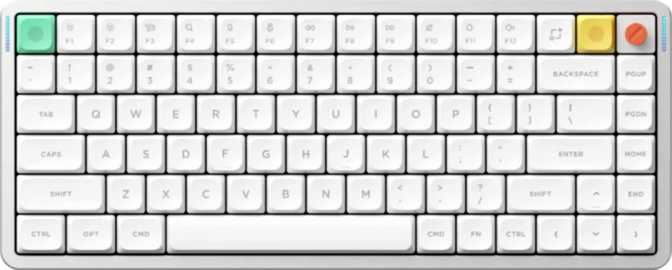
NuPhy Air75 V3 Full Review: The Wireless 75% Keyboard Done Right
KeyboardsMost low-profile keyboards force a choice between portability and real typing feel. The NuPhy Air75 V3 rejects that trade-off — it pairs a 75% compact layout with genuine mechanical switches, a premium gasket mount, and tri-mode wireless connectivity that covers every desk scenario. Whether you are a professional building a cleaner workspace or an enthusiast hunting a travel-ready board that still rewards customization, the Air75 V3 positions itself as a serious daily driver worth examining closely.
Layout
75% Compact
Wireless
Tri-Mode
Battery
Up to 1,200 hrs
Switches
Hot-Swappable
Polling Rate
1,000 Hz
Mount
Gasket
| Keyboard Type | Mechanical, Low-Profile |
| Layout | 75% ANSI (US) |
| Switch | NuPhy Red Nano Linear |
| Actuation | 2 mm / 45 g force |
| Total Travel | 3.5 mm |
| Hot-Swap | Yes |
| Mount Type | Gasket |
| Plate | Aluminum |
| Connectivity | BT 5.0 / 2.4 GHz / USB |
| Polling Rate | 1,000 Hz |
| Battery Life | Up to 1,200 hrs |
| Keycaps | Double-shot PBT, OEM |
| Backlight | RGB, North-facing |
| NKRO | Yes |
| Case Material | Aluminum + Plastic |
| Weight | 724 g |
| Dimensions | 319 × 129 × 13.2 mm |
| Colors | Black, White |
| QMK / VIA | Not supported |
| Warranty | 1 Year |
Design and Build Quality: Slim Without Feeling Cheap
Materials and First Impressions
Pick up the NuPhy Air75 V3 and the first thing you notice is the profile — at just over 13mm at its thickest point, this keyboard sits dramatically lower on your desk than a standard mechanical board. Most conventional mechanical keyboards rise between 35mm and 40mm at the back. The Air75 V3 is less than half that, which fundamentally changes how your wrists align during extended typing sessions.
The case combines aluminum and plastic with purpose. The top plate — the structural backbone that anchors every switch — is solid aluminum, contributing rigidity and a grounded, consistent keystroke feel. Plastic panels on the chassis manage weight intelligently, bringing the total to 724 grams: heavy enough to stay planted on your desk during fast typing, light enough to drop into a laptop bag without hesitation.
Color options are limited to black and white, both executed with clean, understated finishes. These are boards that look deliberately chosen rather than accidental — equally at home on a professional desk or a gaming setup.
The Low-Profile Advantage
The 13.2mm thickness changes the ergonomic equation meaningfully. With lower key height, your fingers travel less distance between neutral position and the keycaps, reducing wrist extension for many users over long sessions. Adjustable feet let you raise the rear for a modest typing angle or keep the board flat for a nearly level surface that pairs well with a separate wrist rest — one is not included in the box.
The footprint — roughly 319mm wide and 129mm deep — is compact without being cramped. The 75% layout preserves the function row, arrow cluster, and a compact navigation column while eliminating the numpad and the dead space that pads a full-size board.
13.2
mm thick
724
grams
75%
layout
Switch Performance: The Heart of the Typing Experience
Red Nano Linear Switches
Purpose-built for low-profile boards, the Red Nano Linears compress total travel to 3.5mm with actuation at the precise 2mm midpoint. Every keystroke requires less physical movement than a standard mechanical switch, producing a snappier, more responsive feel per keypress.
The 45-gram actuation force hits the sweet spot for linear switches — light enough for fast, sustained typing without finger fatigue, not so featherlight that accidental keypresses become a problem. If Cherry MX Red switches feel familiar, this force profile will too. Sound is smooth and uninterrupted; no tactile bump, no audible click.
2 mm
Actuation
45 g
Force
3.5 mm
Travel
Gasket Mount Construction
In a traditional keyboard, the plate is rigidly bolted to the case, transmitting every keystroke vibration directly into your desk. A gasket mount system suspends the internal plate assembly using silicone buffers, giving each keystroke a tiny but perceptible amount of give.
This flex absorbs impact energy before it reaches the case, producing a softer, more cushioned sound profile — what typists describe as moving from hollow to thocky. On a low-profile keyboard where key travel is already shorter, the gasket mount compensates by making each keypress feel more complete and dampened. It is an uncommon engineering choice at this tier.
Hot-Swap Flexibility
Every switch on the Air75 V3 is hot-swappable — pull them out, push in replacements, done. No soldering iron, no technical expertise required. Compatible low-profile mechanical switches from other brands drop straight in using a standard switch puller.
This is a meaningful long-term value proposition. If the Red Nano Linears feel too light, too heavy, or you want to experiment with a tactile or clicky variant, you can swap the entire set in an afternoon. A board that accepts different switches is effectively a different keyboard every time you try something new.
Wireless Performance and Battery Life
The Air75 V3 covers every connection scenario without compromise. Three distinct wireless modes each serve a different purpose — and critically, none of them require sacrificing the 1,000Hz polling rate that separates responsive peripherals from sluggish ones.
Bluetooth 5.0
Handles multi-device pairing across phones, tablets, and secondary computers. Bluetooth 5.0 delivers more stable, lower-latency connections than older Bluetooth standards, with better handling of interference in crowded wireless environments like open offices. Pair multiple devices and switch between them as needed.
2.4 GHz Wireless
Uses a dedicated USB dongle and operates at the full 1,000Hz polling rate — the keyboard reports its state 1,000 times per second. This is the standard for gaming peripherals and the practical ceiling for real-world responsiveness. No latency compromise versus wired mode, making it the go-to for gaming and fast typists.
Wired USB
The fully detachable cable makes this more than a fallback. Detachable cables prevent stress damage at the keyboard end and eliminate the need to replace the whole board if a cable eventually wears out — a small detail that matters for long-term ownership. Custom cable upgrades are also straightforward.
Battery Life: The Honest Picture
The rated endurance of 1,200 hours is the headline number, and like all keyboard battery claims, it assumes backlighting is off or minimized — the standard manufacturer measurement method. With RGB lighting active, real-world endurance will be notably lower.
That said, even with active lighting, the combination of Bluetooth 5.0 power efficiency and NuPhy's low-profile design means weeks of normal daily use between charges rather than days. For users who prefer tasteful static backlighting, endurance can extend to months. This is not a keyboard that will leave you anxiously watching battery indicators.
Estimated Endurance by Usage Pattern
Estimates based on the 1,200-hr rated spec and typical RGB power draw. Actual results vary by brightness, animation complexity, and connection mode.
RGB Lighting and Keycap Quality
North-Facing LEDs Explained
The Air75 V3 uses north-facing LEDs — the lights sit at the top side of each switch housing rather than the bottom. On a low-profile board with relatively thin keycaps, this distinction is less visually dramatic than on standard-height keyboards. Light diffuses through the keycap with reasonable uniformity.
For enthusiasts considering keycap upgrades: shine-through keycaps designed for north-facing layouts will produce the best results. The stock keycaps use a two-layer molded plastic construction, so the lighting effect reads as ambient glow around the keycap base rather than a bright illuminated legend — which many users find more refined and easier on the eyes during long sessions in dim rooms.
Double-Shot PBT: Why It Matters Long-Term
The included keycaps are double-shot PBT — two separate layers of molded plastic form the legend and the keycap body together. The practical result is that the legends physically cannot fade or wear off through use. There is no printing, no laser etching, nothing to degrade over time regardless of how heavy your daily use is.
PBT plastic is denser and more resistant to the surface shine that develops on cheaper ABS keycaps after extended contact with finger oils. These keycaps will look close to new after years of daily use — a quality detail that is not universal at this price point and one worth factoring into long-term value comparisons.
The OEM keycap profile used here is one of the most familiar shapes in the keyboard world — slightly curved from front to back and angled for natural finger positioning. Coming from any standard office keyboard, OEM profile will feel immediately comfortable from the first session.
Features, Firmware, and Honest Limitations
What This Keyboard Delivers
-
Full N-Key Rollover (NKRO)
Every simultaneous keypress registers without exception. No dropped inputs regardless of how many keys are held at once — critical for complex gaming bindings and rapid typists who rely on overlapping key combinations.
-
1,000 Hz Polling in All Performance Modes
Input registration at the practical performance ceiling — active in both 2.4GHz and wired modes. No response time compromise versus dedicated gaming peripherals when the dongle is in use.
-
Fully Standard Key Layout
Every keycap uses a conventional size. Aftermarket keycap sets drop in without modification or compromise — a practical advantage that many competing compact keyboards fail to offer through non-standard bottom rows or unusual modifier sizing.
-
Detachable Cable
Eliminates the most common long-term failure point. Swap cables, replace them if worn, or install a custom cable for a cleaner desk aesthetic — none of which require touching the keyboard itself.
-
Adjustable Tilt Feet
Customize the typing angle to ergonomic preference. On a low-profile board where the default deck angle matters more than on taller keyboards, having the option is a meaningful quality-of-life feature.
Notable Omissions to Know Before Buying
-
No QMK, ZMK, or VIA Support
The single most significant limitation for the enthusiast market. Open-source firmware control — per-key remapping, complex macros, unlimited layer configuration — is not available. Customization is confined to NuPhy's proprietary software ecosystem.
-
No Rapid Trigger or Adjustable Actuation
Dynamic actuation reset and sub-millimeter actuation adjustment — features popular in competitive gaming keyboards — are absent. The actuation point is fixed at 2mm with no software adjustment available.
-
No Wrist Rest Included
Low-profile typing helps wrist alignment, but a dedicated wrist rest is not bundled in the box. Budget for one separately if your setup typically includes one.
-
Media Keys via Function Layer Only
No dedicated volume knob or media control keys. All media functions require a two-key combination through the Fn layer — acceptable for most users, a small friction point for media-heavy workflows.
-
One-Year Warranty Only
Shorter than some competitors in the same price range, which occasionally provide two-year coverage as standard. A notable disparity when evaluating long-term ownership confidence.
Who Should Buy the NuPhy Air75 V3
Remote Professionals and Heavy Typists
Six or more hours of daily typing benefit measurably from the gasket mount and linear switch pairing. Less fatigue, softer acoustics, more comfortable long sessions than rigid-mount alternatives at the same price point.
Minimalist Multi-Device Users
Three wireless modes covering desktop, laptop, and tablet from a single compact board — the right fit for decluttered setups where cable management is a priority rather than an afterthought.
Enthusiasts Seeking a Customizable Base
Hot-swap compatibility means factory switches are just the starting point. The gasket mount and aluminum plate create a foundation worth investing in over time through switch swaps and keycap upgrades.
Travelers Who Use Mechanical Keyboards
At 724 grams with a genuinely slim profile, this packs into a bag more practically than a full-size or standard tenkeyless board — without sacrificing the function row, arrow keys, or wireless freedom.
Firmware Customization Enthusiasts
The absence of QMK and VIA support is a hard wall for anyone who treats open-source firmware control as non-negotiable. No per-key remapping, no community-driven macro ecosystem, no VIA graphical configurator.
Competitive FPS and Battle Royale Players
Without rapid trigger or adjustable actuation, this board cannot match the input responsiveness advantages of keyboards built specifically around those features for high-level competitive play.
Mac-First Users Expecting Native Integration
Not specifically designed for macOS. The keyboard functions on Mac but dedicated key labeling and Mac-native layout support are not part of the package — functional rather than native in feel.
Tactile or Clicky Switch Loyalists
Coming from tactile browns or clicky blues? The smooth, uninterrupted linear feel is a genuinely different experience. Hot-swap compatibility helps, but requires additional investment in compatible low-profile switch alternatives.
How It Compares to the Alternatives
The Air75 V3's most direct competition comes from other wireless 75% low-profile boards, but the field also includes standard wireless tenkeyless options and gaming-focused 75% boards at similar price points. The gasket mount is the single biggest differentiator in this comparison.
| Feature | NuPhy Air75 V3 | Typical Wireless TKL | Gaming-Focused 75% |
|---|---|---|---|
| Layout | 75% Compact | Tenkeyless (87-key) | 75% Compact |
| Profile | Low-Profile | Standard Height | Standard or Low-Profile |
| Mount Type | Gasket | Tray or Top Mount | Top Mount or Gasket |
| Wireless Modes | BT + 2.4 GHz + USB | BT + USB (varies) | 2.4 GHz + USB (BT rare) |
| Polling Rate | 1,000 Hz | 125–1,000 Hz | 1,000 Hz |
| Open Firmware (QMK/VIA) | Rarely at this tier | No | |
| Rapid Trigger | No | Sometimes | |
| Hot-Swap Switches | Sometimes | Sometimes | |
| Battery Life | Exceptional | Moderate to Good | Moderate |
Honest Assessment: Strengths and Trade-offs
Where the Air75 V3 Stands Out
The gasket mount on a low-profile board is genuinely uncommon at this tier. Most competing keyboards in this form factor use tray or top mount construction — stiffer, louder, and less pleasant to type on for extended periods. The typing experience the Air75 V3 delivers is softer and more satisfying than boards at a similar or even higher price point that skip this engineering detail.
The battery life is exceptional in practical terms, even accounting for manufacturer measurement methods. Weeks of wireless use on a single charge is not marketing hyperbole here — it is a realistic baseline with everyday RGB usage, and a genuine competitive advantage over much of the wireless keyboard market.
The combination of hot-swap switches, a fully standard key layout, and double-shot PBT keycaps gives the Air75 V3 meaningful long-term value. This is a board worth investing in over time through better switches and better keycaps, without ever needing to replace the foundation underneath them.
Where It Falls Short
No QMK or VIA support is the most significant limitation and genuinely narrows the audience. This is not a vague caveat — it is a hard wall for anyone who treats firmware openness as a baseline requirement. Remapping options and macro capabilities are constrained to NuPhy's own software, and the breadth of that software cannot match a community-driven open firmware ecosystem.
The one-year warranty is shorter than it should be at this price point. Some competitors offer two-year coverage as standard, and the disparity is noticeable when evaluating long-term ownership confidence — particularly for a board being considered as a primary daily driver.
The absence of rapid trigger means this keyboard cannot compete on equal footing with gaming-first boards in scenarios where sub-millisecond actuation variance is a real advantage. For casual and dedicated gamers, this distinction is academic. For competitive players operating at the highest level, it is not.
A Clear Recommendation for the Right Buyer
The NuPhy Air75 V3 is one of the most thoughtfully engineered low-profile wireless keyboards at its price point. The gasket mount alone separates it from most of its competition, and when paired with smooth linear switches, three-mode wireless connectivity, and a battery that genuinely lasts, the result is a keyboard that earns its place on a serious desk setup without apology.
Buy this keyboard if you want
A slim, portable mechanical board that prioritizes typing comfort, acoustic quality, and wireless flexibility. The gasket mount, exceptional battery, and tri-mode connectivity make it genuinely competitive in its category.
Skip it if you need
QMK or VIA firmware support, rapid trigger technology, or a macOS-native layout. Those requirements are not met by this board, and there are better-suited options available for each specific need.
For professionals, minimalists, and enthusiasts willing to work within NuPhy's software ecosystem, the Air75 V3 delivers at a level that justifies the price. The deliberate engineering decisions — gasket mount, tri-mode wireless, hot-swap switches, double-shot PBT keycaps — form a coherent package designed for people who type for a living and care deeply about the experience of doing so.