NuPhy WH80 Full Review: Wireless Hall Effect Gaming Keyboard
KeyboardsMost wireless gaming keyboards make you choose: either you get the freedom of cutting the cord, or you get the cutting-edge input technology that competitive players actually care about. The NuPhy WH80 refuses that trade-off — pairing genuinely rare magnetic switch technology with one of the highest polling rates available on any keyboard, wireless or otherwise, in an 80% tenkeyless layout that fits a gaming desk without dominating it.
NuPhy WH80
Wireless Hall Effect
Gaming Keyboard
- 8,000 Hz over wireless
- Hall effect rapid trigger
- Gasket mount + PBT keys
- No QMK / VIA firmware
Design and Build Quality
Construction and Materials
The WH80's chassis combines an aluminum outer shell with internal plastic components — a pairing that keeps the keyboard feeling solid and premium while managing overall weight. The mounting plate is full aluminum, producing a firmer, more precise keystroke response compared to polycarbonate or brass alternatives.
At just over a kilogram, this is not a light keyboard. For a tenkeyless design, that weight sits at the heavier end of the spectrum. The practical upside is that it stays planted during intense gaming sessions — no flex, no slide, no rattle. The trade-off is that it is not the most portable option for users who frequently move their setup.
The only available colorway is a neutral gray, which suits either a clean desk setup or a darker themed build. The aluminum surface manages fingerprints reasonably well and the overall finish is consistent across the board.
Physical Dimensions and Ergonomics
The tenkeyless footprint gives your mouse significantly more room to the right while keeping every key you need for gaming and productivity. The keyboard sits at a slim profile of under 22mm at its lowest point, and adjustable rear feet let you dial in the tilt to preference.
NuPhy includes a wrist rest in the box — a genuine value addition that saves you from budgeting for one separately. The cable is detachable, so any cable damage means replacing a cable, not the keyboard.
The Switch Technology: Why Magnetic Switches Change the Equation
The NuPhy Magnetic Switch is the WH80's core differentiator. Understanding how hall effect technology works explains why the keyboard performs the way it does in competitive play — and why the polling rate is only part of the story.
Traditional mechanical switches rely on physical contact between metal components to register a keystroke. Every time that contact is made or broken, there is a small amount of wear. Over millions of keypresses, contact points degrade and actuation points shift.
Hall effect switches eliminate physical contact entirely. The NuPhy Magnetic Switches use a magnet embedded in the stem and a sensor in the housing. The sensor detects changes in the magnetic field as the key moves, registering exact position without any two metal surfaces ever touching. The sensing mechanism is effectively immune to the contact degradation that limits the lifespan of conventional switches.
The linear feel — smooth throughout the entire stroke without tactile bumps — suits both fast gaming input and extended typing. The 40-gram actuation force means minimal resistance on rapid keypresses and less hand fatigue during long sessions.
Because position is measured continuously, the WH80 lets you set precisely where a keypress registers — anywhere from an almost imperceptible 0.1mm of movement all the way to a near-full 4mm depression. A conventional switch has one fixed point that cannot be moved.
For competitive first-person shooters, setting actuation at the minimum means your movement keys respond at the very first hint of downward pressure. For typing-heavy use, dialing it past 2mm prevents accidental inputs from resting fingers.
Players who have compared fixed-actuation keyboards against adjustable ones in competitive titles will notice the difference — particularly in strafing precision, where tiny rapid alternating presses define character movement.
The WH80 allows you to pull switches out and replace them without soldering. This is meaningful here because hall effect compatible switches represent a narrower ecosystem than traditional mechanical switches. Compatibility with NuPhy's own magnetic switches is confirmed.
Before installing third-party hall effect switches, verify compatibility carefully — hall effect socket specifications can vary between manufacturers, and not all hall effect switches work in all hall effect boards.
Performance Features: Built for Competitive Play
8,000 Hz Polling
The keyboard communicates its state to your computer eight times more often per second than the 1,000 Hz rate previously considered premium — and eight hundred times more than the baseline standard. Applied over 2.4 GHz wireless, this places the WH80 in rare company: almost no wireless keyboards operate at this frequency.
Rapid Trigger
On any standard keyboard, a key must return past its fixed actuation point before the game considers it released. Rapid trigger removes that floor — the key registers as released the moment it moves upward by a configurable minimum distance. In competitive titles where this applies, it enables direction changes that are simply not possible on conventional hardware.
Analog Input
Continuous position sensing allows the depth of a keypress to register as a variable value — similar to a controller thumbstick. Games that support analog keyboard input can use this for variable-speed movement, gradual acceleration in racing titles, or any mechanic that benefits from a spectrum of input rather than a binary on/off.
Dual Actuation
Different actions can be assigned to different depths of the same key. A light tap might sprint; a full press crouches — one finger performing two distinct commands based purely on how far the key travels. Game support is still developing, but the hardware capability is fully present and ready.
N-Key Rollover
Every key on the WH80 can be pressed simultaneously and registered correctly. You will never drop an input while holding movement, crouch, and an ability key at the same time. At this hardware tier, its presence is expected — its absence would have been a serious omission.
RGB Backlighting
North-facing LEDs illuminate each key's legend from behind the switch stem, producing vibrant character illumination. The included OEM-profile PBT keycaps manage light bleed reasonably well. Enthusiasts planning aftermarket keycap swaps should verify profile and translucency compatibility with the north-facing LED position before purchasing.
Connectivity: Three Ways to Connect
The WH80 supports three independent connection methods. The polling rate advantage applies across the primary wireless channel — not just when cabled.
2.4 GHz Wireless
Best for GamingThe primary gaming mode. A dedicated receiver maintains connection quality genuinely comparable to wired. Paired with 8,000 Hz polling, this is what makes the WH80's wireless-without-compromise claim hold up under competitive conditions.
Bluetooth
Multi-DeviceDesigned for switching between a gaming PC and a work laptop without swapping cables or receivers. Latency is higher than 2.4 GHz, so Bluetooth is not recommended for competitive gaming, but for everything else the convenience is real.
Wired USB
Fallback & ChargingThe detachable cable provides a reliable fallback and handles charging. Transition is clean: unplug and you're wireless, plug in and you're wired, with no extra configuration required beyond your software settings.
Platform note: The WH80 is designed for Windows and PC use. Basic keyboard functions work on other platforms, but there is no Mac-specific layout optimization or macOS key labeling on the included keycaps.
Typing Experience
The Gasket Mount Difference
The WH80 uses a gasket mounting system, where the switch plate is suspended on silicone or rubber gaskets rather than screwed directly to the case. The result is a characteristic bounce that absorbs some of the impact from each keystroke, producing sound that is softer and more even across the board.
The aluminum plate paired with the gasket isolation hits a useful middle ground: the plate provides structural firmness and a crisp response, while the gasket prevents that firmness from becoming harsh. It works well for fast gaming input and extended writing sessions alike.
PBT Double-Shot Keycaps
PBT is the preferred material over the ABS plastic found on many keyboards: harder, more resistant to developing shine from fingertip oils, and producing a slightly deeper, more solid sound. The legends are molded through two-shot injection — a separate piece of plastic fused into the keycap — meaning they cannot wear off with use.
The keycap profile is OEM, a standard curved shape most typists are already familiar with. Beginners will find it immediately comfortable. Enthusiasts who prefer lower profiles may eventually swap to aftermarket sets, keeping the north-facing LED position in mind when selecting replacements.
Sound and Acoustics
The combination of gasket mounting, aluminum plate, PBT keycaps, and linear switches produces a typing sound on the quieter, more dampened end of the mechanical spectrum. It lacks the loud clack of tactile or clicky switches and the high-pitched resonance common in cheaper constructions. Most users will find it acceptable in shared spaces, though an open-plan office with nearby colleagues would push courtesy limits.
Rotary Dial and Media Controls
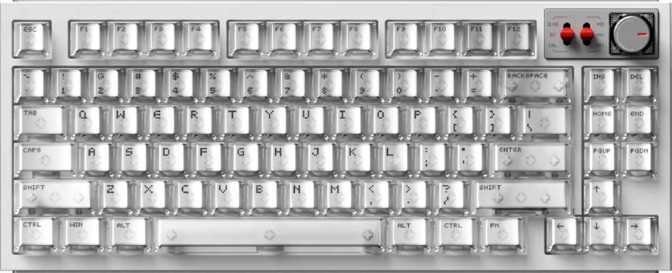
A physical rotary control on the top-right of the layout handles volume adjustment, media scrubbing, and any other function you choose to assign — reducing the need to reach for software controls during gameplay. Media controls broadly are accessible through the function layer, consistent with the tenkeyless philosophy of keeping the physical footprint small without abandoning essential controls.
Who Is This Keyboard For?
The Right Choice For
-
Competitive PC GamersRapid trigger, adjustable actuation, 8,000 Hz polling, and analog input together represent the complete set of advanced input features available in the category right now — all in one keyboard.
-
Players Wanting Wireless Without Compromise2.4 GHz wireless with top-tier polling makes this viable for serious competitive play untethered — something most wireless keyboards cannot claim.
-
Heavy Gamers Who Also Type ExtensivelyThe gasket mount and PBT keycaps give the WH80 enough typing quality to serve as a genuine daily driver, not just a gaming peripheral set aside for sessions.
-
Multi-Device UsersBluetooth support adds genuine versatility for switching between a gaming PC and a work laptop without swapping cables or receivers.
The Wrong Choice For
-
Mac UsersThe keyboard is built around Windows-centric labeling and functionality. While it functions on macOS at a basic level, there is no dedicated Mac layout and the experience is not optimized.
-
Open Firmware EnthusiastsWithout QMK, VIA, or ZMK support, you are entirely dependent on NuPhy's proprietary software. If your workflow requires community firmware, look elsewhere.
-
Users Who Travel with Their KeyboardA kilogram is substantial for a tenkeyless keyboard. The aluminum construction is the direct cause — if portability matters regularly, lighter alternatives exist.
-
Users with Specific Color RequirementsGray is the only available colorway. If your setup has a specific aesthetic theme and neutral gray doesn't fit, your options are limited.
How It Compares to Logical Alternatives
The WH80's unique position is the convergence of 8,000 Hz polling with wireless connectivity and the full suite of hall effect gaming features — a combination most alternatives force you to sacrifice at least one element of.
| Feature | NuPhy WH80 | Typical Hall Effect Competitor | Typical Premium Wireless KB |
|---|---|---|---|
| Polling Rate | 8,000 Hz | 1,000 Hz | 1,000–4,000 Hz |
| Wireless Modes | 2.4 GHz + Bluetooth | Usually wired-only | 2.4 GHz + Bluetooth |
| Switch Type | Hall Effect (Magnetic) | Hall Effect | Traditional Mechanical |
| Rapid Trigger | Yes | Yes | Rare |
| Analog Input | Yes | Sometimes | No |
| Dual Actuation | Yes | Sometimes | No |
| Mount Type | Gasket | Plate-mounted | Varies |
| Keycap Material | PBT Double-shot | ABS or PBT | Varies |
| Wrist Rest | Included | Rarely | Rarely |
| Open Firmware | No QMK/VIA | No | Sometimes |
| Mac Support | No | No | Often Yes |
Honest Assessment
Where It Excels
The WH80's greatest strength is coherence. Every premium feature supports the same central purpose: reducing the gap between your intent and what registers in the game. The switches, the polling rate, the rapid trigger implementation, and the analog capabilities are all components of the same engineering philosophy — and they work together, not in isolation.
The build quality reinforces that premium positioning. Gasket mounting requires more complex construction and raises costs — finding it here is not a checkbox feature. The full aluminum plate inside a gasket-suspended frame produces a typing experience that exceeds most of the gaming keyboard category. Having a wrist rest included rather than sold separately is a straightforwardly good value decision that many competitors skip.
Where It Falls Short
The honest weakness lies in ecosystem control. Without QMK or VIA support, users are entirely dependent on NuPhy's proprietary software for remapping, macros, and configuration. If that software is well-maintained, this is manageable. If it falls behind or NuPhy deprioritizes updates, users have no fallback. The hardware is impressive; the software dependency is the one variable outside NuPhy's physical engineering that careful buyers should weigh seriously.
The weight is a secondary consideration — not a flaw in isolation, but real for anyone who moves their keyboard frequently. A kilogram is substantial for a tenkeyless, and the aluminum construction is the direct cause. The restriction to a single gray colorway is a cosmetic limitation, not a performance one, but worth stating plainly: gray or nothing is a narrow palette for a product at this tier.
Frequently Asked Questions
Final Verdict
The NuPhy WH80 is built for one type of buyer: the competitive PC gamer who refuses to accept that going wireless means going slower.
The WH80 delivers 8,000 Hz polling, rapid trigger, adjustable actuation, analog input, and dual actuation — all running over 2.4 GHz wireless, wrapped in a gasket-mounted chassis with an aluminum plate and PBT keycaps that are well above average for a gaming keyboard. If wireless, high-performance gaming is your primary use case, this feature set is nearly impossible to match in a single package.
For competitive FPS and action-game players who want genuinely current hardware without a cable tethering them to the desk, the NuPhy WH80 is a serious and substantive choice that addresses real performance bottlenecks. This is not a keyboard built around marketing language — it is built around the actual physics of input latency.
Buy It If...
- Wireless competitive gaming is your primary use case
- You are within the Windows ecosystem
- Rapid trigger and hall effect input are priorities
- You want a keyboard that doubles as a quality daily driver
Skip It If...
- QMK, VIA, or ZMK firmware support is essential to you
- macOS is your primary operating system
- You frequently move or travel with your keyboard
- Gray doesn't fit your setup's color scheme