Nikon Nikkor Z DX 16-50mm f/2.8 VR: Full Review and Honest Verdict
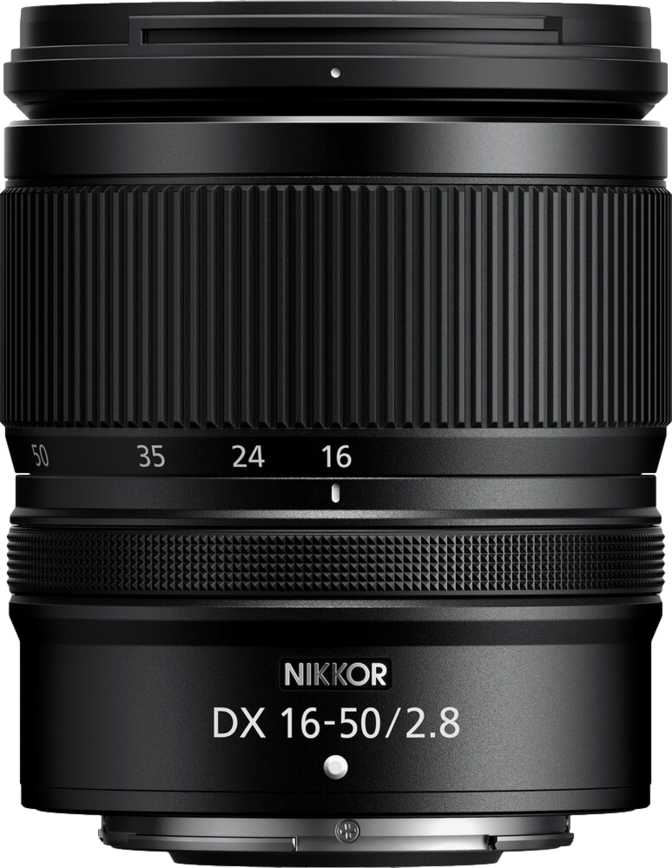
Camera LensesMost zoom lenses sold alongside mirrorless cameras make a quiet compromise: the aperture shrinks as you zoom in. You start wide and bright, then the moment you reach the longer end of the range, available light tightens and image quality quietly degrades. The Nikon Nikkor Z DX 16-50mm f/2.8 VR refuses that trade. It holds a constant maximum aperture of f/2.8 from the widest angle all the way through to the portrait end — a specification that, on a DX-format lens at this price tier, is genuinely uncommon and practically significant for anyone shooting in varied lighting.
This is a lens designed specifically for Nikon's Z-mount APS-C (DX) mirrorless bodies. Not a stopgap or a basic kit option — it is a considered piece of glass aimed at photographers who want one versatile, fast zoom that earns a permanent place in the bag.
At a Glance
A constant f/2.8 DX zoom that earns its place in a serious kit bag.
Design and Build Quality
Physical Form Factor
At 330 grams, the Nikkor Z DX 16-50mm f/2.8 VR occupies a specific and deliberate niche. It is meaningfully lighter than full-frame f/2.8 zooms, which routinely exceed 800 grams, yet it carries the optical and mechanical character of a professional tool rather than an entry-level accessory. On a compact DX mirrorless body, the balance is natural without being front-heavy.
The 67mm filter thread is a practical, widely supported size. Circular polarisers, ND filters, and protective glass in this diameter are easy to source and reasonably priced — unlike the larger threads found on full-frame workhorses that make accessory costs spiral quickly.
Construction Quality
The mount is metal. This matters more than it might initially appear: the lens-to-body connection point absorbs mechanical stress every time you mount, unmount, or shift the camera's angle while holding the lens. A metal mount handles that repeated loading without developing the slight looseness that plastic mounts can exhibit over years of regular use.
Weather sealing is present, making this lens usable in light rain, humid coastal environments, and dusty outdoor conditions — provided your camera body also carries equivalent environmental protection. This is not submersion-proof construction, but it removes the anxiety of working through sudden weather changes on location.
The included lens hood protects the front element from direct light and incidental contact, though it is not reversible for storage — meaning it either stays on or comes off entirely rather than flipping back onto the barrel when stowed.
Focal Range in Real-World Terms
What 16–50mm Means on a DX Camera
Because this lens is built for APS-C sensors, its focal range translates to an equivalent field of view of approximately 24–75mm in full-frame terms. That is a thoroughly practical everyday span, and each part of the range earns its keep in real-world use.
Interiors, architecture, group shots, and environmental storytelling. Wide enough to work in tight spaces without the distortion extremes of an ultra-wide lens.
Street photography, documentary work, and casual travel shooting. The focal length range most photographers instinctively reach for when exploring unfamiliar surroundings.
Comfortable working distance for portraits, food photography, and detail shots without the need to crowd your subject.
The 3.1x zoom ratio means you are not constantly swapping lenses to handle a full day of varied shooting. One lens covers the ground that might otherwise require two separate primes or a wider-and-longer combination.
The f/2.8 Constant Aperture: What It Actually Changes
Low-Light Performance
An aperture of f/2.8 admits significantly more light than the variable f/3.5–5.6 aperture found on most kit zooms — at the longest focal length, the difference can exceed two full stops. In practical terms, that means shooting in a dimly lit reception hall, a shaded outdoor market, or a late-afternoon street scene without forcing your camera to sensor sensitivities that introduce visible grain. You retain more creative control over your exposure rather than being pushed toward ISO settings you would otherwise avoid.
Depth of Field and Subject Separation
At f/2.8 on an APS-C sensor, you can produce meaningful background separation — particularly at the 50mm end, where the combination of focal length and wide aperture isolates subjects with a smooth quality to the out-of-focus regions. Nine rounded aperture blades contribute directly to this: they produce a more circular, natural-looking blur pattern compared to lenses with fewer or straight-edged blades. Point light sources rendered out of focus appear as smooth circular discs rather than harsh polygonal shapes.
This matters most in portrait work, product photography, and any situation where the relationship between a sharp subject and a soft background is deliberate rather than incidental.
Video Shooting
A constant aperture is especially valuable for video work. When a zoom lens has a variable aperture, zooming during a shot causes the exposure to shift mid-clip — a problem requiring post-production correction or careful manual compensation. With f/2.8 held across the entire range, you can zoom freely during a take without the frame brightening or darkening unexpectedly. For solo shooters and run-and-gun operators, this is one less variable to manage in the field.
Optical Image Stabilisation: Built-In VR
Nikon's Vibration Reduction system is built into the lens itself, which means stabilisation is available regardless of which DX Z-mount body it is paired with — including bodies that lack in-body image stabilisation. For handheld video and slower shutter speed stills work such as architectural interiors in low light, this reduces the visible shake that would otherwise require either a tripod or a compensating ISO increase.
When used on a body that also includes in-body stabilisation, the two systems communicate and cooperate, extending the effective stabilisation range beyond what either could achieve independently. The lens-side VR means this cooperation is available across Nikon's full DX Z-mount lineup, not just those with the most capable sensor-shift systems.
Focusing System: Fast, Silent, and Override-Ready
Autofocus Behaviour
The built-in focus motor is silent in operation — an important characteristic for video shooters who use on-camera microphones. A loud focus motor introduces audible noise into recordings; this lens eliminates that problem at the source. Autofocus speed and responsiveness depend significantly on the paired body, but a dedicated lens-side motor removes dependency on the camera body's internal focus drive — every Z-mount body benefits from the lens doing part of that mechanical work itself.
Full-Time Manual Focus Override
Full-time manual focus override means you can reach in and adjust focus by hand at any point without switching the camera into a dedicated manual focus mode. For photographers who use autofocus as a starting point and then fine-tune — common practice in macro work, portrait sessions, and deliberate compositional setups — this removes an extra button press from the workflow.
Minimum Focus Distance
At 15 centimetres, the minimum focus distance is shorter than most zoom lenses in this class. To put it in perspective, 15cm is roughly the length of a standard pencil — meaning you can fill the frame with objects as small as a wristwatch face, a coin, or a plated dish of food at close range. This is not a dedicated macro lens, but the close-focus capability adds genuine versatility for detail and still-life photography.
Who This Lens Is Built For
-
Hybrid photo/video creatorsConsistent exposure across the zoom range and silent autofocus for footage with clean natural audio.
-
Travel and street photographersA single walk-around lens handling architecture through candid portraits without a bag full of glass.
-
Event photographersWorking receptions, conferences, and indoor gatherings where fast aperture at both wide and standard focal lengths is the difference between a usable shot and a missed one.
-
Kit lens upgradersPhotographers ready to understand, in a single purchase, what a consistent fast aperture changes about their results day to day.
-
DX Z-mount usersWho want professional-grade optics matched to their crop-sensor body rather than overpaying for full-frame glass they cannot fully utilise.
-
Telephoto specialists50mm (75mm equivalent) is a moderate portrait length, not a sports or wildlife focal length.
-
Prime lens puristsThose who prefer maximum per-focal-length optical quality over the convenience of a single versatile zoom.
-
Ultra-wide landscape specialistsPhotographers needing a field of view below 16mm to capture expansive panoramic vistas.
-
Budget-focused daylight shootersIf you work primarily in bright outdoor light and rarely need background separation, a lighter variable-aperture zoom delivers similar results at lower cost and weight.
How It Compares to the Alternatives
| Feature | Nikkor Z DX 16-50mm f/2.8 VR | Variable-Aperture Kit Zoom | Full-Frame f/2.8 Standard Zoom |
|---|---|---|---|
| Aperture at long end | f/2.8 | f/5.6 | f/2.8 |
| Built-in stabilisation | Yes | Often yes | Yes (varies) |
| Weight class | ~330 g | ~130–200 g | ~700–900 g |
| Filter thread | 67 mm | 46–52 mm | 77–82 mm |
| Minimum focus distance | ~15 cm | 25–30 cm | 28–40 cm |
| Target sensor | APS-C (DX) | APS-C | Full-frame |
The Nikkor Z DX 16-50mm f/2.8 VR occupies a well-reasoned middle position: constant-aperture performance and optical quality scaled correctly to APS-C sensor dimensions at a manageable size and weight.
Strengths and Honest Weaknesses
- Constant f/2.8 across the entire zoom range — the defining strength that separates this lens from category alternatives and changes how you can shoot across the full day.
- Weather sealing and metal mount extend usable working life and remove caution from shooting in unpredictable outdoor conditions.
- Silent autofocus and full-time manual override make it genuinely suitable for professional video use — not merely passable, but properly equipped for serious production.
- Nine rounded aperture blades produce smooth, circular out-of-focus blur across the frame — a detail that elevates portrait and still-life work.
- 15cm minimum focus distance adds close-up versatility that most zoom lenses in this class cannot match, opening up detail work without a second lens.
- The front element rotates during focusing — a genuine friction point for photographers who regularly use circular polarising filters, requiring manual repositioning after each focus adjustment.
- The lens hood is non-reversible, making it a remove-or-leave-on proposition rather than a quick-flip storage solution when moving between shots.
- At 330 grams, it is noticeably heavier than the lightest variable-aperture kit alternatives. The trade-off is clear capability, but the weight is real for minimalist setups.
- The constant f/2.8 premium makes little financial sense for photographers who work primarily in bright, controlled daylight with no need for subject isolation or low-light headroom.
Questions Buyers Ask Before Purchasing
Final Verdict
The Nikon Nikkor Z DX 16-50mm f/2.8 VR makes a clear argument: an APS-C shooter should not have to choose between portability and optical performance. It delivers a constant fast aperture, meaningful image stabilisation, close-focus capability, and professional-grade build quality in a package that does not fight your camera for dominance.
It earns a strong recommendation for DX Z-mount users who want a single, dependable zoom that handles low light, video, portraits, and everyday shooting without compromise. It is not the right tool for telephoto specialists, ultra-wide enthusiasts, or shooters whose work never takes them away from ideal lighting conditions.
For the hybrid shooter, the travel photographer, the event creator, and anyone who wants one great lens rather than a bag full of adequate ones — this is a considered, capable choice that delivers on its central promise.