Minix Neo Z95 Review: A Compact Desktop With Serious Connectivity
Mini PCsMost people associate desktop computing with towers, tangled cables, and the kind of footprint that claims an entire corner of a room. The Minix Neo Z95 makes a different argument: that a full Windows-capable PC can live behind your monitor, tuck into a bag, or sit almost invisibly on a shelf — and still handle real daily computing without compromise. This is not a novelty device or a stripped-down media player with a keyboard attached. It is a proper mini PC built around a mobile-class processor, paired with modern memory, fast storage, and a connectivity suite that would embarrass many mid-range laptops.
Design and Build: Smaller Than You're Imagining
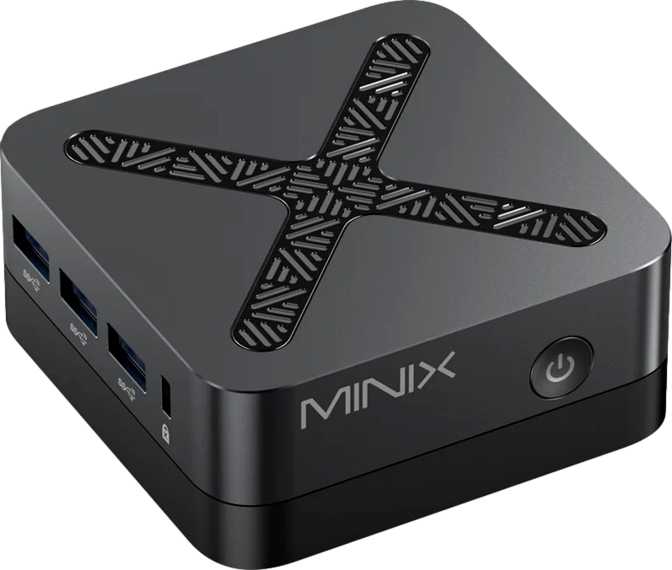
The Neo Z95 occupies a footprint roughly the size of a thick paperback novel. At 88 mm wide, 88 mm deep, and just 43 mm tall, the entire chassis fits easily in one hand. The total enclosed volume sits at around 333 cubic centimeters — approximately the size of a large coffee mug.
Minix has been building compact PCs long enough to understand that small doesn't have to mean cheap. The Neo Z95 carries the brand's characteristic no-nonsense aesthetic: clean lines, low-profile ventilation, and port placement that prioritizes accessibility over appearance.
For desk setups, the size dividend is significant. You gain back real estate, eliminate the visual bulk of a tower, and if you mount it to the back of a monitor using a VESA adapter (often sold separately), the computer effectively disappears from your workspace entirely.
- Width88 mm
- Depth88 mm
- Height43 mm
- Total Volume333 cm³
- Form FactorMini PC (Micro-ATX)
- Warranty1 Year
Processor Performance: What a 15-Watt CPU Actually Delivers
The processor at the heart of the Neo Z95 is a mobile-architecture chip operating within a 15-watt thermal envelope. That single number tells you a great deal about the engineering philosophy here. Traditional desktop CPUs routinely consume 65 to 125 watts under load. Running at a fraction of that power is precisely how Minix keeps the chassis this compact, the fan this quiet, and the power adapter this portable. The chip boosts individual tasks considerably higher than its base frequency when short bursts of speed are needed.
In practical terms, this is a processor that handles everyday computing — web browsing with dozens of tabs open, office documents, video calls, media playback, and light photo editing — without friction. The single-core benchmark score is the more relevant figure for most users, since the vast majority of daily software tasks execute on a single thread at any given moment.
Where the processor will disappoint is under sustained, heavy multi-threaded workloads. Video encoding, 3D rendering, large data processing, and running multiple resource-intensive applications simultaneously will reveal the ceiling quickly. For those workloads, a 15-watt processor — regardless of the specific chip — is simply not the right tool.
No Hyperthreading: What It Means in Practice
The processor uses physical cores only, without hyperthreading — a technology that creates virtual processing threads to improve multitasking efficiency. For most home and office users, this distinction is entirely invisible. For developers running heavy build processes, virtual machines, or parallel workloads, it means the four cores are four real threads, and no more.
- Thermal Design Power
- 15 W
- Base Clock (per core)
- 1.7 GHz
- Turbo Boost
- 3.4 GHz
- Physical Cores
- 4
- Hyperthreading
- No
- L3 Cache
- 6 MB
- Max CPU Temp
- 105 °C
Memory and Storage: Where the Neo Z95 Genuinely Delivers
If the processor is the machine's honest limitation, the memory and storage configuration is where Minix clearly invested. Both choices reflect a more forward-thinking platform than budget rivals typically ship.
16 GB DDR5 — Meaningfully Modern
The Neo Z95 ships with 16 gigabytes of DDR5 memory — the latest generation RAM standard, operating at speeds that weren't available in mainstream systems just a few years ago. Modern browsers, operating systems, and productivity applications are memory-hungry, and 16 GB ensures you won't feel pressure to close tabs or restrict background applications during normal use.
The memory runs in a single-channel configuration, which means the integrated GPU draws from a single memory pipeline rather than the wider dual-channel path. For general computing and video playback this is a non-issue. For graphics-intensive tasks, single-channel memory is a soft constraint on GPU performance. The 16 GB ceiling is fixed — not user-upgradeable in the field.
512 GB NVMe SSD — Fast Storage That Shows
The storage is a 512 GB NVMe solid-state drive — not a slow eMMC flash chip or a budget SATA SSD, but a proper NVMe drive using a direct PCIe lane. The day-to-day result: the operating system boots quickly, applications launch without hesitation, and large file operations complete without the spinning-wheel frustration that plagues slower mini PC storage solutions.
512 gigabytes is a comfortable working capacity for most users. A Windows installation, a full suite of productivity software, and a substantial library of documents and media will fit without requiring careful storage management. Users with large local media collections or game libraries will eventually want to add an external USB drive — the USB 3.2 Gen 2 ports accommodate this at up to 10Gbps.
Graphics: Three Screens, Honest Expectations
The integrated GPU operates using 16 execution units clocked at up to 1,200 MHz, built on a 10nm process node. It carries full support for DirectX 12 and OpenGL 4.6 — current-generation API compatibility levels that mean the GPU can run modern software, browsers with hardware acceleration, and current media codecs including 4K video decoding without burdening the processor.
What this GPU will not do is run modern 3D games at comfortable frame rates. Integrated graphics at this execution-unit count handles light titles, older games, and emulation reasonably — but expecting it to keep pace with demanding AAA releases is the wrong expectation for any mini PC in this class.
The more impressive specification is display support. The Neo Z95 can drive three monitors simultaneously through a combination of two HDMI 2.1 outputs and one DisplayPort output. HDMI 2.1 handles 4K resolution at high refresh rates, making this machine a genuinely capable heart for a multi-display workstation targeting productivity, financial analysis, coding, or content monitoring work. The ability to run three full-resolution screens from a device this size is a real capability advantage over many small form factor competitors.
- GPU ModelUHD Graphics
- Execution Units16 EU
- GPU Turbo Clock1,200 MHz
- Process Node10 nm
- DirectX12
- OpenGL4.6
- OpenCL3.0
- PCIe VersionGen 3
- Simultaneous Displays3 Screens
Connectivity: Unusually Well-Equipped
For a machine this small, the Neo Z95's port selection is generous and practically considered. Several individual choices here go beyond what you'd expect at this form factor and price tier.
1× DisplayPort
1× Gen 1 (5 Gbps)
Dual Network Paths
Bluetooth 5.2
Full Connectivity Reference
| Category | Specification |
|---|---|
| USB-A High Speed | 3 × USB 3.2 Gen 2 10 Gbps |
| USB-A Standard | 1 × USB 3.2 Gen 1 5 Gbps |
| USB-C | None |
| HDMI Outputs | 2 × HDMI 2.1 |
| DisplayPort | 1 × DisplayPort |
| Max Simultaneous Displays | 3 Screens |
| Ethernet | 2 × RJ45 Dual Port |
| Wi-Fi | Wi-Fi 6 — 802.11ax, 802.11ac, 802.11n |
| Bluetooth | 5.2 |
| Audio Jack | 3.5mm combo |
| Optical (S/PDIF) | Not Present |
| VGA | Not Present |
Who This Machine Is For — and Who It Isn't
- Home office workers who need a capable, quiet machine for documents, video calls, email, and web-based tools — and want to reclaim desk space.
- Triple-monitor productivity setups where the display flexibility is a genuine advantage over similarly priced alternatives that top out at two screens.
- Living room or entertainment center PCs where a small, quiet device running full Windows is preferable to a streaming stick with limited app support.
- Light network appliance roles — the dual Ethernet configuration opens up routing, NAS-adjacent, and home server possibilities that single-port mini PCs cannot match.
- Users replacing aging low-end desktops where any modern machine delivers a noticeable improvement, and the compact form factor is a bonus.
- Secondary or guest machines that need to be capable but not expensive.
- Video editors and content creators working with high-resolution footage who need sustained multi-core performance and dedicated GPU memory.
- Gamers, even casual ones expecting modern titles at reasonable visual settings and frame rates.
- Developers running multiple containers, virtual machines, or heavy multi-threaded build processes simultaneously.
- Users who plan to upgrade over time — the fixed 16 GB memory ceiling and non-expandable storage mean the machine ships at its maximum configuration permanently.
- Power users who depend on USB-C — the complete absence of USB-C ports is a real friction point for anyone with USB-C monitors, docks, or accessories already in their setup.
How It Compares to Alternatives in This Space
The mini PC category has become genuinely competitive. The Neo Z95 positions itself thoughtfully, but understanding where it stands against the field helps calibrate expectations — and confirms where its genuine advantages lie.
| Feature | Minix Neo Z95 | Typical Entry Mini PC | Mid-Range Mini PC |
|---|---|---|---|
| Memory Type | DDR5 | DDR4 | DDR4 / DDR5 |
| RAM Capacity | 16 GB | 8 GB | 16 GB |
| Storage | 512 GB NVMe | 256 GB eMMC / SATA | 512 GB NVMe |
| Multi-Display Output | 3 Screens | 2 Screens | 2 Screens |
| Dual Ethernet | Yes | Rare | Occasionally |
| USB-C | None | Sometimes | Often |
| Wi-Fi Standard | Wi-Fi 6 | Wi-Fi 5 | Wi-Fi 6 |
| Bluetooth | 5.2 | 5.0 / 5.1 | 5.1 / 5.2 |
Comparison reflects typical specifications found in this price tier. Individual models will vary.
Honest Assessment: Strengths and Limitations
Where It Genuinely Delivers
The three-display capability in a machine this size is genuinely impressive. Most compact PCs at this tier top out at two screens, and HDMI 2.1 support means those screens can be 4K displays without compromise. The dual Ethernet is a thoughtful inclusion that opens up use cases most mini PCs at this price simply can't address — from NAS-direct connections to lightweight network routing.
DDR5 memory signals that Minix built this machine with at least some forward-looking intent in the platform choice. The storage and memory combination is well-matched: 16 GB paired with a proper NVMe drive produces a day-to-day experience that feels noticeably quicker than budget alternatives shipping with slower storage or half the RAM.
Wi-Fi 6 and Bluetooth 5.2 round out a wireless package that matches current standards rather than shipping with legacy wireless versions — a distinction that matters in congested environments like offices and apartment buildings.
Where It Falls Short
The processor, operating within its thermal constraints, will not satisfy users who regularly push demanding workloads. A video export, a large spreadsheet recalculation, or a demanding game will find the ceiling. This isn't a flaw in execution — it's a fundamental characteristic of a 15-watt chip. Buyers must understand this clearly before purchasing.
Memory is fixed and cannot be expanded. USB-C is entirely absent, which is an increasingly conspicuous omission as the port type continues to dominate the accessory market. And the one-year warranty is the minimum expectation for a device in this category — not a confidence signal for long-term ownership peace of mind.
Single-channel memory also acts as a ceiling for GPU performance. Users running GPU-accelerated effects or any graphics-adjacent workload will feel the bandwidth limitation more acutely than the execution unit count alone might suggest.
Frequently Asked Questions
Answers to the questions real buyers search for before making a decision.
Final Verdict: A Well-Considered Compact PC With One Clear Caveat
The Minix Neo Z95 earns a confident recommendation for its intended audience — and that audience is wider than skeptics of mini PCs might assume.
If your computing life consists of productivity software, web applications, video calls, media consumption, and multi-monitor work, the Neo Z95 delivers all of that from a device small enough to forget is there. The three-display output flexibility is a genuine standout: most compact PCs at this tier top out at two screens, and HDMI 2.1 support means those screens can be 4K displays without compromise. Add DDR5 memory, a fast NVMe drive, Wi-Fi 6, and twin Ethernet ports, and the Neo Z95 presents a specification set that punches well above its physical stature.
The caveat matters: the complete absence of USB-C ports requires adapter friction that some buyers will find genuinely inconvenient. If your peripherals are already USB-C-heavy, audit that carefully before buying. And the 15-watt processor, while perfectly capable for daily tasks, has a real ceiling for anyone who regularly pushes demanding workloads.
- A clean, quiet home office desktop
- Triple-monitor productivity setup
- A full Windows living room PC
- Dual-network or NAS-connected use
- Heavy video or creative workloads
- Gaming beyond light / older titles
- USB-C monitor or dock support
- Future memory upgradeability