MacBook Neo Full Review: Silent Performance Meets All-Day Portability
LaptopsThere is a quiet but significant shift happening in the thin-and-light laptop category, and the MacBook Neo sits squarely at the center of it. This is not a conventional laptop with a mobile-adapted chip bolted inside. It is a device built from the ground up around a philosophy of silence, efficiency, and all-day portability — powered by processor architecture refined over years of mobile engineering and applied to a full productivity form factor. It weighs just over 1.2 kilograms, runs without a single moving part, connects to cellular networks natively, and delivers benchmark numbers that outpace many actively-cooled competitors. That combination is genuinely unusual, and it demands a close look before deciding whether the trade-offs match how you actually work.
Design and Build Quality
Physical experience, dimensions, and construction trade-offs
Physical Presence
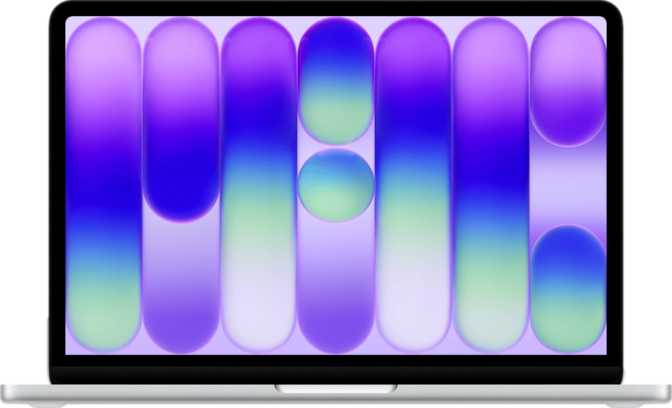
At 297mm wide, 206mm deep, and just 12.7mm thin, the MacBook Neo occupies less desk space than a standard sheet of paper and slips into most sleeves and bags without resistance. The sub-800 cubic centimeter volume makes this one of the more compact 13-inch laptops available, and the 1,230g weight means you will rarely notice it in a bag — a full day of commuting with it is genuinely different from carrying a traditional laptop.
The fanless design is the single most consequential physical choice here. There is no cooling fan, which means there is no fan noise — ever. Not during heavy document work, not during video calls, not during extended export tasks. The processor is built on a 3-nanometer manufacturing process with a thermal envelope of just 10 watts, meaning it generates so little heat that passive cooling through the chassis is sufficient. For anyone who has been distracted by fan ramp-up noise during a meeting or a quiet work session, this matters more than any spec sheet figure suggests.
The Keyboard Decision Worth Knowing About
The MacBook Neo does not have a backlit keyboard. In a dimly lit meeting room, on a red-eye flight, or working after dark without overhead lighting, this limitation becomes immediately practical. It is an unusual omission for a machine at this capability level, and it is worth weighing honestly against your typical working environment before purchasing.
Durability Expectations
The MacBook Neo is not weather-sealed and does not carry a rugged certification. It is engineered for professional productivity environments — offices, cafés, flights, home desks — and should be treated accordingly. The operating temperature range of 10°C to 35°C reflects standard indoor use conditions. It is not designed for outdoor field work or physically demanding environments.
Display: Sharp, Bright, and Touch-Enabled
13-inch IPS LCD panel analysis and real-world viewing quality
The Panel Itself
The 13-inch IPS LCD panel uses LED backlighting and produces a resolution of 2,048 × 1,506 pixels. At 219 pixels per inch, text is crisp and images are clean without individual pixels being discernible at normal viewing distances. This is a noticeably sharper panel than the 1080p or 1200p displays found in many competing thin-and-lights, and the difference is visible when working with dense spreadsheets, reading long documents, or editing fine-detail design work.
Brightness reaches 500 nits at typical settings, which is well-suited to indoor and partially shaded outdoor use. Direct sunlight remains challenging for any display without peak brightness modes, and the absence of an anti-reflection coating means glare is managed through positioning rather than technology. In controlled lighting — which describes most professional environments — the display performs at a high level.
Touch Input
The panel supports touch interaction, which is an uncommon feature on Mac-based productivity laptops. Whether touch navigation adds meaningfully to your workflow depends on the software you use, but for annotation, scrolling, and gesture-based navigation, having the option available without reaching for an external accessory is a quiet convenience that accumulates over time.
Refresh Rate and External Display Support
The panel refreshes at 60Hz — standard for document-focused productivity work, though users accustomed to high-refresh gaming monitors or premium display panels will notice the difference in motion smoothness when scrolling quickly. The MacBook Neo supports one external display via its USB-C connectivity, which covers the vast majority of desk setups without additional hardware.
Performance: Mobile Architecture, Laptop Results
Processor, memory, storage, and graphics capability analysis
The Processor
The chip inside the MacBook Neo uses a six-core configuration divided into two types: two high-performance cores running at approximately 3.9GHz and four efficiency cores operating at around 2.2GHz. This big.LITTLE arrangement — borrowed from Apple's mobile engineering — is the reason the machine can sustain demanding tasks efficiently while still preserving battery during lighter work. The chip automatically shifts tasks between core types based on demand, without user intervention.
Built on a 3-nanometer process with 20 billion transistors packed into the die, this is among the most advanced silicon in any laptop in this size class. A 16MB L2 cache keeps frequently accessed data close to the processor cores, reducing latency in real workflows and contributing to the snappy day-to-day feel users will notice immediately.
Benchmark Results in Context
The MacBook Neo returns a Geekbench 6 single-core score of 3,582 — a result that compares favorably to many actively-cooled competitors. The multi-core score of 9,089 across six threads is competitive for the productivity category. Crucially, both numbers come from a fanless machine that never throttles due to thermal pressure. Consistent peak performance without fan assistance is, in practice, more valuable than a higher-rated chip that occasionally throttles under heat.
Reflects single-threaded responsiveness — the speed you feel in everyday tasks like launching applications, navigating interfaces, and handling individual processes.
Reflects parallel workload performance — handling multiple demanding tasks, exporting files, and running several applications simultaneously across all six threads.
Memory and Storage
The 8GB of unified memory operates via DDR5 at 4,800MHz, delivering a memory bandwidth of approximately 78.8GB/s. This matters because the GPU and CPU share this memory pool — faster bandwidth means graphical and computational tasks can exchange data more quickly. In practice, 8GB handles the full range of productivity software comfortably, though it represents a fixed ceiling: the maximum supported memory is 8GB, and this cannot be changed after purchase.
Storage is a 512GB NVMe SSD — the fastest class of solid-state storage available. Application launches, file operations, and overall system responsiveness all benefit directly from this, and the capacity suits most productivity users without requiring constant external drive management.
Graphics Capability
The integrated Apple A18 GPU with 128 shading units supports hardware ray tracing — a rendering technique producing more physically accurate lighting in compatible applications. At 1,490MHz clock speed, it handles creative software, light 3D work, and casual gaming capably. It is not positioned for professional 3D rendering or high-fidelity gaming, but it significantly exceeds what integrated graphics delivered in previous-generation thin laptops. Note that the GPU draws from the shared memory pool, so sustained graphical workloads can compete with CPU memory bandwidth — a nuance that matters for creative power users but is invisible to productivity-focused buyers.
Battery Life: The Standout Achievement
Endurance, real-world implications, and charging behavior
A 36.5 watt-hour battery is a modest capacity — smaller than what many competing 13-inch laptops carry. Yet the MacBook Neo is rated for 16 hours of use on a charge. This apparent contradiction resolves entirely through the processor's 10-watt thermal design: the chip draws so little power that a smaller battery goes significantly further than a larger one powering a conventional processor.
In practical terms, a full charge on a Monday morning should comfortably cover a complete workday for most users, with reserve remaining. Frequent travelers will find that charging anxiety — the habit of hunting for outlets in airports and conference venues — largely dissolves. The machine also supports charging through USB-C sleep ports, meaning it can top up from compatible accessories even while in standby.
The 16-hour rating aligns with mixed real-world productivity workloads. Sustained high-brightness video playback or continuous heavy CPU use will draw the battery down faster, but the efficiency characteristics of this chip mean those scenarios still typically exceed what comparable thin-and-light laptops deliver on a charge.
Connectivity: Modern Wireless, Constrained Wired
Port selection, wireless standards, and built-in cellular capability
Wireless Capabilities
Wireless connectivity is genuinely forward-looking. Wi-Fi 6E support means the MacBook Neo can connect to the newest generation of routers using the 6GHz band — delivering faster speeds with less interference in dense wireless environments like offices and conference centers. Bluetooth 6, the latest generation of the standard, brings improvements in connection reliability and efficiency for audio devices and peripherals.
Most distinctively, the MacBook Neo has 5G and LTE connectivity built directly into the chip. This is not a dongle or an add-on — it is integrated silicon, functioning the same way a phone connects to mobile networks. For users who work outside of reliable Wi-Fi environments — in transit, at client sites, or in locations without guest network access — this is a qualitative shift. You do not depend on your phone's hotspot; the laptop connects independently.
- Wi-Fi 6E — 6GHz band support included
- Bluetooth 6 — latest generation standard
- 5G & LTE built into the chip natively
- AirPlay wireless display mirroring supported
Wired Ports
This is where the MacBook Neo's compromises are most concentrated. The port selection consists of two USB-C connectors: one operating at the faster 10Gbps transfer rate and one at the standard 5Gbps rate. There are no USB-A ports, no HDMI output, no SD card slot, and no Thunderbolt connectivity.
For users with existing USB-C peripherals and a USB-C monitor, this may not cause friction. For anyone dependent on USB-A devices, HDMI displays, or wired ethernet, an adapter or hub becomes a required day-one purchase — an accessory that partially undermines the clean portability story.
The absence of Thunderbolt limits compatibility with high-bandwidth docking stations and professional storage devices that depend on that standard — a consideration for power users with established desk setups.
Features That Complete the Experience
Audio, security, input, and built-in capabilities beyond the core specs
Audio
Stereo speakers with Dolby Atmos support produce spatial audio that punches well above what the chassis dimensions suggest. A 3.5mm headphone jack handles wired audio in and out, and a dual-microphone array captures voice for calls and commands cleanly without needing an external microphone in typical environments.
Security
A fingerprint scanner handles biometric authentication quickly and reliably. TrustZone and NX bit hardware architecture protects system memory and isolates sensitive operations at the silicon level. Three-dimensional facial recognition is not present, so the fingerprint scanner is the sole biometric login method.
Camera
A front-facing camera handles video calls and conferencing. Given the device's positioning as a professional productivity laptop, it is built for adequate quality across standard call and meeting scenarios without requiring an external webcam in typical use.
Voice & Input
Voice command support enables hands-free control of compatible system functions. Two dedicated microphones provide clean voice capture for both commands and conference calls. Touch screen input adds an additional interaction mode that most competing productivity laptops in this category do not offer.
Who This Laptop Is For — And Who Should Look Elsewhere
Matching the MacBook Neo to real buyer profiles before you commit
A Strong Fit If You...
- Move between locations frequentlyIntegrated 5G means you are never dependent on Wi-Fi availability — the laptop connects independently wherever mobile signal exists, without a hotspot in sight.
- Work primarily in productivity applicationsDocuments, spreadsheets, video calls, email, and web browsing — this machine handles all of it without reservation, in complete silence, all day.
- Prioritize portability and battery enduranceAt 1.23kg with a 16-hour battery rating, this is a true all-day carry that does not need a charger in tow on most travel days.
- Work in shared or quiet environmentsA completely silent laptop is a genuinely different experience in open-plan offices, libraries, and shared workspaces where fan noise is a persistent irritant.
Consider Alternatives If You...
- Regularly work in low-light conditionsNo keyboard backlight means typing in dim environments becomes genuinely frustrating. This is a real daily limitation on flights, in dim meeting rooms, and during evening work sessions.
- Rely on USB-A, HDMI, or wired ethernetWithout these ports natively, you will need an adapter or hub as a permanent companion — which meaningfully undermines the clean portability value proposition.
- Need sustained heavy multi-threaded workloadsVideo production pipelines, large-scale 3D rendering, and scientific computing all benefit from more cores and active cooling than this machine provides.
- Anticipate needing more than 8GB of RAMThe memory ceiling is fixed at 8GB and cannot be raised after purchase. If your needs are likely to grow over the laptop's lifetime, factor this in before committing.
How It Compares to Logical Alternatives
MacBook Neo vs. Windows thin-and-lights and competing ARM laptops
| Feature | MacBook Neo | 13" Windows Thin-and-Light | Competing ARM Laptop |
|---|---|---|---|
| Cooling System | Fanless | Active fan | Varies (some fanless) |
| Cellular Connectivity | Built-in 5G/LTE | Rare, add-on only | Occasionally available |
| Battery Life | ~16 hours | 8–12 hours typical | 12–15 hours |
| Keyboard Backlight | Standard | Typically yes | |
| USB-A Ports | None | 1–2 standard | Varies |
| Thunderbolt | None | Often included | Rarely |
| Touch Display | Common | Less common | |
| Bluetooth Generation | 6 | 5.3 typical | 5.x typical |
The MacBook Neo's most direct competition comes from other ARM-architecture thin laptops prioritizing efficiency over raw throughput. Against those, the cellular integration and battery longevity are the clearest differentiators. Against traditional x86 ultrabooks with active cooling, the MacBook Neo trades peak sustained multi-threaded performance and port breadth for silence, thinness, and dramatically longer battery endurance.
Strengths and Honest Weaknesses
A balanced assessment without glossing over the genuine trade-offs
Where It Excels
The MacBook Neo's strengths stack together convincingly. A 3-nanometer chip that runs cool and completely silent, benchmark numbers that compete with actively-cooled alternatives, a sharp touch-enabled display, and Bluetooth 6 with Wi-Fi 6E for future-ready wireless — these are not incremental improvements. The native 5G integration is a genuine differentiator that changes how the device functions in mobile-dependent work environments.
Battery life that covers a full working day without a charger is not a rounding error — it is a qualitative change in how you carry and use the device. And a fanless machine that never throttles under thermal pressure delivers more consistent real-world performance than benchmark comparisons alone communicate.
The security architecture is comprehensive at the hardware level, and the Dolby Atmos audio output punches well above what the chassis dimensions imply. These are finishing details that reward daily ownership, even if they rarely appear in comparison tables.
Where It Falls Short
The weaknesses are real and should not be minimized. No keyboard backlighting on a professional productivity laptop is a strange omission that affects daily usability in common scenarios — a dim meeting room or an evening flight will expose this limitation immediately. Port selection is sparse enough that many users will need a hub as a day-one purchase, which erodes the clean portability story.
The 8GB memory ceiling is not a problem for most workflows today, but it is a constraint worth naming if your needs are likely to grow. You cannot add more RAM later, and that decision point happens at purchase, not at the moment you feel the pressure of it.
For experienced buyers: despite supporting ray tracing, the GPU draws from shared system memory. Sustained graphical workloads will compete with CPU memory bandwidth in ways that a dedicated GPU does not — a nuance that matters for sustained creative work, even if it is invisible to standard productivity users.
Questions Buyers Ask Before Purchasing
Straight answers to the real questions people search for before buying
A Clear Recommendation for the Right Buyer
MacBook Neo — our complete purchase verdict
The MacBook Neo is a genuinely well-considered machine for a specific kind of professional user — one who moves through the world frequently, values silence and thin portability, and wants battery life that removes charging from the daily mental checklist. The cellular integration alone makes it meaningfully different from most laptop competitors, and the combination of a 3-nanometer processor with fanless operation and 16-hour endurance is an engineering outcome that rewards careful attention.
The trade-offs are real and should not be minimized. No keyboard backlight, limited port selection, a fixed 8GB memory ceiling, and no Thunderbolt connectivity are genuine constraints — not bugs, but deliberate choices made in service of thinness, efficiency, and silence. Whether those choices align with your daily reality is the central question this review is designed to help you answer.
You work primarily in productivity and communication apps, move between environments without reliable Wi-Fi, and want a laptop that runs silently all day on a single charge.
You need a backlit keyboard, broad port compatibility without adapters, more than 8GB of RAM for demanding workloads, or Thunderbolt connectivity for professional docking solutions.