Lenovo Lecoo Cool 310 Review: Compact Desktop, Capable Graphics
Mini PCsAt a Glance
The essential specifications before you read on
Processor
8-Core / 16-Thread
4.9 GHz Peak Turbo
Graphics
Radeon 780M
RDNA 3 — 8.3 TFLOPS
Memory
16 GB DDR5
Dual-Channel
Storage
1 TB SSD
SATA Interface
Wireless
Wi-Fi 6E
Bluetooth 5.3
Form Factor
Micro-ATX
Compact Desktop
Recommended for home and small office use
What Is the Lenovo Lecoo Cool 310?
The compact desktop PC market has quietly grown into one of the most competitive segments in consumer computing. Buyers who once had to choose between a power-hungry tower and an underpowered office-grade box now have a third path: small form factor machines that punch well above their physical size. The Lenovo Lecoo Cool 310 positions itself squarely in that category.
This is a Micro-ATX machine built around an AMD APU platform — a processor design that integrates both the CPU and a capable graphics unit on a single chip. The result is a compact desktop capable of handling serious productivity workloads, driving multiple displays, and managing casual gaming, all while remaining physically small and thermally efficient.
What elevates the Cool 310 above its peers in this segment is the caliber of its integrated graphics. The Radeon 780M is built on the RDNA 3 architecture — the same underlying design powering AMD's current discrete desktop and laptop GPUs. Paired with DDR5 memory and Wi-Fi 6E, this is clearly more than an office-grade compromise.
What this review covers: Both the genuine strengths and the real limitations of the Cool 310 receive equal attention here — including the absent USB-C ports and the SATA storage trade-off.
Design and Build Quality
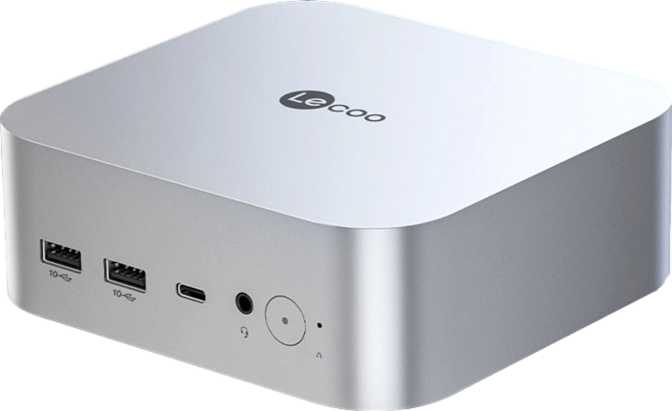
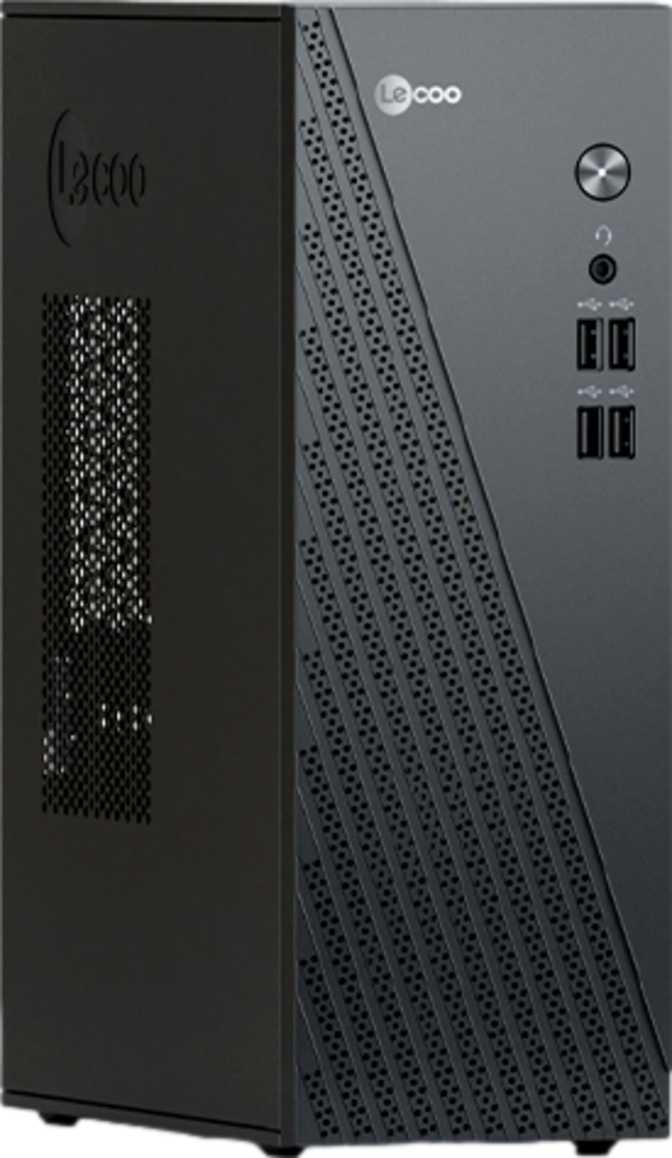
The Micro-ATX form factor places the Cool 310 precisely between ultra-compact NUC-style mini PCs and a traditional mid-tower desktop. It occupies meaningfully less desk space than a tower while offering more internal expansion headroom than a palm-sized box. For most desk environments it can sit upright beside a monitor or lie flat under one — a practical everyday machine rather than a statement piece.
Lenovo's Lecoo sub-brand is aimed at buyers who want the quality-control and supply chain backing of a major global manufacturer without paying a premium brand tax. The Cool 310 reflects that positioning in its chassis design: clean, functional lines with no RGB lighting strips or aggressive gamer-facing styling. For office environments, home workstations, and small business deployments, that restraint is genuinely useful — the machine is designed to disappear into the workspace rather than dominate it.
Given the processor's low thermal ceiling, the cooling system does not need to work particularly hard. Under typical workloads this machine should operate with low fan noise — a detail that matters in quiet home offices and shared working environments.
Compact Footprint
Micro-ATX chassis
Quiet Operation
Low thermal output
Upgrade Headroom
More than ultra-compact PCs
Office-Ready Look
No aggressive styling
Performance Analysis
The Cool 310's performance breaks into two distinct areas: a modern efficiency-tuned processor that handles everyday and multi-threaded workloads reliably, and an integrated GPU that fundamentally redefines what integrated graphics can actually achieve in a compact machine.
Processor: Efficient, Threaded, and Capable
8 / 16
Cores / Threads
4.9 GHz
Peak Turbo Speed
28,797
PassMark Multi-Thread
3,556
PassMark Single-Thread
The processor operates within a 15-watt thermal envelope — a figure that signals efficiency over brute-force sustained power. In practice this architecture delivers eight cores with full multithreading support, a competitive base frequency, and a peak burst speed approaching 5 GHz. The chip accelerates sharply under short workloads then settles into a sustained operating point the cooling system handles quietly over time.
The 16 MB of L3 cache is a meaningful day-to-day asset. Cache acts as ultra-fast on-chip storage for the processor — the more of it a chip carries, the less frequently it reaches into slower system memory. In everyday use this translates directly to snappier application launches, smoother multitasking, and lower latency when switching between open programs. You feel this as system responsiveness long before any benchmark confirms it.
The single-thread PassMark result of 3,556 places this processor firmly in the capable mainstream tier — responsive enough for everyday computing without standing out as a single-core speed champion. The multi-thread result of approximately 28,800 outpaces many traditional quad-core office machines and aligns with mid-range desktop configurations, which is a strong position for a system this small and this quiet.
For advanced users: The processor includes hardware AES acceleration, AVX2, and FMA3 instruction support. AES hardware means VPN connections and encrypted file transfers add almost no CPU overhead. AVX2 enables certain AI inference tools, encoding routines, and scientific workloads that specifically leverage these instruction paths.
Radeon 780M: Integrated Graphics Reconsidered
This is the specification that makes the Cool 310 genuinely interesting. The Radeon 780M is AMD's flagship integrated GPU, built on the same RDNA 3 architecture that drives AMD's current discrete desktop and laptop GPUs. Most integrated graphics solutions are functional footnotes. The 780M is not.
8.3
TFLOPS Throughput
2,700 MHz
GPU Peak Boost
DX12U
DirectX 12 Ultimate
4
Max Displays Supported
In practical gaming terms: popular esports titles and games from a few years ago run well at 1080p with medium-to-high settings. Very recent AAA releases will generally require reduced resolution or quality presets to maintain smooth frame rates. The 780M is not a substitute for a discrete GPU in a gaming-first build, but for a compact desktop never intended as a dedicated gaming rig, its output is a genuine surprise.
The 780M supports DirectX 12 Ultimate and OpenGL 4.6 — both current-generation graphics APIs. DirectX 12 Ultimate includes hardware-accelerated ray tracing. At integrated graphics performance levels ray tracing always involves trade-offs, but hardware-level support future-proofs the system for games and applications that use these features even at lower intensity settings.
One relevant note: NVIDIA's DLSS AI upscaling is not supported here — this is an AMD platform. AMD's FSR (FidelityFX Super Resolution) is software-based and works across a broad range of hardware including the 780M, so titles that support FSR can leverage upscaling to boost frame rates without requiring dedicated hardware blocks.
Memory and Storage
The Cool 310 ships with 16 GB of DDR5 in a dual-channel configuration — a setup specifically important for the Radeon 780M, which draws on system memory for its graphics work. Running in dual channel rather than single channel means significantly more memory bandwidth is available to the GPU, which directly lifts graphics performance above what a cheaper single-channel setup would achieve.
Sixteen gigabytes is comfortable for most workloads today: multitasking across productivity apps, browser-heavy workflows, video calls, streaming, and casual gaming all feel smooth at this level. The theoretical maximum capacity of 256 GB is most relevant for small business server deployments and virtualization environments where headroom matters far more than most home users require.
ECC (Error-Correcting Code) memory support is an uncommon feature at this price tier. ECC automatically detects and corrects single-bit memory errors, a capability valued in environments where data integrity is critical — financial systems, medical record management, or always-on small business servers. Most home users will never need it, but for professional buyers it is a meaningful differentiator.
16 GB
Included RAM
256 GB
Maximum Capacity
7,500 MHz
Max RAM Speed
One terabyte of SSD storage ships as standard — enough to hold the operating system, a full software suite, a large media library, and still leave the majority of the drive genuinely available. A typical Windows installation with common applications uses roughly 50–80 GB, so the usable space from day one is substantial.
Important limitation: The included drive uses a SATA interface rather than NVMe. SATA SSDs deliver roughly half the sequential read and write throughput of a modern NVMe drive. For everyday tasks — opening apps, loading documents, web browsing — this gap is rarely noticeable. For large file transfers, software installations, and game loading times, the difference is measurable.
For productivity-first buyers, the SATA SSD is perfectly adequate. For users who regularly move large video files, back up significant data volumes, or require the fastest possible load times, it is worth confirming with the retailer whether the Micro-ATX chassis includes a free M.2 slot for a future NVMe addition alongside the existing drive.
Flash storage is not the interface type used here — the installed drive is a conventional SATA SSD, not a flash-embedded solution.
Connectivity: Modern Wireless, Mixed Wired
Wireless Networking
Wi-Fi 6E is a premium feature that many compact desktops in this category still do not offer. The 6E designation extends Wi-Fi 6 into the 6 GHz frequency band — a less congested spectrum compared to the 2.4 GHz and 5 GHz bands used by all older routers. In dense wireless environments like apartments in multi-unit buildings or busy shared offices, Wi-Fi 6E provides meaningfully lower latency and more consistent speeds. Accessing the 6 GHz band requires a Wi-Fi 6E compatible router; on older hardware the Cool 310 connects normally via Wi-Fi 6 or Wi-Fi 5.
Bluetooth 5.3 handles wireless peripherals, headsets, and accessories with improved connection stability and lower energy consumption compared to older Bluetooth versions.
Wired Ports
| Port Type | Count | Notes |
|---|---|---|
| HDMI | 1 | Primary display output |
| Gigabit Ethernet (RJ45) | 1 | Wired networking |
| USB 3.2 Gen 1 (USB-A) | 2 | Up to 5 Gbps transfer |
| USB 2.0 (USB-A) | 6 | Keyboard, mouse, hubs |
| 3.5mm Audio Jack | 1 | Headphone / mic combo |
| USB-C (any version) | 0 | Not available |
| DisplayPort | 0 | Not available |
| Thunderbolt | 0 | Not available |
USB-C users, take note: The Cool 310 offers no USB-C ports of any kind. Buyers with USB-C monitors, docks, external drives, or peripherals will need adapters throughout their entire workflow.
Who the Cool 310 Is Built For
- You want a quiet, capable desktop for home or small office productivity without a tower footprint
- You need a compact machine that can drive two or three monitors simultaneously
- Your small business environment requires ECC memory support for data integrity
- Casual gaming matters to you, but purchasing or maintaining a discrete GPU does not
- Your network setup benefits from Wi-Fi 6E and you have a compatible router
- Desk space is limited and a full mid-tower build is simply not practical
- You play demanding AAA titles at high settings — a machine with a discrete GPU is the correct choice
- Video editing, 3D rendering, or high-volume creative processing is your primary daily workload
- Your peripherals, monitors, or docks rely on USB-C connectivity in any form
- Maximum storage throughput — NVMe-level read/write speeds — matters for your workflow
- Your workload demands long-term sustained CPU performance at high power levels
How It Compares to the Alternatives
The Cool 310 sits in a competitive but clearly defined segment. The two most likely alternatives a buyer in this category would consider are a budget Intel N100 mini PC and an entry-level tower desktop without a discrete GPU.
| Feature | Lenovo Lecoo Cool 310 | Intel N100 Mini PC | Entry-Level Tower PC |
|---|---|---|---|
| GPU Tier | Radeon 780M RDNA 3 — best-in-class iGPU | Intel UHD — functional, significantly weaker | Varies; often comparable or weaker without discrete GPU |
| Memory Standard | DDR5 Dual-Channel | DDR4 or LPDDR5, often single-channel | DDR4 typical |
| Wi-Fi Support | Wi-Fi 6E | Wi-Fi 5 or 6 common | Wi-Fi 5 — often no built-in wireless |
| USB-C Ports | None | 1–2 ports typical | Varies by model |
| ECC Memory | Supported | Not supported | Rarely at this price tier |
| Sustained Load | Limited by 15W thermal ceiling | Constrained by ~6W TDP — more limited | Higher headroom with proper desktop cooling |
| Physical Footprint | Micro-ATX compact | Ultra-compact (palm-sized) | Full desktop tower |
The Cool 310's clearest advantage over budget mini-PCs is the graphics architecture — the gap between the 780M and Intel's UHD integrated graphics in the N100 class is substantial in any graphics-intensive scenario. Against entry-level towers without a discrete GPU, the 780M's performance is actually competitive or superior. The trade-off relative to towers is sustained CPU throughput: a desktop chip with adequate desktop cooling runs at significantly higher power levels for much longer under heavy loads.
Honest Strengths and Weaknesses
Where the Cool 310 Delivers
The most compelling strength of the Cool 310 is the Radeon 780M integrated graphics. No compact desktop at this form factor and price class typically ships with graphics performance at this level as a standard configuration. Buyers who have dismissed integrated graphics based on older Intel or low-end AMD experiences will find the 780M requires a genuine reassessment — light-to-medium gaming, multi-display productivity, and graphics-accelerated workflows are all within reach without a discrete card.
The DDR5 memory implementation reinforces that graphics advantage. Dual-channel DDR5 running at high speeds provides the 780M with the bandwidth it needs to operate near its ceiling. The theoretical 256 GB maximum capacity and ECC support add professional-grade flexibility rarely found at this compact form factor — a meaningful differentiator for small business buyers deploying these as dual-purpose workstations.
Wi-Fi 6E is a forward-looking connectivity choice that most competitors in this category still omit. The generous L3 cache provides tangible daily responsiveness that raw clock speed figures alone do not capture. Multi-display support at the GPU hardware level gives productivity users genuine multi-monitor flexibility from a machine that sits behind a monitor stand.
Where the Cool 310 Falls Short
The USB port situation is the most glaring weakness. In a market where USB-C is becoming the default interface for monitors, docking stations, external drives, and modern peripherals, the Cool 310 offers no USB-C connectivity of any kind — not a single port across any USB-C generation. For buyers invested in a USB-C ecosystem this is not a minor footnote; it is a daily friction point requiring adapters for everything.
The SATA SSD is a cost-driven compromise with measurable consequences. While more than adequate for everyday productivity use, sequential transfer speeds cap at roughly half what a modern NVMe drive delivers. The gap shows during large file operations, heavy software installations, and content loading — exactly the moments that feel sluggish when storage performance is the bottleneck.
The single HDMI output limits practical multi-display use despite the GPU's four-display hardware capability. Achieving a two-monitor setup requires an adapter, and scaling beyond that requires more. The one-year warranty falls short of the two-to-three-year coverage some competitors in this class offer, and the 15-watt thermal ceiling means sustained heavy workloads like extended rendering or compilation jobs will throttle over time in ways a tower desktop with higher power headroom would not.
Common Buyer Questions
Answers to the questions buyers ask most often before purchasing the Lecoo Cool 310
Final Recommendation
Our verdict on the Lenovo Lecoo Cool 310
The Lenovo Lecoo Cool 310 is a well-considered compact desktop for a specific buyer profile, and it delivers meaningfully on its core promise. If you need a quiet, space-efficient machine for productivity, light creative work, casual gaming, or a capable home or small office workstation — and you can work within its connectivity limitations — it earns a confident recommendation.
The Radeon 780M graphics alone distinguish it from most compact competitors. No similarly sized machine at this price class typically offers graphics performance at this level as a standard configuration. Paired with fast DDR5 memory and Wi-Fi 6E, the Cool 310 feels like a current-generation product rather than a spec-shaved compromise.
The USB-C omission and SATA storage are genuine limitations that should not be dismissed. If either directly conflicts with your existing setup or near-future plans, examine alternatives carefully before committing. But for buyers whose priorities align with what the Cool 310 genuinely does well — productivity, multi-display flexibility, a modern wireless experience, and surprisingly capable graphics from a compact and quiet box — this machine punches convincingly above its footprint.
Buy it if
You want an efficient, capable compact desktop for productivity and light gaming with Wi-Fi 6E and best-in-class integrated graphics.
Skip it if
USB-C connectivity, NVMe-speed storage, or sustained heavy CPU workloads are non-negotiable requirements for your use case.
Review based on manufacturer specifications and comparative analysis. Individual results may vary by configuration and use case.