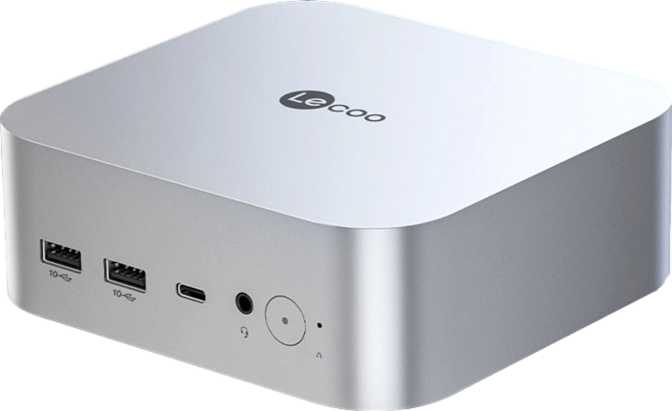
Lenovo Lecoo AI Mini Pro Full Review: Compact Size, Serious Specs
Mini PCsThe Lenovo Lecoo AI Mini Pro is a thoughtfully engineered compact desktop that punches well above its size. With 32GB of DDR5 memory, a PCIe 5 NVMe drive, Thunderbolt 4, and triple-display support — all within a 17W power envelope — it makes a compelling case as a primary machine for professionals, developers, and power users who refuse to sacrifice desk space or silence.
At a Glance
- CPU: 8-core big.LITTLE, 4.8GHz turbo, 17W
- RAM: 32GB DDR5 (max)
- Storage: 1TB NVMe PCIe 5
- Displays: 3 simultaneous (up to 4K)
- Thunderbolt 4: Yes (40Gbps)
Design and Build Quality
Physical Presence
At 134mm deep, 128mm wide, and just 52mm tall, the Lecoo AI Mini Pro occupies a footprint closer in size to a thick paperback than to any conventional desktop. Its total internal volume sits under 900 cubic centimetres — less than a standard one-litre bottle. It can be VESA-mounted behind a monitor, tucked into a cabinet, or placed flat on a desk without demanding real estate.
The Micro-ATX designation refers to the internal board architecture rather than a traditional tower chassis. The external profile is genuinely compact, with the internal layout engineered to fit everything into that slender horizontal form.
Build Philosophy
Lenovo's approach to the Lecoo series prioritises pragmatic solidity over premium theatrics. There is no RGB lighting competing for attention, no aggressive venting fins making the unit look like a miniaturised gaming rig. The chassis is understated — the kind of product that sits on a professional desk and draws no comments, which is precisely what most buyers in this category want.
The Processor: Efficiency First
Architecture and Power Envelope
The CPU uses an eight-core big.LITTLE design — the same split-core principle used in modern smartphones and laptops, where two groups of cores handle different types of work. The processor automatically assigns lighter background tasks to its more power-efficient cores while reserving full capability for demanding workloads.
Operating within a 17-watt power budget is key to understanding this machine. Most traditional desktop processors consume three to seven times that power. This chip runs cool, runs quiet, and still delivers desktop-competitive performance for productivity workloads. Base clocks sit at 2.2GHz across all eight cores, with a turbo ceiling of 4.8GHz and 12MB of L3 cache to reduce how often the processor waits for data.
The chip does not use simultaneous multithreading, operating with exactly eight threads across eight physical cores. For most productivity software and general computing, this is not a disadvantage — the architecture prioritises real cores doing real work over virtual core multiplication.
Benchmark Results in Context
Comfortably ahead of most budget and mid-range desktop towers
Drives fast application launches and responsive daily use
Capable parallel performance for multi-tasking workloads
Strong single-thread result well above older mobile chips
Graphics: Intel Arc 140V — Integrated, Not Generic
What Makes the Arc 140V Different
The Intel Arc Graphics 140V is not generic integrated graphics — it is a dedicated GPU architecture built on the same 3-nanometre manufacturing process as the CPU. That 3nm process node is the same advanced fabrication used in the best mobile chips available today, enabling meaningful GPU performance while staying within the system's 17W power budget.
The GPU turbos from its base of 300MHz up to 1,950MHz under load — a wide dynamic range that reflects how the chip redistributes power between CPU and GPU based on active workload demands. With 1,024 shading units and up to 136GB per second of memory bandwidth drawn from the system's DDR5 pool, it handles tasks that would have required a discrete card just a few years ago.
Full DirectX 12 Ultimate support includes hardware-accelerated ray tracing and mesh shaders. OpenGL 4.6 and OpenCL 3 coverage rounds out the professional and compute-adjacent use cases, while Intel's XeSS upscaling technology benefits creative software integrating AI-accelerated processing.
Realistic Performance Expectations
Full hardware decode capability — smooth, efficient, with no dropped frames.
GPU-dependent filters and adjustments accelerate noticeably over older iGPUs.
1080p timelines handle without dropped frames during playback.
Playable experience in less demanding titles. Variable results in modern engines.
Not suited. Modern graphically intensive titles at 1440p or 4K will hit hard limits.
Memory and Storage: Built Without Bottlenecks
32GB DDR5 RAM
DDR5 is the current generation of system memory, and at speeds reaching up to 8,533MHz, it delivers substantially more bandwidth than DDR4-based systems. That feeds directly into CPU performance and, critically, into the integrated GPU's graphics workload capability.
For the vast majority of users — professionals running multiple virtual machines, developers with large codebases, video editors working with high-resolution footage — 32GB is the threshold at which memory stops being a bottleneck. Tasks simply stop running out of RAM at this capacity level.
1TB NVMe via PCIe 5
The included terabyte of NVMe storage uses the latest PCIe 5 interface — the fastest storage connectivity standard available in consumer hardware. A PCIe 5 NVMe drive can sustain sequential read speeds that make even fast PCIe 4 drives look measured.
In everyday practice, this translates to application launch times that feel nearly instant, large file transfers that complete before you wonder how long they will take, and system boot times measured in seconds.
A terabyte accommodates a full OS installation, a substantial software library, a large project archive, and still leaves room for media files without immediately running dry.
Connectivity: One of the Strongest Arguments for This Machine
The port selection on the Lecoo AI Mini Pro is more thoughtfully considered than most mini PCs at this size. It is worth understanding each category rather than treating them as a raw count.
Thunderbolt 4 — The Headline Port
Running at 40Gbps, this single port supports external GPU enclosures, high-speed docking stations that expand the entire port selection from one cable, daisy-chaining multiple Thunderbolt peripherals, up to 100W power delivery, and video output. One port that can replace an entire workstation's worth of connections.
Dual Ethernet — Rare at This Size
Two RJ45 ports enable running the machine as a lightweight router, firewall, or network appliance — bridging two separate network segments without additional hardware. For home lab enthusiasts, IT professionals, or those who need both a wired home and office connection simultaneously, this is a feature larger systems often lack.
Triple Display — No Adapters Needed
Two HDMI 2.1 ports (supporting 4K at 144Hz or 8K at lower refresh rates) and one DisplayPort output provide three dedicated video connections. A fully equipped three-monitor setup requires no adapters, no hubs, and no additional hardware of any kind.
Full Connectivity at a Glance
| Connection Type | Details | Count |
|---|---|---|
| Thunderbolt 4 | 40Gbps — eGPU, docking, video, power delivery | 1 |
| USB 4 (40Gbps) | Ultra-fast external storage and peripherals | 1 |
| USB 3.2 Gen 2 (USB-A) | 10Gbps — fast external SSDs, cameras, hubs | 2 |
| USB 2.0 (USB-A) | Legacy peripherals — keyboards, mice, dongles | 2 |
| HDMI 2.1 | 4K@144Hz or 8K-capable video output | 2 |
| DisplayPort | Professional and standard monitor compatibility | 1 |
| RJ45 Ethernet | Dual wired network — router/firewall capable | 2 |
| Wi-Fi | Wi-Fi 6 (802.11ax) with backward compatibility | 1 |
| Bluetooth | Built-in | Yes |
| 3.5mm Audio Jack | Headphones and headsets | 1 |
| VGA | Not included | — |
| S/PDIF Optical | Not included — route audio via HDMI for AV receivers | — |
Who This Machine Is For — and Who It Is Not
Ideal For
Look Elsewhere If You Need…
-
Serious or Competitive Gaming
Consistent high frame rates in modern titles at medium-to-high settings require a discrete GPU. The integrated Arc 140V is not the right tool for competitive play in current-generation AAA games.
-
ECC Memory Workloads
Scientific computing, financial calculations, or any application where data integrity at the bit level is a hard requirement. ECC is not supported.
-
Future Memory Expansion
The 32GB ceiling is fixed. Anyone expecting to need more RAM within a reasonable ownership period has no upgrade path available and should plan accordingly.
-
Sustained Heavy Compute
Persistent compute servers or workloads demanding maximum CPU output for extended hours will encounter the natural ceiling of the 17W power envelope.
How It Compares to the Alternatives
The Lecoo AI Mini Pro competes in a category that spans entry-level machines running older mobile chips all the way up to larger compact systems with full discrete GPU support. Here is where it stands.
| Feature | Lecoo AI Mini Pro | Budget Mini PCs (Older Gen) | Larger Compact PCs |
|---|---|---|---|
| Process Node | 3nm | 10nm or older | Varies |
| RAM | 32GB DDR5 | 8–16GB DDR4 | 16–64GB DDR4/5 |
| Storage Interface | 1TB NVMe PCIe 5 | 256–512GB PCIe 3/4 | 512GB–2TB |
| GPU | Arc 140V (modern) | Older Intel/AMD iGPU | Discrete or larger iGPU |
| Thunderbolt 4 | Rarely | Sometimes | |
| Dual Ethernet | Occasionally | ||
| Display Outputs | 3 | 2 | 2–4 |
| TDP / Power Draw | 17W | 15–28W | 35–65W |
Honest Assessment: Strengths and Weaknesses
The combination of 32GB DDR5 with a PCIe 5 NVMe drive means storage and memory will not be bottlenecks in any realistic productivity scenario. Those two specifications alone separate this machine from the bulk of the mini PC market, which still ships with DDR4 and PCIe 3 or 4 storage.
The Thunderbolt 4 port is a genuine provision for the future. A user who wants to add a discrete GPU enclosure or upgrade to a high-bandwidth dock later can do so without replacing the whole machine — a flexibility most compact PCs at this size simply do not offer.
The dual Ethernet implementation is a niche but real advantage that larger, more expensive systems frequently skip. And the three display outputs — two HDMI 2.1 plus DisplayPort — deliver a multi-monitor capability that most buyers assume requires a larger, noisier system.
Operating at 17W keeps this machine quiet under most conditions, cool enough to require only modest cooling hardware, and inexpensive enough to run around the clock without a noticeable electricity impact.
The 17W power envelope is simultaneously the machine's most important strength and its most significant constraint. For burst workloads — the kind most knowledge workers encounter — the turbo to 4.8GHz handles things adeptly. For sustained, continuous heavy computing, the power limit governs peak throughput in ways a 35W or 65W chip would not.
The memory ceiling deserves honest acknowledgment: 32GB is the top, and there is no room to grow. Buyers who might need more than 32GB within a reasonable ownership period should either treat this as a hard no, or plan for this to be a dedicated single-purpose machine rather than a long-term expandable workstation.
The GPU, while modern and capable for integrated graphics, belongs in a conversation about what integrated graphics have become — not a conversation about discrete gaming hardware. Anyone installing current-generation AAA titles expecting high-settings performance will be disappointed. The Arc 140V turns the Lecoo AI Mini Pro into a capable casual gaming machine, nothing more, and presenting it otherwise would be dishonest.
Questions Real Buyers Ask Before Purchasing
Final Verdict
A Compact Workstation That Earns Its Place
The Lenovo Lecoo AI Mini Pro is a genuinely well-specified mini PC for its form factor — and that is not a qualified compliment. At the size of a thick paperback, it delivers 32GB of DDR5 memory, a terabyte of PCIe 5 storage, Thunderbolt 4, three display outputs capable of running 4K panels simultaneously, dual wired Ethernet, and a processor that benchmarks ahead of much of the competition running at higher wattage.
The machine is built for a specific kind of buyer: one who needs a capable, quiet, space-efficient desktop for professional or prosumer productivity work, values connectivity depth over raw GPU performance, and either does not game seriously or games casually enough that integrated graphics are sufficient. For that buyer, it is difficult to identify a comparable alternative at this physical size that offers as complete a package.
For the professional, developer, or power user who wants a primary daily machine that handles serious workloads, stays nearly silent, clears the desk, and costs very little to run around the clock — the Lenovo Lecoo AI Mini Pro makes a compelling and well-supported case for itself.