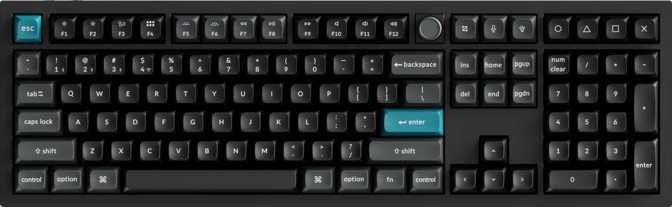
Keychron Q6 Ultra Full Review – A Wireless Full-Size Built Without Compromise
KeyboardsQuick Verdict
Editor's Score
8.8
out of 10
Performance Breakdown
Scores reflect real-world evaluation across six key performance categories.
Key Specifications at a Glance
What every major spec actually means for your daily experience.
660h
Battery Life
Weeks between charges, not days
8K Hz
Polling Rate
8× faster input reporting than standard
3-Mode
Connectivity
BT 5.3, 2.4 GHz wireless, USB-C
Hot-Swap
Switch Sockets
Change switches, no soldering needed
Gasket
Mount Type
Flex-cushioned for softer keystrokes
2.2 kg
Chassis Weight
Aluminum build stays planted on the desk
100%
Full Layout
Numpad, F-row, nav cluster all present
Mac+PC
Dual Platform
Ships with keycaps for both systems
Build Quality & Physical Design
What happens the moment you pick it up — and what that tells you about the engineering behind it.
Picking up the Keychron Q6 Ultra immediately tells you what it is. At just over 2.2 kilograms — roughly the weight of a filled one-liter water bottle sitting on your desk — this board does not move during use. The primary structure is aluminum, and the plate that holds every switch is aluminum as well. The result is a chassis that feels engineered rather than simply manufactured.
The case combines aluminum framing with a plastic internal chassis layer — a common construction choice at this price tier. It keeps weight meaningful without pushing into territory that causes discomfort, and it allows useful acoustic dampening flexibility internally. Available in black and white, the Q6 Ultra stays clean and professional. Neither colorway announces itself as a gaming peripheral, which is deliberate given how broadly this board is intended to serve both office and enthusiast contexts.
The profile follows the standard row-height staircase familiar to anyone who has used a keyboard throughout their life. The adjustable feet let you find your preferred typing angle, which matters considerably more over a long session than most buyers realize before they have used a flat board for eight hours straight. A wrist rest is not included, and given the board's 31mm standing height, investing in one separately is worth considering if you type for more than a couple of hours at a stretch.
The detachable USB-C cable is a practical detail that simplifies transport and prevents one of the most common wear points on keyboards used daily.
Materials & Construction
- Aluminum outer frame and switch plate deliver rigidity and a premium tactile feel
- Plastic inner chassis layer allows internal acoustic tuning and balances total mass
- Black and White colorways — professional, desk-agnostic, not gaming-branded
- Adjustable feet for personalized typing angle and comfort during long sessions
- Detachable USB-C cable — clean setup, easy replacement if damaged
- No wrist rest included — budget separately given the 31mm standing height
The Gasket Mount: The Most Important Feature on This Keyboard
Before discussing switches or polling rates, this single engineering decision deserves its own section.
On a conventional keyboard, the switch plate is screwed directly into the case. Every keystroke's force travels straight through the plate and into the desk. The feel can be sharp, occasionally harsh, and long typing sessions accumulate physical fatigue you may not notice until late in the day — when your wrists start complaining.
A gasket mount suspends the internal plate assembly between soft silicone gaskets rather than screwing it rigidly in place. When you press a key, the entire plate has a small, controlled amount of give — a fraction of a millimeter — before springing back. That micro-flex absorbs keystroke impact and transforms the experience from percussive to cushioned.
The practical result on the Q6 Ultra is a typing feel that is noticeably gentler than a tray-mount or top-mount keyboard running identical switches. Noise is also reduced because impact energy is partially absorbed rather than transmitted directly into a resonant metal-and-plastic enclosure. The board sounds more uniform across the key range as well, which matters both acoustically and in open-office settings.
If you type for four or more hours daily and have ever finished a session with wrist fatigue, the gasket mount is more relevant to your long-term comfort than any single switch specification. It is the structural decision that elevates a capable keyboard into one you can actually use all day without consequence.
Why Gasket Mount Matters
Softer Keystrokes
Plate flex absorbs impact energy on every press
Quieter Sound Profile
Impact energy doesn't reverberate through the chassis
Less Long-Session Fatigue
Critical for anyone typing four or more hours daily
Enthusiast-Grade Feel
The flex characteristic that custom boards charge a premium for
Switch Analysis: Silk POM Red in Real-World Terms
What these switches feel like to type on daily — and why the material science behind them matters.
What "Linear" Actually Feels Like
The Q6 Ultra ships with Silk POM Red switches — linear mechanicals, meaning each key travels from top to bottom with no tactile bump or audible click at any point. The keystroke feels consistent throughout its travel: no resistance ramp, no confirmation bump, just smooth motion until the key bottoms out.
Linear switches suit fast typists who have developed consistent technique and rely on muscle memory for feedback. For gaming, linear switches have long been favored for their speed and predictability. For office typing, experienced typists tend to prefer them, while those still refining their technique occasionally find their error rate climbs until their hands adjust.
The specific feel here is unusually smooth for a stock linear. POM — polyoxymethylene, an engineering-grade plastic — generates lower friction between stem and housing than the nylon used in most standard switches. The result is an actuation that feels silky, with no grittiness or scratch perceptible even during fast typing.
Switch Specifications Decoded
| Specification | Value | Real-World Meaning |
|---|---|---|
| Switch Type | Silk POM Red | Smooth linear — no bump, no click |
| Actuation Point | 2 mm | Registers exactly at the halfway point |
| Total Travel | 4 mm | Standard depth; familiar to most typists |
| Actuation Force | 45 g | Light-to-medium; accessible for most adults |
| Hot-Swappable | Yes | Replace without soldering, ever |
Hot-Swap: More Significant Than It Sounds
You are not permanently committed to Silk POM Reds. Decide six months from now you prefer tactile or clicky switches? Pull out the old ones, press in new ones — no tools, no heat, no risk. It removes the pressure of choosing the "right switch forever" before you have tried enough options to know.
Wireless Performance & Connectivity
Three distinct connection modes — and understanding when each one belongs in your workflow.
Bluetooth 5.3
Connects without any additional hardware. Current-generation Bluetooth brings improved stability and lower power consumption compared to older iterations. Supports multiple paired devices — switch between your Mac and a Windows machine without re-pairing. Best for flexible, multi-device desk setups.
2.4 GHz Wireless
Uses a small USB receiver plugged into your computer. Eliminates the latency and occasional dropout characteristics of Bluetooth. For consistent, reliable wireless performance — whether in a competitive context or simply because you want a dedicated connection — this is the mode to use as your primary.
USB-C Wired
A direct, zero-compromise connection via the detachable cable. No battery management, no wireless overhead. When you want absolute floor-level latency, need to charge while working, or simply prefer the certainty of a physical connection, the cable is always there and the swap takes seconds.
The 8,000 Hz Polling Rate — Who It Actually Helps
The polling rate determines how often the keyboard reports its state to the computer. At 1,000 Hz — the industry standard until recently — that happens every millisecond. At 8,000 Hz, it happens every 0.125 milliseconds.
For typing, the practical difference between these two rates is imperceptible. No human can type fast enough to detect a sub-millisecond improvement in keystroke registration.
For competitive keyboard-centric gaming — specifically titles where individual keystrokes must register as fast as physically possible — higher polling rates do marginally compress input latency. Whether that improvement is meaningful in practice depends on the game, the player's skill tier, and the rest of the system's input pipeline. At the keyboard level, the Q6 Ultra will not be your bottleneck.
Polling Rate in Context
8× more frequent input reporting than the previous industry standard
Battery Life: The Category-Defining Advantage
660 hours is not a marketing number — here is what it translates to at a real desk.
The Q6 Ultra's battery is measured in the hundreds of hours. For a professional who types for eight hours daily with the RGB backlight running at moderate brightness, the keyboard would need charging approximately once every few weeks — not the once or twice per week common with wireless peripherals that include full RGB lighting.
At reduced or disabled backlight levels, the intervals between charges extend further still. Most wireless mechanical keyboards with RGB active manage 40 to 100 hours before needing power. The Q6 Ultra's figure implies either an unusually large cell, aggressive power management from the ZMK firmware, or both — but the real-world implication is the same regardless of the technical breakdown.
Battery anxiety — that background awareness of a device's charge level before an important session — essentially disappears. You stop thinking about the keyboard's battery the same way you stop thinking about a wired keyboard's power. For a device used every working day, that quality-of-life shift is more meaningful than the raw number suggests.
Rated Battery Life
660
hours
- Equivalent to ~82 full eight-hour working days
- Weeks between charges at moderate backlight
- 6–7× longer than typical wireless RGB keyboards
Keycaps & RGB Backlighting
PBT double-shot construction and south-facing LEDs — what these terms mean for longevity and light quality.
The keycaps included with the Q6 Ultra are PBT plastic with double-shot legends. The distinction matters: most keycap legends are surface coatings applied on top of the plastic — they wear down with use. Double-shot legends are not printed at all. The character is a separate plastic layer physically molded inside the cap through a two-injection manufacturing process.
The practical result is that legends cannot fade, peel, or wear off regardless of how intensively the keyboard is used or how aggressively you clean it. A set of double-shot PBT keycaps used hard for two years typically still looks close to new — as sharp on day 730 as on day one.
PBT plastic itself resists the shine and greasiness that ABS keycaps develop over months of daily use. ABS sets on frequently used keyboards tend to develop a polished, worn appearance within the first year. PBT maintains its texture substantially longer.
South-Facing LEDs: What the Direction Means
The LED for each key is positioned beneath the legend rather than above it. This positioning — called south-facing — illuminates the character on the keycap directly, providing cleaner legend readability and reducing the light bleed around keycap edges that north-facing setups sometimes produce.
Aftermarket Keycap Compatibility Note
South-facing LEDs can create shine-through issues with aftermarket keycap sets designed specifically for north-facing lighting. If you plan to upgrade keycaps down the line, verify LED orientation compatibility with your chosen set before purchasing.
Software & Firmware: ZMK Without VIA
The Q6 Ultra's one genuine limitation — and how significant it is depends entirely on how you configure your keyboards.
The Q6 Ultra runs on ZMK firmware — an open-source wireless keyboard firmware designed specifically for low-power wireless builds. For enthusiasts who want deep customization, ZMK supports key remapping, macros, multi-layer key configurations, and more through a configuration file that you modify and flash to the keyboard.
However, ZMK does not support VIA or QMK — the two most widely used configuration tools in the enthusiast keyboard space. VIA in particular has become a standard expectation for premium boards because it enables real-time key remapping through a browser interface with no coding or flashing required. If you have been using VIA on previous keyboards, its absence here will be noticeable.
Keychron provides its own configuration software that meaningfully simplifies the experience for basic remapping and layer management. It is more accessible than raw ZMK configuration files and covers the majority of typical use cases without firmware editing. Enthusiast-level customization — complex macros, conditional behaviors, deep layer architectures — lives in ZMK territory and requires time investment a wired QMK board would not.
The trade-off is structural: ZMK exists because it enables the wireless power efficiency that produces the exceptional battery life. A keyboard running QMK cannot achieve the same power management. The firmware limitation is the direct price of the battery advantage — knowing that going in makes it easier to accept.
VIA Users — Read This First
If you currently use VIA for key remapping, the Q6 Ultra's configuration system will require adjustment. Keychron's software covers common use cases, but the real-time drag-and-drop simplicity of VIA is not replicated here.
Firmware Comparison
- ZMK enables deep customization
- Keychron app covers basic remapping
- ZMK is the reason the battery is exceptional
- No VIA real-time configuration
- No QMK support
Layout, Compatibility & Key Features
A full-size ANSI layout with native Mac support, N-key rollover, and a rotary dial — what each means in daily use.
Full 100% ANSI Layout
Every key you expect is present: the full numpad, all function keys, the complete navigation cluster, and dedicated arrow keys. For professionals who work extensively in spreadsheets, financial tools, or data-entry applications, a full layout is non-negotiable — the Q6 Ultra delivers without any key-size compromises. Media functions are accessed via the Fn key combination. The rotary dial partially offsets this by providing physical, tactile volume control without key combinations.
Mac & Windows Support
The Q6 Ultra ships with both Mac and Windows modifier keycaps in the box. Mac-specific keys — Command and Option — are properly labeled and positioned when you swap the included keycaps. The multi-device wireless connections make switching between operating systems a hardware toggle rather than a system setting change. A natural choice for anyone who runs both platforms at the same desk or across a home and office setup.
N-Key Rollover
N-Key Rollover means every key pressed simultaneously registers, with no inputs dropped regardless of how many keys you hold at once. This eliminates "ghosting" — the dropped inputs cheaper keyboards exhibit when multiple keys are held. It is relevant for fast typists whose fingers occasionally overlap keystrokes, and for gaming where holding several keys simultaneously is standard rather than exceptional.
Who Should Buy the Keychron Q6 Ultra?
This board excels for a specific type of user — and is the wrong choice for another. Be clear with yourself before purchasing.
This is the right keyboard if you…
- Type for four or more hours daily and want a typing experience that does not punish your wrists by the end of the session
- Rely on the numpad regularly — accountants, data-entry professionals, and spreadsheet-heavy workers who refuse a separate numpad
- Work across Mac and Windows simultaneously and want one keyboard that handles both without configuration effort
- Want wireless freedom without battery anxiety — you charge devices when convenient, not on a schedule
- Are a switch enthusiast who wants to experiment over time — hot-swap means this board adapts to your evolving preferences
- Have a permanent desk setup and want a keyboard premium enough to anchor it for years
Look elsewhere if you…
- Depend on VIA for graphical key remapping — the ZMK-based configuration requires more technical investment than a drag-and-drop interface
- Need a keyboard you can carry — over two kilograms means this board lives on a desk, not in a bag
- Compete in keyboard-centric esports requiring rapid trigger or adjustable actuation — the Q6 Ultra does not offer these features
- Are working with a tight budget — this is a premium-tier product priced accordingly
- Strongly prefer clicky or tactile switches and do not wish to hot-swap — the stock linear switches have a specific feel not everyone will prefer
How It Compares to the Alternatives
The Q6 Ultra's competitive position within the premium full-size mechanical keyboard category.
| Feature | Keychron Q6 Ultra | Premium Wired Full-Size | Wireless Gaming Full-Size |
|---|---|---|---|
| Wireless Connectivity | BT + 2.4GHz + USB | Wired only | BT or 2.4GHz only |
| Mount Type | Gasket Mount | Tray mount (common) | Tray mount (common) |
| Hot-Swappable Switches | Often yes | Varies by model | |
| Battery Life with RGB | ~660 hours | 40–100 hours typical | |
| Native Mac Support | Varies widely | Rarely optimized | |
| Firmware / Config Tool | ZMK + Keychron app | QMK / VIA | Proprietary software |
| Build Material | Aluminum + Plastic | Varies widely | Usually plastic-dominant |
| Polling Rate | 8,000 Hz (wired) | 1,000 Hz typical | 1,000–4,000 Hz |
Honest Assessment: Strengths & Limitations
What the Q6 Ultra genuinely excels at — and where it asks you to accept a trade-off before purchasing.
Where It Genuinely Excels
The Q6 Ultra's greatest strengths are interconnected in a way that makes them greater than their sum. The gasket-mounted aluminum chassis combined with POM-stemmed linear switches creates a typing character that feels genuinely premium — not the imitated premium of a plastic board weighted to seem substantial, but the earned premium of thoughtful structural engineering.
The wireless implementation is the standout achievement for this category. Three connection modes, current-generation Bluetooth, and a battery life that removes charging from your mental checklist entirely — this is what wireless full-size keyboards have lacked. The Q6 Ultra is one of very few products at this tier that delivers on the wireless promise without hardware compromise elsewhere.
Hot-swap in a wireless full-size context remains less common than it should be. The Q6 Ultra's solder-free switch replacement future-proofs the investment: as your preferences evolve or better switch options emerge, the keyboard accommodates them without requiring a new purchase.
Where Trade-offs Exist
The weight is the most honest limitation for anyone not placing this on a permanent desk. An aluminum full-size keyboard built to this standard will be heavy — that is physics, not a flaw. But buyers should internalize it before purchasing, because the Q6 Ultra does not belong in a laptop bag.
The ZMK firmware situation is the most functionally significant limitation for a specific type of user. If you have never configured a keyboard through anything other than a graphical interface, the learning curve is real. Keychron's own software mitigates this for everyday remapping, but enthusiasts who live in VIA will feel its absence.
The one-year warranty is modest for a keyboard at this price point. The build quality suggests it will last considerably longer — but warranty coverage should scale with product cost, and here it does not. A transparent data point that informed buyers deserve to have before committing.
Frequently Asked Questions
Answers to the questions real buyers search for before committing to a purchase at this price.
The Wireless Full-Size Mechanical Keyboard Enthusiasts Have Been Waiting For
A clear-eyed conclusion for buyers ready to decide.
The Keychron Q6 Ultra is the wireless full-size mechanical keyboard that enthusiasts have been waiting for a legitimate version of. It resolves the longstanding tension between premium typing feel and wireless convenience without forcing meaningful sacrifices in either direction.
The combination of a gasket-mounted aluminum chassis, Silk POM Red switches, and a category-leading battery in a full-100% wireless form factor is genuinely uncommon. These features compound on each other: the gasket mount makes extended sessions more comfortable, the hot-swap sockets future-proof the switch choice, and the battery life removes the last remaining psychological friction of wireless keyboard ownership.
The ZMK firmware and the absence of VIA support are real limitations that certain users will feel. The one-year warranty is modest for the price. The weight makes this a desk keyboard permanently rather than a portable one occasionally. Enter aware of all three.
Within those parameters — for professionals who type daily, use a numpad, and work across multiple operating systems — the Keychron Q6 Ultra is a confident, well-considered recommendation. It earns its price through engineering decisions that improve your actual experience, not specifications designed to win comparisons on paper.
Editor's Score
8.8