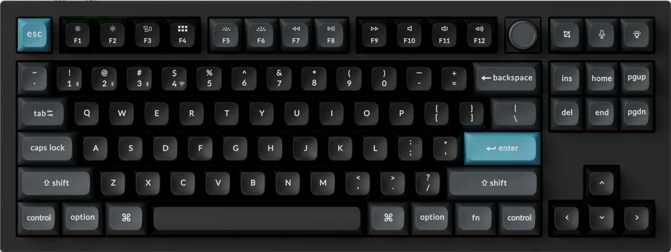
Keychron Q3 Ultra: Premium Wireless TKL Review for Typists and Gamers
KeyboardsThe mechanical keyboard market has long been split into two camps: productivity-focused enthusiasts who want premium typing feel, gasket mounting, and wireless freedom, and competitive gamers who demand the fastest possible response rates. The Keychron Q3 Ultra is Keychron's most direct attempt to serve both audiences from a single tenkeyless chassis — and the result is a keyboard that gets a surprising amount right, while making a few deliberate trade-offs worth understanding before you buy.
Our Verdict at a Glance
Scored across five key categories that matter most to daily typists and competitive gamers
Design and Build Quality
Aluminum construction, gasket engineering, and a chassis that earns its weight
The Case and Materials
The Q3 Ultra is built around an aluminum and polycarbonate case paired with an aluminum switch plate. The outer shell combines both materials to keep weight concentrated in the base while maintaining a clean aesthetic on top. Available in black or white, both finishes wear a muted, professional look that sits comfortably on any desk without demanding attention.
What immediately stands out when you lift it is the weight. At just under 1,800 grams, this is a dense, serious piece of hardware — most premium tenkeyless keyboards land between 900 and 1,200 grams. For a permanent desk setup, that mass is a feature: it stays planted through typing sprints and doesn't budge during fast gaming sessions. For anyone who carries their keyboard between locations, this is a significant consideration to factor in early.
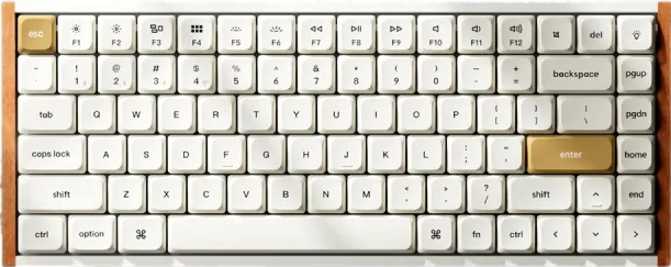
The footprint — approximately 365mm wide and 137mm deep — delivers a full alphanumeric block with function row and navigation cluster, but without a dedicated numpad. Recovering that horizontal space brings the mouse closer without forcing a cramped typing position, and adjustable feet let you dial in your preferred typing angle.
- Width
- 365 mm
- Depth
- 137 mm
- Thickness
- 31 mm
- Weight
- ~1,800 g
- Case Material
- Aluminum + PC
- Plate
- Aluminum
- Colors
- Black, White
- Adj. Feet
- Included
- Wrist Rest
- Not included
What Gasket Mount Actually Means
In a gasket mount, the switch plate floats between layers of compressible material rather than being screwed directly to the case. Every keypress has a slight, cushioned give — impact is absorbed rather than returned hard through your fingers. The sound profile shifts toward a deep, dampened thock rather than a sharp ping, and extended typing sessions become noticeably more comfortable than on stiffer, plate-mounted alternatives at the same price tier.
Backlighting: What to Know
RGB backlighting comes standard, with south-facing LEDs beneath each switch. Light shines clearly through the PBT keycap legends in day-to-day use. The south-facing orientation only becomes relevant if you later upgrade to aftermarket keycap sets specifically engineered for north-facing illumination — for anyone using stock or standard aftermarket keycaps, this is a non-issue.
Triple-Mode Connectivity
Three distinct connection methods, each built for a different scenario
Wired USB
Plug in and everything works immediately with no latency concerns. The detachable cable means you can swap in any preferred cable style or length without replacing the keyboard — a simple but practical quality-of-life detail.
2.4GHz Wireless
Recommended for GamingAt 8,000 Hz, the keyboard reports its position to the computer eight times more frequently than the 1,000 Hz standard that has governed gaming peripherals for years. Input latency is reduced to the point where the keyboard is never the bottleneck — and this level of wireless responsiveness is still uncommon enough in this segment to be genuinely notable.
Bluetooth 5.3
Designed for multi-device productivity rather than low-latency gaming. Connect to a tablet, second computer, or any device where a USB dongle isn't practical. Latency is higher than 2.4GHz but completely imperceptible during typing, writing, or office work.
Keychron includes Mac-compatible keycaps and layout support out of the box — modifier key behavior maps correctly to macOS without workarounds. Windows users retain full functionality through switch remapping. For professionals moving between both operating systems at the same desk, this dual-platform support is a meaningful quality-of-life advantage.
The Switches: Silk POM Red
Linear smoothness that starts from the factory, not the lubricant kit
What Makes These Switches Different
The Q3 Ultra ships with Keychron's Silk POM Red switches — linear switches that travel straight down without a tactile bump or audible click. Linear switches suit touch typists who have already built timing muscle memory, and gamers making rapid repeated keypresses like running in an FPS or executing combos in fighting games.
The "POM" refers to polyoxymethylene, the material used for the switch housing. POM is inherently self-lubricating, which means the factory smoothness on these switches genuinely rivals the feel that enthusiasts spend hours manually lubricating other switches to achieve. You get a polished, glassy keystroke straight from unboxing — no preparation required.
Actuation happens at the halfway point of the key's travel, triggering at 2mm depth on both press and release. The 45-gram actuation force sits at the lighter end of the mainstream range — fast and low-fatigue over extended sessions, though typists who prefer heavier resistance sometimes find lighter linears prone to accidental keypresses when resting their hands between bursts of activity.
- Switch Type
- Linear
- Actuation Force
- 45 g
- Actuation Distance
- 2 mm
- Total Travel
- 4 mm
- Housing Material
- POM
Hot-Swap: Total Switch Freedom
Every switch position is fully hot-swappable — pull out and install new switches without soldering equipment. Your preference today doesn't lock you in permanently. The sockets accept any standard MX-footprint switch in both 3-pin and 5-pin variants, covering virtually every switch available on the market.
Keycaps: PBT Double-Shot
Legends that cannot fade, texture that will not shine
The included keycaps are made from PBT plastic using a double-shot manufacturing process. These two details together determine how the keycaps hold up over years of heavy daily use — and both are the right answer.
PBT is denser and more heat-resistant than the ABS plastic found on most budget keyboards. ABS develops a glossy sheen from finger oils within weeks or months of regular use; PBT resists this significantly longer and maintains a slightly textured surface that most typists find more pleasant to touch over long sessions.
Double-shot means the legends — the letters and symbols — are formed by molding two layers of plastic together rather than printed on top. They cannot fade or wear off regardless of how many hours you type. This is the benchmark for keycap longevity, and it comes standard here rather than as a premium upgrade.
Compatibility & Key Layout Details
-
ANSI US Layout
Compatible with virtually every aftermarket keycap set on the market — no hunting for unusual size compatibility. -
Standard Key Sizing Throughout
No non-standard modifier or bottom-row sizes. Any TKL keycap set fits without modification or adapter kits. -
Mac Keycaps in the Box
Mac-labeled modifier keys included from the start — no need to source them separately after purchase. -
Physical Rotary Dial Included
A tactile control dial on the board maps to volume or other function commands — a small but genuine quality-of-life addition for media-heavy workflows.
Battery Life: Charge It Once, Forget About It
Among the strongest wireless endurance figures in the premium keyboard segment
What 660 Hours Means in Practice
Typing 8 hours a day, 5 days a week adds up to roughly 40 hours of use per week. At that pace, the Q3 Ultra needs a charge approximately every 16 weeks — or about four months between charges. Even accounting for RGB lighting reducing that figure in practice, realistic daily use with moderate lighting puts the recharge interval comfortably in the multi-week range for most users.
This is among the strongest battery figures in the premium keyboard segment and largely eliminates battery anxiety as a concern — a frequent complaint against wireless keyboards at lower price points. You think about charging it roughly as often as you think about changing a TV remote battery.
Software and Customization
ZMK firmware, onboard features, and what the spec sheet doesn't explain
ZMK, Not QMK — The Key Difference
The Q3 Ultra runs ZMK firmware rather than the more widely adopted QMK. Both are open-source keyboard firmware platforms, but they differ in architecture and workflow. QMK has broader community documentation and supports VIA — a real-time graphical remapping tool many enthusiasts use as their standard customization interface. The Q3 Ultra supports neither QMK nor VIA.
ZMK is built with wireless-first architecture, which is part of why it's chosen here — its power management handles Bluetooth and 2.4GHz operation more efficiently. Customization through ZMK requires editing configuration files and compiling firmware, which asks more of the user than VIA's point-and-click approach. For users who don't intend to remap extensively beyond onboard defaults, the difference is low impact. For QMK power users who rely on complex macros or advanced layers, it's worth knowing before purchasing.
Onboard Features Worth Knowing
-
N-Key Rollover (NKRO)
Every key pressed simultaneously registers independently — no missed inputs regardless of how many keys are held at once. Matters for both fast typists and gamers holding multiple keys in motion. -
Rotary Dial
A physical control dial on the board maps to volume or function commands. Small addition, but users with media-heavy workflows notice it immediately. -
No Rapid Trigger
The ability for individual key actuation to reset faster than the physical switch travel — favored in certain competitive FPS titles — is absent on this board. -
No Adjustable Actuation Point
The actuation point is fixed at 2mm. There is no per-key actuation adjustment or analog input available.
Who the Keychron Q3 Ultra Is Built For
Match your use case before committing to a premium keyboard at this price point
- A productivity professional or writer who wants premium typing feel with the flexibility to go wireless without sacrificing gaming responsiveness
- A Mac user who needs proper macOS key labeling and modifier behavior out of the box, without workarounds
- A dual-platform user moving between macOS and Windows at the same desk throughout the working day
- An enthusiast who values long-term flexibility — hot-swap sockets and standard keycap sizing mean the board grows and changes with your preferences
- A gamer who doesn't require esports-specific features like rapid trigger but wants wireless performance that matches a wired board
- A frequent traveler or commuter — at nearly 1,800 grams, this is an unambiguous desk-bound board; portable use is simply impractical
- A VIA or QMK power user who depends on that ecosystem for deep real-time remapping — ZMK has a different, steeper customization workflow
- A competitive FPS player who considers rapid trigger a baseline requirement for precision movement-key control
- A budget-conscious buyer — the build quality and feature set place this firmly at the premium end of the market, and the price reflects that
How It Compares to the Alternatives
Measured against the two most logical alternatives in the same market tier
| Feature | Keychron Q3 Ultra | QMK Enthusiast TKL | Dedicated Esports TKL |
|---|---|---|---|
| Polling Rate | 8,000 Hz | 1,000 Hz | 1,000–8,000 Hz |
| Wireless Modes | Bluetooth + 2.4GHz + USB | Wired only (typically) | Wired + sometimes 2.4GHz |
| Mount Type | Gasket | Gasket / Tray (varies) | Tray mount (common) |
| QMK / VIA Support | No (ZMK) | Yes | No |
| Rapid Trigger | No | No | Yes (some models) |
| Battery Life | ~660 hours | N/A — wired only | 40–100 hours (varies) |
| Hot-Swap | Yes | Yes | Varies |
| Typical Weight | ~1,800 g | 800–1,200 g | 700–1,000 g |
The Q3 Ultra occupies a specific position: high-polling-rate wireless performance inside a premium enthusiast build. That combination remains uncommon and is the primary reason to choose it over a board that does only one of those things.
Honest Assessment
What the Q3 Ultra genuinely does well — and where it falls short
The Q3 Ultra's strengths concentrate in areas that matter for long-term daily use. The gasket mount and POM linear switches together create one of the more comfortable extended typing experiences available at this tier — impact is absorbed rather than reflected back, and the switches arrive smooth without requiring any manual preparation.
Battery life is a genuine differentiator. The multi-month endurance effectively eliminates wireless maintenance behavior — you charge it occasionally and forget it exists. This is a meaningful upgrade over the 40–100 hour ranges common on competing wireless gaming keyboards.
The 8,000 Hz polling rate in 2.4GHz mode is a substantive specification, not a marketing number. Build quality carries through in every physical interaction: the aluminum construction communicates permanence, and the weight keeps the board grounded under any typing load.
The weight is the most significant practical constraint. At nearly 1,800 grams, the Q3 Ultra is essentially immovable for portable use. This isn't a flaw for its intended purpose — but it firmly eliminates consideration by anyone who needs a keyboard that travels with them.
The absence of QMK and VIA support will genuinely frustrate the portion of the enthusiast market that has built workflows around that ecosystem. ZMK works, but it asks significantly more of the user to reach the same customization depth. This is a coherent architectural decision for wireless performance — but it has real practical implications.
Rapid trigger is absent, which is specifically relevant to competitive FPS players who now treat that feature as a baseline expectation. The one-year warranty also sits on the shorter end for a keyboard at this investment level — hardware that remains in service for years or more deserves coverage that reflects that lifespan.
Common Questions Before Buying
The questions buyers search for most — answered directly
Final Verdict
Keychron Q3 Ultra — Premium Tenkeyless Wireless Mechanical Keyboard
The Keychron Q3 Ultra earns a strong recommendation for a specific kind of buyer: someone who types seriously, games regularly, wants genuine wireless performance across multiple devices, and isn't willing to compromise on build quality to get it.
The gasket mount and Silk POM Red switches make it one of the most comfortable typing experiences available at this tier, and the 8,000 Hz 2.4GHz wireless is a meaningful differentiator — not a specification added for marketing purposes. If your use case involves daily typing and wireless gaming on a desk that stays where it is, the Q3 Ultra is one of the most complete TKL keyboards available at its price point. The weight keeps it planted. The battery keeps it free. The build quality keeps it relevant for years.
- Daily typists who also game regularly
- Mac and Windows dual-platform setups
- Enthusiasts wanting long-term switch flexibility
- Fixed desk setups prioritizing wireless freedom
- Rapid trigger is a competitive requirement
- QMK / VIA is central to your workflow
- You carry your keyboard between locations
- Budget is the primary constraint