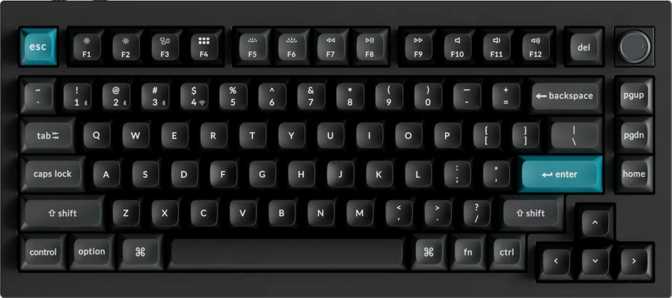
Keychron Q1 Ultra Review: A Premium 75% Keyboard That Earns Its Price
Keyboards8.8/10
Overall Score
Quick Specification Snapshot
Layout
75% Compact · ANSI
Connectivity
USB · 2.4GHz · BT 5.3
Polling Rate
8,000 Hz
Battery Life
660 hours (wireless)
Switches
Silk POM Red · Hot-swap
Construction
Gasket Mount · Aluminum
The mechanical keyboard market has fractured into two distinct camps: budget entry-level boards that compromise on feel, and boutique custom keyboards that cost as much as a laptop and require a group-buy waitlist measured in months. The Keychron Q1 Ultra lands squarely in the middle — a factory-built keyboard that punches well above its price class in construction and feature depth, while remaining something you can actually buy today.
What makes this board genuinely interesting isn't any single feature. It's the combination: a wireless-capable keyboard with a proper gasket mount, aluminum construction, hot-swappable sockets, and a high-rate polling connection, all wrapped in a compact layout that doesn't sacrifice too many keys. That combination used to be impossible at a non-boutique price. Whether that combination is right for you is what this review is here to answer.
Build Quality and Physical Design
Aluminum Construction — Substantial by Intent
Pick up the Q1 Ultra and the first thing you notice is the weight. At just over 1.7 kilograms, this is not a keyboard you accidentally knock off your desk, and it's not a keyboard you're casually tossing in a bag for commute use. The heft comes from a real aluminum chassis — not aluminum-brushed plastic, not a metal badge on a hollow shell, but a case that is genuinely, densely built.
The aluminum exterior is paired with an aluminum switch plate internally, which directly affects how the keyboard sounds and feels under your fingers. Metal plates produce a crisper, tighter keystroke feedback compared to polycarbonate or brass alternatives. For typists who prefer that precise, defined bottom-out sensation, the aluminum plate delivers it consistently. The case is available in matte black and matte white — both finishes resist fingerprints reasonably well.
Gasket Mount — The Engineering Detail That Changes the Experience
Most mass-market keyboards use a tray mount or top mount, where the switch plate connects rigidly to the case. The Q1 Ultra uses a gasket mount, which means the plate is suspended against silicone or foam gaskets rather than screwed directly to the case walls.
What gasket mount means for you:
The typing surface has a very slight, controlled flex when you press keys. This absorbs impact energy that would otherwise travel straight into your fingers, reducing fatigue over long sessions and producing a softer, more cushioned sound profile. Gasket mounts are standard at the $200+ custom keyboard tier — finding one here is a genuine differentiator.
Dimensions and Desk Footprint
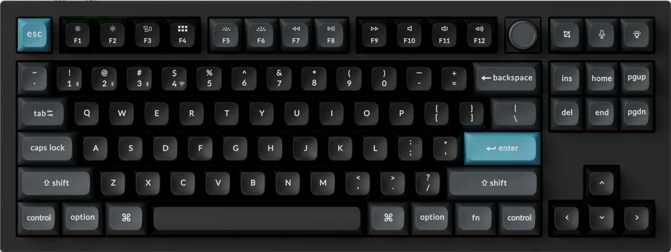
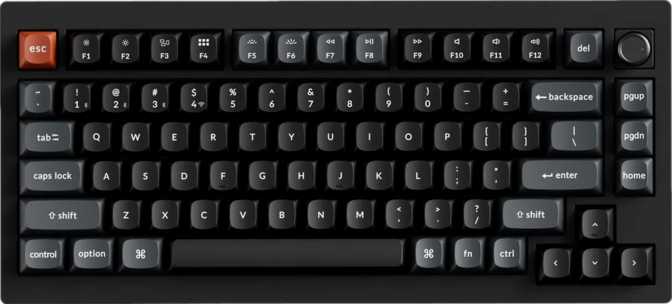
At 75% layout, the Q1 Ultra eliminates the numpad and standalone navigation cluster of a full-size keyboard, but keeps dedicated arrow keys and a compressed function row — the defining advantage of 75% over 65%. The physical width sits just under 33 centimeters, fitting naturally on almost any desk without crowding the mouse. Adjustable feet let you tune the tilt angle to suit your wrist position. A wrist rest is not included, which is worth noting if you're transitioning from a flat, low-profile keyboard.
Rotary Dial
Positioned at the top-right corner, the rotary dial is machined aluminum in keeping with the rest of the body — not a plastic afterthought. Volume control, scroll speed, media scrubbing — whatever you map to it through ZMK firmware — it becomes something your hand reaches for instinctively. It's the kind of feature that sounds optional until you've used one daily.
Physical Specifications
- Width
- 327.6 mm
- Depth
- 145 mm
- Thickness
- 31.8 mm
- Weight
- 1,724 g
- Case Material
- Aluminum & Plastic
- Plate Material
- Aluminum
- Mount Type
- Gasket
- Colors
- Black · White
Design Features
- RGB Backlighting (South-facing)
- Adjustable Tilt Feet
- Detachable USB Cable
- Aluminum Rotary Dial
- No Wrist Rest Included
Connectivity — Genuinely Tri-Mode
Three distinct connection methods, each serving a different use case. Having all three is more useful than it might initially seem.
Wired USB
The baseline connection. Plug in the detachable cable and the keyboard charges simultaneously while delivering a completely stable link to your computer. No interference, no battery management, no trade-offs of any kind.
Best for: Reliability2.4GHz Wireless
Uses a compact USB receiver for a near-wired response feel over radio. The connection is stable, interference resistance is strong, and response characteristics are indistinguishable from wired in practical use.
Best for: Wireless power usersBluetooth 5.3
Enables connection to laptops, tablets, and secondary machines without a USB receiver. Invaluable in multi-device workflows — switch between your desktop and MacBook without touching a cable.
Best for: Multi-device setupsPolling Rate — 8,000 Hz in Context
The Q1 Ultra reports its position to the computer 8,000 times per second. A standard office keyboard typically operates at 125 Hz. Most gaming keyboards run at 1,000 Hz. The Q1 Ultra's rate is eight times that gaming standard.
For most users — including enthusiast typists and productivity-focused users — the practical difference between 1,000 Hz and 8,000 Hz is imperceptible in daily use. Where ultra-high polling rates have measurable relevance is in competitive gaming scenarios demanding precise, low-latency input tracking at the frame level. If that's your context, the capability is meaningful. If it isn't, treat it as comfortable headroom.
Polling Rate — Comparative View
Bar widths are proportional to visual comparison only, not linear scale.
The Switches — Silk POM Red Explained
What makes these switches different, and why the hot-swap system matters more than the stock choice.
A Switch Material That Changes the Feel
The Q1 Ultra ships with Silk POM Red switches — a linear mechanical switch made from POM (polyoxymethylene), an engineering plastic with a naturally slick, low-friction molecular structure. The practical result is a switch that feels noticeably smoother out of the box compared to standard linear switches, which typically require manual lubing to achieve similar glide quality. With the Silk POM Reds, that smoothness is built into the material itself.
Linear switches register a keypress without any tactile bump or audible click mid-travel. The keystroke goes straight down and comes straight back up. For typists who prefer speed and rhythm over tactile confirmation — or who work in shared spaces where click noise is antisocial — linears are the right choice. For typists who want physical confirmation of each keypress, a tactile switch may suit better, and the hot-swap system makes that change trivially easy.
The Numbers in Real Terms
Each keypress activates after traveling halfway through the switch's total range of motion, requiring roughly the force of a large paperclip to register. That activation force is intentionally light enough to type quickly without fatigue during long writing sessions, while the full travel distance delivers the physical, tactile keystroke experience that defines mechanical keyboards over laptop keys.
Hot-Swap: The Decision You Can Always Change
Every socket on the Q1 Ultra accepts replacement switches without soldering — no tools beyond a switch puller, no voided warranty. If you later prefer a tactile bump or a heavier actuation force, the swap takes minutes. This converts your initial switch choice from a permanent commitment into a starting point.
Switch Specifications
- Switch Name
- Silk POM Red
- Switch Type
- Linear (no tactile bump)
- Actuation Force
- 45 g
- Actuation Distance
- 2 mm
- Total Travel
- 4 mm
- Hot-Swappable
- Yes — MX-footprint
Switch Feel Options
- Linear — Silk POM Red (stock)
- Tactile — Swap-in option
- Clicky — Swap-in option
Keycaps and Backlighting — Built to Last
Premium materials that separate long-term investments from keyboards that look worn within months.
PBT Plastic — Why the Material Matters
The keycaps are made from PBT (polybutylene terephthalate) — a denser, harder plastic than the ABS used on most budget and mid-range keyboards. ABS keycaps develop a greasy, worn shine in high-use areas — particularly the spacebar and common letter keys — within months of regular use. PBT resists this shine for years under normal conditions, maintaining a consistent matte texture regardless of how many hours accumulate.
This is a detail that compounds over time. Keyboards with ABS keycaps look visibly used within six to twelve months of heavy typing. PBT keyboards retain their appearance far longer, which matters when you're investing in a premium board.
Double-Shot Manufacturing
The legends — the letters and symbols on each key — are formed from a separate layer of plastic molded into the keycap, rather than printed or laser-etched onto the surface. A printed legend can fade or wear away with use. A double-shot legend is structurally part of the keycap and cannot wear off regardless of how many keystrokes accumulate.
The south-facing LED orientation means backlighting shines through the legends cleanly toward you, producing well-lit, clearly readable text — the direction most conducive to crisp RGB readability when the double-shot legends allow light to pass through.
Battery Life — What 660 Hours Actually Means
The Q1 Ultra's wireless operation is powered by a battery designed for extraordinary endurance. At eight hours of use per day, that capacity theoretically covers more than eighty days of continuous use before depletion — assuming typical Bluetooth operation with moderate lighting.
In practice, RGB backlighting is the dominant variable. Running full-brightness lighting effects will reduce that figure substantially. Users who disable or dim the backlight during wireless operation will see longevity closer to the rated capacity.
For most desk-based users, even a conservative real-world estimate puts charging frequency somewhere between once a month and once every few months — far enough apart that battery life simply stops being a consideration in day-to-day ownership. The detachable USB cable means charging and wired use can happen simultaneously when the battery eventually needs attention.
Estimated Wireless Endurance by Lighting Mode
Estimates based on 660-hour rated capacity. Actual results vary by backlighting settings and connected device count.
Firmware and Software — ZMK Explained
What ZMK means for customization, and what the absence of VIA and QMK means for you practically.
The Q1 Ultra runs ZMK firmware — an open-source keyboard firmware platform. ZMK is what allows you to remap any key, create custom layers, build macros, and configure the keyboard's behavior without being limited to the factory defaults. It works natively with wireless keyboards, which is technically non-trivial, and its open-source development means active, community-driven maintenance.
The VIA/QMK Trade-Off
The Q1 Ultra does not support QMK or VIA. QMK is the more historically dominant firmware in the custom keyboard community, and VIA is a popular graphical configuration tool that runs on top of QMK. Users who have built workflows around VIA's point-and-click, real-time remapping interface will need to learn ZMK's more text-based configuration approach.
Important for power users:
ZMK does not currently support real-time configuration through a graphical interface equivalent to VIA. Configuration involves editing text files and flashing firmware — more involved than VIA, but not fundamentally difficult for anyone comfortable with basic file editing. The learning curve is real but short.
NKRO — No Inputs Lost
Full N-Key Rollover (NKRO) is supported, meaning every key pressed simultaneously is registered accurately with no ghosting. For fast typists who regularly hit multiple keys in quick succession, and for gaming use cases, this ensures no inputs are dropped regardless of how many keys are held at once.
Software & Feature Support
-
ZMK FirmwareOpen-source, wireless-native
-
N-Key Rollover (NKRO)All simultaneous inputs registered
-
VIA SupportNot available
-
QMK FirmwareNot available
-
Rapid TriggerNot supported
-
Adjustable ActuationNot supported
-
USB PassthroughNot available
Platform Compatibility — Mac-First, Not Mac-Only
Keychron has always positioned its keyboards as strong Mac companions, and the Q1 Ultra continues that. The ANSI layout includes Mac-specific modifier keys out of the box, and Bluetooth 5.3 pairs cleanly with macOS. The design language — clean, aluminum, uncluttered — fits naturally into an Apple ecosystem desk setup.
Windows and Linux users are not excluded. The keyboard's standard USB HID compatibility means it works with any modern operating system without requiring driver installation. The default key labels and modifier placement are Mac-oriented, but ZMK configuration allows complete remapping for Windows or Linux layouts — including repurposing Mac-specific keys to Windows equivalents.
Platform Support
- macOS (optimized out of the box)
- Windows (fully compatible)
- Linux (fully compatible)
- iPad & tablets via Bluetooth
- Multi-device switching
Who Should Buy the Keychron Q1 Ultra
Getting this wrong costs you money. Honest audience targeting is more useful than enthusiasm.
Strong Match If You…
- Work across multiple devices and want one keyboard for all of them
- Spend several hours per day typing and want to reduce hand fatigue
- Want a customizable platform for switches, keycaps, and firmware
- Prefer a clean desk setup without sacrificing arrow keys or a function row
- Are entering the custom keyboard hobby and want a capable foundation without group-buy waiting
- Are a Mac user seeking a well-integrated wireless mechanical keyboard
Not the Right Choice If You…
- Need portability — 1.7 kg is desk-bound weight by any standard
- Want rapid trigger or adjustable actuation for competitive gaming — those features are absent
- Rely on VIA or QMK for your existing keyboard configuration workflows
- Prefer tactile or clicky switches and are not willing to source replacements separately
- Need USB passthrough for peripheral connectivity at the keyboard
- Are budget-constrained — the premium build quality is fully reflected in the price
Competitive Positioning
How the Q1 Ultra stacks up against logical alternatives at and around its price bracket.
| Feature | Keychron Q1 Ultra | Typical $80–$100 Wireless | Boutique Custom Build |
|---|---|---|---|
| Gasket Mount | Rare | Standard | |
| Tri-mode Wireless | Bluetooth-only typical | Varies | |
| Hot-Swap | |||
| Polling Rate | 8,000 Hz | 1,000 Hz typical | Varies |
| Build Material | Full Aluminum | Plastic dominant | Aluminum / Brass |
| Firmware | ZMK (open-source) | Proprietary | QMK / ZMK |
| Availability | In-stock | In-stock | Group-buy wait |
| Typical Weight | 1,724 g | 700–1,000 g | 1,000–2,500 g |
Honest Assessment — Strengths and Weaknesses
Credibility comes from balance. Here's the unvarnished version of both sides.
Where It Excels
The Q1 Ultra's greatest strength is coherence. Many keyboards at this price level are strong in one dimension and compromised in another — excellent wireless but mediocre construction, or excellent build quality but locked firmware. The Q1 Ultra avoids those compromises to an unusual degree, delivering a package that would require cherry-picking multiple keyboards at lower price points to assemble from components.
The gasket mount alone separates it from most competitors in its class. Add tri-mode wireless, a legitimate hot-swap system, premium PBT double-shot keycap construction, and an 8,000 Hz polling rate, and the picture is of a keyboard that refuses to cut corners in the areas that physically affect your daily experience.
The weight is simultaneously a strength in the right context. On a dedicated desk, 1.7 kg means the keyboard stays exactly where you place it — no shifting, no sliding, no repositioning mid-session.
The battery capacity is exceptional for a wireless keyboard at this feature level. Even with modest backlighting, months can pass between charges — removing battery anxiety entirely from the ownership experience.
Where It Compromises
The same weight that makes the keyboard so stable makes it impractical for anyone who travels with their keyboard regularly. This is not a portable tool. If you split time between office and home setups, you're either buying two boards or carrying a significant load.
The firmware situation requires honest acknowledgment. ZMK is genuinely capable, and its wireless-native architecture is technically superior to QMK for wireless keyboards. But VIA's real-time graphical remapping has become the expected standard in this price bracket. Users who rely on VIA will find ZMK's configuration workflow less immediate and more demanding of patience.
Competitive gamers specifically need to look elsewhere. Rapid trigger, adjustable actuation, and analog input are all absent — these are deliberate design priorities that favor typists and productivity users over competitive FPS players. There is no firmware update path that adds these capabilities.
The one-year warranty period is adequate but shorter than some competitors offer at this price. For a keyboard built this solidly, long-term durability should not be a concern in normal use — but buyers who factor warranty depth into decisions will find it briefer than they might prefer.
Common Questions Answered
The questions real buyers search for before purchasing — answered directly.
Final Verdict
The Keychron Q1 Ultra earns its position at the top of the production keyboard segment through genuine engineering decisions rather than marketing language. The gasket mount alone separates it from most competitors in its class. Add tri-mode wireless, a legitimate hot-swap system, premium keycap construction, and an 8,000 Hz polling rate, and the picture is of a keyboard that refuses to cut corners in the areas that physically affect your daily experience.
The keyboard asks something of you in return: a permanent place on your desk, patience with ZMK if you intend to customize deeply, and acceptance that features like rapid trigger and adjustable actuation simply are not on the table here.
For writers, developers, power users, and Mac-ecosystem users who spend serious hours at a keyboard and want the physical quality to match that investment — without waiting months for a boutique group-buy to ship — the Q1 Ultra is one of the most complete off-the-shelf options available. Buy it for the build, stay for the switches, and customize it on your own timeline.
8.8/10
Overall Score