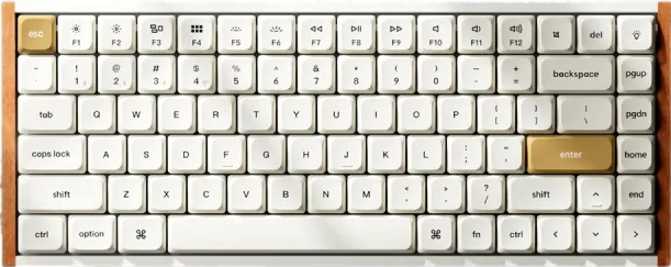
Keychron K3 Ultra Review: Low-Profile Compact Keyboard Done Right
KeyboardsThe low-profile keyboard market has long been a place of quiet trade-offs — slim boards that look great on a desk but disappoint the moment you need them to perform. The Keychron K3 Ultra arrives with a different proposition: a compact, low-profile keyboard engineered with competitive-grade internals that enthusiasts typically expect from full-size gaming rigs. Whether you are a designer who needs a clean desk, a commuter who carries a keyboard daily, or a competitive player who refuses to give up millimeters of travel for milliseconds of performance, the K3 Ultra makes its case for all three simultaneously.
out of 5
Design and Build Quality
A Compact Footprint Without Sacrifice
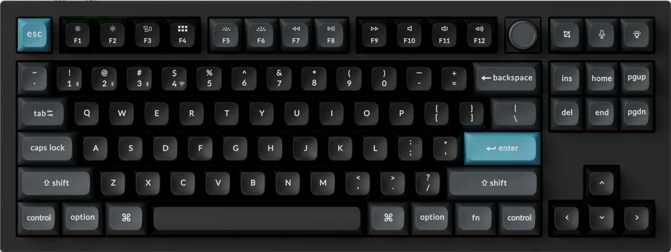
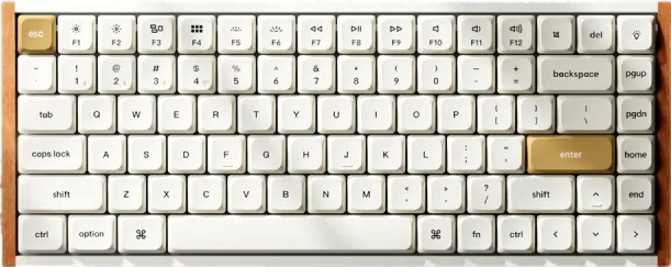
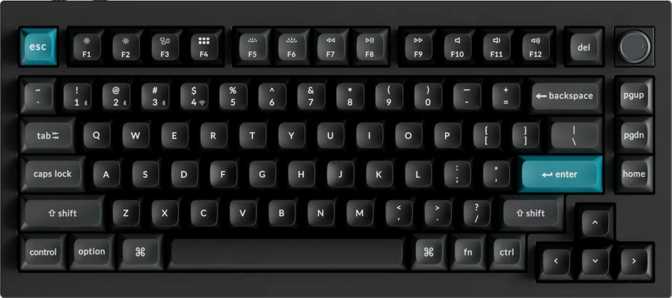
The K3 Ultra occupies the 75% keyboard category — a layout that preserves the function row, arrow cluster, and essential navigation keys while eliminating the numpad and some spacing between clusters. At 306mm wide, it is roughly the width of a standard paperback novel, covering significantly less desk space than a full-size or tenkeyless board while keeping the keys most people use daily.
At 22mm thick, the K3 Ultra sits noticeably flatter than conventional mechanical keyboards, which typically run 35–40mm at the back. This is not purely aesthetic — a lower typing angle reduces wrist extension, which accumulates meaningfully over long sessions. No wrist rest is included in the box, so users who rely on cushioned palm support will need to source one separately.
Materials and Construction
The case blends plastic and aluminum construction. The aluminum provides structural rigidity and a premium tactile feel; the plastic keeps the overall weight at a practical 540 grams — light enough to slip into a bag without issue, but dense enough that the board holds its position during fast typing sessions.
The plate is full aluminum, which influences the typing experience directly. Aluminum plates are stiffer than brass or polycarbonate alternatives, producing a firmer, more precise keystroke with a crisper sound profile. For a low-profile board where key travel is already abbreviated, a firm plate foundation is the right call. Adjustable rear feet are included for those who prefer a steeper typing angle.
Physical Specifications
| Width | 306 mm |
| Depth | 116 mm |
| Thickness | 22 mm |
| Weight | 540 g |
| Layout Size | 75% Compact |
| Case Material | Aluminum + Plastic |
| Plate Material | Full Aluminum |
| Mount Type | Plate Mount |
| Colors Available | Black, White |
| Adjustable Feet | Included |
| Wrist Rest | Not included |
| Detachable Cable | Yes |
| Warranty | 1 Year |
Physical Layout and Daily Usability
The 75% layout is one of the more practical compact formats because it preserves more utility than it removes. Understanding exactly what you gain and give up is essential before committing to the form factor.
Retained vs. Full-Size
- Full alphanumeric block
- Function row (F1–F12)
- Arrow keys (full-size cluster)
- Del, Page Up / Down, Home, End
- Dedicated media keys
Removed vs. Full-Size
- Number pad
- Extended navigation key spacing and isolation
For most users — programmers, writers, and gamers included — the 75% layout removes nothing used regularly while cutting a meaningful footprint. The dedicated media keys for volume and playback operate without a Fn modifier.
Mac and Multi-Platform Support
The K3 Ultra is explicitly designed with macOS in mind, shipping with Mac-layout keycaps. This does not make it exclusive to Mac — it operates across all operating systems — but the keycap labeling and default layer configuration acknowledge that a significant portion of this keyboard’s target audience lives in macOS. Bluetooth 5.3 multi-device pairing makes it natural to switch between a Mac desktop and an iPad, for example, without reaching for a dongle.
Connectivity: Wired, Wireless, and Everything Between
The K3 Ultra supports three connection modes that can be switched on the fly, covering every scenario from competitive gaming to clean-desk multi-device setups.
USB Wired
The direct connection and the recommended mode for competitive gaming or any situation demanding the absolute lowest latency. The detachable cable means you are not locked to a proprietary connector — it can be replaced or upgraded independently without touching the keyboard itself.
2.4 GHz Wireless
Operates on a dedicated frequency that sidesteps the congestion issues Bluetooth can face in busy environments. Think of this as the “wireless but still fast” option — the effective middle ground between full wired stability and complete cable freedom for performance-sensitive use.
Bluetooth 5.3
The right choice for clean desk setups, laptop pairing, and multi-device workflows. Bluetooth 5.3 is the current standard, offering stronger and more stable connections than earlier versions. Ideal for Mac users switching between a desktop and a tablet without reaching for a dongle.
Performance: Where the K3 Ultra Gets Serious
The performance feature set on the Keychron K3 Ultra represents the current frontier of keyboard input technology. These are not downgraded versions — they are the same features found on top-tier full-size gaming boards, delivered in a compact wireless package.
8,000 Hz Polling Rate
Polling rate is how often a keyboard reports its status to your computer. Most standard keyboards report 1,000 times per second — already more than adequate for typing. The K3 Ultra reports 8,000 times per second, a rate previously reserved for high-end full-size gaming peripherals.
For everyday typing and productivity, this distinction is imperceptible. In fast-paced competitive gaming, faster polling means your inputs register closer to the actual physical moment of the keypress — reducing the chance of a stroke arriving a frame late where frames decide outcomes.
Rapid Trigger
Conventional keyboards work on a fixed-point system: press past a certain depth and the keypress registers; release past another point and it resets. Rapid Trigger changes this entirely — the moment a key starts moving upward after being pressed, it begins resetting immediately, with no fixed reset point.
The practical result is that you can press and re-press a key dramatically faster, which translates directly into faster input re-registration in games that reward rapid direction changes. This is one of the most meaningful competitive advantages a keyboard can offer.
Analog Input & Dual Actuation
Rather than treating every keypress as a binary on/off event, analog input reads how far you have pressed a key and translates that into a proportional signal — similar to how an analog thumbstick works on a controller. This provides fine-grained control that a standard digital keypress simply cannot replicate.
Dual actuation allows a single key to trigger two separate actions at different press depths — a shallow press for one function, a full press for another. Adjustable actuation lets you set the precise registration depth to match your typing style or specific game requirements.
N-Key Rollover (NKRO)
The K3 Ultra supports full N-Key Rollover, meaning every single key on the board can be pressed simultaneously and registered without conflict. For gaming, this is a guarantee that no input goes missing regardless of how many keys you are holding at once.
For typing, NKRO is simply a confidence guarantee. You will never lose a character to the keyboard’s inability to track simultaneous presses — every keystroke registers as intended, every time, without exception.
The Switches: Keychron Milk POM Red
What These Switches Feel Like
The K3 Ultra ships with Keychron’s own Milk POM Red switches — a linear switch designed specifically for the low-profile format. Linear switches move straight down with consistent, smooth resistance from top to bottom and no tactile bump or audible click at the actuation point. This is the preferred switch type for gaming because the absence of a tactile event means you can press and actuate as quickly as possible without any resistance interrupting the motion.
The “POM” refers to Polyoxymethylene, the plastic material used in the switch housing and stem. POM is recognized in the keyboard community for producing a naturally smooth, slightly muted sound profile with good self-lubricating properties — these switches tend to feel smoother fresh out of the box compared to standard nylon-based switches that typically benefit from manual lubrication.
Actuation and Travel in Context
The switches actuate at 1.3mm of downward travel and bottom out at 3.1mm total. A standard full-height mechanical switch typically actuates around 2mm and bottoms out at 4mm. The K3 Ultra’s entire keystroke happens in roughly the same distance as just the actuation-to-bottom gap on many conventional switches.
At 45 grams of actuation force, these sit on the lighter side of the linear spectrum. Light switches allow faster actuation cadences during gaming and reduce finger fatigue over extended typing sessions. Users who prefer heavier switches can take full advantage of the hot-swap feature to install compatible alternatives.
Switch Specifications
| Switch Name | Keychron Milk POM Red |
| Type | Mechanical Linear |
| Actuation Point | 1.3 mm |
| Total Travel | 3.1 mm |
| Actuation Force | 45 g |
| Hot-Swappable | Yes, tool-free |
Travel Depth Comparison
K3 Ultra — 3.1 mm total
Actuates at 1.3 mm • Bottoms at 3.1 mm
Standard MX-Style — 4.0 mm total
Actuates at ~2.0 mm • Bottoms at ~4.0 mm
Hot-Swap Ready: All switches can be removed and replaced by hand using a standard switch puller — no soldering required. The default linear feel is not a permanent commitment.
Keycaps: LSA Profile, PBT Double-Shot
LSA Profile
LSA stands for Low Spherical Arc — Keychron’s proprietary keycap profile designed to complement low-profile switches. The caps sit at a shallow height with a spherically scooped top surface, similar in concept to SA profile but dramatically flatter. The result is a comfortable, finger-conforming feel that suits both touch typists and those who prefer resting fingers on the keys between inputs.
Most users adapt to the LSA profile within a few days. The sculpted tops help orient fingers naturally, and the combination of low-profile switches with low-profile keycaps creates a typing plane genuinely lower than most keyboards on the market — beneficial for wrist posture over long sessions.
PBT Double-Shot Material
PBT (polybutylene terephthalate) plastic is harder, denser, and more resistant to shine and wear than the ABS plastic found on many keyboards in this segment. The keys will not develop a greasy sheen with use — a common complaint on cheaper boards after a few months of daily contact with fingertips.
The legends are formed through a double-shot molding process: each keycap is made from two separate layers of plastic fused together. The legend is part of the cap’s physical structure, not a print on the surface. This means the legends cannot fade regardless of how many hours accumulate.
RGB backlighting uses north-facing LEDs, which illuminates legends effectively with the LSA keycap profile. The standard ANSI layout means aftermarket keycap sets are straightforward to source if you want to change the appearance later.
Battery Life and Power
Stated wireless battery life
A stated 550-hour wireless battery life places the K3 Ultra at the high end of the wireless keyboard category. In practical terms, if you use the keyboard for ten hours a day, that figure suggests you could go weeks between charges depending on your lighting configuration.
RGB backlighting is the primary variable: running LEDs at full brightness consumes considerably more power and will reduce runtime; turning the lighting off or running it at low brightness extends it significantly. The 550-hour figure almost certainly reflects usage with backlighting off or minimal — standard practice in battery life reporting for backlit keyboards.
Real-world note: Runtime with full RGB enabled will be shorter than the stated figure. Even so, the underlying battery capacity required to reach 550 hours under minimal-lighting conditions means the K3 Ultra is built for genuinely extended wireless use. Most users will find weekly or bi-weekly charging sufficient for normal mixed-use patterns.
Customization: QMK, ZMK, and VIA Support
The K3 Ultra supports three of the most respected open-source keyboard firmware and configuration platforms — a combination that covers every level of customization depth from beginner to advanced enthusiast.
QMK
The most widely used open-source keyboard firmware in the enthusiast community. QMK lets you remap every key, build complex macros, configure multiple layers, and adjust RGB behavior through code. It offers essentially unlimited customization depth for those willing to engage with it at the firmware level.
ZMK
A modern, power-efficient firmware option built with wireless keyboards in mind. ZMK is designed to minimize battery drain — a relevant choice given the K3 Ultra’s wireless capabilities. If maximizing time between charges is a priority for your use case, ZMK is the firmware path worth exploring.
VIA
A graphical configuration tool that sits on top of QMK without requiring any coding. Remap keys and configure layers through a visual interface — changes apply in real time without reflashing the keyboard. For most users who want meaningful customization without a learning curve, VIA is the right starting point.
Who Should Buy the Keychron K3 Ultra
Excellent Fit For
-
Competitive and enthusiast gamers
Rapid trigger, 8000Hz polling, and analog input in a portable wireless body. This feature set has typically required full-size wired boards; the K3 Ultra brings it into a 75% package you can carry.
-
Mac-primary users
Explicitly designed with macOS in mind, with native Mac key labeling and Bluetooth 5.3 multi-device switching built in.
-
Desk-space-conscious professionals
The compact 75% footprint works well in dual-monitor setups, shared workspaces, and travel bags where real estate is limited.
-
Customization enthusiasts
Full QMK/VIA access, hot-swap capability, and a genuine platform to build upon — without soldering or specialized tools.
-
Users who split time between typing and gaming
The K3 Ultra performs well at both without the usual compromises that gaming keyboards bring into office contexts.
Consider Alternatives If
-
You work extensively with numbers
No 75% board solves the numpad gap without an external accessory. If numerical data entry is a significant part of your day, consider a tenkeyless or full-size layout.
-
You strongly prefer tactile or clicky switches
The included Milk POM Red switches are linear and smooth. Hot-swap allows changes, but the default experience is quiet — not snappy or clicky.
-
You are on a tight budget
The K3 Ultra’s feature set carries a price that reflects its internals. There are cheaper compact wireless keyboards, but none combine this level of gaming performance with wireless flexibility and open firmware.
-
You need a wrist rest included
The low-profile design provides a naturally lower typing angle, but no wrist rest ships with the keyboard. Plan for an additional purchase if cushioned palm support is important to you.
-
You prefer a gasket-mount feel
The plate-mount construction is firm and precise. Users accustomed to the softer, cushioned feedback of gasket-mount boards may find this less forgiving on extended sessions.
Competitive Positioning
The K3 Ultra occupies a position with very few direct competitors. Below is how it stacks up against the logical alternatives a buyer in this category would consider before purchasing.
| Feature | Keychron K3 Ultra | Typical Low-Profile Wireless | Typical 75% Gaming |
|---|---|---|---|
| Polling Rate | 8,000 Hz | 1,000 Hz | 1,000–4,000 Hz |
| Rapid Trigger | Occasionally | ||
| Analog Input | Rarely | ||
| QMK / VIA Support | Rare | Rare | |
| Hot-Swap Switches | Rarely | Sometimes | |
| Bluetooth + 2.4 GHz | Often BT only | Rarely BT | |
| Mac-Optimized | Sometimes | ||
| Battery Life Class | Exceptional | Moderate–Good | N/A (usually wired) |
Honest Strengths and Weaknesses
Where It Excels
The K3 Ultra’s greatest strength is its refusal to treat “compact and wireless” as an excuse for reduced capability. The 8000Hz polling rate, rapid trigger, analog input, and dual actuation are not watered-down versions of features found elsewhere — they are the same features, in a smaller package. That combination is genuinely difficult to source in any form factor at any price.
The aluminum plate and POM linear switches produce a clean, precise typing experience. The plate-mount construction favors accuracy over cushioning, which for a performance-oriented low-profile board is the correct trade-off. The sound profile is satisfying without being intrusive in shared spaces.
Full QMK, ZMK, and VIA support combined with hot-swap switches makes the keyboard genuinely future-proof. Users who develop different switch preferences, layout requirements, or performance tuning needs over time can address every one of them without buying a new keyboard.
Where It Falls Short
The plate-mount construction means the board is firmer and less flexible than gasket-mount designs, which some typists prefer for the softer, more cushioned feedback during extended sessions. This is a design philosophy choice rather than a deficiency, but it is worth knowing before purchase if you are accustomed to premium gasket-mount boards.
The one-year warranty period is standard but not exceptional for a keyboard positioned at this price and performance tier. A longer warranty window would be a more reassuring signal of long-term manufacturer confidence. It is adequate, but it is a point of parity rather than distinction.
No wrist rest is included, which is a practical gap for some users. The low-profile build provides a naturally lower typing angle, but users accustomed to cushioned palm support will need to budget for an additional purchase. The north-facing LED placement works well with LSA keycaps but is worth considering if you ever plan a keycap swap with profiles optimized for south-facing illumination.
Common Questions Buyers Ask
The Verdict on the Keychron K3 Ultra
The Keychron K3 Ultra makes a compelling case that very few compact keyboards can match: it brings features previously found only in full-size, wired gaming boards into a 75% layout that works wirelessly, travels easily, and plays well with macOS. The 8,000Hz polling rate, rapid trigger, analog input, and dual actuation represent the current leading edge of keyboard input technology — and they are all present here, in a board that fits in a laptop bag.
QMK and VIA support ensure the keyboard’s behavior can be tuned to any use case without requiring coding knowledge. Hot-swappable switches mean the default linear feel is not a permanent decision. The 550-hour battery life means wireless use is genuinely practical rather than a compromise. And explicit Mac support means macOS users are treated as a first-class audience rather than an afterthought.
The trade-offs are minor and predictable: plate-mount construction that favors precision over cushioning, a missing wrist rest, and a one-year warranty that is adequate but not generous. None of these are surprising given the form factor and feature density — and none materially undermine what the K3 Ultra achieves. For the user who needs a keyboard that performs at a competitive level, disappears into a bag between sessions, and does not require an OS compromise, the K3 Ultra is one of the strongest options available in its category.