At a Glance
Six specifications that define what this keyboard actually is.
What Makes the Keychron K3 HE Different
The compact keyboard market is crowded. There are dozens of 75% boards fighting for desk space, and most of them tell the same story: decent build, decent switches, decent software. The Keychron K3 HE is not telling that story.
It arrives with hall effect magnetic switches — technology that was, until recently, the exclusive territory of high-end gaming peripherals — tucked inside a low-profile chassis built for people who actually travel, commute, or just refuse to give up half their desk. If you have been waiting for a keyboard that takes competitive gaming features seriously without demanding a full-sized footprint or a tethered USB cable, this is the one to examine closely.
Design and Build Quality: Compact Without Feeling Cheap
Physical Dimensions and Portability
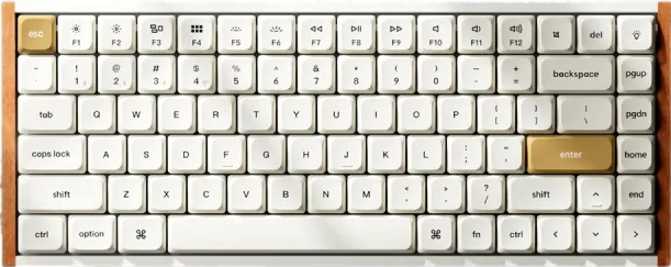
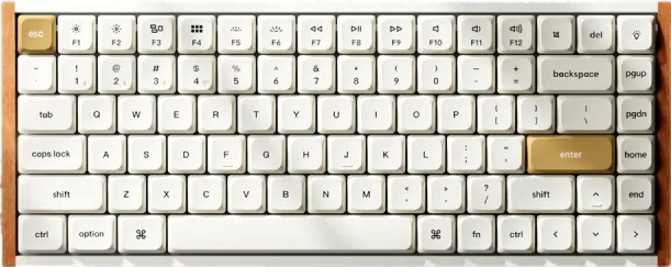
At 306mm wide and 116mm deep, the K3 HE fits on a tray table, inside a laptop bag, or in the portion of your desk usually occupied by a mousepad. The 22mm thickness keeps the profile genuinely flat — not just marketed as flat — which means using it without a wrist rest is a realistic option for most people, not a compromise.
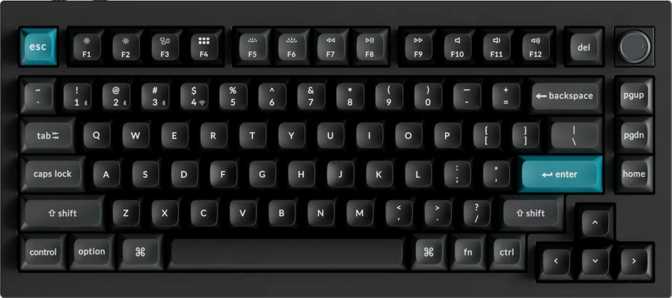
At 540 grams, it is light enough for daily travel but heavy enough to stay planted during fast typing sessions. The 75% layout strikes the balance many keyboard users spend months searching for: you lose the numpad, but keep dedicated arrow keys, a function row, and most navigation keys — all within reach without repositioning your hands. For anyone who has tried a 65% or 60% board and missed a real function row, the 75% form factor usually ends the search.
Materials and Case Construction
The case combines plastic and aluminum to keep weight down while giving the top and frame a premium feel. The plate underneath the switches is full aluminum, contributing directly to how typing sounds and feels — more solid and less hollow than polycarbonate alternatives, with a firm and consistent keystroke bottom-out. The aluminum construction also provides structural rigidity with no flex when you press firmly at the corners.
Color options are limited to black and white. Adjustable feet let you choose between a flat and a slightly raised typing angle — a small detail that accumulates importance across long sessions where wrist position drives fatigue over hours.
What Is Not Included
- No wrist rest. The low-profile design means most users will not need one, but those transitioning from taller keyboards should expect a brief adjustment period.
- No USB passthrough port — you cannot plug a mouse or secondary device directly into this keyboard.
The Switches: Why Hall Effect Changes the Conversation
How Hall Effect Switches Actually Work
Traditional mechanical switches use physical metal contacts that touch when you press a key. Those contacts wear down over time and require a fixed minimum travel before they register. Hall effect switches use a magnet and a sensor to detect key position electronically — with no physical contact at any point during the keystroke. The result is no mechanical wear, no contact bounce, and precise position detection at any depth across the full travel range.
Gateron Magnetic Jade Pro: What the Specs Actually Mean
The switches in the K3 HE are linear — no tactile bump, no audible click, just smooth consistent motion from top to bottom. The actuation force is 35 grams, which is on the lighter side. This reduces finger fatigue during extended gaming and enables faster repeated keypresses, but if you prefer deliberate, weighted resistance in your keystrokes, these will feel unexpectedly effortless. Total travel is 3.5mm — shorter than standard mechanical switches, partly due to the low-profile design and partly a deliberate speed optimization.
| Specification | Value | What It Means for You |
|---|---|---|
| Switch Name | Gateron Magnetic Jade Pro | Magnetic sensing — no contact wear over time |
| Switch Feel | Linear | Smooth press with no tactile bump or audible click |
| Actuation Force | 35 g | Light — fast for gaming, may feel too effortless for typists used to heavy switches |
| Actuation Range | 0.1 mm – 4.0 mm | Fully adjustable per-key registration point |
| Total Travel | 3.5 mm | Shorter than standard — speed-optimized for a low-profile build |
| Hot-Swap | Yes (Hall Effect only) | Replace switches without soldering; hall effect switches only |
Four Features That Define the K3 HE's Performance Ceiling
Rapid Trigger
On a standard keyboard, each key resets only when it physically rises back above a fixed actuation threshold — creating a dead zone where the key is neither registering nor fully reset. Rapid trigger eliminates that dead zone entirely. The key fires a new press the instant it starts moving downward again, at any point during its upward travel. For counter-strafing and fast lateral movement in competitive shooters, this produces a response that contact-based switch technology physically cannot replicate.
Adjustable Actuation
Every key's registration point is tunable individually across the full 0.1mm to 4.0mm range. A competitive player might set WASD to fire at 0.3mm for near-instant response while keeping spacebar at 2mm to prevent accidental jumps. A typist might set everything to 1.5mm for a more deliberate feel that reduces misfires. This level of per-key granularity is unusual at any price tier.
Dual Actuation
A single key can trigger two different actions at two different depths. A light press performs one function; a deep press performs another — without any additional hardware. This is most useful in games with complex control schemes and in creative or productivity workflows where additional bindings are valuable without adding physical keys to the layout.
Hot-Swap Capability
Switches can be pulled out and replaced without soldering tools. Switch preference is personal — weight, spring feel, and travel all vary between models. Hot-swap protects your investment if your preferences evolve. One important constraint: only hall effect-compatible switches will work in these sockets. Standard mechanical switches are physically and electronically incompatible.
Connectivity: Three Ways to Connect, Zero Dongles Required
Bluetooth 5.3 is the current standard for low-energy wireless peripherals. The K3 HE pairs with multiple devices — switching between a work laptop, a personal computer, and a tablet without re-pairing each time.
Latency is acceptable for typing and general productivity. For competitive gaming, most players will prefer the 2.4GHz connection.
Best for: Multi-device productivity across Mac, PC, and tablet.
The 2.4GHz wireless mode uses a USB receiver and delivers latency close enough to wired that it is viable for competitive gaming. This is the connection mode to use when you want wireless freedom without accepting any meaningful input delay.
Best for: Gaming. Matches the standard used by dedicated high-performance wireless gaming peripherals.
The detachable USB cable provides a true wired connection with the keyboard reporting its state 1,000 times per second — giving a maximum theoretical input latency from the keyboard itself of just 1 millisecond. The detachable design simplifies cable replacement if it wears out.
Best for: Tournament environments where wireless devices are restricted.
Software and Customization: QMK, ZMK, and VIA
For Those New to QMK and VIA
QMK is open-source keyboard firmware that lets you remap every key, create custom macros, program multiple layers — think of each layer as an invisible secondary keyboard you switch between — adjust lighting, and configure hall effect features like actuation depth and rapid trigger sensitivity. VIA is a companion tool that handles most of those changes through a visual interface in a browser or desktop app, with no coding required.
The K3 HE supports both, making it compatible with an enormous ecosystem of guides, preset configurations, and community-created layouts. Everything from remapping Caps Lock to building a dedicated media layer is possible without proprietary software that may stop receiving updates.
ZMK and N-Key Rollover
ZMK is a wireless-first firmware framework. Its inclusion signals that the K3 HE's wireless features are treated as first-class capabilities, not afterthoughts. For users who primarily work wirelessly and want fine control over power management and wireless behavior, ZMK support is a meaningful long-term asset.
N-key rollover means every key on the keyboard can be pressed simultaneously and registered correctly — no dropped keypresses regardless of how many keys are held at once. This matters in gaming and in accessibility contexts where complex simultaneous key combinations occur frequently.
- Full key remapping across every key
- Custom macros and programmable layers
- Per-key actuation tuning (0.1–4.0 mm)
- Rapid trigger configuration per key
- VIA visual interface — no coding required
- QMK for advanced code-level customization
- ZMK wireless-first firmware support
- N-key rollover — no dropped keypresses
- Dual actuation — two actions per key
Keycaps: Profile, Material, and Platform Support
LSA Profile Explained
LSA is a low-profile sculpted design. Unlike standard OEM or Cherry profile keycaps that rise in varying heights across each row, LSA keycaps are relatively uniform in height but angled ergonomically. This is what makes the K3 HE's flat silhouette possible — standard-height keycaps would undermine the entire low-profile premise. Adjustment from a standard keyboard typically takes a few days. Sourcing aftermarket LSA keycaps is also harder than finding Cherry or OEM alternatives, which are far more widely produced — worth knowing before committing.
PBT Double-Shot Construction
PBT plastic is harder and more wear-resistant than the ABS plastic found on most stock keyboards. The legends are formed from a second layer of plastic molded into the keycap itself — not printed on the surface — so there is no ink to fade or wear away over time. After months of heavy daily use, the legends remain crisp, the surface stays matte, and the keycaps do not develop the greasy shine that plagues ABS alternatives. This is a long-term durability feature that prevents the frustration of replacing worn-out keycaps a year into ownership.
Backlighting and Platform Support
The RGB LEDs are north-facing, sitting above the switch and illuminating legends more directly than south-facing alternatives. The compatibility concern north-facing LEDs typically create with south-facing switch designs does not apply here — the K3 HE uses matched low-profile hall effect switches throughout. The keyboard ships with keycap sets for both Mac and Windows, and switching between profiles is handled through the keyboard itself, making this a genuinely cross-platform device rather than one that merely tolerates both operating systems.
Real-World Usage: Who This Keyboard Is and Is Not For
- You are a competitive gamer who travels. Hall effect with rapid trigger in a travel-ready 75% form factor, with 2.4GHz wireless for home sessions and a wired mode for tournament environments where wireless is restricted.
- You work across multiple machines. Multi-device Bluetooth pairing with native Mac key support makes this a strong daily driver for anyone moving between Mac, Windows, and tablet throughout the day.
- You want hall effect technology at a more accessible price. Hall effect boards have historically commanded a significant premium. The K3 HE brings rapid trigger, adjustable actuation, dual actuation, hot-swap, and QMK/VIA to a lower tier.
- You care about long-term firmware independence. QMK and VIA mean you are never dependent on a manufacturer's proprietary software staying active. The firmware ecosystem exists independently and will outlast any product-specific app.
- You need tactile or clicky feedback. The Gateron Magnetic Jade Pro switches are linear only. There are no tactile or clicky hall effect options in this board's hot-swap system.
- You require a numpad. The 75% layout is a permanent design decision. If a numpad is essential to your workflow, a different form factor is required.
- You want a rotary volume dial. The K3 HE does not include one. Other Keychron models offer this feature if it matters to your setup.
- You need USB passthrough. You cannot plug a mouse, drive, or secondary device directly into this keyboard — there is no passthrough port.
Competitive Positioning: How the K3 HE Compares
The K3 HE competes in a rare intersection: low-profile design, hall effect switches, multi-mode wireless, and full open-source firmware support — simultaneously. Very few boards hold all four positions at once.
| Feature | Keychron K3 HE | Typical Hall Effect Gaming Board | Typical Low-Profile Wireless Board |
|---|---|---|---|
| Hall Effect Switches | |||
| Rapid Trigger | Most | ||
| Low-Profile Design | |||
| Wireless (BT + 2.4GHz) | Rarely | ||
| QMK / VIA Support | Rarely | Rarely | |
| Hot-Swap Switches | Rarely | Sometimes | |
| 75% Layout | Rarely | Sometimes | |
| Mac + Windows Dual Support | Rarely | Sometimes |
Most hall effect gaming keyboards are full-sized or tenkeyless, designed for stationary setups, and locked into proprietary software. Most low-profile wireless keyboards use standard switches without advanced actuation features. The K3 HE bridges both categories — with open-source firmware support added on top.
Honest Assessment: Strengths and Weaknesses
The case for this keyboard is genuinely strong. Hall effect technology with rapid trigger at this level of polish — in a travel-friendly form factor, with open-source firmware support and multi-device wireless — is not a combination you find commonly at this tier. The keycap quality is above average for a stock keyboard, the aluminum plate provides consistent feel across every key, and the actuation flexibility means it serves both gaming and productivity workflows without compromise.
QMK and VIA support adds longevity that proprietary-software boards cannot match. Your customizations, key maps, and actuation settings are not locked to a manufacturer's app that may stop receiving updates. The open ecosystem means this keyboard remains fully supported as long as the community maintains the firmware — which, given QMK's track record, is likely to be a long time.
For competitive players, the rapid trigger and per-key actuation tuning are the standout capabilities. These are not marketing differentiators — they produce measurable differences in how the keyboard responds to fast, repeated keypresses in ways that contact-based switches physically cannot replicate.
The weaknesses are real but mostly the result of deliberate design choices rather than corner-cutting. The linear-only switch feel is the most significant limitation. If you prefer tactile feedback or audible confirmation with each keypress, this board will not satisfy — and there are no tactile or clicky options within the hall effect hot-swap system to remedy that after purchase.
The one-year warranty is shorter than some competitors in this category offer. The LSA keycap profile will feel different from standard-height keycaps, and sourcing aftermarket LSA keycaps is considerably harder than finding alternatives in Cherry or OEM profiles, which are far more widely produced and supported by the hobby community.
The absence of a rotary dial is a noticeable omission at this positioning. Many competing boards include one for volume control, and a physical dial is meaningfully faster for moment-to-moment audio adjustment than dedicated media keys. It is a minor gap, but a consistent one that everyday desk setups will notice.
Common Questions Before You Buy
Final Verdict
The Keychron K3 HE makes a case that is difficult to dismiss. It is the most complete low-profile wireless keyboard available with hall effect switches and full open-source firmware support. For a competitive gamer who has outgrown a desk-bound setup, a power user moving between Mac and PC throughout the day, or an enthusiast who has been waiting for hall effect technology to arrive in a more portable package — this board delivers without obvious shortcuts.
The weaknesses are real: linear-only switches, no rotary dial, a one-year warranty, and the niche feel of low-profile keycaps will send some buyers toward alternatives. But for the audience this keyboard is designed for, very few competitors check the same boxes simultaneously.
If you have wanted the performance headroom of hall effect actuation — rapid trigger, sub-millimeter sensitivity, per-key tuning — without anchoring yourself to a full-sized board on a fixed desk, the Keychron K3 HE is the most direct answer currently available.