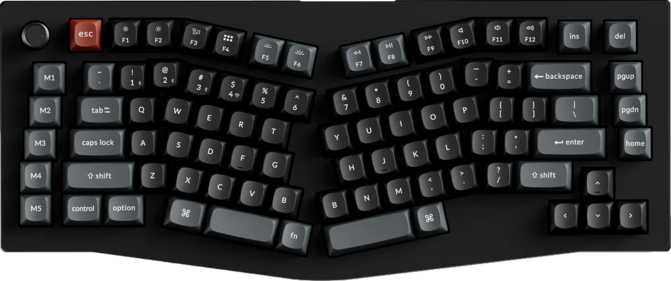
Keychron V10 Ultra Review: Wireless Performance Without Compromise
KeyboardsPremium wireless 75% mechanical keyboard
The 75% keyboard market has become genuinely competitive. You can find budget boards that feel hollow, gaming-branded keyboards that look aggressive but type poorly, and premium enthusiast boards that demand you sacrifice wireless for performance. The Keychron V10 Ultra is a direct challenge to that forced compromise — a compact, gasket-mounted mechanical keyboard that pairs an 8,000Hz polling rate with nearly a month of wireless battery life. That combination alone makes it worth examining closely.
Whether you're a programmer wanting a cleaner desk, a gamer who refuses to lose a cable fight mid-session, or an office worker who has finally decided that membrane keyboards are not worth tolerating — this board is competing for your attention. The question is whether it earns it.
Design and Build Quality
The Chassis: Premium Where It Counts
The V10 Ultra uses a two-material construction strategy that reflects smart cost management rather than corner-cutting. The outer case is plastic, while the plate — the structural backbone that holds every switch in place — is machined aluminum.
The plate is where rigidity and sound profile are determined. A soft plastic plate would produce a hollow, rattly character. The aluminum plate keeps the typing feel firm and consistent without inflating the price unnecessarily.
At just under a kilogram, the V10 Ultra plants on your desk and stays there. The compact 75% footprint — roughly 39 cm wide and 16 cm deep — frees up meaningful desk real estate compared to a full-size or tenkeyless board. If you use a mouse extensively, that recovered space adds up quickly over long sessions.
South-Facing RGB and Typing Angle
Adjustable rear feet let you set your preferred typing angle — a small but important ergonomic detail during extended sessions. A wrist rest is not included in the box, so budget for one separately if needed.
The RGB backlighting shines from beneath the south side of each keycap, facing toward you rather than through the legend tops. This produces a warm, even glow and reduces shine-through inconsistency on double-shot keycaps.
South-facing LEDs mean legends appear slightly less illuminated than north-facing setups viewed straight-on. For most users the effect looks excellent — but those who prioritize maximum legend brightness should factor this in.
The Gasket Mount: Why It Matters for How This Keyboard Feels
Keyboard mounting style is one of the biggest differentiators in how a board sounds and feels to type on — and it's rarely explained clearly. In a gasket-mount system, the internal plate assembly is suspended by soft gaskets rather than screwed directly to the case walls. The result is a typing experience with flex and cushioning built into the physical structure. Each keystroke lands softer, sounds slightly more muted and thuddy, and produces less high-pitched clack than a traditional tray-mounted or top-mounted design.
| Mount Type | Feel | Sound Profile | Typically Found In |
|---|---|---|---|
| Tray Mount | Stiff, direct | Hollow, high-pitched | Budget boards |
| Top Mount | Firm | Moderate | Mid-range boards |
| Gasket Mount | Cushioned, flexible | Deeper, thuddy | Premium boards |
Gasket mounting is standard in boards costing significantly more. Its presence in the V10 Ultra is a genuine value point — not a marketing claim.
The Switches: Keychron Silk POM Red Explained
What Makes These Switches Different
The V10 Ultra ships with Keychron's own Silk POM Switch in Red. POM — polyoxymethylene — is a self-lubricating engineering plastic used for the switch housing. The practical effect is a smoother keypress out of the box compared to standard switches, which typically require manual lubing to reach a comparable feel. You get factory-tuned smoothness without needing to disassemble and lube 75+ switches yourself.
Linear Feel: What to Expect
These are linear switches — no tactile bump or audible click as the key travels. They actuate at exactly 2mm of travel and reach full bottom at 4mm. The 45-gram actuation force sits on the lighter end of the mechanical spectrum, reducing finger fatigue during long sessions while increasing the chance of accidental presses for those transitioning from heavy membrane keyboards.
Linear switches are the dominant choice among gamers for speed and consistency, and they suit programmers and writers who prefer uninterrupted, quiet keystrokes. Those who prefer a physical confirmation on each keypress should look at tactile switches — the hot-swap feature means you have that option without buying a different board.
Hot-Swap: Change Your Switches Without Soldering
Every switch socket on the V10 Ultra is hot-swappable. Pull out any switch and replace it with a compatible one using nothing more than a switch puller tool — no soldering iron required. If the stock linears aren't for you, or if a switch eventually fails, replacement takes seconds per switch. This extends the useful life of the keyboard and makes it a platform for ongoing customization rather than a fixed product.
- Switch Name
- Silk POM Red
- Type
- Linear (mechanical)
- Actuation Point
- 2 mm
- Total Travel
- 4 mm
- Actuation Force
- 45 g
- Hot-Swappable
- Yes
- POM Housing
- Self-lubricating
Connectivity: Three Modes, Genuinely Useful
USB Wired
Absolute reliability and zero latency. The mode of choice for extended gaming sessions or any context where a cable is not an inconvenience. The detachable cable prevents port failure from becoming a keyboard failure.
2.4 GHz Wireless
Wireless performance with a polling rate equivalent to wired. This is the mode for competitive gaming without a cable — no latency penalty, no performance compromise.
Bluetooth 5.3
Multi-device switching across profiles — connect to a laptop, tablet, or second machine. Current-generation Bluetooth for stable, efficient pairing with minimal power overhead.
What the 8,000Hz Polling Rate Actually Means
A standard keyboard reports its state to your computer 1,000 times per second. The V10 Ultra does it 8,000 times per second — eight times the frequency. The difference matters most in competitive gaming where input lag at the millisecond level has real consequences. For typing and productivity, 1,000Hz is already imperceptible. The 8,000Hz figure signals a board built without compromise for the performance use case, whether you personally need it or not.
Battery Life: The Real-World Picture
Translating 660 hours into daily use: eight hours per working day, five days a week, equals roughly 40 hours of weekly use. At that rate, the battery lasts over 16 weeks — approximately four months — before needing a charge.
Even in more intensive all-day use across seven days a week, you are still looking at nearly three months between charges. This is exceptional for a wireless mechanical keyboard, where two to four weeks is considered good by category standards.
Running RGB at full brightness and maximum polling rate will reduce these figures. Even with lighting active at moderate levels, runtime stays well above competitors. A low battery never means a lost session — the detachable USB cable allows wired use at any time, including while charging.
Software, Customization, and Keycaps
ZMK Firmware Support
The V10 Ultra supports ZMK firmware — open-source keyboard firmware designed primarily for wireless keyboards. ZMK allows you to remap keys, create custom layers, and define macros, all with power-efficient wireless in mind.
It does not support QMK or VIA. Users who expect a visual remapping interface will need to adapt to ZMK's workflow, which involves editing configuration files rather than clicking through a graphical layout tool. This is a real consideration for beginners who want easy customization — ZMK has a genuine learning curve. For users already comfortable with ZMK, or those willing to invest the time, the customization depth is substantial.
The Rotary Dial
A rotary dial on the top-right of the board controls volume, scroll speed, or any function you map to it — pressing it down adds a secondary function. Adjusting audio without breaking keyboard shortcuts or hunting screen controls becomes effortless muscle memory. It earns lasting appreciation from the first week of use.
NKRO and Keycaps
N-Key Rollover ensures every simultaneously pressed key registers accurately — no dropped characters during fast typing or gaming inputs with multiple keys held at once.
The PBT double-shot keycaps resist shine and legend fade across years of heavy use. PBT plastic is denser than ABS and holds its texture far longer. Double-shot construction means legends are physically molded in — they cannot fade regardless of keystroke count. The standard ANSI layout means virtually any aftermarket keycap set will fit without modification.
Who Should Buy the Keychron V10 Ultra
- Competitive gamers who want wireless — 8,000Hz polling and 2.4GHz wireless together mean no performance penalty for going cable-free. This combination is rare at any price.
- Multi-device users — Three connectivity modes handle a gaming PC, laptop, and tablet without requiring separate keyboards for each.
- Enthusiasts on a customization path — Hot-swappable switches, ZMK support, and standard keycap sizing make this a board you can evolve over time.
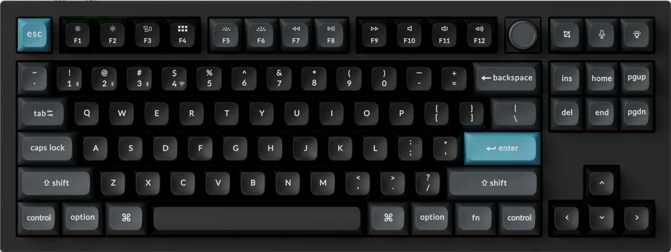
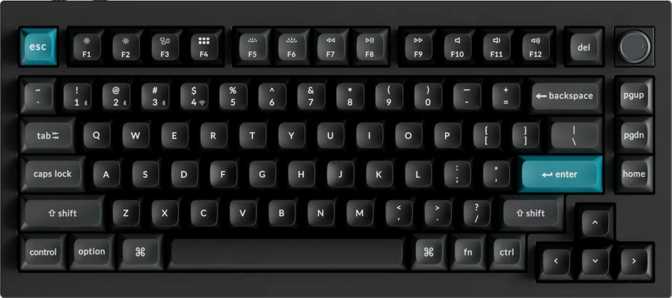
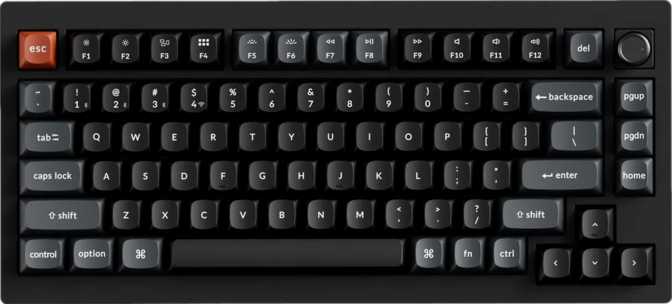
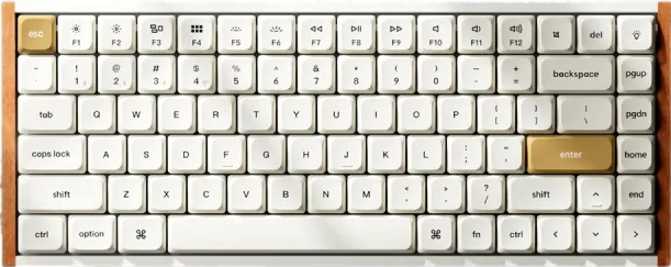
- Compact desk setups — The 75% layout eliminates the numpad while keeping arrow keys and a function row. The best balance of compactness and usability for most people.
- Long-session typists and programmers — Gasket mount and smooth linears create a fatigue-reducing typing experience across hours of continuous use.
- Users who want simple plug-and-play remapping — If you expect a visual tool like VIA, ZMK's file-editing workflow will feel like a significant step backward.
- Those who need a numpad — The 75% layout permanently removes it. Workflows dependent on rapid numeric entry will create real friction.
- Tactile or clicky switch devotees — The stock switch is linear. Hot-swap allows substitution, but the keyboard arrives tuned for smooth, quiet strokes.
- Budget buyers — Priced as a premium product. It earns that positioning, but it is not competing at entry-level price points.
- Players who need rapid trigger — No analog input or rapid trigger features means competitive players in certain precision shooters will find this board lacking tools their peers have.
How It Compares to the Alternatives
The V10 Ultra's defining competitive advantage is its polling rate paired with genuine wireless flexibility. Most keyboards force a choice: either you get gaming-grade polling over a cable, or you get wireless with standard performance. Very few boards at any price offer both simultaneously with a dedicated 2.4GHz option — that is where the V10 Ultra has no direct equivalent at a comparable price point.
| Feature | Keychron V10 Ultra | Typical Gaming 75% | Typical Enthusiast 75% |
|---|---|---|---|
| Polling Rate | 8,000 Hz | 1,000 Hz | 1,000 Hz |
| Mount Type | Gasket | Tray or Top | Gasket |
| Wireless Modes | USB + BT + 2.4 GHz | Wired only or BT | Varies |
| Battery Endurance | ~660 hours | N/A or 40–80 hrs | Varies |
| Switch Customization | Hot-swappable | Often soldered | Hot-swappable |
| Firmware | ZMK | Proprietary | QMK / VIA common |
| Keycap Quality | PBT Double-shot | ABS or PBT | PBT Double-shot |
ZMK is the one area where enthusiast alternatives have a clear edge. Boards running QMK with VIA support are more immediately accessible for custom layouts without configuration file editing — a factor worth weighing if remapping matters to you.
Honest Strengths and Weaknesses
Where It Excels
The gasket mount is not a token feature — it genuinely shapes the typing character of the board in a way that distinguishes it from cheaper construction. Each keystroke absorbs differently than you would expect from a keyboard at this price tier, and once you've typed on it for a week, going back feels like a downgrade.
The battery runtime is remarkable enough that charging becomes a quarterly inconvenience rather than a weekly ritual. For a wireless keyboard, that alone removes one of the most common long-term ownership frustrations.
The Silk POM switches deliver smoothness without requiring buyer intervention, removing a meaningful barrier for anyone who wants quality typing feel without learning switch maintenance. And the hot-swap capability makes this board a long-term investment — if a switch fails or preferences change, replacements take seconds, not an evening with a soldering station.
Where It Falls Short
The absence of QMK and VIA support is a genuine limitation, not a minor omission. The enthusiast community has built extensive resources, layouts, and tooling around those two ecosystems. ZMK is capable, but its documentation and community resources are comparatively sparse, and its workflow is more technical. First-time customizers may find themselves frustrated before finding their footing.
The weight — just under a kilogram — is appropriate for a desk keyboard but rules out anyone looking for something portable. The black-only colorway limits aesthetic flexibility for buyers who want lighter or more expressive finishes.
Players in games where rapid trigger technology has become competitive standard will find those peers have tools this board cannot match. No analog input, no rapid trigger — for the majority of use cases this is irrelevant, but it's worth confirming before purchasing.
Questions Real Buyers Ask
Keychron V10 Ultra
The Keychron V10 Ultra earns its premium positioning through a combination that is genuinely hard to find: a gasket-mounted, hot-swappable 75% keyboard with 8,000Hz wireless performance and a battery measured in months rather than weeks.
For gamers who have always felt forced to choose between wireless convenience and competitive-grade responsiveness, this board makes that compromise unnecessary. For typists and professionals who want a premium mechanical experience in a compact form factor without being locked into a cable, the connectivity flexibility and build quality justify the investment.
The ZMK learning curve is real, and buyers who want immediate, visual key remapping should weigh that carefully. But for anyone who can accept that trade-off — or who already works with ZMK — the V10 Ultra is a cohesive, well-engineered keyboard that improves on what most boards offer in the categories that matter most.
Buy It If...
- You want wireless performance without wireless penalties
- You value long-term switch customization
- The compact 75% layout suits your workflow
Look Elsewhere If...
- You need VIA or QMK support out of the box
- Tactile switches are non-negotiable for you
- You rely on a number pad daily