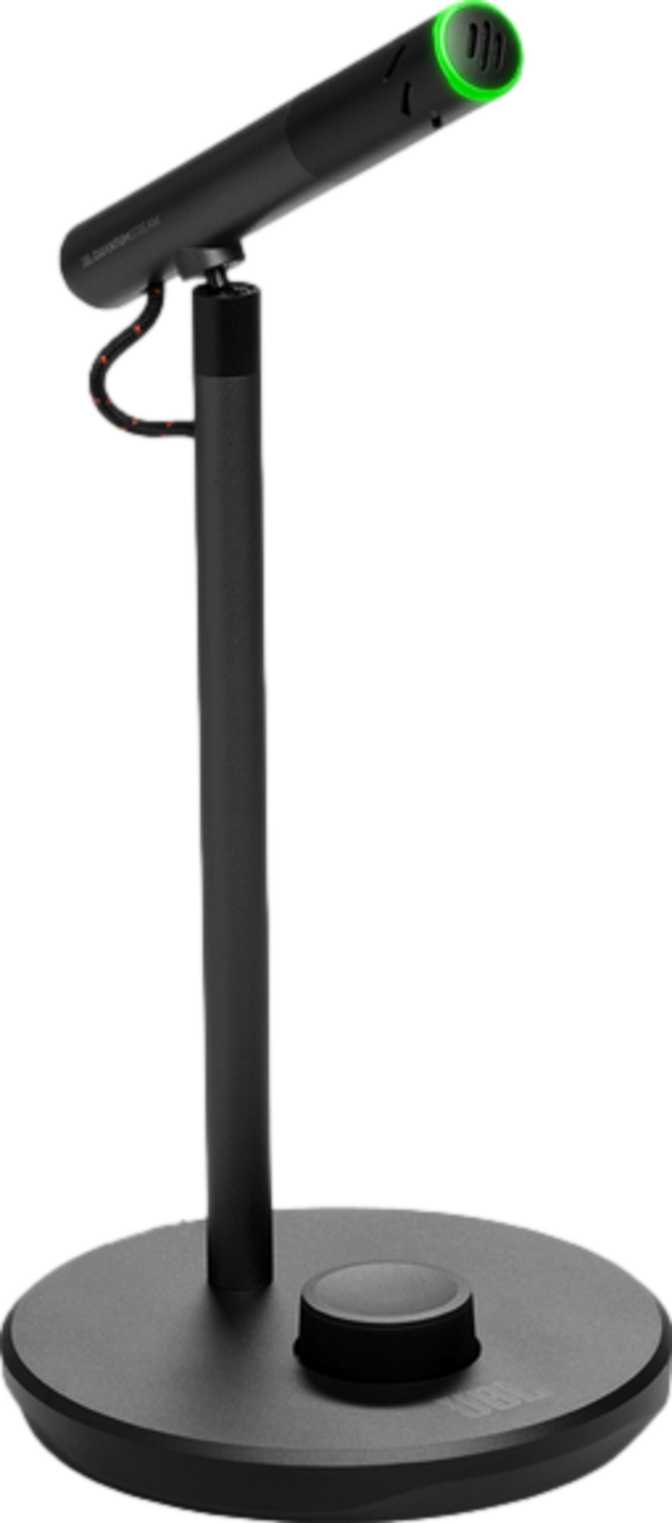
JBL Quantum Stream Talk: A Full Review for PC Streamers
MicrophonesUSB microphones have multiplied faster than most buyers can keep up with. Every streaming brand, audio company, and tech manufacturer now has at least one option on the market, and the specifications start to blur together quickly. What separates a microphone that genuinely improves your audio from one that simply looks good on a desk? The JBL Quantum Stream Talk enters this conversation carrying real brand credibility in audio, paired with a design unambiguously aimed at streamers and gaming setup enthusiasts. The question worth answering isn't whether it looks the part — it clearly does — but whether the audio engineering backs up the aesthetics.
Specifications at a Glance
Six figures that define this microphone before the deeper analysis
24-bit
Audio Depth
USB
Plug-and-Play
3.5mm
Monitor Jack
PC + Mac
Compatible
On-Body
Controls
Included
Shock Mount
Design, Build Quality, and Physical Experience
What it's like to live with this microphone on your desk every day
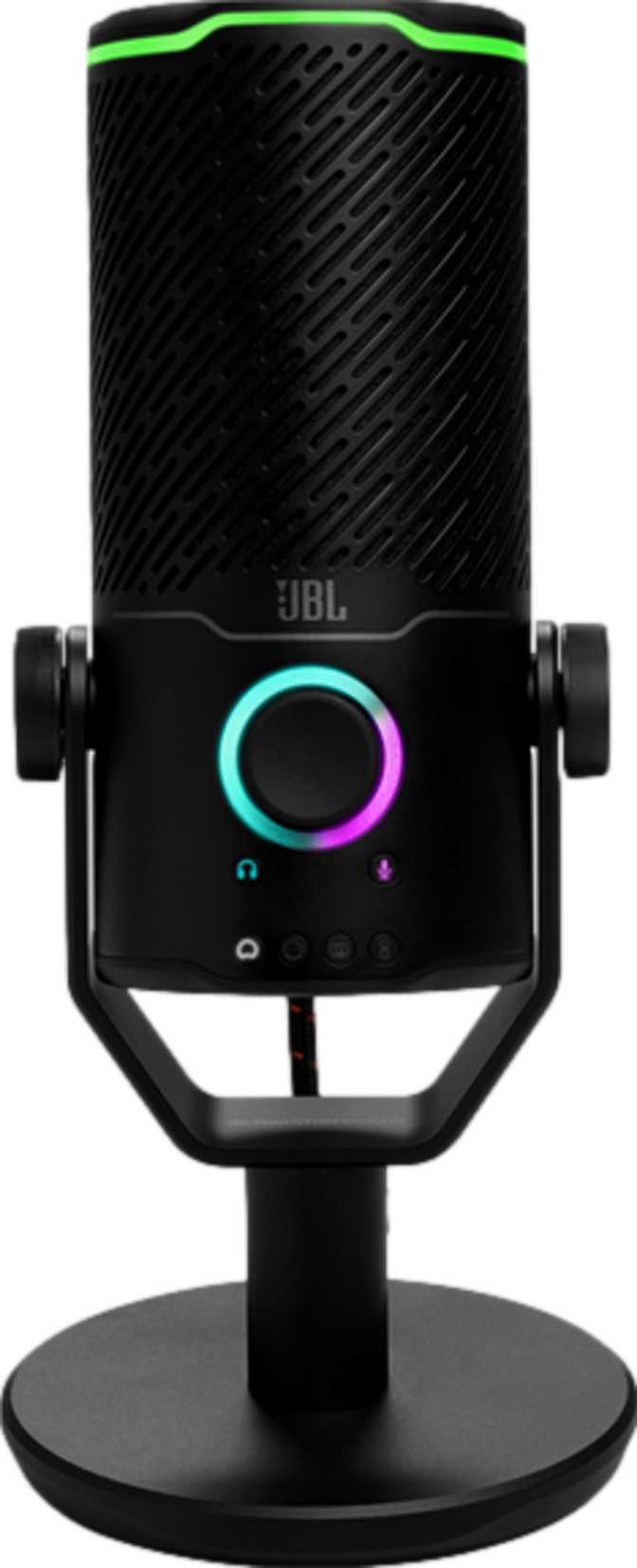
At just 146 grams, the JBL Quantum Stream Talk is among the lighter desktop microphones in its category. That low weight doesn't signal flimsy construction — it reflects a compact, efficiently proportioned body that stands 185mm tall with a footprint of roughly 105mm across. It won't dominate a small desk, and it won't require a heavy arm or clamp to keep it stable.
The most practically useful design decision is the inclusion of a shock mount directly in the package. A shock mount mechanically decouples the microphone capsule from surface vibrations — so when you type, move your mouse, or accidentally knock your desk, that physical impact doesn't translate into a low rumble in your recording. Many competing microphones at this price level sell shock mounts as separate accessories or bundle them only in premium variants. Getting it in the box removes an immediate additional purchase.
RGB lighting is present throughout the body. Given the Quantum branding — JBL's gaming-focused line — this is entirely expected and consistent with the product's intended home on a streaming or gaming desk. Whether the lighting is a feature you care about or simply something you tolerate is personal, but it functions as a clear signal of the product's intended audience.
Controls are built directly into the device body rather than requiring a companion application for everyday functions. Muting, in particular, benefits from this — physical controls on the hardware mean you can cut audio with a single gesture during a live stream or call, without hunting for a button on a screen.
Design Highlights
-
Compact Footprint
185mm tall, 105mm wide — desk-friendly proportions at only 146g
-
Shock Mount in Box
Absorbs desk vibrations before they reach the capsule — no extra purchase needed
-
On-Device Controls
Physical mute and volume — no software panel required during a live session
-
RGB Lighting
Integrates visually into lit gaming or streaming desk setups
-
No Pop Filter Included
Budget for a separate purchase — plosive sounds on "P" and "B" words need controlling
Microphone Audio Performance
How the JBL Quantum Stream Talk actually captures your voice — and what the numbers mean in practice
Frequency Capture and Voice Clarity
The microphone capsule captures audio from 50 Hz at the low end — deep enough to convey the full warmth and body of a male voice — up to 12,000 Hz at the top. Intelligible human speech sits roughly between 80 Hz and 8,000 Hz, with the consonants and vowel structures that define clarity clustered well within that range.
The 12 kHz upper limit means the Quantum Stream Talk focuses its capture on the vocal band rather than the extended high-frequency range needed for instruments. This is a deliberate engineering decision, not a shortcut. Concentrating on the region that makes voices sound clear and natural allows the capsule to prioritize consistency where it counts for the target use case.
24-Bit Depth — Why It Matters
The microphone captures at 24-bit depth — the same standard used in professional recording studios. Bit depth determines how finely your audio is digitized: the more bits, the wider the dynamic range between the quietest whisper the recording can capture and the loudest peak before distortion.
For streaming and podcasting, the practical benefit is that your raw audio has more room to breathe before you process it. Compression, noise reduction, and equalization applied in real time all change the signal — starting with a 24-bit capture means those processes don't degrade your audio quality as quickly as a 16-bit alternative would.
Headphone Monitoring Output
Real-time monitoring through the built-in 3.5mm jack — and what it changes about your workflow
The 3.5mm headphone jack on the JBL Quantum Stream Talk is not just a convenience — it enables real-time monitoring, which fundamentally changes how you work when recording or streaming. Hearing yourself as the microphone picks you up, live and without delay, lets you catch problems as they happen: mouth too close to the mic, background noise creeping in, volume inconsistency. Without monitoring, those problems appear in playback. With it, you correct them before they're captured.
The headphone output reproduces the full spectrum of human hearing, delivering a complete signal to your headphones rather than a voice-range reduction. The signal maintains a strong separation between the audio content and any electronic noise floor, keeping the feed clean and comfortable to listen to for extended sessions.
The output is matched to the impedance range of standard consumer headphones and gaming headsets, meaning it drives them to comfortable volumes without requiring a separate headphone amplifier. The connection is a standard 3.5mm jack — universal among consumer and gaming headsets. There is no 6.35mm (quarter-inch) output, so professional studio headphones using that connector standard would require a simple adapter.
Headphone Output Specs
- Frequency Response
- 20 Hz – 20,000 Hz
- Signal-to-Noise Ratio
- 92 dB
- Impedance
- 32 Ohms
- Connector
- 3.5mm Jack
- Amp Required
- No
Platform Compatibility: What Works and What Does Not
This is a point that demands clarity before purchase — check it carefully
Windows
CompatiblemacOS
CompatibleAndroid
Not CompatibleiOS / iPadOS
Not CompatibleMobile Users: This Will Not Work
The Quantum Stream Talk connects via USB and is designed strictly for desktop environments. It does not function with smartphones or tablets of any kind — Android or iOS.
Console compatibility (PS5, Xbox) is unconfirmed by the specifications. Verify directly with the retailer before purchasing if that is your intended use.
Key Features in Practice
What each feature actually does for you on a daily basis
Physical Mute Control
On a live stream or in a meeting, cutting your audio instantly — without hunting for a software button — makes a genuine difference. Physical controls are faster and more reliable in time-sensitive situations than software interfaces. The mute function sits directly on the device body for immediate, tactile access at any moment.
Zero-Latency Monitoring
The headphone jack connects directly to the device's hardware output rather than routing through the computer's audio software. This eliminates the perceptible delay that makes listening to yourself distracting. You hear your voice in real time — what the microphone is actually picking up, not a software-delayed version.
Shock Mount in the Box
The shock mount's impact on audio quality is measurable and immediate. Every keystroke and desk vibration that would otherwise produce a thud in your recording is absorbed before it reaches the capsule. For streamers who type actively during sessions, this passive protection adds real value from the very first session.
On-Device Controls
Having essential controls on the hardware itself reduces the cognitive overhead of operating the microphone during a live session. No software panel needs to stay open, no system tray application needs managing, and you're not dependent on software updates to access basic functionality. The controls are always there, regardless of what's running on screen.
Who Should Buy This — and Who Should Not
The JBL Quantum Stream Talk is built for a specific audience. Knowing whether you're in it can save real money.
This Microphone Is a Strong Fit For:
-
PC Streamers and Gaming Content Creators
Want voice clarity well above a headset boom mic and a visual fit for a lit desk setup
-
Remote Professionals on Windows or macOS
Need clear, reliable voice input for video meetings beyond what a laptop microphone provides
-
Beginner Podcasters
Want 24-bit audio in a plug-and-play format without the complexity of an audio interface
-
Gamers Who Monitor Through Headphones
Want to hear in-game audio and their own voice simultaneously through the 3.5mm output
Look Elsewhere If You Are:
-
A Mobile User
No smartphone or tablet support whatsoever — Android or iOS, any device
-
A Music Producer or Instrument Recorder
The capsule is voice-optimized; recording instruments requires a full-range studio microphone
-
Someone Who Needs Polar Pattern Flexibility
No selectable pickup patterns — group recordings or multi-source setups need a different microphone
-
Anyone Wanting a Fully Complete Kit
A pop filter is absent — plan for an additional purchase from day one
Competitive Positioning
How the JBL Quantum Stream Talk stacks up against typical RGB gaming USB microphones at the same price level
| Feature | JBL Quantum Stream Talk | Typical RGB Gaming USB Mics |
|---|---|---|
| Audio Bit Depth | 24-bit | Varies — 16-bit to 24-bit |
| Shock Mount | Included in box | Often sold separately |
| Pop Filter | Not included | Typically not included |
| Headphone Monitoring | 3.5mm included | Varies by model |
| Mobile Compatibility | Windows & Mac only | Most: desktop only |
| Body Weight | 146g — notably compact | Often 250–600g or more |
| On-Device Controls | Yes | Common in category |
Honest Assessment: Strengths and Weaknesses
The full picture — where the JBL Quantum Stream Talk delivers and where it genuinely falls short
Where It Delivers
The JBL Quantum Stream Talk gets the fundamentals right in ways that matter. The 24-bit audio capture is the headline technical achievement — and it is legitimate. Voice recordings from this microphone have a clean, dynamic foundation that provides real room for processing without degradation. This isn't a marketing number; it translates into recordings that handle compression and equalization more gracefully than 16-bit alternatives at the same price level.
The headphone monitoring output is well-implemented, with a clean signal that makes real-time self-monitoring genuinely useful rather than merely functional. The shock mount is a pragmatic inclusion that directly improves audio quality from day one — a detail that separates a considered product from one built purely around spec-sheet optics.
The compact, lightweight body is an underappreciated advantage. Smaller desks can accommodate it without a mounting arm, repositioning requires no effort, and the proportions look right on camera for streamers who are conscious of how their setup appears. Plug-and-play USB operation means there is zero friction from unboxing to first use on a Windows or Mac machine.
Where It Falls Short
The weaknesses are specific but real. The microphone's upper frequency ceiling categorically makes it a voice tool, not a music capture device. Buyers who intend to graduate into recording instruments will need to replace it — this microphone does not grow with a music production workflow.
The absent pop filter is the most frustrating oversight. Including a shock mount while omitting plosive protection is an inconsistent decision: it addresses one acoustic problem while leaving an equally common one unsolved. Plosive sounds on "P" and "B" words are the single most common beginner audio problem, and a pop filter costs almost nothing to include.
The fixed pickup configuration — without selectable pattern modes — limits recording versatility compared to microphones that offer switchable cardioid, omni, or bidirectional options. And the strict desktop-only compatibility narrows its usefulness for any workflow that extends beyond a Windows or Mac computer. Mobile users are simply excluded from the start.
Questions Buyers Ask Before Purchasing
The six most common questions about the JBL Quantum Stream Talk — answered directly
Final Recommendation
RecommendedThe JBL Quantum Stream Talk is a capable, honest-to-its-purpose USB microphone that earns a clear recommendation for its intended audience. The 24-bit audio capture sets a strong technical foundation, the included shock mount adds immediate practical value, and the headphone monitoring is clean and genuinely useful for real-time voice work. The compact, lightweight body suits smaller setups, and plug-and-play USB operation means zero friction from unboxing to first use.
The conditions of that recommendation matter. This microphone belongs on a Windows or macOS desktop. It is a voice tool, not a music recorder. A pop filter should be added separately. And buyers who need mobile flexibility or multi-pattern recording versatility will find better options elsewhere at a comparable price point.
Buy it if you stream, podcast, or take video calls from a Windows or Mac desktop and want a clear step up from a headset mic — without the complexity of an audio interface setup.
Skip it if you need mobile compatibility, instrument recording capability, polar pattern options, or a kit that requires nothing added straight out of the box.