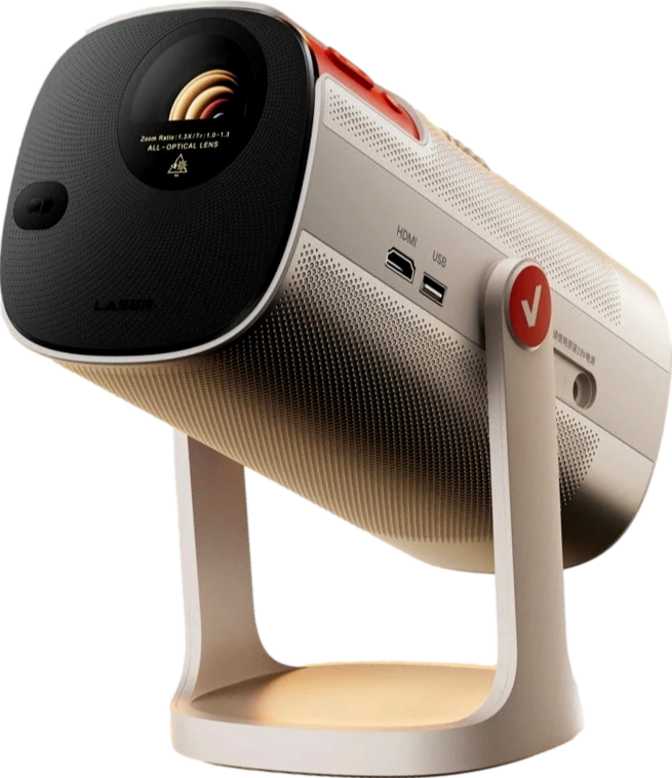
Hisense Vidda LightGo: Full Review and Real-World Performance Test
ProjectorsWho Is the Hisense Vidda LightGo For — And Does It Deliver?
The portable projector market has grown crowded with products that promise cinematic living rooms but deliver murky, washed-out images in anything brighter than a blackout. The Hisense Vidda LightGo positions itself differently: a compact, connectivity-rich projector aimed at users who want a genuine full HD big-screen experience without the weight, wiring complexity, or price tag of a permanent home theater setup.
Its standout move is combining three wireless casting protocols — AirPlay, Chromecast, and Miracast — in a single unit under 2.2 kilograms, alongside a full smart TV platform, dual-driver stereo audio with Dolby Atmos processing, and HDR10+ support. That feature set is uncommon at this size and weight. Where it compromises, those compromises are real and reviewable. This review covers all of it.
- 1080p Full HD output
- Up to 100" projected image
- AirPlay, Chromecast & Miracast
- 2×7W Dolby Atmos stereo
- HDR10, HDR10+ and HLG
- Built-in smart TV platform
- Dedicated smartphone app
- Voice command support
Design and Build: Compact Enough to Mean It
At just over two kilograms, the Vidda LightGo sits in a comfortable middle ground. It is lighter than most traditional home projectors, yet substantial enough to feel like a considered, quality product rather than a throwaway travel gadget. You can carry it between rooms without hesitation, and it fits inside a backpack or carry-on without drama.
The physical design follows the clean, understated aesthetic Hisense has adopted across its Vidda line. There are no sharp edges or over-engineered gimmicks — it looks like something that belongs in a modern living space without demanding attention.
No Lens Shift — Room Placement Must Be Precise
There is no lens shift in either direction, horizontal or vertical. The projector must sit at a very specific angle relative to your screen or wall to produce a geometrically correct image. If your shelf or table position is not aligned with the centre of your projection surface, digital keystone correction will step in — and that always involves some loss in sharpness. Buyers who need flexible room placement should weigh this carefully before purchasing.
Warranty: One year — standard for this category but not generous. It signals that Hisense treats this as a consumer lifestyle product rather than a premium long-term investment.
Picture Quality: What 1080p Actually Means Here
Resolution and Image Sharpness
The Vidda LightGo outputs at Full HD — 1920×1080 pixels. For a projected image up to 100 inches diagonally, that resolution is entirely appropriate. At normal viewing distances, the image appears crisp and film-like. Pixel structure only becomes visible if you sit unusually close, which a large projection naturally discourages.
This is not a 4K projector, and that is fine for most households. Streaming content, including the vast majority of movies and TV series on major platforms, still delivers enormous amounts at Full HD. The perceptual difference between 4K and 1080p is significantly less pronounced on a projected image than on a flat panel display viewed at close range.
HDR Support: More Coverage Than the Competition
The Vidda LightGo supports three high dynamic range formats, giving it broader coverage than most projectors at this price tier. The table below explains what each one means in practice — and flags one important omission:
| HDR Format | Status | Used By | Real-World Meaning |
|---|---|---|---|
| HDR10 | Supported | All streaming platforms, Blu-ray, gaming consoles | Universal baseline — every HDR source you own is covered |
| HDR10+ | Supported | Amazon Prime Video, select streaming services | Per-scene metadata for more accurate brightness and contrast mapping frame by frame |
| HLG | Supported | Broadcast television, live TV signals | The format for live TV as broadcast adopts HDR standards |
| Dolby Vision | Not Supported | Netflix, Apple TV+, Disney+ | Falls back to HDR10 — Dolby Vision dynamic tone mapping is not utilized |
Throw Distance and Room Requirements
The minimum throw distance of 2.2 meters means the projector must be placed at least that far from the wall or screen to produce a usable image. To fill a 100-inch screen, you will typically need 2.8 to 3.5 meters of room depth depending on the zoom range. This is not a projector suited to small apartments or tight rooms. It needs space to perform.
Room Depth Check Before You Buy
Minimum 2.2 m for any usable image — you need 2.8–3.5 m to fill a 100" screen. Measure your room before purchasing if available space is a concern.
Audio: A Surprisingly Capable Built-In System
Many projectors treat audio as an afterthought, bundling a single underpowered speaker that sounds hollow and thin. The Vidda LightGo takes a different approach — and the difference is audible.
Stereo separation — two distinct channels rather than a single mono driver — creates genuine spatial width in the sound. That matters when watching films or playing games where directional audio adds to the experience. At 14 combined watts, the system is sufficient to fill a mid-sized living room at comfortable listening volumes without distortion.
The Dolby Atmos support is worth understanding in context. On a two-speaker stereo system, Atmos does not produce the overhead height and surround channels that a full multi-speaker Atmos setup delivers. What it does is process Atmos-encoded audio tracks properly rather than downmixing them crudely. The result is a noticeably more detailed, spatially aware stereo image compared to projectors that ignore Atmos metadata entirely. For a self-contained projector, this is a genuine value-add.
For those who want more, the 3.5mm headphone output allows connection to a wired external speaker or soundbar. There is no optical audio output (S/PDIF), so those expecting to pass lossless audio to a dedicated AV receiver will need to use HDMI or the analog jack instead. Bluetooth is also available for wireless speaker or headphone pairing.
Smart Features and Connectivity
Built-In Smart Platform
The Vidda LightGo includes a full smart TV operating system, which means streaming apps are available directly without any external device. No Fire Stick, no Chromecast dongle, no Apple TV required. The dedicated smartphone app extends this further, allowing your phone to act as a remote control. Voice command support is also integrated, enabling hands-free search and playback control — particularly useful when the projector is placed somewhere inconvenient to reach manually.
Wireless Casting: Three Standards Covered
The connectivity stack here is unusually comprehensive for a projector in this class. Most competitors pick one or two casting protocols. The Vidda LightGo covers all three major device ecosystems:
Any Android device, Chromebook, or Chrome browser tab can cast directly to the projector without a physical connection or extra hardware.
iPhones, iPads, and Macs cast natively without adapters or third-party apps. The entire Apple ecosystem works out of the box.
Windows laptops and Android devices connect via direct peer-to-peer wireless display — no router required for the connection itself.
Physical Ports: Minimal but Functional
The physical port selection is intentionally lean. Here is the complete picture before you commit:
| Port / Connection | Count / Status | Notes |
|---|---|---|
| HDMI | 1 port | Handles consoles, Blu-ray, laptops — one device at a time only |
| USB | 1 port | Flash drive content playback |
| 3.5mm Audio Out | Yes | Wired headphones or analog soundbar connection |
| Bluetooth | Yes | Wireless headphones or Bluetooth speakers |
| Ethernet (RJ45) | None | Wi-Fi only — no wired network option |
| S/PDIF Optical | None | AV receiver integration via optical is not possible |
| VGA / DVI | None | Legacy display connections are not supported |
Single HDMI + Wi-Fi Only — Two Practical Implications
If you regularly switch between a gaming console and a laptop, you will need an HDMI switch. The absence of wired Ethernet means all streaming performance depends entirely on your Wi-Fi signal strength and consistency — a relevant concern in congested network environments.
Real-World Usage: Who Should Buy This Projector?
- Renters and apartment dwellers who want a big screen without drilling walls or making permanent changes to their space
- Families who want to move movie night between the living room, backyard, and guest room
- Mixed-device households where both Apple and Android users need seamless, no-friction casting access
- Casual gamers who want an occasional large-screen gaming session without a permanently dedicated setup
- First-time projector buyers entering the category who want smart-platform simplicity without extra hardware costs
- Have a room shorter than 3.5 meters — the throw distance requirements make tight spaces very impractical
- Cannot control ambient light — daytime use in a bright room degrades image quality significantly
- Specifically require Dolby Vision — Netflix and Apple TV+ content will fall back to HDR10
- Run a complex AV setup requiring optical audio output, multiple HDMI sources, or lens shift flexibility
- Need true ultralight portability for frequent air travel — at 2.1kg it is manageable but not pocket-friendly
How It Compares to the Alternatives
The Vidda LightGo competes against two broad categories: cheaper entry-level LED projectors and more expensive laser-based portables. Here is where it honestly stands on each key dimension:
| Feature | Hisense Vidda LightGo | Typical Entry Smart Projector | Laser Portable Projector |
|---|---|---|---|
| Resolution | 1080p Full HD | 720p or 1080p | 1080p |
| HDR Support | HDR10, HDR10+, HLG | HDR10 only | Varies by model |
| Wireless Casting | AirPlay + Chromecast + Miracast | One or two protocols | Varies by model |
| Built-In Audio | 2×7W Dolby Atmos stereo | 1×5W mono typical | 1×5W to 2×10W |
| Light Source | LED / Lamp | LED / Lamp | Laser |
| Smart Platform | Built-in | Built-in or none | Usually built-in |
| Weight | ~2.1 kg | 1.5–3 kg | 0.8–2.5 kg |
Note on laser vs LED/Lamp: Laser projectors maintain peak brightness significantly longer over the product lifespan. LED and lamp sources dim gradually with use. If you plan heavy use over many years, factor that brightness longevity into your value calculation before deciding.
Honest Assessment: Strengths and Weaknesses
The LightGo's clearest strength is how thoughtfully Hisense built out its wireless and software layer. Triple casting protocol support — AirPlay, Chromecast, and Miracast simultaneously — is not common at this size and price tier. For a household with a mix of iPhones, Android phones, Macs, and Windows PCs, this matters practically every time someone wants to cast content without fumbling with cables or dongles.
The audio system earns real credit, too. Fourteen total watts of stereo output with genuine Dolby Atmos processing is significantly above what most competing projectors offer built-in. The HDR10+ support adds meaningful content compatibility beyond the baseline HDR10 that rivals typically provide.
- Triple-protocol casting covers Apple, Android, and Windows
- HDR10+ and HLG go beyond the category baseline
- 2×7W Dolby Atmos stereo punches above its weight
- Built-in smart platform removes the need for external streaming devices
- Voice commands and smartphone app add genuine daily convenience
The most significant physical limitation is the absence of lens shift in either direction. A projector that otherwise emphasizes flexibility and portability is constrained by geometry every time it is placed in a new room. Without lens shift, digital correction is the only remedy for misaligned placement — and that correction costs image quality in measurable ways.
The single HDMI port will frustrate anyone with more than one external device, and the lack of wired Ethernet is a practical issue in environments with unreliable or congested Wi-Fi. These are common concessions in compact projectors, but they are still real limitations that affect daily use.
- No lens shift (either axis) — room placement must be precise
- Single HDMI port — multi-source setups need an external switch
- No wired Ethernet — fully dependent on Wi-Fi quality
- No Dolby Vision — premium streaming content falls back to HDR10
- No S/PDIF optical output — AV receiver integration is limited
- 1-year warranty is standard but not generous for this category
Questions Real Buyers Ask Before Purchasing
Hisense Vidda LightGo: Recommended for the Right Buyer
The Hisense Vidda LightGo is a well-considered portable projector that earns its place in the market through smarter software and connectivity decisions than most competitors at its tier. The combination of AirPlay, Chromecast, and Miracast in a single device is not common at this size — most rivals pick one or two and stop there. For a household with a mix of Apple and non-Apple devices, that three-protocol approach has real, practical value every single day.
The audio system genuinely exceeds expectations for a self-contained projector. Fourteen combined watts of stereo output with Dolby Atmos processing is a clear step above what the category typically offers built-in. HDR10+ support adds meaningful content compatibility beyond what entry-level alternatives provide.
The trade-offs are real but manageable for the right buyer. No lens shift demands careful room planning from the start. A single HDMI port limits multi-device setups. Without laser brightness, ambient light is the primary enemy — this projector rewards users who can control their viewing environment. None of these issues are disqualifying for the buyer this product is actually built for.
- You want a portable big-screen projector for a dedicated dim or dark viewing space
- Your household mixes Apple and Android devices that all need frictionless casting access
- You value a complete smart platform without needing to buy additional streaming hardware
- Above-average built-in audio matters to you and external speakers are not a priority
- Laser brightness longevity is a priority for heavy, long-term daily use over several years
- You need Dolby Vision support, optical audio output, or multiple HDMI inputs
- Your room is under 3.5 meters deep or you cannot reliably dim it for viewing sessions
- You need lens shift for flexible or unconventional projector placement angles