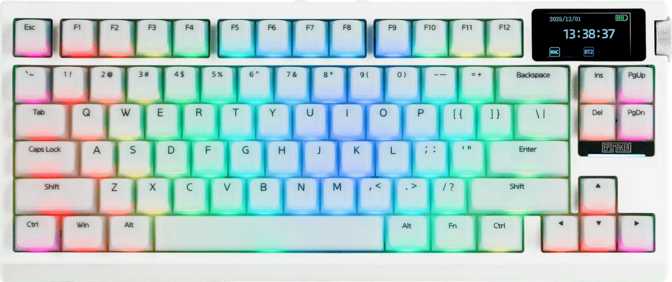
Epomaker G84 Pro Review: A Wireless 75% That Refuses to Compromise
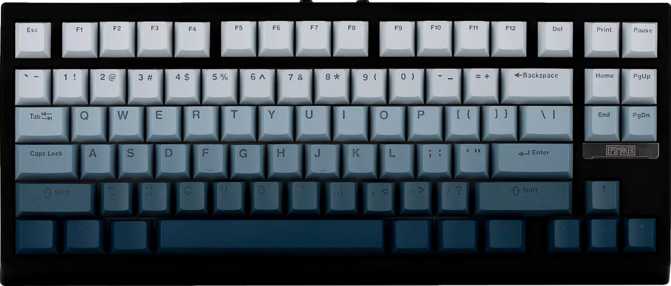
KeyboardsThe Epomaker G84 Pro is a tri-mode wireless mechanical keyboard in a compact 75% layout, built around a gasket mount, hot-swappable linear switches, and full QMK/VIA firmware support. It targets enthusiasts who refuse to choose between customization and wireless convenience.
Quick Scores
Design and Build Quality
Form factor, footprint, materials, and physical experience
Form Factor and Physical Footprint
At 75%, the G84 Pro hits the sweet spot for desk efficiency without sacrificing usability. You keep the function row, arrow keys, and a column of navigation keys on the right — all the keys most users genuinely need day-to-day — while cutting out the numpad and trimming the gaps that bloat a full-size layout.
The result is a board that fits comfortably on smaller desks, leaves room for wide mouse movements, and still feels like a complete keyboard rather than a stripped-down compromise. The physical dimensions — roughly 347mm wide and 147mm deep — make it comparable in footprint to many tenkeyless boards, but noticeably narrower.
The 42mm thickness sits on the taller side for a modern keyboard, which is partly a byproduct of the gasket mount internals and the battery housed inside for wireless operation.
Weight, Materials, and Finish
At 970 grams, the G84 Pro is on the heavier end for a wireless board in this size class. On a fixed desk, this weight works in your favor: the keyboard stays planted. For frequent travel or carrying between locations, it demands a dedicated bag slot rather than tossing it into a backpack as an afterthought.
The case is made from plastic — a practical choice at this price tier that keeps the overall cost manageable. Well-executed plastic does not mean cheap, but buyers expecting the premium heft of aluminum should know upfront that this is not that. Available in black, the G84 Pro has a clean, understated appearance that suits both gaming setups and professional desk environments.
Adjustable feet allow you to change the typing angle, which significantly affects comfort over long sessions. No wrist rest is included, so plan to source one separately if you type for extended periods.
Onboard Display
The G84 Pro includes a small onboard display that sets it apart from most boards at this size. Practically, it surfaces the current connection mode, battery level, or active layer without requiring software or a second glance at your screen. On a multi-mode wireless keyboard, knowing which device you're connected to at a glance removes a common point of frustration.
RGB Backlighting
North-facing RGB LEDs illuminate the keycaps from the back of the switch — the orientation that shines light directly through legends on backlit keycaps. The visual result is brighter, more uniform legend illumination compared to south-facing configurations. For users with shine-through keycaps (stock or aftermarket), north-facing positioning produces the best visual result.
Physical Specifications at a Glance
| Specification | Value | What It Means |
|---|---|---|
| Layout | 75% Compact | Function row + arrows + nav cluster; no numpad |
| Width | 347 mm | Tenkeyless-comparable footprint, narrower gaps |
| Depth | 147 mm | Leaves generous room for wide mouse movement |
| Thickness | 42 mm | Taller than most — accommodates gasket + battery |
| Weight | 970 g | Heavy for wireless; stays planted on desk |
| Case Material | Plastic | Functional and cost-effective; not aluminum |
| Mount Type | Gasket | Flex and dampening built into the structure |
| Feet | Adjustable | Customize typing angle for ergonomic comfort |
Typing Feel: The Epomaker Creamy Jade Switches
Switch characteristics, actuation profile, and the hot-swap advantage
Switch Characteristics
The G84 Pro ships with Epomaker's own Creamy Jade linear switches, and the specs tell a coherent story about what to expect. A 45-gram actuation force sits in the middle of the linear spectrum — lighter than switches that demand deliberate effort, heavier than ultra-light options that cause accidental keypresses during gaming.
For most typists and gamers, 45g is the kind of force that feels effortless after a short adjustment period without feeling unstable. Actuation happens at exactly 2mm into the 4mm total travel. This means every keypress registers at the precise midpoint of the stroke, giving your fingers equal amounts of pre-travel and post-travel.
The result is a predictable, consistent feel that linear fans appreciate: no tactile bump breaking the motion, no audible click drawing attention in shared spaces. Linear switches like these are the preferred choice for gaming because the smooth, uninterrupted keystroke allows for rapid repeated presses. They're equally suited to high-volume typists who find tactile switches fatiguing.
- Switch Type
- Linear (smooth)
- Actuation Force
- 45 grams
- Actuation Point
- 2 mm
- Total Travel
- 4 mm
- Pre-Travel
- 2 mm (50% of total)
- Post-Travel
- 2 mm (50% of total)
- Hot-Swappable
- Yes
- Compatibility
- MX 3-pin & 5-pin
Hot-Swappable Design: Why It Matters
Hot-swap support is one of the G84 Pro's strongest practical features. Switch replacement takes a few minutes with a basic switch puller — the sockets hold switches securely during normal use but release cleanly when you want to swap. This means the keyboard you buy today can become a completely different typing experience next month without purchasing a new board.
No soldering required. Replace all switches in under 30 minutes with a basic puller tool.
Future-proof purchase. Try tactile or clicky switches without buying a new board.
Standard keycap layout means aftermarket sets fit without hunting for irregular sizes.
Connectivity: Tri-Mode Wireless Explained
USB wired, 2.4 GHz wireless, and Bluetooth 5.0 — when to use each
USB Wired
The most reliable option for competitive gaming or any situation where zero latency and zero battery concern matter.
Detachable Cable2.4 GHz Wireless
Low-latency wireless via a USB dongle — suited to gaming or productivity at a fixed desk, with a stable connection and 1000 Hz polling.
Gaming-Grade WirelessBluetooth 5.0
For connecting to laptops, tablets, phones, or any device where a 2.4 GHz dongle isn't practical. Supports multi-device pairing.
Multi-Device PairingMulti-Device Use in Practice
Bluetooth 5.0 supports pairing with multiple devices, making the G84 Pro a genuinely useful keyboard for people who switch between a desktop PC and a laptop, or between a work machine and a personal one. The onboard display helps here — at a glance, you can confirm which device is active before you start typing.
The detachable cable is a practical quality-of-life detail: it reduces the mechanical stress point at the keyboard itself and allows you to replace the cable cheaply if it wears out rather than sending the whole board for service.
Polling Rate and Input Latency
At 1000 Hz, the G84 Pro reports its state to the connected device 1,000 times per second. This is the standard rate for gaming peripherals and means there is effectively no perceptible input delay during normal and competitive use. It is the floor that serious gaming keyboards operate at, and the G84 Pro meets it.
The 2.4 GHz mode at 1000 Hz polling is functionally comparable to wired connections under typical conditions — a meaningful advantage over Bluetooth for gaming use.
Battery Life: A Legitimate Differentiator
How far the G84 Pro's endurance claim holds up in real-world use
The claimed battery endurance of up to 400 hours is the specification that stands out most in this product category. To put that in everyday terms: a user typing for 8 hours a day would, in theory, go roughly 50 days between charges. Even if real-world use reduces that figure significantly — which it will, particularly with RGB lighting active — monthly or longer charging cycles are plausible with modest backlighting settings.
Most wireless keyboards in this category offer battery life measured in days or a few weeks. The 400-hour figure suggests a substantially larger cell and conservative power management, which also contributes to the keyboard's weight.
The RGB Factor
RGB lighting draws power continuously and will shorten battery life considerably. Running with reduced brightness or lighting turned off will preserve far more charge than any other single adjustment. With lighting off, approaching the rated figure becomes realistic.
Epomaker G84 Pro (RGB off)
Up to ~400 hours claimed
Epomaker G84 Pro (RGB on)
Real-world (estimated significant reduction)
Typical Category Competitor
40–100 hours typical
Estimates based on typical usage patterns. RGB brightness, polling mode, and ambient conditions all affect real-world results.
Customization: QMK, VIA, and What They Actually Mean
Firmware depth, key remapping, macros, and the rotary dial
QMK and VIA Support
QMK is open-source firmware that gives you complete control over every key on the board. You can remap any key to any function, create multiple layers, set up macros, adjust lighting behavior, and more. For enthusiasts, QMK support is a mark of a keyboard that takes customization seriously.
VIA is a graphical tool that works on top of QMK, allowing you to make changes through a visual interface in your browser — no programming required. Remapping keys with VIA takes about 30 seconds. This means QMK's full power is accessible to beginners through VIA's approachable interface, and fully accessible to advanced users through QMK's deeper configuration options.
The G84 Pro does not support ZMK, which is primarily relevant for split keyboards and specific open-source wireless builds. Its absence here is not a meaningful limitation for this type of board.
Additional Features
-
Rotary Dial
The rotary dial adds an analog input element — common uses include volume control, scroll behavior, or zoom. It's positioned to be accessible without breaking typing posture, and its presence adds genuine utility rather than being a cosmetic feature.
-
N-Key Rollover (NKRO)
Full NKRO means every key on the board can be pressed simultaneously and registered correctly. This eliminates the ghosting or missed keypress problems that older keyboards exhibit under demanding combinations — relevant for gaming and power users alike.
-
Media Controls
Dedicated media functions are accessible via the Fn layer — no standalone media keys occupy space on the layout. Playback and volume controls remain available through key combinations. Most 75% users adapt to this arrangement quickly.
-
Mac Compatibility
The G84 Pro includes Mac key support, making it usable across macOS and iOS devices. It is not purpose-built around the Apple ecosystem but handles multi-platform switching — including iPad via Bluetooth — without friction.
Who the Epomaker G84 Pro Is For
Real-world usage scenarios, ideal buyers, and honest exclusions
- You want a single keyboard that works across a desktop, laptop, and tablet — without swapping cables.
- You're an enthusiast who values hot-swappable switches and QMK/VIA support but doesn't want to sacrifice wireless for them.
- You do a mix of gaming and productivity and want one board that handles both contexts without compromise.
- You're moving from a larger layout to a more compact footprint and need to retain arrow keys and function row access.
- Battery longevity matters to you, and you're tired of charging your wireless keyboard every few days.
- You need cutting-edge gaming features like rapid trigger, adjustable actuation, or analog input — these are absent, and competing boards have built their identities around them.
- You want an aluminum chassis or premium weight that signals build quality through material — this is a plastic board.
- You need a numpad or prefer a full-size layout for data-heavy work.
- You're on a Mac-first workflow and want macOS-specific optimizations beyond keycap support — the G84 Pro handles Mac use but isn't purpose-built around it.
How the G84 Pro Compares to Its Competition
Competitive positioning across the 75% tri-mode mechanical keyboard segment
| Feature | Epomaker G84 Pro | Budget 75% Wireless | Mid-Range Enthusiast 75% |
|---|---|---|---|
| Connectivity | USB + 2.4 GHz + BT 5.0 | Usually 2 modes | Varies by model |
| Mount Type | Gasket | Tray or top mount | Gasket common |
| Hot-Swap | Yes | Often no | Usually yes |
| QMK / VIA | Both supported | Rarely | Common |
| Battery Life (claimed) | ~400 hours | 40–100 hours typical | Varies widely |
| Onboard Display | Yes | Rarely | Occasional |
| Rapid Trigger | No | No | On some models |
| Case Material | Plastic | Plastic | Plastic or aluminum |
| Rotary Dial | Yes | Uncommon | Common on premium |
The G84 Pro's defining competitive advantages are battery life and the combination of QMK/VIA + hot-swap + full tri-mode wireless in a single package. Its key competitive gap is the absence of rapid trigger, which has become a differentiating feature for keyboards marketed primarily at competitive FPS players.
Honest Assessment: Strengths and Weaknesses
A balanced evaluation — because credibility comes from acknowledging both sides
The G84 Pro makes a genuinely compelling case when assessed as a complete package rather than a single-spec comparison. The gasket mount means the typing feel benefits from some flex and noise dampening that rigid-mount boards cannot replicate. The QMK/VIA combination means long-term owners can adapt the keyboard's behavior to their needs without replacement. The tri-mode wireless with actual 2.4 GHz support — not just Bluetooth — covers both low-latency gaming wireless and multi-device convenience.
Where It Excels
- Gasket mount feel. The internal structure absorbs typing force and reduces noise, giving the board a quality that rigid-frame boards at the same price tier rarely match.
- Genuine tri-mode wireless. The 2.4 GHz mode is not an afterthought — at 1000 Hz, it is a proper gaming wireless implementation alongside flexible Bluetooth multi-device support.
- Battery endurance. The underlying cell capacity means infrequent charging rather than a daily ritual — a comfort feature that compounds over months of ownership.
- Full customization stack. Hot-swap switches, QMK firmware, VIA browser interface — this is an enthusiast feature set rarely bundled with wireless at this price point.
- Onboard display. Practical feedback that removes the guesswork from multi-device switching — a small feature with outsized daily value.
Where It Falls Short
- No rapid trigger or adjustable actuation. Competitive FPS players who prioritize these features will find better-suited options at a similar price. This is a deliberate trade-off, not an oversight.
- Plastic construction. Functional and reasonable for the price, but the material doesn't signal premium in the way aluminum or polycarbonate alternatives do.
- Weight for a wireless board. Nearly a kilogram means "wireless portability" is relative. It travels — but not invisibly.
- One-year warranty. Standard for the category but not exceptional — buyers expecting longer coverage will need to factor this in.
Common Questions Before Buying
Answers to the questions real buyers search for before purchasing
Final Verdict
Epomaker G84 Pro: Recommended
The Epomaker G84 Pro earns its place as a strong all-rounder in the 75% wireless mechanical keyboard segment. It doesn't chase a single feature to the exclusion of everything else — instead, it assembles a specification set that addresses the real-world needs of both enthusiast typists and versatile users who move between devices and contexts throughout the day.
The gasket mount, QMK/VIA support, hot-swappable Creamy Jade linears, genuine 2.4 GHz wireless, and an unusually long battery life make for a package that competes above its apparent weight class. The plastic construction and absence of rapid trigger are honest trade-offs, not failures — and the latter only matters if competitive FPS gaming at the highest level is your primary use case.
Buy this if you want a fully customizable, multi-device wireless board with strong enthusiast credentials and minimal compromises.
Look elsewhere if rapid trigger or premium materials are non-negotiable requirements for your specific needs.
9/10
Typing Feel
8.5/10
Wireless
9/10
Customization
8.7/10
Overall