Epomaker G84 HE Review: Wireless Hall Effect Done Right
KeyboardsFor years, competitive gamers who wanted the most advanced switch technology available had to accept one trade-off: a cable. Hall effect keyboards—boards that use magnets rather than physical contacts to detect keypresses—dominated the performance tier, but they almost universally came tethered to a desk. The Epomaker G84 HE breaks that assumption. It pairs the precision and longevity of magnetic switch technology with full wireless freedom, wraps it in a compact 75% layout, and loads it with features that, until recently, only existed on high-end wired boards. Whether that combination justifies the trade-offs in build material is exactly what this review is here to answer.
- Wireless hall effect keyboard with the full competitive feature set
- Rapid trigger, adjustable actuation, and dual actuation over wireless
- Exceptional battery life—weeks or months between charges
- QMK and VIA open-firmware support in a wireless board
- Plastic case limits the premium build feel
- No wrist rest or rotary dial included
Design and Build Quality
Form Factor and Footprint
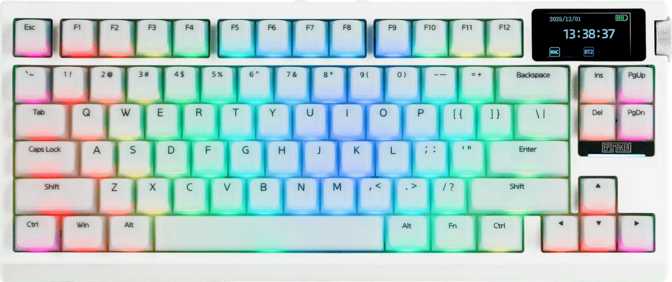
The 75% layout keeps every key a working typist genuinely needs—the full number row, function row, arrow cluster, and a navigation column—while eliminating the numpad that most users rarely touch. Compared to a standard full-size board it reclaims roughly 30% of lateral desk space, letting the mouse sit closer without repositioning the keyboard arm.
Adjustable tilt feet let you dial in the exact typing angle for your wrist position. The keyboard sits at a moderate height—not as flat as ultra-slim designs, but the elevation works naturally with the Cherry-profile keycaps fitted here.
Case Material and Finish
The enclosure is plastic, and that should be stated plainly. There is no cold aluminum chassis, no machined heft to the frame. The G84 HE ships in black only, which keeps it visually neutral on any desk but limits hardware-level personalization options.
At approximately one kilogram, this is heavier than most compact keyboards—the wireless hardware and battery contribute meaningfully to the mass. What plastic offers in return is better vibration absorption than rigid aluminum, working in tandem with the gasket mount system beneath the PCB.
Gasket Mount: The Feel Underneath
The internal PCB is not bolted directly to the case—it rests on silicone gaskets that absorb impact energy on each keypress. The practical effect is a slight give to the typing feel rather than a hard, clacky bottom-out. For typists who spend hours at the keyboard, this construction meaningfully reduces vibration transmitted to the fingertips over a long session. It is the same approach enthusiast-tier boards use for acoustic tuning, included here as a standard feature.
North-Facing RGB Backlighting
The LEDs sit above each switch stem rather than below it. This orientation produces cleaner, more even illumination through the keycap legends with less sideways light bleed. With the PBT Cherry-profile keycaps used here, north-facing lighting looks noticeably more polished—legends glow evenly rather than pooling light around their edges. For users who run RGB regularly, this distinction shows clearly in daily use.
The Switch Technology Explained
Hall effect is a fundamentally different approach to key detection. Understanding how it works makes every other feature on this keyboard make complete sense.
How Magnetic Switches Work
Conventional switches complete an electrical circuit when two physical contacts touch—and that contact point wears with every press. Hall effect switches hold a tiny magnet on the stem; a sensor in the board reads the changing magnetic field as it moves. No physical contact ever occurs, eliminating the primary wear mechanism and allowing the sensor to read stem position as a continuous value rather than a simple on or off signal.
Dusk Rise Magnetic Switches
The installed switches move straight down without a tactile bump or audible click—a linear feel that favors speed over tactile feedback. Actuation force sits at the lighter end of the mechanical spectrum, meaning minimal finger effort registers a keypress. Total travel is shallower than traditional mechanicals by design: less distance to cover means faster activation. The gasket mount adds a cushioned landing that complements the smooth stroke throughout.
Hot-Swap Capability
Every switch pulls free without a soldering iron. If a heavier linear feel suits you better, or you want to experiment with a different hall effect switch brand as the market develops, nothing is permanent. This future-proofing means the G84 HE can receive switch upgrades over its lifetime without requiring a new board purchase.
Performance Features in Depth
Continuous position data from the hall effect sensor enables features that are physically impossible on traditional contact-based switches.
Rapid Trigger
Standard keyboards reset actuation only after a key rises back past a fixed threshold near its original trigger depth. Rapid trigger resets the instant the key begins any upward movement at all—even by a fraction of a millimeter. For games where re-triggering movement keys as quickly as possible determines outcomes, this is the defining hardware advantage available today.
Adjustable Actuation
The trigger depth can be configured anywhere across the full travel range—from an ultra-shallow hair trigger to the deepest point of the stroke. Set gaming keys to minimum depth for maximum speed; configure typing keys deeper to prevent accidental triggers from resting fingers. Per-key adjustment through VIA takes seconds and can be revised at any time.
Dual Actuation
A single key carries two distinct actions at two different press depths. A light press fires one command; pressing further to a deeper zone fires another. Walk and sprint on one key is the clearest gaming application, but productivity macro layers use the same logic—more functions, fewer keys, no hand repositioning required.
8,000 Hz Polling
The board reports its state 8,000 times per second—eight times the standard gaming keyboard rate. Each additional report narrows the gap between a physical keypress and its registration on the computer. For most users this difference is imperceptible; for those optimizing every timing variable at the highest competitive level, this is the current ceiling.
Analog Input
Rather than reading keypresses as on or off, the sensor can expose position data as a continuous variable—similar to how far you push a joystick. In supported games, movement speed can be proportional to press depth. Supported titles are currently limited, but analog key input is a direction keyboard gaming is only beginning to explore.
N-Key Rollover
Every key on the board registers accurately regardless of how many others are held simultaneously—no cap on concurrent inputs. Combined with 8,000 Hz polling, there is no scenario where legitimate input is dropped, missed, or delayed, from the most complex gaming keybind to multi-modifier shortcuts in professional software.
Connectivity and Battery Life
Three Connection Modes
The G84 HE connects three ways: direct USB cable for zero-latency wired use, a 2.4 GHz dongle for near-wired wireless performance, and Bluetooth 5.0 for multi-device flexibility. Bluetooth is particularly useful for pairing with a work laptop, a Mac, or a tablet at the same desk without disrupting the primary gaming machine. Mac-compatible input mapping is confirmed, making this a genuine all-platform option rather than a Windows-only peripheral.
The cable is detachable, extending the hardware's useful life. Cables degrade at the connector over time; when one eventually fails, replacing it costs a few dollars rather than the keyboard itself.
Without RGB lighting active, the G84 HE can sustain weeks or months of typical daily use between charges—among the highest ratings in the wireless mechanical keyboard category. The frustration of discovering a dead keyboard at the start of a session effectively disappears.
Software and Customization
Open-source firmware in a wireless keyboard is genuinely unusual. QMK and VIA support together put the G84 HE ahead of most proprietary wireless boards on customization depth.
QMK Firmware
QMK is open-source firmware that allows complete reprogramming of every key, layer, macro, and behavior at the firmware level. For experienced users it opens tap-hold behaviors, conditional layers, custom key timing, and macro complexity no proprietary software can match. The community is large and actively maintained, meaning support documentation and shared configurations are widely available without any dependency on the manufacturer.
VIA Configuration
VIA provides a real-time graphical interface for layout editing without touching code—drag, drop, and remap in a browser or desktop application. For beginners, basic remapping takes a few minutes with no technical background required. For experienced users it offers the visual ergonomics that raw QMK compilation lacks. The two tools complement each other: VIA for quick daily adjustments, QMK for deep architectural builds.
Analog Input and Epomaker’s Software
Hall effect's continuous position sensing enables analog input configuration beyond what QMK and VIA cover. Settings for rapid trigger sensitivity, dual actuation depths, and per-key thresholds route through Epomaker's companion software alongside VIA. This layered approach—proprietary software for hall effect-specific settings, open firmware for layout and macros—is the current standard architecture for HE keyboards on the market.
ZMK Support Is Not Available
ZMK is open-source firmware built specifically for wireless keyboards. Its absence means the wireless connection runs under Epomaker's proprietary implementation. For the majority of users this is irrelevant. For those building within ZMK-based wireless ecosystems, this is a genuine limitation to factor into the decision.
Keycaps: Substance Over Style
The caps are made from PBT plastic—a harder, denser material than the ABS found on most bundled keycap sets. PBT resists the greasy shine that develops on ABS after months of daily use. The double-shot manufacturing process means key legends are physically molded into each cap rather than printed on the surface: they cannot wear off, fade, or peel. This is the durability standard you want in any keyboard intended for years of daily use.
The keycap shape follows the Cherry specification—one of the most widely used profiles in the enthusiast keyboard world. Cherry-profile caps sit at a moderate height with a slight backward angle toward the typist. Most users find this geometry comfortable across extended sessions: not as flat as budget keycap profiles, not as dramatically sculpted as SA. It occupies a practical middle ground equally suited to typing and gaming.
The ANSI US layout uses standard key sizes with no unusual modifier widths or shifted positioning. This directly determines aftermarket options: the overwhelming majority of replacement keycap sets designed for standard layouts are direct drop-in replacements. Customizing the G84 HE's appearance is as straightforward as keycap shopping gets—no compatibility hunting required.
Who This Keyboard Is Built For
How It Compares to the Competition
The G84 HE sits at the intersection of two markets that rarely overlap: hall effect precision and wireless convenience. Here is how it stacks up against the logical alternatives.
| Feature | Epomaker G84 HE This Review | Wired HE Competitor | Wireless (No HE) |
|---|---|---|---|
| Wireless Connectivity | 3 Modes USB, 2.4 GHz, BT5 | Wired Only | Yes |
| Hall Effect Switches | Yes | Yes | No |
| Rapid Trigger | Yes | High-end models only | No |
| Hot-Swappable | Yes | Varies | Varies |
| QMK / VIA Support | Yes | Varies | Rarely |
| Battery Life | Exceptional 800 hr rated | N/A (wired) | Moderate to Good |
| Case Material | Plastic | Varies (some aluminum) | Plastic / Aluminum |
| Layout Size | 75% | Varies (60%, TKL) | Varies |
An Honest Assessment
Where It Delivers
The G84 HE's genuine strengths are concentrated around its core technology and versatility. The hall effect implementation is not a marketing checkbox—rapid trigger, dual actuation, and analog input change how the keyboard responds at a hardware level, functioning correctly whether gaming or building a complex productivity layout in QMK. The 8,000 Hz polling rate is the current ceiling for keyboard reporting speed.
The battery life is a category standout. Long-endurance wireless combined with high polling rates and a full feature set has been a difficult combination to produce. QMK and VIA support in a wireless board remains unusual enough to be a meaningful differentiator. The gasket mount, PBT double-shot caps, and hot-swap capability together form a feature package that punches above its tier in every area except the chassis material.
Where It Falls Short
The plastic case is the most honest weakness. At this weight and price point, the chassis does not feel inert or premium the way an aluminum board does. It is functional and does not rattle, but picking it up delivers no sense of machined quality. The single colorway compounds this limitation for buyers who care about desk aesthetics at the hardware level.
The one-year warranty is conservative for a keyboard in this performance class—two years is more common at comparable prices among competitors. The lack of a rotary encoder and the absence of a wrist rest are narrower concerns, but they matter to the specific audiences who rely on them. ZMK's absence is irrelevant to most but is a genuine gap for those already invested in that ecosystem.
Score Breakdown
Questions Real Buyers Ask
These are the questions that surface most often when evaluating this specific keyboard category.
For wireless hall effect buyers and multi-device power users
The Epomaker G84 HE answers a specific question that has not had a clean answer for long: what if you want hall effect precision and wireless convenience in the same keyboard, at a reasonable price, with proper open-source firmware support? For competitive gamers on a wired hall effect board who resent the cable, the path here is straightforward. For enthusiasts who assumed hall effect was off-limits in wireless form, that assumption is now wrong. For multi-device professionals wanting one board that handles both gaming and work across different platforms, the combination of Bluetooth, QMK, and magnetic switch technology covers ground that most keyboards split across separate products.
The plastic case is a genuine limitation that should not be softened. But if it does not determine your purchase—if what you want is the best switch technology currently available in a wireless compact board you can customize at the firmware level and live with for years without charge anxiety—the G84 HE makes a strong, credible case for itself.