Epomaker Luma100 Review: Low-Profile Wireless Done Right

Epomaker Luma100 Review: Low-Profile Wireless Done Right

Keyboards

At a Glance

The low-profile mechanical keyboard market has long been a compromise zone. Laptop users want the speed of a slim board without surrendering the tactile satisfaction of a proper mechanical switch. Office workers want something quiet, flat, and desk-friendly that fits in any setting. The Epomaker Luma100 plants its flag squarely in that middle ground — a full-size wireless board with a mechanical heart, a gasket-mounted chassis, and enough connectivity options to serve as your only keyboard across multiple devices. The question is not whether it checks boxes. It is whether the execution matches the ambition.

100% Full-Size Tri-Mode Wireless Gasket Mount Hot-Swappable 130-Hour Battery

Editor's Overall Rating

4.3 / 5

Layout

100% Full

Switch

Low-Profile

Battery

130 hrs


Mount

Gasket

Wireless

3-Mode

Warranty

1 Year

Design and Build Quality

Physical profile, materials, and the experience of living with this keyboard day to day

A Full-Size Board That Does Not Apologize for Its Size

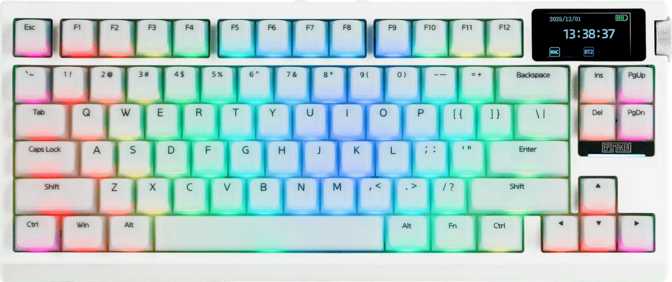
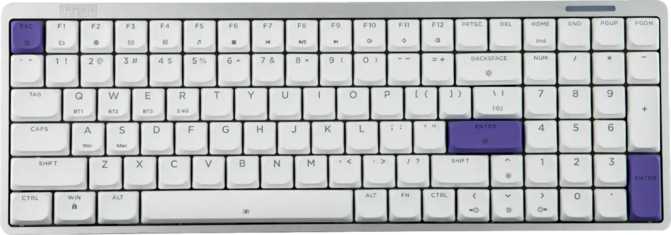
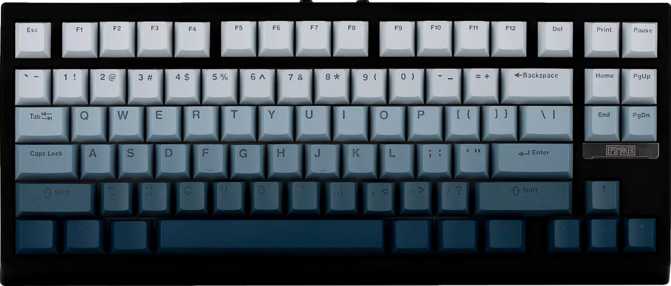
The Luma100 is a 100% layout keyboard, which means every key is present — full number row, dedicated numpad, navigation cluster, function row, the works. For anyone migrating from a compact or tenkeyless board, this is a significant footprint. At 371mm wide, it will claim a real portion of your desk. That is not a flaw — it is a deliberate choice, and one that data-heavy professionals and anyone who lives in spreadsheets will consider non-negotiable.

The physical profile is what distinguishes this board visually. At just 25.5mm thick, it sits considerably flatter than a conventional full-size mechanical keyboard, which typically clears 30–40mm at the rear. Paired with adjustable feet, the Luma100 can be configured for a comfortable typing angle without requiring a palm rest — though none is included in the box.

Materials and Feel in Hand

The case is a combination of plastic and aluminum, and the distinction matters. Aluminum accents give the board a premium visual presence, while the internal plate is full aluminum — a material choice that directly affects acoustic character. Aluminum plates produce a firmer, crisper sound profile with a tighter rebound that many typists associate with precision.

At 620 grams, the Luma100 has enough mass to stay planted during use without being burdensome to move. The board ships in black only — understated, professional, and suited to a wide range of desk setups.

The backlight LEDs are positioned on the north face of each switch. This orientation works well with the stock DSA keycaps. Users considering aftermarket keycaps should verify legend printing direction before purchasing, as south-facing legends may produce subtle shine-through inconsistencies under north-facing illumination.
Physical Specifications

Width
371 mm
Depth
128.5 mm
Thickness
25.5 mm (Low-Profile)
Weight
620 g
Case Material
Plastic + Aluminum
Plate Material
Aluminum
Mount Type
Gasket
Color Options
Black
Adjustable Feet
Yes
Backlight Direction
North-Facing RGB
Wrist Rest Included
No

Switch Performance: The Epomaker Low-Profile Mint

How the switch choice shapes your everyday typing experience

Understanding Low-Profile Switches

Standard mechanical switches have a total travel distance around 4mm. The Mint switches compress that journey to 3.2mm total, with actuation happening at the 1.2mm mark. Your finger barely needs to depress the key before the keystroke registers. For fast typists, this translates to noticeably quicker input cadence once muscle memory adapts. For users coming from laptop keyboards, the travel will feel familiar — but with a cleaner, more definitive press character.

The Mint switches are linear in character — no tactile bump mid-press and no audible click. The keystroke is smooth from top to bottom. The actuation force sits at 50 grams: light enough to type quickly without fatigue during long sessions, but not so feather-light that accidental keypresses become a persistent annoyance. This is a well-balanced specification for a daily driver.

Hot-Swap: The Feature That Future-Proofs Your Investment

The Luma100 supports hot-swappable switches — individual switches pull out and replace without soldering. Swap a single faulty switch in seconds, or change the board's feel entirely by installing a different low-profile switch type over time. For keyboard enthusiasts, hot-swap transforms the Luma100 from a fixed product into a customizable platform. Buyers should verify compatibility before purchasing third-party low-profile switches.

Switch Specification Breakdown

Actuation Point 1.2 mm — Very Early

Registers input with minimal finger travel — ideal for fast typists

Total Key Travel 3.2 mm — Slim

Roughly 20% shorter than standard switches — noticeably slim feel

Actuation Force 50 g — Balanced

Mid-range weight — comfortable for all-day use, not prone to misfires


Switch Name
Epomaker Low-Profile Mint
Character
Linear (Smooth, Silent)
Hot-Swappable
Yes

Connectivity: Three Ways to Connect

Wired, wireless dongle, and Bluetooth — each with a distinct purpose

USB-C Wired

Direct, zero-latency connection via a detachable USB-C cable. If the cable wears out, you replace the cable — not the keyboard. The reliable go-to for desktop use where wireless convenience is not a priority.

2.4 GHz Wireless

The recommended mode for latency-sensitive work. The keyboard reports its state up to 1,000 times per second — fast enough that there is no perceptible gap between keystroke and on-screen response.

1000 Hz Polling Rate

Bluetooth 5.0

Ideal for tablets, phones, smart TVs, and laptops where a wireless dongle is impractical. Slightly higher latency than 2.4 GHz by physics — but for typing and productivity, the difference is not meaningful.

Multi-Device Switching

The Luma100 supports switching between connections to serve different machines. It does not maintain multiple simultaneous active Bluetooth profiles with one-tap switching the way some premium boards do — a consideration if rapid device-switching is central to your workflow.

Mac Compatibility

The Luma100 is explicitly designed with Mac users in mind. The relevant key mappings are present, and the board functions correctly across macOS without remapping workarounds — a meaningful distinction from boards that require manual configuration to handle Command and Option keys properly.

Battery Life: The Number That Changes How You Think About Wireless

At 130 hours per charge, recharging becomes a fortnightly ritual rather than a daily chore

130 hours of battery life per charge is exceptional for a full-size wireless mechanical keyboard. Most wireless keyboards in this category land in the 40–80 hour range. The Luma100's endurance effectively doubles what you might expect from a competing product.

For a user who types eight hours a day, that translates to roughly one charge every two to three weeks. Casual users — those who type three to four hours daily — could reasonably expect an entire month between charges. Recharging stops being something you think about and becomes an occasional background task.

This figure assumes backlight usage is managed. RGB lighting, particularly at high brightness, draws meaningful current. Running the backlight at moderate brightness or disabling it during non-display-critical work will extend the charge cycle further. If wireless endurance is a priority, treating the backlight as an on-demand feature rather than a persistent one is the right approach.

Battery Life Comparison

Epomaker Luma100 130 hrs
Typical Standard-Profile Rival ~60 hrs
Typical Gaming Low-Profile Rival ~45 hrs

Competitor figures represent category norms. Actual runtime varies with backlight use and typing patterns.

Key Features Explained

What the specifications actually mean for your daily use

N-Key Rollover

Every key on the board can be pressed simultaneously and each will register correctly. For typists, this eliminates missed keystrokes during rapid input. For gamers using complex key combinations, no input is dropped regardless of how many keys are held at once.

USB Passthrough Port

Connect a mouse or USB hub directly to the keyboard rather than reaching to the back of your PC. For desktops positioned under the desk or behind a monitor, this quality-of-life feature meaningfully reduces cable management friction during daily use.

Hot-Swap Switches

Pull out and swap individual switches without any soldering. Replace a worn switch in seconds or change the board's entire feel over time by installing a different low-profile switch type. This single feature transforms the Luma100 from a fixed product into a customizable platform.

PBT Double-Shot Keycaps

The legends are formed from a second layer of plastic fused during molding — not printed on top. This means legends will not fade or wear through regardless of how long the board is used. PBT material also resists the greasy, shiny texture that develops on cheaper keycaps with heavy daily use.

Gasket Mount

Most keyboards in this tier use a tray mount, where the plate screws directly into the case bottom. A gasket mount suspends the plate within soft gasket material, absorbing typing impact and softening both acoustic and tactile feedback. The result is a cushioned typing feel that is an unusually premium engineering choice at this price point.

RGB Backlighting

North-facing LEDs illuminate the keycaps, and the DSA profile stock keycaps are well-suited to this orientation. RGB backlighting is fully functional across all three connection modes including wireless — though at sustained high brightness, it meaningfully shortens the time between charges.

Who Is the Epomaker Luma100 For?

Matching the right buyer to the right board

Ideal For

  • Office and productivity professionals

    Work in spreadsheet-heavy environments and need a full numpad, but want a flat wireless board that does not look aggressively "gamer."

  • Multi-device users

    Need a single keyboard to serve a PC and a Mac or tablet, cycling between wired and wireless modes throughout the day.

  • Mac users

    Want a mechanical keyboard without macOS key mapping headaches. Works correctly out of the box with no software workarounds required.

  • Laptop keyboard migrants

    Want a mechanical option with low-profile switch travel that feels closer to the laptop keyboard they are accustomed to.

  • Customization-curious beginners

    Want a hot-swappable board as a starting point for exploring switch types without committing to a soldered configuration.

Not Recommended For

  • Competitive FPS or MOBA gamers

    Rapid trigger, adjustable actuation, and analog input are not supported. Boards from Wooting or the Razer Huntsman line are better positioned for that use case.

  • Open-source firmware enthusiasts

    QMK, ZMK, and VIA are not supported. Deep per-key remapping and macro scripting require working within Epomaker's own software environment.

  • Users who need a wrist rest included

    No wrist rest is bundled in the box. Budget for one separately if your ergonomic setup requires it.

  • Color-conscious desk builders

    The Luma100 ships in black only. If your desk aesthetic demands white, silver, or custom colorways, look elsewhere for now.

  • Rapid multi-device Bluetooth switchers

    Device-switching works, but lacks the instantaneous one-tap multi-profile Bluetooth pairing found on boards from Logitech's MX series or similar premium alternatives.

How It Compares to the Competition

The Luma100 measured against typical alternatives in the same price tier

Feature Epomaker Luma100 Standard-Profile Rival Gaming Low-Profile Rival
Layout Full 100% Full 100% TKL or 75% (common)
Switch Profile Low-Profile Standard Height Low-Profile
Mount Type Gasket Tray / Top (common) Tray (common)
Wireless Modes USB + BT5 + 2.4 GHz USB + BT (common) USB + 2.4 GHz (common)
Battery Life ~130 hours 40–80 hrs (typical) 30–60 hrs (typical)
Hot-Swap Yes Varies Varies
QMK / VIA No Sometimes Rarely
Rapid Trigger No No Sometimes
NKRO Yes Sometimes Yes (common)

Competitor columns represent category norms, not a specific named product.

Honest Assessment

Where the Luma100 genuinely excels — and where it falls short

Category Scores

Build Quality88 / 100

Gasket mount and aluminum plate elevate it well above its price tier

Connectivity90 / 100

Tri-mode coverage handles every realistic use case

Battery Life95 / 100

Category-leading endurance — charges become a fortnightly ritual

Switch Feel80 / 100

Solid linear low-profile choice; hot-swap keeps future options open

Firmware Customization55 / 100

No QMK/VIA — programmability limited to Epomaker's own software

Value Proposition85 / 100

Premium engineering features without demanding a premium budget

In Plain Terms

The Luma100's strongest argument is its engineering coherence. Gasket mounting a low-profile board is a decision that typically appears in keyboards costing significantly more. Pairing that with tri-mode wireless, hot-swappable switches, and a battery rated for weeks of use gives the Luma100 a specification profile that punches well above its visible price tier.

The switch choice is sound. Linear low-profile switches at 50 grams actuation suit the broadest possible audience — not too heavy for prolonged typing, not so light that resting fingers trigger unwanted inputs. The PBT double-shot keycaps in DSA profile are durable and will outlast the keyboard's mechanical lifespan without showing wear.

The limitations are real and specific: no QMK or VIA support constrains power users who want deep programmability. A single color option narrows aesthetic appeal. No wrist rest, no rotary dial, and no display keep the feature set functional rather than flashy. The 1-year warranty is adequate but not generous — some competitors offer 2-year coverage, and that gap is worth acknowledging before purchase.

Standout Strengths

  • Gasket mount at this price tier
  • 130-hour wireless endurance
  • Tri-mode connectivity
  • Hot-swappable low-profile switches
  • PBT double-shot keycap durability
  • Native Mac compatibility

Real Limitations

  • No QMK, ZMK, or VIA support
  • No rapid trigger or adjustable actuation
  • Single color option (black only)
  • No wrist rest included
  • No rotary dial or display
  • 1-year warranty (not generous)

Frequently Asked Questions

The questions real buyers search for before purchasing

Yes. Bluetooth 5.0 connectivity is broadly compatible with iOS, iPadOS, and Android. The Mac-optimized key layout also adapts reasonably well to iOS and iPadOS devices. Bluetooth is the practical connection mode for tablets, as most do not have a USB-A port for the 2.4 GHz dongle.

For maximum responsiveness in latency-sensitive tasks, the 2.4 GHz dongle is the preferred mode. Bluetooth 5.0 is fully sufficient for typing and productivity but introduces slightly higher and less consistent latency. If you travel without the dongle, Bluetooth is a completely functional fallback for all standard use cases.

No. The Luma100 is engineered specifically for low-profile switches. Standard MX-style switches are physically incompatible with both the socket depth and case clearance. If you plan to swap switches, ensure any aftermarket options are specifically designed for low-profile keyboards and verified as compatible with the Luma100's socket type before purchasing.

The layout is standard ANSI, so most DSA keycap sets with standard compatibility will fit. Verify that the set includes the specific modifier sizes present in a 100% layout, particularly for the numpad section, before purchasing. The keycap market offers fewer DSA-profile sets than Cherry-profile alternatives, though the selection has grown steadily.

Yes, the RGB backlight is fully functional in both 2.4 GHz and Bluetooth modes. Running backlighting at full brightness in wireless mode will reduce the charge interval. The lighting can be adjusted or disabled independently of the connection mode — dimming or switching off the backlight during travel is the practical way to extend battery life when wireless endurance matters.

Yes. The Luma100 ships with Mac compatibility built in, and standard Windows use requires no additional configuration. The relevant macOS key mappings — Command, Option, and related modifiers — are present without requiring software workarounds. This is a meaningful distinction from boards that require manual remapping to behave correctly on macOS.

Final Verdict

Who should buy the Epomaker Luma100?

The Epomaker Luma100 is a well-considered full-size low-profile keyboard that delivers genuine premium features — gasket mounting, tri-mode wireless, hot-swappable switches, and exceptional battery life — in a package that does not require an enthusiast-level budget to justify.

Its limitations are specific and honest: no open-source firmware support, no advanced gaming input features, a single color option, and no included wrist rest. If none of those constraints apply to your use case, the Luma100 represents a genuinely strong buy in the low-profile wireless full-size segment. For the typist who wants a flat, wireless full-size board with mechanical feedback and weeks of battery life between charges — this is exactly the keyboard you have been looking for.

Best For

Office professionals, multi-device Mac/PC users, productivity typists

Standout Feature

Gasket mount and 130-hour battery in a low-profile full-size chassis

Main Limitation

No QMK/VIA support; not suited for competitive gaming use cases

4.3 / 5

Recommended

Aisha Nkemdirim Nairobi, Kenya

Tablets & E-Readers Editor

Digital education advocate and mobile productivity writer who reviews tablets, e-readers, and stylus accessories. Evaluates devices from the perspective of students, educators, and creative professionals.

Tablets E-Readers Digital Education Mobile Productivity Stylus Tech
  • MA in Educational Technology
  • Google Certified Educator Level 2
View Full Profile