Elgato Wave Neo Review: A USB Microphone Built for Serious Streamers
MicrophonesThe USB microphone category has never been more crowded. Every major audio and peripherals brand now offers a plug-and-play condenser aimed at creators, and separating genuine quality from marketing gloss requires more than a glance at numbers. The Elgato Wave Neo is positioned squarely at content creators who want broadcast-quality audio without routing their signal through a separate audio interface. It carries the Elgato brand name that streamers trust, and its specifications suggest it has the technical integrity to back that trust up.
A microphone is more than the numbers attached to it. The questions that actually matter are whether it captures your voice the way a listener hears it, whether it lives comfortably on a desk without disrupting your workflow, and whether it justifies its place in a market packed with capable alternatives. This review works through all of that, piece by piece.
24-bit
Professional Audio Depth
48kHz
Broadcast Sample Rate
120dB
Max SPL — No Clipping
Direct
Zero-Latency Monitoring
Design and Build
What It Looks, Feels, and Lives Like on Your Desk
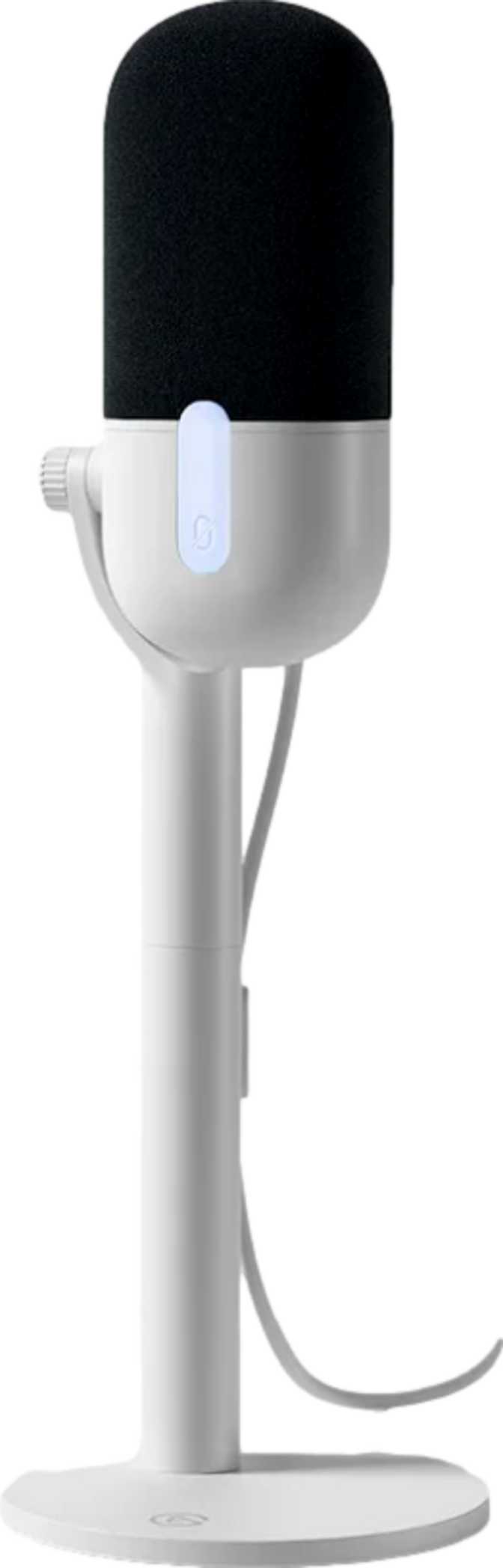
The Wave Neo is a desk-standing condenser microphone with a footprint that is deliberately restrained. It stands 182mm tall — roughly the height of a standard water glass — with a square base measuring 92mm on each side. That combination places it in the space of a large coffee mug, compact enough to sit comfortably alongside a monitor without crowding a typical content creation desk. At 450 grams, it has enough heft to feel planted and purposeful without being awkward to reposition when your setup changes.
The overall volume is just over 1,500 cubic centimeters — genuinely compact for a microphone at this performance tier. Many competing products at similar price points are taller, wider, or simply bulkier. Elgato has kept the Wave Neo tight without hollowing it out.
The Wave Neo reads as a product where the design team had a clear brief and executed it without padding the result. It is not trying to look like a high-end recording studio condenser. It is a streaming desk microphone, and it looks like one — cleanly, confidently.
RGB Lighting
Built into the body. For streamers visible on camera, it adds visual character to a desk setup. For audio-only creators, it has zero impact on performance and can simply be paid no attention. It is an addition, not a compromise forced on anyone.
Pop Filter Included
Bundled in the box. Pop filters intercept the burst of air from plosive consonants before it reaches the capsule, preventing low-frequency thumps in recordings. Having it included removes an accessory purchase that most first-time buyers would otherwise need to make separately.
1.5m Cable
Long enough for most desktop arrangements where the computer sits on the desk surface. Anyone routing cable to a machine stored under a desk or at a distance should verify this measurement against their actual setup before purchasing.
Audio Performance
What the Specifications Actually Mean for Your Recordings
The Wave Neo records at 24-bit depth and a 48kHz sample rate — two figures that together set the ceiling for what this microphone can capture. Understanding what they actually mean in plain terms separates informed buyers from spec-sheet shoppers.
Bit Depth: The Dynamic Range Story
24-bit RecordingBit depth controls how many distinct loudness levels the microphone records between silence and maximum signal. At 24-bit, there are over 16 million possible levels — compared to roughly 65,000 at the 16-bit standard used on audio CDs. In practice, this means far more headroom between quiet moments and loud ones. Subtle vocal character is preserved at low volumes, sudden loud passages hold together cleanly, and recordings respond well to level adjustments in post-production without falling apart.
Sample Rate: The Industry Standard
48kHz Broadcast RateA 48kHz sample rate takes 48,000 audio measurements per second, capturing everything within the human hearing range with headroom to spare. This is the sample rate used across professional video production and broadcast audio — not a marketing number, but a genuine industry alignment. Audio recorded at this rate slots cleanly into any video editing timeline without conversion artifacts, which matters practically for creators whose microphone audio ends up alongside video footage.
Frequency Response
20Hz to 20,000HzThe Wave Neo captures the complete range of human hearing from the lowest bass frequencies to the highest treble. For voice recording, the practically relevant range sits between roughly 80Hz and 8,000Hz — meaning this microphone covers well beyond what is needed on either end. No artificial roll-off or filtering colors the natural character of a voice. Bass warmth, midrange presence, and upper-frequency clarity all reach the recording unfiltered.
Sound Pressure Handling
120dB SPL MaximumThe Wave Neo absorbs up to 120 decibels of sound pressure before the signal begins to distort — roughly equivalent to standing near heavy industrial machinery at close range. For voice work, including the most animated streamers reacting to gameplay, this threshold is effectively impossible to reach in normal use. The short answer for any voice-primary user: you will not clip this microphone by talking into it, regardless of how energetically you speak.
The Cardioid Pickup Pattern
Why Single-Focus Design Serves Most Creators Better
The Wave Neo uses a cardioid pickup pattern, capturing sound primarily from the direction it is pointed while progressively rejecting input from the sides and rear. Think of it as a directional sound funnel — aimed at whatever sits directly in front of it.
This is the pattern that the overwhelming majority of solo content creators actually need, even if they have not consciously chosen it. When you sit in front of the Wave Neo and speak into it, your voice is captured cleanly while keyboard sounds behind the microphone, room reflections from other directions, and ambient environmental noise are significantly reduced. It will not eliminate background noise entirely — no microphone pattern can in an untreated room — but it prioritizes the source it is aimed at over everything else.
The Wave Neo does not offer an omnidirectional mode, a bidirectional mode, or a hyper-cardioid mode. Multi-pattern microphones sell well on the promise of flexibility, but the reality for most buyers is that they select one pattern during setup and never revisit the choice. By committing to a single, well-implemented cardioid pattern, Elgato removes complexity without meaningfully limiting the product for its target audience.
Co-Hosted Recordings: A Real Limitation
Recording two speakers facing each other from the same microphone requires either a bidirectional pattern or two separate microphones. If you co-host a podcast at the same desk, the Wave Neo alone will not cover both voices at a consistent level. Two Wave Neos — one per person — would solve this; a single unit will not.
Onboard Controls and Monitoring
More Than You Might Expect From a USB Microphone
The controls built into the Wave Neo body are more considered than most microphones in this category provide. Together, they make the microphone a self-sufficient recording station — everything needed to manage input and output is reachable from the device itself, without requiring a second application or piece of hardware.
Physical Mute Button
A hardware mute function sounds minor until the exact moment you need it — when a phone rings mid-recording, someone enters the room unexpectedly, or you need a pause between takes. A physical mute is faster and more reliable than switching to software to silence your input, with no risk of accidentally unmuting via a keyboard shortcut.
LED Level Indicator
An LED indicator on the body displays your input level in real time. For first-time users, this removes the guesswork of gain setup — you can see whether you are too quiet, too loud, or in the right range without opening any software. For experienced users, it is genuinely useful during stream prep when you cannot simultaneously watch an audio meter on screen and speak to test levels.
3.5mm Headphone Output
A 3.5mm jack on the body enables direct hardware monitoring — you hear exactly what the microphone captures in real time, before the signal passes through your computer's audio buffer. This eliminates the processing delay that software monitoring introduces. Standard headphones and earbuds connect directly. Studio headphones with a larger connector require an external adapter.
Platform Compatibility
Where It Works, and One Important Absence
Supported Platforms
The Wave Neo connects via USB and is recognized on both Mac and Windows without requiring driver installation. It also supports iOS, making it a practical option for creators who record on an iPad or iPhone using the appropriate adapter for their device's connector.
For desktop and laptop users on Mac or Windows — which describes the majority of content creators — compatibility is a complete non-issue. The plug-and-play USB connection means the operating system handles everything from the moment of connection.
Android Is Not Supported
The Wave Neo is not designed to work with Android phones or tablets. This is not a minor compatibility gap — Android devices represent a significant share of the mobile market. Any creator who primarily records using an Android device will find this microphone will not function in that environment. If Android compatibility is a hard requirement, a different microphone is needed before any other evaluation begins.
Who This Microphone Is For
Real-World Fit: Matching the Product to the Creator
A Strong Fit For
-
Solo streamers and content creators who want clear, professional voice capture without needing audio engineering knowledge to achieve it.
-
Solo podcasters recording at home where a directional pattern reduces background noise and room sound before any post-processing begins.
-
Remote workers and video call users who want noticeably better audio than a webcam microphone or laptop input, without complex setup requirements.
-
iPad and iPhone creators who need a high-quality USB microphone that integrates with Apple's mobile ecosystem.
-
First-time microphone buyers for whom the included pop filter, visual level indicator, and plug-and-play USB connection remove the traditional friction of audio hardware setup.
Consider Another Option If You Are
-
Co-hosting a podcast at the same desk — the cardioid-only design captures one speaker at a time; two people at one desk require two separate microphones.
-
A musician needing a primary recording solution — an XLR condenser through a dedicated audio interface is the appropriate tool for professional multi-source music production.
-
Recording primarily on an Android device — Android compatibility is absent, with no workaround available.
-
Running cable across a longer distance — the 1.5-meter supplied cable suits standard desk setups but will fall short for machines placed under a desk or at a distance.
Competitive Positioning
How the Wave Neo Sits in the Streaming Mic Market
The streaming USB microphone category has converged around a clear baseline. Plug-and-play USB connection, a cardioid pickup pattern, onboard mute controls, and a headphone monitoring output have become expected features at this tier rather than differentiating ones. The Wave Neo meets all of them and adds an LED level indicator — a feature that genuinely aids setup and is absent from many competitors that otherwise match it on paper.
Where the Wave Neo holds a distinct positional advantage is Elgato's Wave Link software ecosystem. Wave Link functions as a software mixing board, allowing independent control of multiple audio sources, virtual channel routing, and stream-optimized audio separation. For creators already using Elgato stream decks or capture cards, the Wave Neo integrates into a single software environment — a practical workflow benefit that does not appear on any hardware specification table but represents real value in daily use.
| Feature | Elgato Wave Neo | Multi-Pattern USB Mics |
|---|---|---|
| Pickup Patterns | Cardioid only — optimized for solo voice | Multiple: omni, bidirectional, cardioid |
| Audio Quality Ceiling | 24-bit / 48kHz | Varies; 24-bit / 48kHz becoming common |
| Visual Level Feedback | LED indicator on body | Often absent at comparable price |
| Software Ecosystem | Wave Link — multi-source mixing, stream routing | Basic companion apps or none |
| Pop Filter Included | Yes — bundled in box | Rarely bundled |
| Android Support | No | Varies by model |
| Two-Person Recording | Not possible with one unit | Possible with bidirectional pattern |
The 24-bit/48kHz specification has become a standard marker for serious USB microphones rather than a premium differentiator. What separates products in practice is capsule quality, analog circuit implementation, and polar pattern accuracy — none of which can be read from a spec table. The Wave Neo's position within the Elgato ecosystem and its clean onboard feature set place it strongly among options that match it on paper alone.
Honest Assessment
Where It Wins and Where It Asks for Compromise
What the Wave Neo Gets Right
-
The 24-bit / 48kHz recording specification is not a cut-corner number. It represents a genuine commitment to audio quality rather than a compromise made to hit a lower price point. These figures are appropriate for any streaming, podcast, or content creation use case a typical creator will encounter.
-
Including a pop filter in the box rather than selling it separately reflects a real understanding of what buyers actually need when they first set a microphone up. This one decision removes a friction point that plagues cheaper microphone packages.
-
The LED level indicator is one of the most underrated inclusions in the package. It makes correct gain setup faster and more accessible, and eliminates the experience of recording an entire session only to discover the levels were wrong throughout.
-
The cardioid-only pattern is a strength, not a compromise, for solo creators. A single, well-optimized polar implementation for the most common real-world use case outperforms a multi-pattern microphone that implements four patterns adequately and none of them exceptionally.
Where It Asks for Compromise
-
The 1.5-meter cable is short. For most standard desktop setups it will be fine, but anyone who stores their computer under a desk or at a distance should verify this measurement against their actual arrangement before purchasing.
-
Android compatibility is absent entirely. This is not an obscure edge case — Android devices represent a significant share of the mobile market, and any creator who records primarily on an Android device needs to know upfront that this microphone will not serve them.
-
The cardioid-only pattern is a genuine limitation for co-hosted or multi-source recording scenarios. This is not a criticism — it is clarity about the product's defined scope. Two Wave Neos solve the two-person problem, but a single unit will not.
-
As a fixed desk object, the Wave Neo occupies real estate and commits you to a specific placement. Buyers planning to use a desk arm or boom mount should verify the mount's weight and dimensional capacity against the microphone's specifications before purchasing.
Common Questions Answered
What Buyers Search for Before Purchasing
USB microphones built to modern standards typically register as audio input devices without requiring driver installation — the operating system recognizes them automatically. Elgato's Wave Link software meaningfully extends the microphone's mixing and routing capabilities but is not required for basic recording. The microphone should function on both Mac and Windows immediately upon connection.
For home demos, voice-over narration, or capturing a single acoustic instrument as a reference recording, the Wave Neo's frequency coverage and dynamic handling are capable. Its high SPL tolerance means acoustic instruments can be recorded without distortion even from energetic playing. For professional music production where preamp character and capsule performance are central, a dedicated XLR condenser through a quality audio interface is the more appropriate choice.
The cardioid pattern significantly reduces sound arriving from behind and beside the microphone. In a home environment with moderate ambient noise — a fan, air conditioning, or distant traffic — the Wave Neo will prioritize a voice positioned directly in front of it over surrounding noise. No microphone pattern is acoustic isolation, but it reduces background prominence relative to your voice when you are positioned correctly.
Monitoring through the 3.5mm output on the microphone body delivers direct hardware monitoring. The headphones receive the raw microphone signal before it passes through the computer's audio processing chain, eliminating the buffer-introduced delay that software monitoring creates. What you hear in your headphones is what the microphone is capturing, in real time.
Any USB microphone recognized as an audio input device by the operating system is selectable within standard streaming software. OBS, Streamlabs, XSplit, and equivalents all draw from the system's audio input list. As long as the Wave Neo is connected and recognized — which on Mac and Windows happens without driver installation — it will appear as an available input.
Yes. iOS compatibility is supported, meaning the Wave Neo can be used with Apple mobile devices using the appropriate USB adapter for the device's port. Android is not supported — this is a firm limitation, not a configuration issue.
Final Verdict
Our Clear, Direct Purchase Recommendation
The Elgato Wave Neo is a USB microphone that makes deliberate decisions for its intended audience rather than trying to be everything to everyone. The 24-bit/48kHz audio specification, zero-latency headphone monitoring, physical mute control, visual level indicator, and included pop filter combine into a package that is genuinely ready to produce professional-quality audio from the moment it is connected.
The cardioid pattern handles the solo creator use case cleanly. The Elgato ecosystem integration via Wave Link is a real workflow benefit for anyone already operating within that environment. The build is compact, purposeful, and appropriate for a desk that also houses a monitor, keyboard, and everything else a content creation setup demands.
Where it asks for clarity: the 1.5-meter cable works for standard desk setups and not much else. Android creators are excluded entirely. Two-person recording requires two microphones. These are real constraints, not minor footnotes — but they define the product's scope rather than undercut its quality within that scope.
Recommended For
Solo Streamers and Podcasters
- Professional 24-bit / 48kHz audio
- Pop filter included in box
- Zero-latency headphone monitoring
- LED level indicator for easy setup
- Plug-and-play on Mac, Windows, iOS
Skip It If
- You record with an Android device
- You need two-person recording