Doogee Tab G6 Pro: A Full Review of the 12-Inch Budget Tablet
TabletsExpert Score & Quick Overview
A budget 12-inch tablet that earns its price with genuine screen size, 90Hz fluidity, and multi-day battery endurance — for a specific kind of buyer.
For the right buyer
Category Scores
Key Specifications
Design & Build Quality
Thin for its class and substantial in the hand — a 12-inch tablet that commits to the format rather than apologising for it.
545g
Comparable to a large hardback novel. Manageable in landscape with two hands, noticeable when held one-handed for extended periods. The weight is the honest price of a 12-inch display.
7.5mm Slim
Genuinely slim for a tablet housing a battery this large. The thinness adds a premium feel that belies the price tier and makes sliding into a bag or sleeve easier than the footprint suggests.
279 × 175mm
Full 12-inch footprint designed for two-hand use, propped viewing, and landscape operation. Doogee built for this reality rather than pretending the size away.
No Water or Dust Resistance
The G6 Pro carries no IP rating of any kind. Keep it away from liquids and avoid wet environments. There is also no branded damage-resistant glass on the screen — a protector is a practical necessity from day one.
The tablet ships without a stylus or detachable keyboard. The listed price covers the core device only — factor in accessory costs separately if you plan a productivity-focused setup.
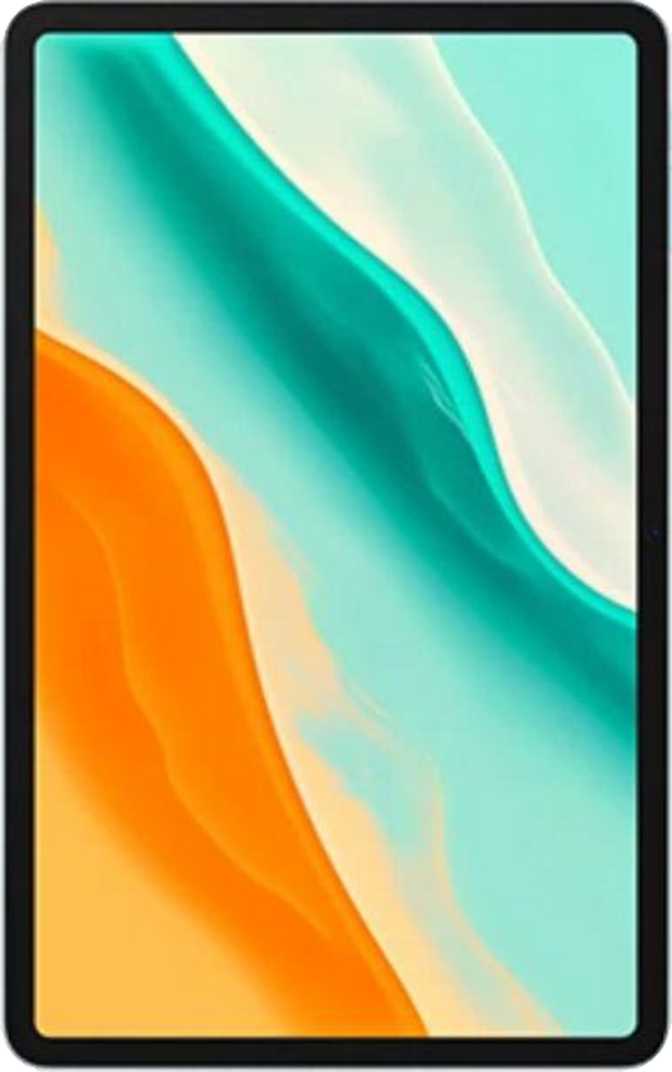
Display: The 12-Inch Main Event
A spacious IPS LCD panel that earns its place — sharp enough for daily use, smooth enough to feel genuinely responsive, honest enough to acknowledge its ceilings.
12″ at 194 PPI
IPS technology delivers wide viewing angles — colours stay consistent whether you're watching alone or sharing the screen. At 194 pixels per inch, text is clean and images are detailed without the grainy softness of cheaper budget panels.
90Hz Smooth
Most budget tablets are locked at 60Hz. The G6 Pro's 90Hz panel makes scrolling, interface navigation, and gaming feel noticeably more fluid — a meaningful real-world upgrade over same-price 10-inch competition that almost universally ships at 60Hz.
1200 × 2000px
Comfortable for reading, video, and browsing — clearly better than entry-level budget panels without reaching the ultra-sharp territory of premium devices. A practical middle ground that serves everyday use well.
Display Limitations to Know Before You Buy
- No HDR support — HDR10, Dolby Vision, and HDR10+ are all absent. Streaming platforms that unlock premium HDR content will not render it as intended on this panel.
- No anti-reflection coating — Glare is a real issue in bright environments. Natural light and lamps behind you will make the screen difficult. Screen positioning matters.
- No damage-resistant glass — A screen protector is a wise investment from the moment the device arrives.
Performance: A Gaming-Grade Chipset in a Budget Chassis
The MediaTek Helio G100 sets this tablet apart — designed for sustained gaming and multimedia, not just passing basic benchmark thresholds.
Understanding the Helio G100
Built on a 6-nanometer manufacturing process, the Helio G100 balances processing capability with thermal efficiency. That translates to a tablet that sustains performance during longer gaming sessions without becoming uncomfortably warm or visibly throttling its output over time.
The processor uses a two-tier architecture: two higher-performance cores at 2.2GHz handle demanding tasks — app launches, active gaming, and multitasking — while six efficiency cores at 2.0GHz manage lighter background workloads. This design keeps the tablet responsive during casual use without draining the battery unnecessarily.
For everyday tasks — browsing, documents, video calls, social media, and streaming — the chipset handles everything without hesitation. Popular mobile games run well at high settings, though the most graphically intensive titles will require adjustments to sustain smooth performance across a longer session.
Processor Specifications
- Chipset
- MediaTek Helio G100
- Process Node
- 6nm
- CPU Config
- 8 cores (2+6)
- CPU Speed
- 2.2 / 2.0GHz
- GPU
- Mali-G57
- GPU Clock
- 1000MHz
- RAM
- 8GB LPDDR4
- RAM Speed
- 4266MHz
- Storage
- 128GB
- Expandable
- microSD slot
Memory & Storage
Eight gigabytes of RAM is genuinely comfortable for modern Android multitasking. A dozen browser tabs, background apps, and active games coexist without the system struggling. Virtual RAM expansion pushes the effective ceiling to 12GB during peak demand — extending capability beyond what the base number suggests.
The microSD card slot removes any anxiety about storage limits. Media collections and game libraries can expand onto an external card — a feature increasingly absent from premium devices that budget tablets still offer.
Android 16
Running Android 16 places the G6 Pro ahead of much of its budget competition on software currency — with the latest privacy controls, split-screen multitasking, Picture-in-Picture, dynamic theming, and up-to-date security architecture all functional out of the box.
Battery & Charging: Endurance Is the Real Story
The battery is large enough that most users will treat daily charging as optional — this is the G6 Pro's strongest individual selling point.
9000mAh
Moderate daily use — streaming, browsing, and light gaming — comfortably reaches two full days between charges. Heavy gaming sessions bring this closer to a single long day, but running dry before bedtime is unlikely under any realistic usage pattern.
18W Fast Charging
Moves the tablet from significantly depleted to fully ready in a practical timeframe — not the fastest charging available, but far from sitting on a cable for hours.
USB-C Connection
Modern, universally compatible charging port. Works with current cables and accessories without adapters.
Battery Health Monitor
System-level battery condition tracking helps you understand long-term capacity degradation — a thoughtful inclusion that aids informed decisions over the device's lifespan.
No Wireless Charging
Cable charging only. Expected at this price point, but worth confirming if wireless charging is part of your established daily routine.
Audio: Better Than Expected at This Price
Stereo speakers and a headphone jack — two features budget tablets often sacrifice. Both are present here.
Stereo Speakers
Two-speaker setups create a real left-right audio stage. Dialogue feels centred, effects have directionality, and the overall listening experience is notably fuller than a single downward-firing speaker in landscape video watching.
3.5mm Headphone Jack
Direct, zero-latency wired audio — ideal for gaming, video calls, and private listening. A feature premium devices have increasingly abandoned that budget-conscious buyers actively look for and appreciate.
Bluetooth 5.2
Stable, efficient wireless pairing for keyboards, headphones, and accessories. Note: premium codecs — aptX, aptX HD, and LDAC — are not supported. High-quality wireless headphones that depend on these codecs will default to standard audio quality.
Cameras: Functional, Not Focal Points
Tablet cameras serve specific purposes — documentation, video calls, and occasional photography. The G6 Pro covers these scenarios without competing with smartphone camera systems.
- Video recording up to 1080p at 30 frames per second
- Touch autofocus and continuous autofocus during video recording
- Manual controls: ISO, white balance, exposure, and focus
- Slow-motion video recording supported
- Built-in HDR photo mode
- No optical image stabilisation — handheld video shows movement
- No optical zoom — digital zoom only degrades image quality
For most tablet users the front camera is the more practically important of the two. The 8MP sensor produces a frame wide enough to include head and upper body in landscape — ideal for video calls propped on a desk.
- Comfortable framing for video conferencing and meetings
- Adequate for casual social video and selfies
- No front-facing LED flash — low-light performance depends entirely on ambient lighting
Camera Verdict: Expect competent results in good light for document scanning, video calls, and casual photography. Cameras are not a reason to buy this tablet — but they won't be a reason to regret it either. Manage expectations in anything other than controlled, well-lit conditions.
Connectivity: 4G LTE with Notable Gaps
Everyday wireless connectivity is handled well — but several features absent here are standard on higher-priced alternatives. Read this section carefully.
4G LTE Cellular
Integrated SIM-based connectivity — connect to mobile data without a phone nearby. Handles streaming, browsing, and cloud work comfortably. A single SIM slot is supported. No 5G.
Wi-Fi 5 (802.11ac)
Compatible with the vast majority of home and office routers. Supports 5GHz connections for faster throughput. Wi-Fi 6 is not supported — this matters mainly in high-density network environments.
Bluetooth 5.2
Stable range and efficient pairing for wireless keyboards, controllers, and headphones. Modern enough to work reliably with current Bluetooth peripherals and accessories.
- No GPS: Location uses network-based triangulation only. Navigation apps work with reduced precision — not suitable for rural driving or hiking.
- No NFC: Contactless payments via Google Pay or tap-to-pay are not available on this device.
- No 5G: Future-proofing consideration for buyers in areas where 5G networks are well established.
- No Fingerprint Scanner: Biometric authentication relies on face recognition — no touch-based unlock option.
- No HDMI Output: Cannot connect to external displays through a dedicated video-out port.
- No Gyroscope or Compass: Limits certain AR applications and precise orientation-based controls.
Software, Productivity & Privacy
Android 16 brings a feature set that extends well beyond raw performance into daily usability, content management, and data protection.
Split-Screen & PiP
Run two apps side by side on the 12-inch display — a use case that feels genuinely useful at this screen size. Picture-in-Picture keeps video active while you work in another app.
Multi-User & Child Lock
Multiple household members maintain separate profiles — their own apps, settings, and files — on one device. Built-in child lock provides practical parental controls.
Privacy Controls
System-level camera and microphone toggles, clipboard activity warnings, app tracking blocks, and granular location permissions are all accessible and active through Android 16's settings.
Offline Voice & Themes
Voice commands function without an internet connection. Dynamic theming, dark mode, and extra-dim display mode offer customisation across different environments and times of day.
Who Should Buy the Doogee Tab G6 Pro?
This tablet solves a specific problem well — understanding whether that problem belongs to you is the key purchase decision.
A Strong Match For
- Media consumers on a budget who want a genuinely large display for streaming, reading, and video without premium brand pricing.
- Students and casual users needing a capable Android device for notes, research, video calls, and document work.
- Families wanting a shared household tablet with multi-user support, child lock, and storage for multiple profiles.
- Travelers and commuters who want 4G LTE connectivity and a battery that doesn't require nightly charging.
- Light gamers who want a large 90Hz screen for popular mobile titles without an enthusiast-level budget.
Not the Right Choice For
- Navigation-dependent users — without GPS, driving directions and hiking apps are not reliable use cases on this tablet.
- Mobile payment users — no NFC means no contactless payment functionality of any kind.
- Premium video enthusiasts — HDR content will not render as intended, limiting the cinematic quality this screen could otherwise deliver.
- Long-term update seekers — future Android versions depend on Doogee's own release schedule, not a guaranteed cadence.
- Wet environment users — zero water resistance makes this a strictly dry-conditions device.
How It Compares to the Alternatives
The G6 Pro holds a specific market position. Understanding where it leads and where it concedes clarifies whether it beats the competition for your use case.
| Feature | Doogee Tab G6 Pro | Typical Budget 10″ Tablet | Typical Mid-Range 12″ Tablet |
|---|---|---|---|
| Display Size | 12 inches | 10 inches | 12 inches |
| Refresh Rate | 90Hz | 60Hz | 60–90Hz |
| Chipset Tier | Gaming-grade (Helio G100) | Entry-level | Mid-range |
| RAM | 8GB + virtual expansion | 3–4GB | 6–8GB |
| Battery | Very large (9000mAh) | Moderate | Large |
| Cellular | 4G LTE | Often Wi-Fi only | 4G LTE |
| 5G | No | No | Sometimes |
| GPS | No | Often yes | Usually yes |
| NFC | No | Sometimes | Often yes |
| HDR Display | No | No | Sometimes |
| OS Update Path | Manufacturer schedule | Manufacturer schedule | Brand-dependent |
Comparison reflects typical category specifications. Individual products vary. The G6 Pro leads on screen size and chipset among budget options; it concedes on sensors and HDR compared to better-resourced competitors.
Honest Assessment: Strengths & Limitations
No catastrophic failures — just deliberate trade-offs made in favour of screen size and chipset performance at the cost of sensor completeness.
The 12-inch 90Hz display is a legitimate differentiator at this price — not a cost-reduced panel straining to overachieve, but a genuinely smooth and spacious screen that changes how you interact with content daily. On a same-price 10-inch tablet, you feel that size difference immediately.
The Helio G100 provides real gaming headroom rather than the barely-adequate performance common to budget devices. App launches are fast, multitasking is comfortable, and the thermal management means sustained performance holds up over a gaming session.
Battery capacity is the G6 Pro's headline strength. Treating daily charging as optional is a meaningful quality-of-life improvement for anyone accustomed to reaching for a cable every evening.
Stereo speakers, a headphone jack, and Android 16 out of the box are each individually common in premium tablets but collectively rare at this price — and their combined presence here earns the device credit it deserves.
The GPS omission is the most significant functional gap — it genuinely removes a use case rather than just reducing quality. No software workaround fully compensates. If navigation is part of your daily routine, this is a dealbreaker, not an inconvenience.
The lack of HDR certification and anti-reflection glass are noticeable when conditions aren't ideal. Sunlit rooms and late-night streaming sessions both expose these limitations in ways that a better-specified display wouldn't.
No NFC removes a convenience that has become standard across mid-range and many budget devices. Combined with the GPS absence, two fairly modern features are simply not present — something to weigh carefully against the screen and battery advantages.
Long-term software support rests on Doogee's own schedule. That's a variable budget-brand buyers always manage, but it's worth factoring into a two-to-three-year ownership horizon.
Buyer Questions Answered
The questions real buyers search for before committing to this tablet — answered directly.
Final Verdict
A Confident Buy — For the Right Buyer
The Doogee Tab G6 Pro delivers a genuinely compelling package for a narrow but well-defined buyer. A 12-inch 90Hz display with real processing muscle, multi-day battery life, stereo speakers, a headphone jack, and Android 16 — all at a budget price — is a combination that outperforms what its price tag suggests should be possible.
The decision against it is equally clear: if you rely on GPS for navigation, use NFC for contactless payments, or prioritise HDR-quality video and guaranteed long-term software updates, the G6 Pro's gaps will frustrate you in ways that no screen size advantage can compensate for.
Buy it knowing exactly what it offers and what it skips. For buyers whose priorities align with its genuine strengths, this is one of the more honest value propositions in the budget 12-inch tablet category.
Buy if you want
- A 12-inch display at a genuine budget price
- 90Hz smooth scrolling and gaming performance
- Multi-day battery endurance without daily charging
- A gaming-capable chipset that sustains performance
- Stereo speakers and wired headphone connectivity
Skip if you need
- GPS satellite navigation for driving or hiking
- NFC for contactless payments
- HDR-certified display quality for premium video
- 5G connectivity for future-proofing
- Guaranteed long-term OS software updates