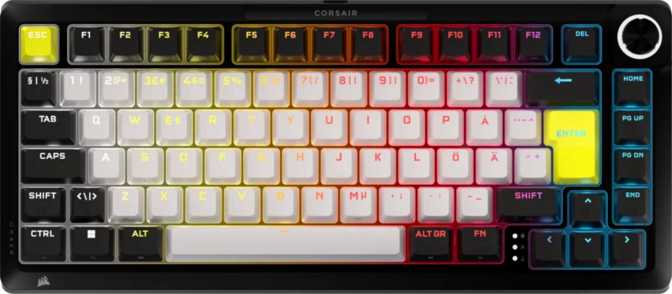
Corsair Makr Pro 75 Review: Hall Effect 75% Gaming Keyboard Tested
KeyboardsThe 75% keyboard layout is a careful calculation. Shrink the board enough to reclaim desk space and let the mouse breathe, but keep the arrow cluster and function row that competitive gaming and daily productivity actually demand. What usually gets sacrificed in that trade-off is performance depth — you get a smaller board, but the wireless connectivity is average, the switches are standard, and the firmware is basic. The Corsair Makr Pro 75 is built on the argument that none of those sacrifices are necessary.
With magnetic hall effect switches that register movement at a fraction of a millimeter, wireless transmission speed that rivals — and in some respects surpasses — traditional wired keyboards, and over a week of battery life between charges, this is a 75% board with the feature set of something much more expensive. Whether the execution matches the specification list is what this review works through, point by point.
Key Specifications at a Glance
Design and Build Quality
Physical construction, materials, and what the keyboard actually feels like on a desk
Footprint, Presence, and Physical Reality
The Makr Pro 75 occupies a genuinely compact desk footprint — noticeably shorter than a tenkeyless board and dramatically more space-efficient than any full-size layout. If mouse placement has been a frustration with larger keyboards, this board solves it immediately. The dimensions are right for the format.
Two physical characteristics will distinguish this board from most wireless compact keyboards you have likely handled. First, thickness: this keyboard sits higher off the desk surface than the category average, which affects natural wrist angle and makes a low-profile desk pad or wrist rest more than a luxury. Second, weight: at approximately 1.28 kilograms, this is a heavy keyboard for its size — heavier than a tenkeyless from most brands, and substantially heavier than the wireless compact keyboards it competes with on paper. That weight pays dividends in stability; during aggressive gaming sessions, this board stays put without a mat or tape solution. Whether that trade-off works for you depends on your priorities. If you intend to carry it anywhere regularly, factor the heft into that calculation honestly.
Case, Plate, and Mounting System
The outer shell is plastic, which is not a compromise on a board like this — it is an intentional choice. Plastic cases offer consistent finish quality, effective resonance management, and manufacturing precision at the dimensions this keyboard requires. The board is available in black only, which will disappoint anyone building a light-coloured or non-black desk setup.
The internal plate is FR4, a fiberglass-composite material that the custom keyboard community has long used as a middle-ground option between rigid aluminium and fully-flexible polycarbonate. FR4 provides a firm, supportive base for key presses without the harsh, unforgiving feedback of metal — it absorbs a small but perceptible amount of keystroke energy, which contributes to typing feel in a way that spec sheets cannot fully capture.
The mounting system is gasket-based. Rather than the switch plate bolting rigidly into the keyboard case, a series of compliant silicone gaskets suspend the plate and circuit board as a semi-floating assembly. Keystroke energy travels into that suspension rather than directly through the case to the desk. The result is a softer, quieter bottom-out character and reduced fatigue over long typing sessions. Gasket mounting originated in the custom keyboard space as a premium construction method; finding it in a wireless gaming keyboard at this level is a genuine upgrade, and you feel the difference immediately if you have used a conventional screw-mounted board.
Lighting and LED Placement
RGB backlighting is present and configurable across the full key layout. The LEDs are south-facing — positioned on the lower side of each switch housing. This orientation avoids the interference between the switch housing and keycap stems that north-facing configurations sometimes create, making the board more compatible with a wider range of aftermarket keycap sets. If you plan to swap the stock keycaps eventually, this orientation reduces the likelihood of compatibility surprises. The cable is detachable, which protects both the keyboard and your desk setup and makes cable replacement straightforward if needed.
The MGX Hyperdrive Switch: Why Hall Effect Changes the Equation
Contactless magnetic sensing redefines what a mechanical switch can actually do
No Physical Wear
The switch registers through magnetic field changes, not metal-to-metal contact. There is no surface to oxidize, pit, or degrade through use. The lifespan ceiling is effectively removed — the switch will outlast conventional alternatives by a significant margin.
No Debounce Delay
Contact-based switches require a small filtering delay to prevent electrical chatter from registering as multiple presses. Because there are no contacts to bounce, that filtering is unnecessary. Inputs register the moment they happen, with nothing added in software.
Continuous Position Data
Rather than detecting whether a key is up or down, the sensor knows exactly where the key is at every moment. This continuous analog data is the foundation for rapid trigger, adjustable actuation, dual actuation, and analog input — none of which contact switches can support.
Feel and Physical Characteristics
The MGX Hyperdrive is a linear switch — smooth travel from top to bottom with no tactile bump and no audible click point. The spring weight is on the light end of the spectrum, which means low physical effort is required to actuate keys. This suits speed-focused typists and competitive gamers who prioritise fast, effortless input. Users who prefer a heavier, more deliberate keypress — or who find that very light switches cause accidental presses during casual typing — should note this before purchasing. There is no tactile version of this switch.
Total key travel from the resting position to the hard bottom is standard for a gaming linear. The wide actuation window — configurable anywhere from an almost imperceptibly shallow register to the full key depth — means the physical feel of the switch and the actuation behaviour are independently tunable to suit your preference.
The switches are hot-swappable, meaning they can be pulled and replaced without soldering. One important caveat applies: the hall effect PCB requires hall effect-compatible replacements. Standard Cherry MX-format mechanical switches will not work in this board because they rely on physical contacts that the magnetic sensor-based PCB cannot read. The hotswap capability is real, but the switch ecosystem is narrower than on a conventional PCB.
- Type
- Linear
- Spring Weight
- Light
- Actuation Range
- 0.1 – 4.0 mm
- Total Travel
- 3.6 mm
- Hot-Swappable
- Yes
Connectivity: Three Modes, Zero Compromise
USB, dedicated 2.4 GHz, and Bluetooth — each mode serves a distinct purpose
USB Wired
Direct ConnectionDirect, zero-interference connection with maximum reliability. The ideal mode for competition-day use when eliminating every variable matters, or as a charging method when the battery runs low. The detachable cable means a damaged cable is a simple replacement rather than a keyboard problem.
2.4 GHz Wireless
Performance ModeThe mode this keyboard was designed around for serious use. Unlike Bluetooth, the dedicated 2.4 GHz channel is not affected by congestion in crowded wireless environments. Response time is indistinguishable from wired in any gaming scenario you are likely to encounter. This is not a compromise — it is a genuine wired equivalent.
Bluetooth
Multi-Device FlexibilityPairs with any Bluetooth-enabled device — a second computer, a laptop, a tablet, a smart TV — without occupying a USB port. Response speed is lower than 2.4 GHz, making Bluetooth the right choice for casual typing on a secondary device rather than for competitive gaming.
The 8,000 Hz Polling Rate — What It Actually Means
A keyboard's polling rate determines how many times per second it checks and reports its key state to the computer. The standard for gaming keyboards is a thousand checks per second — fast enough to catch any deliberate human input. The Makr Pro 75 reports at eight times that rate, delivering an update to the system every 0.125 milliseconds.
At this frequency, the system receives eight times the key state data per unit of time compared to a standard gaming keyboard. The practical benefit is most visible in two scenarios: ultra-fast back-to-back inputs where keys are tapped and released in quick succession, and rapid trigger inputs where the system tracks sub-millimeter key movement. More data points per millisecond means more precise detection of directional key changes. For most users this is substantial headroom. For those competing where input data granularity matters, it removes one remaining variable.
Maximum rate applies over 2.4 GHz wireless and USB connections.
Battery Life: Wireless Without the Anxiety
Weeks between charges, not days
The battery in the Makr Pro 75 is sized to support approximately 172 hours of continuous use under typical conditions. For an eight-hour daily user — someone who works and games on this keyboard through a full day — that figure represents more than three weeks between charges. Framed differently: if you use this keyboard heavily every single day, you will plug in the charging cable fewer than ten times in a typical month.
Advanced Input Features: The Technical Edge
Capabilities only possible because hall effect sensors track key position continuously — not available on any contact-based keyboard
Rapid Trigger
Standard keyboards activate at a fixed depth and deactivate only when the key rises back above that same threshold — a minimum travel requirement before the next press can register. Rapid trigger replaces that fixed reset with directional detection: the keyboard registers a key release the moment it detects any upward movement, and a new press the moment it detects downward movement again. The turnaround is limited only by finger speed, not by switch mechanics. In competitive FPS games, this tightens strafing inputs to a degree that contact-based keyboards cannot match.
Adjustable Actuation Points
Every key's actuation depth is individually configurable across the full range — from an almost imperceptibly shallow press at the very top of the stroke to a full, deliberate bottom-out. A practical gaming configuration might set movement keys to respond at the shallowest possible depth for maximum speed while keeping ability keys at a more deliberate depth to prevent accidental triggers. These two behaviours coexist on the same keyboard simultaneously because each key's configuration is independent.
Dual Actuation
A single key can trigger two different actions — one at a shallow press depth, one at full press — on the same keystroke travel. This is real-time differentiation between partial and full press using continuous position data, not a macro. A common gaming application: press a movement key partway and the character walks; press to the bottom and the character sprints. No separate key assignment required, no hand repositioning. This feature is architecturally impossible on contact-based keyboards regardless of price.
Analog Input Support
The same positional sensing that enables rapid trigger can also transmit keystroke depth as a proportional analog value to compatible software. A key pressed to a third of its travel depth sends a different signal than one pressed to full depth, analogous to how a joystick axis varies with tilt. Supported games — primarily driving simulations and certain action titles — can use this for throttle control, steering input, or any variable-output function. It is a niche capability, but for those it serves, it removes the need for a separate analog peripheral.
Full N-Key Rollover
Every key on the board reports independently with no limit on simultaneous inputs. Any combination of keys pressed at the same time will register accurately. For gaming, this means no input is dropped during complex key combinations. For typing, it is equally useful when multiple modifier keys and character keys are held simultaneously. This is a foundational feature on any serious gaming keyboard, and it is present here without restriction.
Keycaps, Layout, and Day-to-Day Ergonomics
PBT double-shot keycaps, a rotary dial, and a standard layout that accommodates aftermarket keycap sets
Keycap Quality
The stock keycaps are made from PBT plastic — a denser, harder material than the ABS found on most gaming keyboards. PBT does not develop the greasy surface shine that ABS accumulates with use; it stays textured and matte over years of daily contact. It also runs slightly cooler to the touch and produces a subtly crisper sound profile compared to the softer noise of ABS keys.
The legends are formed through double-shot moulding: a second layer of plastic injected into the keycap body during manufacture rather than printed on top. Double-shot legends do not fade. Years of heavy use will not affect the visibility of the lettering.
The keycap profile is OEM — a taller, sculpted design with a different angle on each key row that most keyboard users already know without recognising it by name. OEM is the profile of most mainstream office and gaming keyboards. The fit and feel will be immediately familiar to anyone transitioning from a conventional keyboard. Third-party OEM replacement sets are widely available, which matters if you want to personalise the look.
Layout and Practical Controls
The ANSI US layout provides a complete function row, dedicated arrow cluster, and full alphanumeric area — the core compact 75% arrangement. Media functions are accessible through a key combination using the function layer, which becomes second nature within a few days and is the standard approach on any compact keyboard.
The rotary dial is a practical addition that earns its place. Physical volume adjustment through a dial — turn to raise or lower, press to mute — is faster and more reliable in the moment than reaching for keyboard shortcuts, particularly during gaming when precise audio adjustment is a real need. Once you use it regularly, the absence of it on other keyboards becomes obvious.
The layout uses a standard key sizing arrangement across the board, which means third-party keycap sets fit without modification. Some compact keyboards use non-standard right-shift or bottom-row key sizes that make aftermarket keycap shopping frustrating — this board avoids that problem entirely. The keyboard is designed for Windows-based use; Mac users can connect and type, but the labelling and modifier key positions follow Windows conventions.
Who This Keyboard Is For — and Who It Isn't
A specific tool built for specific users — understanding the fit before purchasing matters
Strong Fit
-
Competitive FPS and Multiplayer Gamers
Rapid trigger, per-key adjustable actuation, dual actuation, and the 8,000 Hz wireless connection form a coherent package targeting competitive input performance. These features are not decorative — they are aimed at specific gaming scenarios, and they function as advertised.
-
Multi-Device Wireless Users
Users who want a single keyboard paired to a desktop via 2.4 GHz and a secondary device via Bluetooth will find the seamless mode-switching capability genuinely useful in a shared desk setup.
-
Long-Session Players Who Dislike Daily Charging
With a battery that covers weeks of daily use between charges, wireless is the default state of this keyboard — not a feature you monitor or manage.
-
Buyers Focused on Long-Term Durability
PBT double-shot keycaps from the factory and contactless hall effect switches that have no wear mechanism combine to make this a keyboard that holds up physically over years of heavy use.
Look Elsewhere If
-
You Need Open Firmware
The Makr Pro 75 does not support QMK, VIA, or ZMK. All configuration lives within Corsair's iCUE software. For users who have built workflows around open firmware, or who want low-level programming freedom, this is an absolute limitation with no workaround.
-
You Type Primarily on macOS
The keyboard connects and functions, but there is no Mac-optimised layout and all modifier key labelling follows Windows conventions. Not designed for Mac-first users.
-
Portability Is a Priority
At approximately 1.28 kilograms, this board excels when planted on a fixed desk. Carrying it between locations regularly is physically possible but not comfortable. Wireless travel keyboards exist in this form factor at a fraction of the weight.
-
You Prefer Tactile or Clicky Switches
The MGX Hyperdrive is a linear-only switch, and the board's hall effect PCB requires hall effect-compatible replacements via hotswap. Standard MX-format tactile and clicky switches are not an option on this board.
How It Compares to the Competition
Side-by-side against typical hall effect and premium traditional 75% keyboards at comparable price points
| Feature | Corsair Makr Pro 75 | Typical Hall Effect 75% | Premium Traditional 75% |
|---|---|---|---|
| Switch Technology | Contactless Hall Effect | Hall Effect | Physical Contact |
| Wireless Modes | USB + 2.4GHz + BT | Often wired-only | USB + 2.4GHz typical |
| Polling Rate | 8,000 Hz | 1,000 Hz typical | 1,000–4,000 Hz |
| Battery Life | ~7 Weeks Daily Use | 3–10 days typical | 1–4 weeks typical |
| Rapid Trigger | Yes | Yes | Select models only |
| Dual Actuation | Yes | Rarely | Rarely |
| Analog Input | Yes | Varies | Rarely |
| Open Firmware (QMK/VIA) | No | Some models | Some models |
| Standard Keycap Sizing | Yes | Varies | Varies |
| Keycap Material | PBT Double-Shot | ABS typical | ABS typical |
| Plate Material | FR4 | Aluminium typical | Aluminium typical |
| Mount Type | Gasket | Screw/Tray typical | Screw/Tray typical |
| Wrist Rest Included | No | No | Occasionally |
| Warranty | 1 Year | 1–2 Years | 1–2 Years |
Honest Strengths and Real Weaknesses
What this keyboard does exceptionally well, and where it genuinely falls short
Where It Excels
The performance capabilities of the Makr Pro 75 are genuine and not evenly distributed across all use cases — which is a feature, not a problem, if you understand what it is optimising for. For competitive FPS gaming specifically, the combination of rapid trigger, dual actuation, continuous per-key position sensing, and wireless transmission speed matching wired performance is a capability set that conventional keyboards cannot replicate at any price. These are architectural advantages rooted in the hall effect technology, not firmware tricks.
The battery life is the most immediately practical strength for a wider audience. A board that sustains wireless use for weeks between charges changes daily habits in a meaningful way. Wireless stops feeling like a feature you manage and starts feeling like the natural state of the keyboard.
Build quality beneath the plastic case exceeds what the material choice implies. The FR4 plate and gasket mounting produce a typing character that most gaming keyboards — including more expensive ones with aluminium shells — do not match. The PBT double-shot keycaps set a durability and feel standard that ABS alternatives don't match over time. Gasket mounting at this price point is an inclusion that genuinely matters.
Real Limitations
The absence of QMK and VIA support is a real limitation for a meaningful segment of the enthusiast market. Corsair's iCUE software is a capable configuration platform, but it is a closed system. The inability to reprogram at the firmware level, access community-developed features, or carry configuration outside the software environment is not a trivial omission at a premium price point. For users who have invested in open firmware keyboard workflows, this is a non-starter.
The weight and thickness are measurable departures from what a compact wireless keyboard is expected to feel like in 2024. Both are defensible — weight contributes to stability, and the height may suit certain desk setups — but both differ enough from category norms that prospective buyers should know before committing. The one-year warranty is shorter than premium pricing usually supports, and most direct competitors offer two-year coverage.
The plastic case creates a slight dissonance with the otherwise premium internal specifications. South-facing LEDs are broadly compatible, but users with a specific aftermarket keycap set already in mind should confirm compatibility before purchasing. These are not fatal flaws — they are trade-offs that define who this keyboard is for and who it isn't.
Common Buyer Questions Answered
Answers to what real buyers search for before purchasing the Corsair Makr Pro 75
Final Verdict
Our authoritative recommendation for the Corsair Makr Pro 75
The Corsair Makr Pro 75 is a technically serious gaming keyboard that earns its advanced specification through genuine engineering rather than feature-list padding. The hall effect switches with rapid trigger and dual actuation deliver input precision that the rest of the market cannot structurally match. The wireless performance at 8,000 Hz removes the traditional argument for keeping a cable plugged in during competitive play. The battery life is the most generous in its product category. The internal construction — FR4 plate, gasket mounting, PBT double-shot keycaps — punches above the plastic case material in every observable way.
The limitations are equally clear. The absence of open firmware support is a meaningful exclusion for a portion of the enthusiast market. The weight and thickness depart from compact wireless keyboard expectations. The one-year warranty is below the standard for a premium investment. These are not fatal flaws — they are the trade-offs that define who this keyboard is for and who it isn't.
Buy This If...
- You play competitive FPS games and want every input performance advantage available
- Wireless is your priority and charging every few days would be a friction point
- You connect to multiple devices and want 2.4 GHz performance on your primary machine
- You are comfortable operating within Corsair's iCUE software ecosystem
Look Elsewhere If...
- Open firmware customisation via QMK or VIA is a requirement for your workflow
- You primarily use macOS and need a keyboard designed around that platform
- Portability and travel use are regular requirements — the weight is substantial
- You prefer tactile or clicky switches and want broad MX-ecosystem swap compatibility