Bosgame P4 Ultra Review: An Honest Look at This Compact Mini PC
Mini PCsThe mini PC market has become one of the most competitive corners of consumer computing, and it earns that competition honestly: these machines ask buyers to make real trade-offs, and the brands that win are the ones that choose the right trade-offs for their target customer. The Bosgame P4 Ultra arrives with a configuration that, on first read, looks meaningfully more generous than most of its direct neighbors — particularly in its wireless capabilities, display flexibility, and base memory allocation. Whether the real-world experience justifies that promise depends almost entirely on who is sitting in front of it.
Design and Build: A Desktop That Disappears
Hold the Bosgame P4 Ultra and the first recalibration begins immediately. The machine's footprint — approximately 130 millimeters on each side, standing less than 50 millimeters tall — puts it comfortably in the palm of one hand. The entire enclosure occupies less volume than a standard brick. Set beside a conventional desktop tower or even a small-form-factor case, it reads as a different category of object entirely.
That scale has direct, practical consequences for desk setup. The P4 Ultra disappears behind a monitor on a VESA mount bracket. It slides into an entertainment cabinet shelf without consuming meaningful depth. It fits in a laptop bag for transport between locations. For anyone who has spent years working around a desktop chassis they mostly ignored, the adjustment to this size is genuinely refreshing.
The physical constraints that make the P4 Ultra so compact are also the constraints that define what it permanently cannot do — no room for a discrete graphics card, no expansion slot for additional hardware, no interior space beyond what ships from the factory. Buyers who understand this architectural reality before purchasing will be far better positioned to make the right decision.
Processing Performance: Eight Cores in a Compact Thermal Envelope
The P4 Ultra runs a mobile-class processor — the same chip architecture used in thin-and-light laptops, adapted for compact desktop deployment. That origin carries specific implications for how the machine performs and how it manages heat under sustained loads.
Multi-Core Depth
Eight physical cores handle instruction processing, each capable of managing two concurrent workloads simultaneously — giving the system sixteen parallel threads of processing capacity. For tasks that spread work across multiple cores — video encoding, large file compression, running several resource-intensive applications at once — the P4 Ultra punches above what its compact chassis suggests. A substantial shared cache pool reduces how often the chip must reach out to slower system RAM, keeping throughput high during data-intensive operations.
Burst Performance
The processor's base frequency runs conservatively during idle and light workloads — a deliberate thermal management decision for a machine this small. When a demanding task arrives, individual cores can accelerate to 4.5 GHz for short durations, providing the burst speed that makes application launches, file operations, and responsive UI interactions feel snappy rather than sluggish. Standardized testing reveals approximately ten percent additional performance reserve at the thermal ceiling, suggesting well-tuned power delivery.
Single-Core Responsiveness
Single-core speed — which governs browser responsiveness, the feel of launching applications, and any task that cannot be divided across multiple cores — lands at a solid mid-range level for this processor class. Day-to-day office and productivity use will not reveal it as a bottleneck. It does not match the ceiling of processors designed with full desktop power delivery and larger thermal allowances, but for the target workload it is functionally transparent.
Benchmark Results in Context
Progress levels reflect position relative to competitive category reference points — not absolute performance ceilings. Raw scores are shown alongside each metric.
Graphics: Capable for Productivity, Honest About Gaming
The integrated GPU built into the P4 Ultra uses AMD's Radeon Vega architecture — a design that serves productivity and media workloads competently but requires honest positioning for any buyer with gaming or GPU-intensive intent.
Where the Vega Architecture Performs
Manufactured on a 7-nanometer process — contributing meaningfully to the system's thermal efficiency in such a small chassis — the integrated GPU handles hardware-accelerated video decode for 4K streaming and local media playback without placing load on the CPU. Modern Windows visual rendering, standard productivity interfaces, and general desktop environments all run without issue. DirectX 12 support ensures full compatibility with current software ecosystems, and the shader processor count is appropriately provisioned for these workloads.
Where the Vega Architecture Reaches Its Limit
Light gaming with older titles and modest indie games is feasible at reduced resolution and quality settings — that is the genuine ceiling, and no driver updates or settings adjustments will meaningfully raise it. Modern titles with demanding lighting, physics, or rendering pipelines will not run at acceptable performance levels. Designers, video editors, 3D artists, or anyone relying on GPU acceleration for effects processing will encounter this ceiling quickly. The P4 Ultra is a productivity workstation; it is not a GPU-dependent creative workstation.
External GPU Consideration: The USB-C port may support external GPU enclosures for buyers who want to explore that path, potentially extending graphics capability beyond what the integrated solution provides. Compatibility depends on eGPU enclosure specifications and Bosgame's firmware support. Verify before committing to external GPU hardware — this capability is not officially guaranteed.
Memory and Storage: Right-Sized for the Target Workload
16 GB DDR4 in Dual-Channel Configuration
The P4 Ultra ships with 16 gigabytes of DDR4 memory configured in dual-channel mode. The dual-channel arrangement effectively doubles the memory bandwidth available to both the processor and the integrated GPU compared to a single-module configuration of the same total capacity. For integrated graphics specifically, memory bandwidth has a direct and measurable effect on performance — the dual-channel decision here is the correct call, not an afterthought.
For the primary use cases this machine targets, 16 GB provides a comfortable working margin. Multi-tab browser sessions, video calls, office document work, and light media creation all coexist without the memory pressure that causes performance to degrade. The platform supports expansion up to 64 GB maximum — ceiling capacity well above what most non-server workloads require.
ECC Memory Support: The hardware platform supports Error-Correcting Code memory, which automatically detects and corrects specific categories of memory errors. This feature is standard on workstation and server platforms but genuinely unusual in consumer-grade mini PCs. Confirm firmware activation in Bosgame's documentation before relying on it.
A Full Terabyte of Fast NVMe Storage
Shipping with a full terabyte of NVMe solid-state storage puts the P4 Ultra ahead of many category competitors that require buyers to pay more for storage they consider a baseline. NVMe storage connects directly through the processor's high-speed pathways rather than an older SATA intermediary — the practical result is boot times measured in seconds, application launches that feel immediate, and file operations that track processor speed rather than constraining it.
One terabyte comfortably houses a complete operating system, a full application library, a personal media collection, and a working project archive with room to spare. Professional video production with large raw footage libraries typically relies on network-attached storage regardless of the workstation driving it, so this limitation seldom affects the target buyer.
There is no memory card slot on the P4 Ultra. External storage expansion routes through the USB ports, which provide adequate speed for most supplementary storage scenarios through the high-speed USB-A and USB-C connections included in the port lineup.
Connectivity and I/O: A Port Lineup That Surprises at This Scale
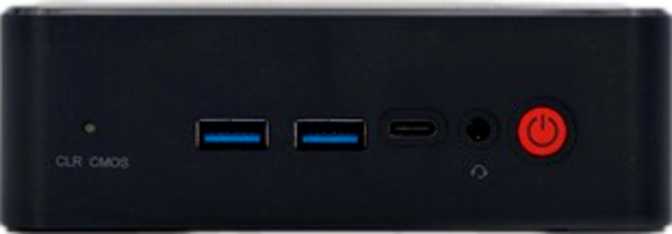
Five USB ports, three independent display outputs, Wi-Fi 6E, wired Ethernet, and Bluetooth 5.2 — the P4 Ultra's connectivity profile is unusually complete for its form factor and price tier.
USB Port Coverage at a Glance
| Port Type | Quantity | Best Used For |
|---|---|---|
| USB 3.2 Gen 2 — USB-A 10 Gbps | 2 | External SSDs, USB hubs, high-bandwidth peripherals |
| USB 3.2 Gen 2 — USB-C 10 Gbps | 1 | Modern accessories, compact docks, current-generation peripherals |
| USB 2.0 — USB-A 480 Mbps | 2 | Keyboards, mice, wireless receivers, low-demand accessories |
| Total USB Ports | 5 | Full desk coverage without an immediate hub requirement |
Triple Display Output
Two DisplayPort outputs and one HDMI 2.1 port support three simultaneous, independent displays. The HDMI implementation supports 4K resolution at high refresh rates without adapter workarounds. Three-monitor support from a machine this physically small is a meaningful selling point for productivity professionals — all achievable with standard cables, no docking station required.
Wi-Fi 6E: The Standout Spec
Wi-Fi 6E adds access to the 6 GHz frequency band — a range that sidesteps the interference accumulated by older bands in dense network environments. In apartment buildings, offices, and neighborhoods where neighboring networks compete for the same spectrum, connections remain stable where Wi-Fi 5 or even congested Wi-Fi 6 bands would degrade. Full backward compatibility ensures reliable operation with any existing router.
Wired Network and Audio
The dedicated wired Ethernet port delivers stable, low-latency connectivity that wireless connections approach but never fully replicate — essential for home server deployments, media streaming, or any setup where wireless reliability is a variable. A 3.5mm audio jack handles standard headphone, speaker, and headset connections. Note: digital optical audio output is absent, which matters for home theater setups routing audio via optical cable to an AV receiver.
Thermal Management and Power Draw
The processor at this machine's core operates within a 15-watt thermal budget — roughly the draw of a bright night light — and this defines several characteristics of the P4 Ultra's real-world behavior that buyers should understand before committing.
During light use — browsing, document work, video playback — the cooling system is nearly inaudible and the machine generates minimal heat. It can comfortably run on a compact power adapter, and leaving it powered continuously costs very little in electricity, which matters for anyone considering it as an always-on server or media device.
Under sustained heavy workloads, the cooling fan becomes audible — remaining background noise rather than a distraction in most environments, but a relevant factor for buyers who require near-silence during intensive computation. In warm environments or tightly enclosed cabinet installations, sustained maximum-effort workloads may trigger thermal management that moderates performance slightly to protect the chip. Keeping the P4 Ultra in open air with reasonable clearance on its vents is sufficient mitigation for typical deployments.
Power at a Glance
Who This Machine Is Built For — and Who Should Look Elsewhere
The P4 Ultra is an excellent machine for the right buyer and genuinely the wrong choice for others. Match your actual use case against these real-world profiles before deciding.
The Right Buyer
All document, browser, communication, and video conferencing workflows run without friction. Multi-application use stays responsive throughout a full workday without the memory pressure that causes slowdowns.
Developers, analysts, content managers, and writers get a fully functional three-screen setup from a unit that disappears behind their primary monitor. Processing and memory allocation serve these workflows well throughout the day.
Low power draw, wired Ethernet, Wi-Fi 6E, and ECC memory support make this a solid foundation for home automation, file sharing, network management, or self-hosted web applications running continuously.
4K playback via HDMI 2.1, a quiet profile during passive viewing, and a form factor that vanishes into any entertainment furniture. A wireless keyboard and trackpad turn it into a capable living room computer.
Web development, API work, scripting, database management, and lightweight containerized environments are well within this machine's capability. Multi-core processing and memory headroom serve typical developer workflows comfortably.
The Wrong Buyer
Even modest gaming expectations meet a hard architectural ceiling with the Radeon Vega integrated GPU. Modern titles will not run at acceptable performance levels, and there is no upgrade path within this chassis — the limitation is permanent.
Video effects pipelines, 3D modeling and rendering, and AI-assisted creative tools require discrete graphics capability that this machine cannot accommodate. The Vega architecture is not suited for these production workloads.
No Thunderbolt port at any generation is present. Workflows built around Thunderbolt docking stations or professional audio interfaces with Thunderbolt requirements need a compatible alternative.
Long video encoding queues, extended batch processing, and large code compilation jobs will encounter this architecture's thermal limits faster than a full desktop platform, with potential performance moderation under extended maximum load.
Competitive Positioning
How the Bosgame P4 Ultra compares to entry-tier and current mid-range mini PC alternatives across the specifications that matter most to informed buyers.
| Category | Bosgame P4 Ultra | Entry-Tier Mini PC | Current Mid-Range Mini PC |
|---|---|---|---|
| CPU Core / Thread Count | 8C / 16T | 4C / 8T | 6C / 12T |
| Peak Single-Core Boost | 4.5 GHz | 3.0–3.5 GHz | 3.8–4.2 GHz |
| Base RAM (Standard Config) | 16 GB DDR4 | 8 GB | 12–16 GB |
| Base Storage | 1 TB NVMe | 256–512 GB | 512 GB |
| Display Outputs | 3 (HDMI 2.1 + 2× DP) | 2 | 2–3 |
| Wi-Fi Standard | Wi-Fi 6E | Wi-Fi 5 | Wi-Fi 6 |
| Integrated GPU Generation | Radeon Vega (aging) | Intel UHD | Iris Xe / RDNA 2 |
The P4 Ultra's out-of-box configuration clearly leads on memory, storage, display outputs, and wireless capability. The one category where more recently released platforms hold a clear advantage is integrated GPU architecture — worth evaluating seriously if any GPU workload is part of your use case.
Honest Assessment: What It Does Well and What It Does Not
Where the P4 Ultra Earns Its Place
The Bosgame P4 Ultra makes several correct decisions. The base configuration is genuinely complete — not a stripped-down entry point that forces immediate upgrades, but a usable productivity machine out of the box. Wi-Fi 6E is a thoughtful inclusion that reflects what a connected professional desk setup actually needs in dense network environments. Triple display support with a current-generation HDMI standard is a meaningful differentiator for multi-monitor users.
The generous base storage allocation avoids the frustration of rapidly filling a drive during normal setup. The processor delivers parallel processing performance that the conservative power rating might cause buyers to underestimate — for multi-core workloads it competes honestly with platforms requiring more power and more desk space.
The dual-channel memory configuration reflects an informed hardware decision that benefits both CPU and GPU workloads directly — precisely the detail that separates a well-designed mini PC from a cost-cut one. The ECC memory hardware support adds meaningful reliability credentials for always-on deployment scenarios, an unusual inclusion at this price point.
Where Honest Limitations Live
The integrated graphics are the machine's defining and permanent limitation. The Radeon Vega architecture is aging in the context of current integrated GPU competition, and it cannot be replaced or upgraded within this chassis. For buyers who will never exercise that limitation — and there are many legitimate productivity users who will not — it is irrelevant to the purchase decision. For buyers who need any meaningful GPU capability beyond standard rendering and video playback, it is determinative.
The absence of Thunderbolt connectivity at any generation narrows the universe of compatible docking stations and professional accessories. Buyers whose desk setup depends on Thunderbolt need to verify USB-C compatibility carefully before purchasing, as the USB-C port operates at a meaningfully lower bandwidth ceiling than Thunderbolt 4 provides.
The one-year warranty period warrants attention. Some competing brands in this segment offer longer coverage periods, and Bosgame's support infrastructure should be evaluated by buyers for whom post-purchase service assurance is a priority.
Common Buyer Questions
Answers to the questions real buyers search for before purchasing the Bosgame P4 Ultra.
Final Verdict
Recommended — With One Critical Condition to EvaluateBuy It If You...
- Need a complete productivity workstation with the smallest possible desk footprint
- Want native three-monitor support without adapters or docking stations
- Operate in a dense wireless environment where Wi-Fi 6E interference resistance matters
- Run a home lab, media center, or always-on server on minimal power draw
- Do general development, scripting, or data work as your primary computing task
Skip It If You...
- Plan to play modern games or rely on GPU-accelerated creative workflows
- Depend on Thunderbolt docking stations or Thunderbolt-specific professional peripherals
- Require sustained heavy computation without performance throttling under extended load
- Want a graphics upgrade path in the future — none exists within this chassis
The Bosgame P4 Ultra earns a confident recommendation for the buyer it is designed around: a productivity-focused professional or home user who wants capable daily-use computing, above-average connectivity including three-monitor support and Wi-Fi 6E, and the ability to reclaim their desk from a machine that had no business taking that much space.
The integrated GPU ceiling is real, permanent, and the single most important factor to evaluate before purchasing. Buyers for whom it does not apply will find the P4 Ultra a well-specified, genuinely capable compact desktop. Buyers for whom it does will be better served by a platform with discrete graphics or a more current integrated GPU design, even if that means accepting a larger footprint or a higher price.