ATK RS6 Ultra Review: Hall Effect 65% Keyboard for Competitive Play
KeyboardsMost gaming keyboards compete on RGB lighting, switch brand recognition, or brand loyalty. The ATK RS6 Ultra is competing on something more fundamental: the physics of how the keypress itself is detected. It uses hall effect switches — a technology borrowed from industrial sensors — that can read the precise position of a key throughout its travel, not just whether the key has been pressed. That distinction sounds technical, but its practical consequences are significant enough to matter to anyone who plays fast-paced games seriously.
The RS6 Ultra is also a 65% compact keyboard layered onto that foundation, which means it pairs gaming performance features with a layout built for desk efficiency. This review works through whether the execution matches the ambition — and who should actually buy it.
Design and Build Quality
What it is made of, how it feels, and what the construction approach means in practice.
Physical Presence and Materials
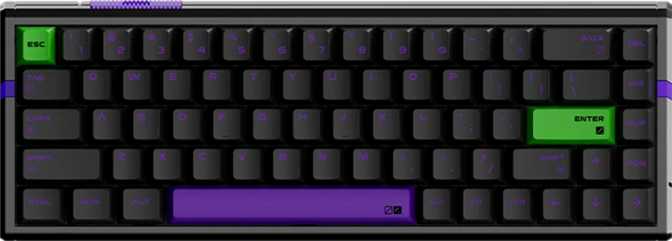
A 65% keyboard is defined by what it removes: the number pad, the dedicated function row, and most of the navigation cluster above the arrow keys. What remains is the full main typing area plus the arrow keys — a layout wide enough to feel complete and small enough to leave meaningful space for large mouse movements.
The RS6 Ultra fills that compact footprint with considerably more mass than typical boards in this category. This is a keyboard that plants itself on a desk rather than sitting on it. You can slam keys hard during an intense game, reach for something and nudge it, and it will not shift. That stability comes directly from the materials: the case combines an aluminum chassis component with plastic paneling, and the internal plate — the structural layer the switches mount on — is full aluminum.
Gasket Mount: What It Actually Means to Type On
Conventional keyboards secure the plate directly to the case — a rigid connection that transmits every impact straight into your fingers and the desk below. The RS6 Ultra uses a gasket mount instead, which suspends the plate assembly inside the case using compressible material at the mounting points. Rather than sending each impact straight down, the board absorbs some of it, creating a subtle flex and rebound.
The easiest comparison is the difference between pressing buttons on a hard surface versus pressing them on a firm but yielding pad. The gasket does not make the keyboard soft or mushy — it makes it feel considered rather than rigid. Combined with an aluminum plate that keeps individual keypresses crisp, the result sits in a middle ground between firm precision and cushioned comfort.
For enthusiasts: gasket mount paired with an aluminum plate is a deliberate combination. The aluminum plate keeps south-facing LEDs in a configuration that avoids the light-bleed interference that north-facing LEDs create when used with Cherry-profile keycap stems. The RGB functions cleanly without any switch modification or workarounds.
Adjustable Tilt Feet
Adjustable feet let you raise the back of the board to find a typing angle that suits your wrist position. No wrist rest is included in the box — for extended typing sessions, a separate wrist rest may be worthwhile.
Per-Key RGB Backlighting
Full per-key RGB with south-facing LED placement ensures clean light distribution through Cherry-profile keycaps without bleed or diffusion artifacts. Four available case colors mean the lighting complements any version of the board.
The Switches: TTC RGB Magneto Hall Effect
Understanding the switch technology is essential — it explains every performance feature that follows.
How Hall Effect Switches Work
A standard mechanical switch works like a light switch. Something physical makes contact at a defined point, completing a circuit, registering the keypress. That contact point is fixed — the key either has or hasn't crossed it. There is no middle state.
Hall effect switches replace the physical contact mechanism with a magnetic sensor. A small magnet on the switch stem passes a sensor as the key is pressed. The sensor reads the strength of the magnetic field passing through it, which changes continuously as the key moves.
At any given moment, the keyboard knows not just whether a key is pressed, but exactly where within its travel range the key is positioned. This is the foundational difference — everything else about the RS6 Ultra's feature set flows from this single change in switch physics.
TTC RGB Magneto: The Specifics
The RS6 Ultra uses TTC RGB Magneto switches — hall effect linears from TTC, a well-regarded manufacturer with an established presence in the keyboard market.
Being linear means these switches move smoothly from top to bottom with no tactile bump and no audible click mid-stroke. The resistance is deliberately light — lighter than most conventional gaming switches. This low threshold enables faster input without fatigue, but typists coming from heavier switches may need a brief adjustment period to avoid unintentional keypresses.
Hot-Swap Support — With a Caveat
Switch sockets are hot-swappable — switches pull out and plug back in without any soldering. If you want to try a different feel, or when TTC releases an updated hall effect switch, you can swap without sending the keyboard for service. One important note: hall effect switch compatibility is more specific than standard MX hot-swap. The sensor geometry and magnet specifications need to align with the board's firmware. TTC's hall effect lineup is the safest starting point — verify compatibility explicitly before purchasing any third-party alternatives.
Performance Features
These features do not exist on contact-based mechanical keyboards — not because manufacturers haven't tried, but because the physics does not allow it.
Rapid Trigger
Conventional switches have a fixed reset point — a gap the key must travel back through before a new press registers. Rapid trigger eliminates that dead zone entirely. A new press registers the instant a key starts moving downward from any position; a release registers the instant it begins moving upward. In tactical shooters, this creates a cleaner connection between intent and on-screen result — movement stops the moment your finger lifts, not after the key travels back through a fixed gap.
Adjustable Actuation
Each key's actuation point can be set independently, anywhere within the switch's full travel range. Set a key to fire near the surface for instant response, or require a deeper press to reduce accidental activation. For gaming, this means per-key optimization: frequently tapped keys can be set shallow, while keys where a misfire is costly can require a more deliberate press. For users who split time between gaming and productivity, a middle-ground setting balances both use cases.
Dual Actuation
Each key can carry two distinct assignments triggered at two different depths within the same keypress. Think of it like a camera shutter: a half-press triggers the first action, pressing through to the bottom triggers the second. This allows movement keys to transition between walking and sprinting on a single key, and reduces how far a hand needs to span during high-pressure moments. Games with variable key input support benefit the most from this feature.
Analog Input
Hall effect switches read a continuously varying position, not a binary state. Analog input exposes that position data to compatible games, allowing a key to behave more like an analog joystick axis than a simple button. In racing games, a partial press gives partial throttle; a full press gives full throttle. For competitive multiplayer titles with binary input systems this feature is less central, but for racing sims and games with variable input support it is a genuine and unusual capability.
8,000 Hz Polling
At the 1,000 Hz standard rate, the maximum delay between a physical keypress and system registration is one millisecond. The RS6 Ultra's polling rate brings that theoretical maximum down to 0.125 milliseconds — eight times more frequent. For most players the practical gap between these rates is narrow, but the value is assurance: if you are assembling a high-performance input chain, the keyboard polling rate is definitively not the bottleneck.
N-Key Rollover
Every key on the RS6 Ultra registers independently regardless of how many others are held simultaneously. No keypress is ever dropped because two others are already held down. This matters in rhythm games, fighting games, and any scenario requiring complex simultaneous input patterns. For standard gaming, it removes a failure mode that cheaper keyboards occasionally exhibit under demanding input loads.
Layout, Keycaps, and Daily Usability
What the 65% layout means day-to-day, and why the keycap choice matters for the long term.
The 65% Layout: What You Gain and Give Up
The 65% layout keeps the full alphanumeric block and the arrow keys, then eliminates the dedicated function row and most of the navigation cluster. The result is a keyboard that fits in a smaller footprint than a tenkeyless board while remaining more practical than a 60%, which removes the arrow keys entirely.
| Factor | Impact |
|---|---|
| Desk Space | More room — directly relevant for large mouse sweeps |
| Arrow Keys | Retained — unlike 60% layouts |
| Aftermarket Keycaps | Standard sizing — full compatibility |
| Function Keys (F1–F12) | Require Fn layer combination |
| Number Pad | Removed entirely — no workaround |
For gaming, the function key trade-off is minor — most game hotkeys sit on the main alphanumeric block. For productivity workflows relying on frequent F-key access, expect a real adjustment period. Most users who make the transition adapt within one to two weeks.
PBT Dye-Sub Keycaps
The keycaps are PBT plastic — denser and harder than the ABS plastic on keyboards at lower price points. PBT resists the gradual shine and surface grease that visibly degrades ABS under regular use. The legends use dye-sublimation: rather than a coating applied on top of the plastic, ink is infused into the material through heat and pressure. There is no surface layer to wear away — the text is part of the keycap itself.
The keycap profile is Cherry — one of the most widely adopted in the market. Virtually every major aftermarket keycap set is designed for it, giving you the broadest possible selection whenever you want to change the look of the board.
Modifier key labeling and layout mapping work natively on both platforms. No remapping or workarounds required.
The cable detaches cleanly — a damaged cable can be replaced without sending the board for service. No wireless option is available on this model.
Who the ATK RS6 Ultra Is For — and Who Should Look Elsewhere
Built For
- Competitive FPS and tactical shooter players — the primary audience. Rapid trigger, adjustable actuation, and 8,000 Hz polling collectively address games where input precision has measurable consequences.
- Players who want the full hall effect feature set — dual actuation, analog input, and configurable actuation depth are all here, not a budget-tier subset.
- Dual-platform Mac and Windows users who game on both without wanting two separate peripherals.
- Desk space-conscious gamers comfortable without dedicated function keys who want maximum mouse room on a fixed desk.
Not Built For
- Keyboard enthusiasts who rely on QMK, ZMK, or VIA — no open firmware support exists. All configuration requires the manufacturer's proprietary software.
- Heavy typists preferring a soft, quiet experience — the aluminum plate produces more firmness and acoustic brightness than some users want for long writing sessions.
- Users who need a number pad — the 65% layout removes it entirely, with no workaround available.
- Users wanting wireless connectivity — this keyboard is wired only. No RF or Bluetooth option exists.
Competitive Positioning
The hall effect keyboard market has matured enough that the RS6 Ultra enters a space with established competitors. Here is how its specification set compares against the category baseline.
| Feature | ATK RS6 Ultra | Category Common Range |
|---|---|---|
| Polling Rate | 8,000 Hz | 1,000 – 4,000 Hz |
| Rapid Trigger | Yes — now category standard | |
| Dual Actuation | Offered by some, not all | |
| Analog Input | Offered by some, not all | |
| Mount Type | Gasket | Varies — top, bottom, gasket |
| Plate Material | Aluminum | Varies — PC, POM, brass, aluminum |
| Keycaps | PBT Dye-Sub | Varies — ABS on some |
| Open Firmware (QMK/VIA) | Offered by select competitors | |
| Mac Support | Frequently PC-only | |
| Hot-Swap | Standard in this tier | |
| Wireless Option | Unavailable on most |
The 8,000 Hz polling rate is among the highest offered on any keyboard in this category. The combination of dual actuation and analog input alongside rapid trigger represents the more complete end of the feature spectrum — some competitors offer rapid trigger alone as the headline feature. The most significant gap is open firmware support, which select competitors provide through open-source ecosystems where users configure and share setups without relying on manufacturer updates. Buyers of the RS6 Ultra commit to the manufacturer's proprietary software for the life of the board.
Strengths and Weaknesses, Honestly Stated
Where It Excels
- Complete hall effect feature set — rapid trigger, dual actuation, analog input, and per-key adjustable actuation in a single board.
- Gasket mount with aluminum plate — premium cushioning paired with precise per-key response.
- 8,000 Hz polling rate puts keyboard latency entirely outside the conversation in any competitive input chain.
- PBT dye-sub keycaps in Cherry profile — durable, visually unchanged years from now, and broadly replaceable.
- Hot-swappable sockets extend the keyboard's useful life without requiring tools or soldering.
- Native Mac and Windows support — no modifier layout compromises for dual-platform users.
Honest Limitations
- No QMK, ZMK, or VIA support — a deliberate product philosophy decision that closes the door on open firmware enthusiasts.
- Conspicuous weight makes it unsuitable for frequent transport to LAN events or multi-location setups.
- Wired-only — no RF or Bluetooth option for anyone prioritizing a cable-free desk.
- One-year warranty sits at the standard minimum — shorter than what some premium competitors offer.
- Hall effect hot-swap has stricter compatibility requirements than standard MX sockets — switch experimentation is more limited.
Questions Real Buyers Ask Before Purchasing
Answers to the questions that come up most often when researching the ATK RS6 Ultra.
Our Recommendation
The ATK RS6 Ultra is a focused product with a clear intended buyer, and it serves that buyer well. For a competitive gamer who wants the complete hall effect feature set — rapid trigger, dual actuation, analog input, and per-key actuation control — in a compact layout with premium construction, this keyboard delivers without cutting corners on the hardware that matters most.
The polling rate is at the high end of what any keyboard offers. The gasket mount with aluminum plate produces a typing experience that matches the price tier. The PBT dye-sub keycaps will look the same in three years as they do today.
The trade-offs are real. The lack of open firmware support is a genuine limitation for enthusiasts who want that flexibility. The weight rules it out for frequent transport. The absence of wireless is absolute. The one-year warranty is something to note when making a long-term investment decision.
For its intended audience — the competitive player who wants every input advantage a keyboard can provide, is comfortable in a proprietary software ecosystem, and works from a fixed desk — the ATK RS6 Ultra is a confident purchase. For buyers whose priorities fall outside that profile, a different keyboard will serve them better, and they should seek it without compromise.