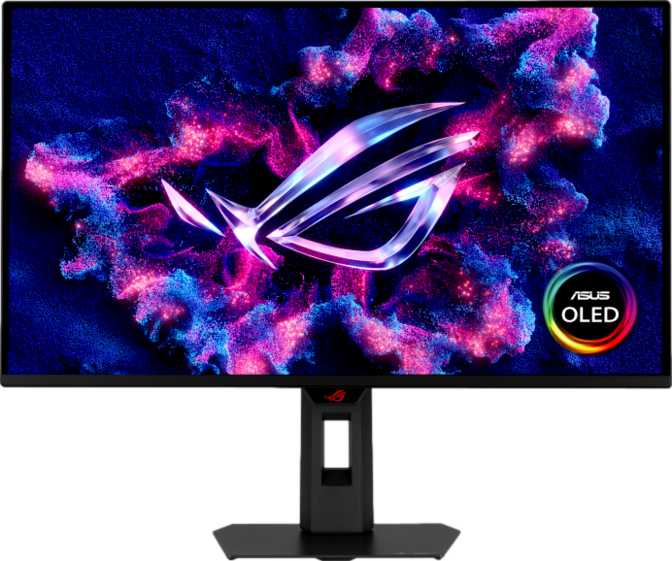
Asus ROG Strix OLED XG27AQDMES: Matte QD-OLED and 240Hz Reviewed
MonitorsThere's a specific moment that happens when you first turn on a QD-OLED display: a game loads, a dark scene fills the screen, and you realize the blacks you've been staring at your entire life weren't actually black. They were dark gray. The Asus ROG Strix OLED XG27AQDMES is built around that moment — and then it delivers 240 times per second.
This is a 27-inch class gaming monitor targeting the enthusiast sweet spot: high enough resolution to look genuinely sharp on a desktop, fast enough to satisfy competitive players, and built around panel technology that most monitors simply cannot match for image quality. But it makes real trade-offs to get there, and knowing what those are is as important as knowing what makes it exceptional.
Expert Ratings at a Glance
Design and Build: Purpose-Built, Not Just Pretty
Physical Presence
At roughly 6.8 kilograms with its stand, the XG27AQDMES plants itself on a desk with authority. The footprint is meaningful, so users with smaller workspaces should measure before purchasing. The weight reflects solid engineering: the stand mechanism holds firm at every adjustment point with no wobble or creep once positioned.
Ergonomics & Flexibility
The stand delivers a genuinely useful range: tilt, swivel, height adjustment, and portrait orientation. Rotating into portrait mode opens up real secondary use cases — vertical code windows, streaming chat feeds, or side-panel productivity work.
VESA compatibility is included for those who prefer a third-party arm. Given the weight, confirm your chosen arm's load rating before committing.
The Matte OLED Surface
Most OLED monitors ship with glossy panels — stunning in a dark room, practically unusable near a window. The XG27AQDMES ships with a matte anti-glare coating on the OLED panel itself, a meaningful engineering decision that most competitors at this tier skip entirely.
You retain core OLED image quality while gaining real-world usability in lit environments. This single feature separates it from most OLED competitors in its class.
Panel Technology: What QD-OLED Actually Means
If you've only used LCD monitors, this section will redefine what you consider a baseline for image quality.
How OLED Differs from LCD
Traditional LCD monitors use a backlight behind a liquid crystal layer. The backlight is always on to some degree — meaning true black is physically impossible. The best LCDs produce very dark gray, never zero light output.
OLED works differently: every pixel generates its own light and can switch itself completely off. When a pixel is black on this display, it is physically off — emitting zero light. This is what produces the 1,500,000:1 contrast ratio. That number reflects something physically real, not a marketing abstraction.
Dark scenes in games look the way the developer intended — not brightened by a backlight that cannot fully shut off.
Quantum Dots and 10-Bit Color
QD-OLED adds a Quantum Dot layer on top of the OLED substrate. Quantum dots are nanoscale semiconductor particles that convert light to extremely precise color wavelengths. The result is a wider color gamut — particularly richer reds and greens — without the oversaturated look that plagued early consumer OLED displays.
This display reproduces over one billion distinct colors at 10-bit depth. An 8-bit display manages roughly 16.7 million. The practical difference shows up most clearly in gradients — skies, skin tones, smoke effects — where 8-bit panels show visible banding and 10-bit panels show smooth, continuous transitions. For gaming this means more realistic atmospheres; for content creators, 10-bit is a professional baseline requirement.
Brightness: The One Honest Limitation
The 200-nit typical brightness figure needs context. OLED panels keep sustained full-panel brightness intentionally low to protect panel longevity — peak brightness on small highlights and HDR content is considerably higher. In a controlled or moderately lit environment, this display looks extraordinary. In direct sunlight or beside an uncovered window, it will struggle, as will every current OLED monitor on the market. The matte coating reduces glare significantly, but cannot overcome the physics of OLED brightness. Anyone upgrading from a high-brightness VA or IPS LCD should factor this shift into their decision.
Performance: Where This Monitor Justifies Its Position
Speed That Exceeds Human Perception
The 0.03-millisecond response time is the fastest category available in consumer displays. Competitive LCD monitors typically achieve 1ms GtG; budget gaming monitors often sit at 4–5ms. The OLED pixel response here is so fast it is, for practical purposes, instantaneous — no trailing smear, no ghosting on fast-moving objects, no compromise during rapid scene transitions.
At 240Hz, the screen redraws 240 times every second — each frame occupies just over 4 milliseconds of screen time. Competitive FPS players and fighting game enthusiasts will feel the difference versus 144Hz or 165Hz displays in sustained fast movement. At this refresh rate, the limiting factor shifts from the monitor to the GPU that supplies frames.
Resolution and Sharpness at 27 Inches
The 2560×1440 resolution at 26.5 inches produces approximately 110 pixels per inch — the sweet spot for desktop-distance viewing at this panel size. Text is sharp without requiring display scaling on Windows, game environments carry meaningful detail over 1080p, and GPU load remains manageable compared to 4K.
At 4K, a monitor this size delivers around 163 PPI — more detail per inch, but demanding dramatically more GPU power to reach high frame rates. At 1440p and 240Hz, a high-end GPU can consistently approach the display's ceiling. At 4K and 240Hz simultaneously, you are waiting for future hardware generations.
Adaptive Sync and Variable Refresh Rate
VESA Adaptive Sync allows the monitor to match its refresh rate dynamically to the GPU's output, eliminating screen tearing without the input lag associated with V-Sync. This works with AMD FreeSync-compatible GPUs and in practice with NVIDIA G-Sync Compatible setups — verify for your specific hardware configuration. Variable refresh rate is standard for a gaming monitor at this level, and it is implemented cleanly here.
Ports and Connectivity
Two HDMI 2.1 ports handle 1440p at 240Hz — or 4K at 144Hz — over a single cable, giving both console and PC connections full-speed without compromise. The dual HDMI 2.1 layout suits users splitting time between a gaming PC and a current-generation console. One DisplayPort 1.4 completes the video inputs with bandwidth to spare at this resolution and refresh rate.
No USB ports of any kind. No hub, no USB-A, no USB-C, no Thunderbolt. A separate USB hub will be needed for monitor-side peripheral connectivity. There are also no built-in speakers — a 3.5mm headphone pass-through jack is the only audio connection provided.
Power Efficiency: An Underrated Advantage
At 25 watts during active use, the XG27AQDMES is notably efficient for its specification tier. This is one of OLED's inherent advantages: pixels that are off draw no power. In gaming — where dark environments represent the majority of screen real estate — the display uses less energy than a comparable high-brightness LCD running its backlight at full intensity.
Standby draw drops to just 0.5 watts — negligible by any measure. For users running the monitor across long daily sessions, lower thermal output also means less heat added to the workspace compared to high-wattage LCD alternatives.
Who This Monitor Is For — and Who Should Look Elsewhere
The Right Buyer
-
Competitive and enthusiast gamers who want speed and image quality without trading one for the other. 240Hz serves the speed requirement; QD-OLED serves image quality. Most monitors force a choice between them.
-
Gamers in controlled or dark environments, where OLED's contrast advantage is most visible and the brightness limitation is least relevant to daily use.
-
PC gamers with a capable high-end GPU that can sustain high frame rates at 1440p. If your card tops out well below 240fps in your primary games, you're paying for headroom you won't reach.
-
Dual-use PC and console setups: Two HDMI 2.1 ports connect both at full speed without a KVM switch or any input compromise.
-
Image-sensitive gamers and creative professionals who need 10-bit color across both gaming and content creation without buying two separate displays.
Who Should Consider Alternatives
-
Users in bright or sunlit rooms: A high-nit IPS panel offers better sustained daytime visibility despite losing OLED's contrast advantage entirely.
-
Anyone who needs monitor-side USB hub functionality. There are zero USB ports on this display — a separate hub is a non-negotiable addition to the budget.
-
Buyers whose GPU cannot sustain high frame rates at 1440p are better served by a 1440p/165Hz monitor until a system upgrade is in place.
-
Professional photo/video editors should verify specific ICC profile support and color accuracy targets are met before committing — calibration support is present, but workflow compatibility must be confirmed.
Competitive Context: How It Stands Against the Field
Understanding how the XG27AQDMES compares to alternatives in the 27-inch 1440p class makes the trade-offs immediately clear.
| Feature | XG27AQDMES | 1440p IPS 240Hz | 1440p VA 165Hz | OLED 1440p Glossy |
|---|---|---|---|---|
| Panel Type | QD-OLED | IPS | VA | OLED |
| Response Time | 0.03ms | ~1ms GtG | ~4ms GtG | 0.03ms |
| Black Level / Contrast | Infinite effective contrast | ~1,000:1 | ~3,000–5,000:1 | Infinite effective contrast |
| Color Depth | 1.07B colors, 10-bit | 16.7M–1.07B, 8–10-bit | Typically 8-bit | 1.07B colors, 10-bit |
| Matte / Anti-Glare | Yes — matte OLED | Usually matte | Usually matte | Usually glossy |
| Bright Room Usability | Good (matte assists) | Excellent | Good | Poor |
| Power Efficiency | High (OLED) | Moderate | Moderate | High (OLED) |
| USB Hub | Not included | Often included | Sometimes included | Varies by model |
Competitor values represent typical specifications across the 27-inch 1440p category. Individual models vary — always verify before purchasing.
Strengths and Limitations: An Honest Assessment
The XG27AQDMES earns its premium position by solving a problem most OLED monitors don't address: making QD-OLED practical for real environments, not just dark rooms. Most matte monitors ask you to accept LCD with its contrast limitations. Most OLED monitors ask you to accept a glossy surface. This display refuses both compromises — which is precisely why it warrants serious consideration from the buyers it's built for.
Where It Excels
-
Matte QD-OLED combination: Genuinely rare at this refresh rate. Most OLED competitors use glossy panels. The matte surface adds practical versatility without surrendering OLED's core image quality advantage.
-
Dual-purpose capability: The 10-bit depth and QD-OLED color volume extend genuinely into creative work — photo editing, video grading, HDR content — in a way standard IPS gaming monitors cannot match.
-
Two HDMI 2.1 ports: Practically designed for modern multi-device setups. Both console and PC users connect at full speed without compromise or a KVM switch.
-
Class-leading motion clarity: At 0.03ms paired with 240Hz, the display imposes no practical limit on motion clarity. The GPU becomes the bottleneck first — the monitor will never be the weak link in the chain.
-
Complete ergonomic range: Tilt, swivel, height adjustment, portrait rotation, and VESA compatibility. This display adapts to your workspace rather than demanding you adapt to it.
Where It Falls Short
-
No USB connectivity whatsoever: No hub, USB-A, USB-C, or Thunderbolt. At this price point this is a genuine omission — competing monitors routinely provide 3–4 USB ports. Budget for a separate hub.
-
OLED brightness ceiling: The physics-based brightness limitation is real and environment-sensitive. In bright rooms the image will look washed out compared to a 400-nit+ IPS. The matte coating mitigates but cannot eliminate this.
-
Substantial weight: At 6.8kg, repositioning takes real effort. Users planning to mount on articulating arms should verify the arm's load rating carefully before purchasing.
-
No speakers, no Picture-in-Picture: Standard omissions at this gaming tier, but first-time monitor buyers expecting multimedia convenience out of the box should plan for a separate audio solution.
Common Questions Before You Buy
Final Verdict
Asus ROG Strix OLED XG27AQDMES — 27-Inch QD-OLED Gaming Monitor
The Asus ROG Strix OLED XG27AQDMES earns its position as a premium gaming monitor by solving a problem most OLED displays don't bother to address: it makes QD-OLED technology practical for real environments, not just dark rooms. The matte panel surface, combined with QD-OLED contrast, 240Hz speed, and 10-bit color volume, creates a display that serves both competitive gaming and creative work without asking you to choose between them.
Its weaknesses — no USB connectivity, the brightness ceiling inherent to OLED physics, and the substantial weight — are real, predictable, and manageable. None of them are surprises for an informed buyer, and none diminish what this monitor does at an exceptional level.
Enthusiast gamers and creative professionals who want QD-OLED image quality at 240Hz without sacrificing usability in real-world lighting conditions.
Bright room setups where sustained high brightness is a priority, or users who depend on monitor-side USB connectivity as part of their daily workflow.