Akko Dash Ultra Review: Full Test of the 40g Wireless Gaming Mouse
MiceWhat the Akko Dash Ultra Gets Right
Ultra-lightweight gaming mice used to mean one thing: a wired connection and a short leash. The Akko Dash Ultra tears up that assumption. At just 40 grams, with a sensor that rivals the best on the market and a tri-mode wireless setup capable of running for nearly two weeks on a single charge, this mouse is a serious proposition for competitive players and productivity users alike. Whether you're building a high-performance gaming setup or looking for a daily driver that won't anchor your wrist, the Dash Ultra deserves a close look — and a few honest caveats.
8.5 / 10
Competitive-grade performance and standout battery endurance at an accessible price point
Complete Specifications
| Akko Dash Ultra — Full Specification Sheet | |
|---|---|
| Performance | |
| Sensor | PixArt PAW3950 |
| DPI Range | 50 – 30,000 DPI (adjustable) |
| Polling Rate | 8,000 Hz |
| Max Tracking Speed | 750 IPS |
| Max Acceleration | 50G |
| Design | |
| Orientation | Ambidextrous |
| Weight | 40g |
| Dimensions (L × W × H) | 117.6 × 60.9 × 37 mm |
| RGB Lighting | No |
| Connectivity | |
| Connection Modes | 2.4GHz Wireless, USB Wired, Bluetooth 5.0 |
| Cable Length | 1.8m |
| Wireless Charging | No |
| Use While Charging | Yes |
| Battery | |
| Battery Life | 220 hours (wireless) |
| Battery Type | Rechargeable, non-removable |
| Buttons | |
| Total Buttons | 6 |
| Side Buttons | 2 |
| Programmable Buttons | 6 (all buttons) |
| DPI Switch Button | Yes |
| Onboard Memory Profiles | None |
| General | |
| Warranty | 1 year |
Design & Build: Ultralight Done Right
Form Factor and Physical Dimensions
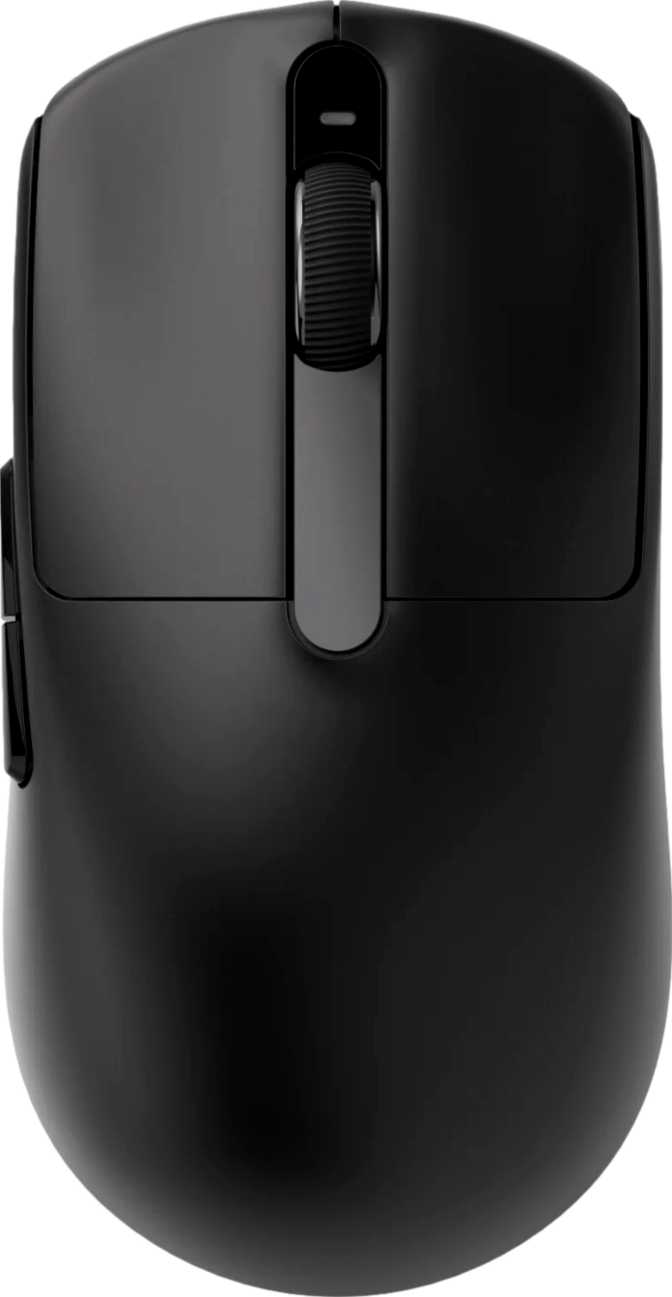
The Akko Dash Ultra is built around an ambidextrous shell — symmetrical on both sides, equally usable whether you're left- or right-handed. At 117.6mm long, 60.9mm wide, and 37mm tall, it sits in a compact-medium footprint that accommodates most grip styles comfortably: claw grip users will find the low profile natural, palm grip users with medium-sized hands should feel at home, and fingertip grip players get exactly the lightweight, low-drag experience they're chasing.
That 37mm height is notably low. Most traditional ergonomic mice sit closer to 42–45mm at their highest point. The Dash Ultra stays flatter, encouraging a more extended finger positioning rather than a deep palm arch. Buyers with large hands who prefer a high-hump palm grip should factor this in before purchasing.
The Weight Advantage
Forty grams is not just a spec — it's a physical experience. The mouse feels almost absent in your hand during extended sessions, which is the entire point. Fatigue accumulates over hours, especially during fast-paced gameplay or long work days. Reducing a mouse's mass cuts strain on the wrist and forearm in a way that sounds subtle on paper but becomes impossible to ignore once you've experienced it. The Dash Ultra lands comfortably in the "ultralight" category alongside the most aggressively weight-optimized mice in the industry.
Finish, Cable, and Aesthetic Choices
There is no RGB lighting on the Akko Dash Ultra. This is a deliberate design decision — removing LEDs trims mass, reduces power consumption, and significantly extends battery life. For competitive players and minimalist desk setups, this reads as a feature. For RGB enthusiasts, it's a firm dealbreaker worth knowing before you commit.
The included USB cable measures 1.8 meters — generous enough to cover virtually any desk configuration without strain. Many users pair this with a lightweight aftermarket paracord cable to reduce surface friction and drag during gameplay.
Connectivity: Three Modes, Zero Compromises
The Akko Dash Ultra supports three distinct connection modes — a 2.4GHz wireless dongle, a direct USB wired connection, and Bluetooth 5.0. Each mode is built for a different scenario, and the mouse handles all three without forcing you to sacrifice performance in one to benefit from another.
The go-to mode for any latency-sensitive work. At 8,000 Hz, the mouse reports its position to your system eight times more frequently than a standard 1,000 Hz gaming mouse. The result is cursor movement that appears perfectly continuous, even during extreme flick movements. This polling rate was once exclusive to wired enthusiast hardware — delivering it wirelessly is the Dash Ultra's most significant technical achievement.
Built for scenarios where a USB dongle is inconvenient — laptop use, multi-device switching, or travel. Version 5.0 offers improved range and connection stability over older iterations. Polling rate in Bluetooth mode is lower by the nature of the protocol — for document work, browsing, and casual use this is entirely adequate, but competitive gaming belongs on the 2.4GHz connection.
The most direct connection possible, and the charging method. Use-while-charging functionality means a depleted battery doesn't force you to stop — plug in and continue without missing a beat. The 1.8m cable provides enough reach that desk mobility isn't meaningfully restricted during a charging session.
Sensor Performance: PixArt PAW3950
The sensor is the heart of any mouse. The PixArt PAW3950 sits at the very top of what's commercially available — PixArt's flagship-tier optical engine — translating physical movement into cursor displacement with exceptional precision and no artificial smoothing or interpolation artifacts.
Speed & Acceleration Handling
The PAW3950 tracks hand movement at up to 750 inches per second — a ceiling so far beyond what human hands can physically generate that the sensor will never be the limiting factor, regardless of how aggressively you play. Even the fastest flick movements in competitive FPS gaming rarely exceed 200–300 IPS. At 50G maximum acceleration, no sudden movement can cause the sensor to lose tracking. Spin-outs and dropout failures common on older-generation sensors simply do not apply here.
DPI Range — From Surgical to Sweeping
Sensitivity runs from 50 DPI at its lowest to 30,000 DPI at its peak. The 50 DPI floor is ideal for sniper players and precision users who need extremely fine cursor control — very few mice go this low. The 30,000 DPI ceiling covers even the most demanding multi-monitor productivity setups. Most users land between 400 and 1,600 DPI in practice, but the full range is continuously adjustable via a dedicated DPI switching button, with no software required for changes.
Battery Life: A Category Leader
Continuous wireless runtime
~27+ days at 8 hrs/day use
On 2.4GHz wireless, the Akko Dash Ultra is rated for 220 hours of continuous use. For a typical user logging eight hours of daily use, that translates to over 27 days on a single charge. Even a heavy 12-hour-a-day user would go nearly three weeks before needing to plug in.
This figure is exceptional by any category standard. Many competing wireless gaming mice offer 70–100 hours; some well-known flagship models sit closer to 60–80 hours at comparable polling rates. The Dash Ultra's combination of no RGB, an efficient sensor circuit, and well-tuned wireless power management produces endurance that removes battery anxiety as a consideration entirely.
The rechargeable battery is internal and non-removable — standard in this category, and the right call for a mouse built around minimum weight. A swappable battery system would add both grams and mechanical complexity.
Real-World Use: Who This Mouse Is For
- Competitive FPS & MOBA playersAn 8,000 Hz wireless polling rate, flagship sensor, and 40g weight combine into exactly what high-level play demands. The ambidextrous shell works well for claw and fingertip grip styles. The absence of RGB and extra weight is an advantage, not a limitation, for this audience.
- Esports-aware productivity usersBluetooth for multi-device flexibility, weeks of wireless endurance, and a minimalist aesthetic that fits professional environments. If you game seriously and work long hours at the same desk, this mouse serves both demands without compromise.
- Travelers and laptop usersBluetooth 5.0 plus a sub-40g body makes the Dash Ultra genuinely portable. The combination of tri-mode wireless flexibility and minimal bulk is a practical, daily-use advantage for anyone who carries a mouse on the road.
- Large-hand palm grip playersAt 37mm tall, the Dash Ultra lacks the hump height that palm grip users with bigger hands rely on for full support over long sessions.
- RGB enthusiastsNo lighting of any kind. If aesthetic integration with an RGB setup matters to you, this mouse is simply not built for that audience.
- Multi-device configuration switchersNo onboard memory means custom button mapping and DPI settings don't follow the mouse to a different computer. Every new machine starts from factory defaults.
- Wireless charging desk usersNo Qi support. Charging requires a cable. Given the 220-hour runtime this is rare, but the workflow difference is real for dedicated wireless charging setups.
How the Akko Dash Ultra Stacks Up Against the Competition
The Dash Ultra brings flagship sensor performance and category-leading battery life while trading away quality-of-life features like onboard profiles, wireless charging, and RGB. Here's how that position translates across the broader category:
| Feature | Akko Dash Ultra | Flagship Competitor | Mid-Range Competitor |
|---|---|---|---|
| Weight | ~40g | ~55–65g | ~70–85g |
| Wireless Polling Rate | 8,000 Hz | 4,000–8,000 Hz | 1,000 Hz |
| Sensor Tier | Flagship (PAW3950) | Flagship | Mid-tier |
| Battery Life | ~220 hrs | ~70–100 hrs | ~60–80 hrs |
| Wireless Charging | No | Often yes | Rarely |
| RGB Lighting | No | Usually yes | Usually yes |
| Onboard Profiles | None | 3–5 | 0–3 |
| Connectivity | 2.4GHz / USB / BT5 | 2.4GHz / USB | 2.4GHz / USB |
Competitor data represents category averages. Individual products vary.
Strengths and Weaknesses: An Honest Assessment
The Akko Dash Ultra's strengths are concentrated and exceptional. The PAW3950 sensor is not a budget compromise — it is a deliberate flagship placement, and the tracking consistency and specification ceiling reflect that. The 8,000 Hz polling rate delivered wirelessly is still genuinely rare in the market, and having it function over 2.4GHz without a tether is a meaningful technical achievement.
The battery life is outstanding. Most users will charge this mouse somewhere between once a month and once every three weeks. That level of wireless freedom changes how you interact with the device — it stops being something you manage and starts being something you simply use.
The 40-gram weight is a legitimate performance advantage for the intended audience. Wrist fatigue decreases and movement recovery shortens — these are real, measurable benefits across extended gaming or work sessions.
The absence of onboard memory profiles is the most practical limitation for real-world versatility. It assumes a single-machine primary use — which doesn't match every buyer's life, especially given that the Bluetooth mode actively invites multi-device use. This tension in the product's design is something some buyers will feel daily.
The one-year warranty period sits on the shorter end for a product at this performance tier. Competing mice from established brands frequently cover two years. For a mouse in daily competitive use, that gap in coverage is worth factoring in.
The no-RGB decision is entirely logical from a weight and battery standpoint, but it removes the Dash Ultra from consideration by a significant portion of the gaming mouse market. The lack of wireless charging matters less given the runtime — but it's a notable absence when competing products increasingly include it as standard.
Common Buyer Questions Answered
Final Verdict
Akko Dash Ultra — Purchase Verdict
The Akko Dash Ultra is built on a clear philosophy: maximize what matters for performance, eliminate what doesn't. The result is a product that outperforms many more expensive alternatives on the metrics that define competitive play — sensor quality, polling rate, and wireless reliability — while delivering battery endurance that puts nearly every other wireless gaming mouse to shame.
The trade-offs are real and specific: no onboard profiles, no RGB, no wireless charging, and a shape that won't suit every hand size or grip style. These are not execution failures — they are deliberate design decisions that define exactly who this mouse is for.
Buy the Akko Dash Ultra if:
You are a competitive or serious gamer who prioritizes raw performance over feature breadth, values ultralight construction, or needs a tri-mode wireless mouse with exceptional endurance. Left-handed players benefit particularly from an ambidextrous flagship-sensor mouse at this price tier.
Pass on the Akko Dash Ultra if:
You rely on RGB for aesthetic integration, regularly move your configuration between multiple computers, prefer a heavily contoured palm-grip shell, or expect wireless charging as a standard feature. For the right user, this isn't a compromise — it's the best possible allocation of what a gaming mouse needs to be.
Performance Ratings
Overall Score