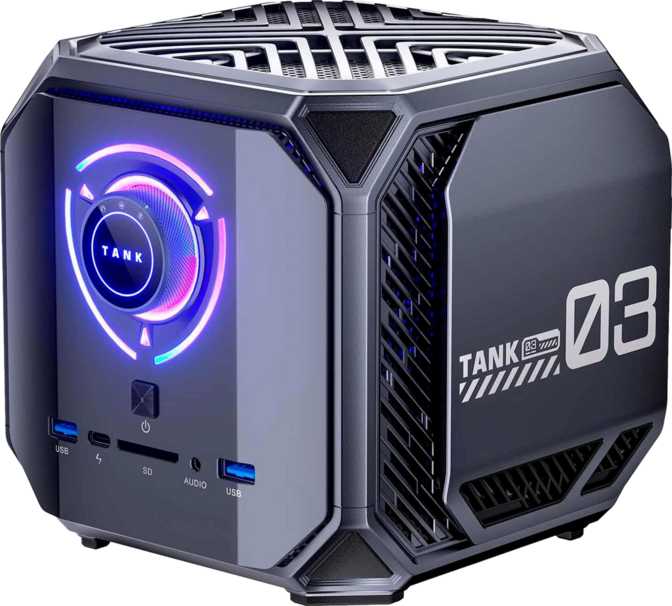
Acemagic M1A Pro Review: Workstation RAM in a Mini PC Form Factor
Mini PCsMost compact desktop PCs make the same trade. You get a small footprint, you lose something important — usually raw memory, storage depth, or processing muscle. The Acemagic M1A Pro is built on the premise that none of those trade-offs are actually necessary.
It pairs a 14-core processor running at peak frequencies competitive with full desktop chips, 128 GB of DDR5 RAM, and four terabytes of NVMe storage in a chassis small enough to mount behind a monitor and forget is there.
That is an audacious specification list for a device this size. Whether it holds up as a practical workstation depends on who is using it and what they are asking it to do. This review covers both.
Workstation-class mini PC
Design and Build: The Machine That Disappears
Physical design, thermal engineering, and day-to-day ergonomics
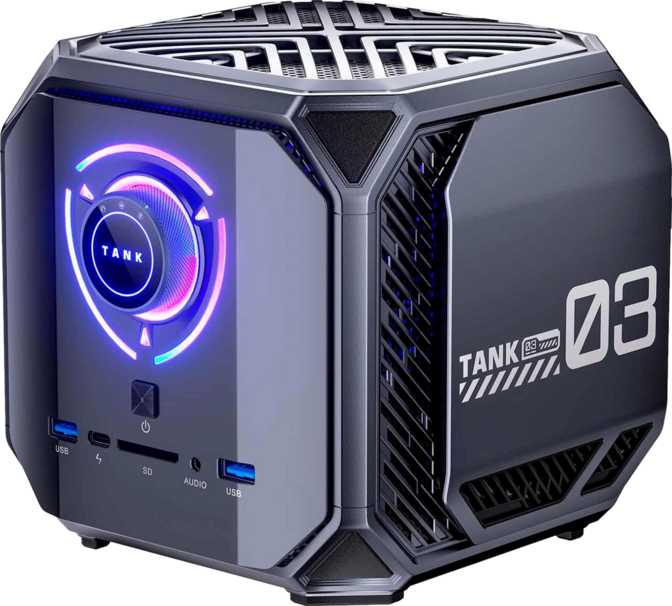
The M1A Pro's physical presence is deliberately understated. The chassis occupies a compact footprint consistent with the current generation of serious mini PCs — a size that sits comfortably on a desk corner, attaches to the back of a VESA-mounted monitor, or tucks neatly into a media cabinet. The unit does not broadcast itself.
That physical restraint comes with an engineering obligation. The processor inside operates at a 45-watt thermal ceiling — the same power budget assigned to high-performance gaming laptop chips — and sustaining that in a compact chassis demands careful thermal design. The M1A Pro uses active cooling to manage heat, and fan behaviour under extended load is relevant for noise-sensitive environments.
Processing Power: A 14-Core Hybrid Engine
Architecture analysis, real-world threading, and benchmark context
How the Hybrid Architecture Works
The processor inside the M1A Pro uses Intel's hybrid core design — pairing two fundamentally different types of cores on a single chip. Six performance cores handle demanding, latency-sensitive work and can surge to a peak of 5.4 GHz under burst conditions. Eight efficiency cores operate at lower speeds, managing background processes, thread coordination, and lighter parallel tasks without stealing headroom from the primary workload.
The result is 20 simultaneous processing threads across 14 physical cores. In practical terms: a video conference, a background cloud sync, a browser session with multiple active tabs, and a compiling build task can run simultaneously without any of them visibly stalling the others.
For Everyday Users
This chip performs at a level typically found in premium creative workstations and high-end gaming laptops. It is not a budget or midrange part dressed up in a small box.
For Enthusiasts
The 24 MB of L3 cache reduces cache-miss penalties in memory-bound workloads. Instruction-set support covers AVX, FMA3, AES, and F16C — accelerating ML inference, cryptographic operations, and floating-point-heavy tasks directly in hardware.
Benchmark Results in Context
PassMark Multi
27,874
Upper-tier mobile result
PassMark Single
3,803
Competitive single-core result
Geekbench 6 Multi
13,629
Confirms sustained throughput
Geekbench 6 Single
2,629
Strong single-thread score
Overclocking note: The unlocked multiplier exposes tuning capability, but the overclocked PassMark of 28,575 represents only a modest gain above the stock result. Thermal constraints within the compact chassis limit sustained frequency headroom — treat this as a fine-tuning option, not a meaningful performance lever.
Memory and Storage: The Numbers That Define This Machine
Why 128 GB DDR5 exists in a mini PC, and who genuinely needs it
128 GB DDR5 — Uncommon at Any Price Point
Most laptops and consumer mini PCs ship with 16 or 32 gigabytes. High-end workstation desktops often top out at 64 gigabytes in standard configurations. A compact desktop arriving with 128 gigabytes of next-generation memory is genuinely uncommon. For casual users — web browsing, streaming, document work, video calls — this capacity exceeds workload demands. The M1A Pro is not positioned for casual users.
The DDR5 memory operates at up to 5,200 MHz, delivering significantly greater bandwidth than the previous generation — relevant for any workload that moves large amounts of data between the processor and RAM rapidly.
4 TB NVMe: Storage That Removes the Mental Overhead
At four terabytes of NVMe solid-state storage, most users will never need to manage storage triage. The operating system, all applications, active project files, virtual machine images, and substantial media archives fit without compromise. NVMe speeds ensure the drive itself is never the workflow bottleneck.
-
VirtualizationRunning 3–4 full OS environments simultaneously with dedicated memory
-
Data AnalysisLarge datasets in working memory — Python, R, SQL, without spilling to disk
-
Software DevelopmentDocker containers, language runtimes, local databases, and build servers concurrently
-
Creative ProductionDense video timelines, 3D scene caches, and sample-heavy DAW sessions
-
Local AI WorkloadsRunning local inference models where RAM capacity determines what fits on-device
Graphics and Displays: Built for Four Screens
Integrated Iris Xe graphics, quad-display output, and GPU limitations
What Integrated Graphics Delivers Here
The Iris Xe Graphics engine is configured at its full 96 execution unit count — Intel's current performance ceiling for integrated graphics. The M1A Pro exposes this through four simultaneous display outputs: three DisplayPort connections and one HDMI 2.1 port.
For productivity-centric multi-monitor setups — code editors, terminals, browsers, dashboards, document applications — this graphics configuration handles everything without strain. The HDMI 2.1 output supports 4K resolution, making a high-resolution primary display alongside secondary monitors a realistic everyday configuration.
Where the GPU Has Clear Limits
Integrated graphics share system memory with the processor rather than using dedicated video memory. Current AAA games require GPU resources that integrated graphics cannot supply at playable frame rates. Older and less demanding titles are more forgiving.
Video professionals doing colour grading or heavy effects rendering will find the absence of a dedicated GPU a real constraint. The processor's built-in Quick Sync video engine handles encoding with reasonable efficiency, but it is not a substitute for dedicated GPU acceleration in professional post-production pipelines.
Connectivity: What Is There and What Is Missing
Full port inventory, wireless standards, and notable omissions
Port Inventory
| Port / Connection | Quantity | Speed / Standard |
|---|---|---|
| USB Type-A (High Speed) | 2 | 10 Gbps (Gen 2) |
| USB Type-A (Standard) | 4 | 5 Gbps (Gen 1) |
| USB Type-C | 1 | 10 Gbps (Gen 2) |
| DisplayPort | 3 | Full-size DP |
| HDMI | 1 | HDMI 2.1 (4K capable) |
| Ethernet | 1 | Gigabit RJ45 |
| Audio | 1 | 3.5 mm combo jack |
| Wi-Fi | Wi-Fi 6 | 802.11ax |
| Bluetooth | 1 | Bluetooth 5.2 |
Notable Absences
-
No Thunderbolt 3 or 4Matters for users with Thunderbolt RAIDs, professional audio interfaces, or eGPU enclosures dependent on this protocol
-
No USB4 (20 Gbps or 40 Gbps)USB4 enables alternate-mode tunnelling for high-bandwidth peripherals — absent here
-
No SD Card ReaderPhotographers and filmographers working with card-based media will need an external reader
-
No S/PDIF Audio OutDigital optical audio is absent — relevant for certain home-theatre setups
Wi-Fi 6 (802.11ax) improves throughput and efficiency in signal-congested environments — shared offices and dense residential buildings — versus prior-generation wireless. For latency-sensitive tasks, the wired Gigabit Ethernet port remains the most reliable option.
Who Should Buy the Acemagic M1A Pro
Matching the right buyer to the right machine
Right Buyer Profiles
When to Look Elsewhere
Competitive Positioning
How the Acemagic M1A Pro stacks up against comparable mini PCs
| Specification Area | Acemagic M1A Pro | Typical High-End Mini PC | Typical Midrange Mini PC |
|---|---|---|---|
| RAM Configuration | 128 GB DDR5 | 32–64 GB DDR4/DDR5 | 16–32 GB DDR4 |
| NVMe Storage | 4 TB | 1–2 TB | 512 GB–1 TB |
| Display Outputs | 4 Screens | 2–3 Screens | 1–2 Screens |
| Thunderbolt | None | Occasional | None |
| Wireless Standard | Wi-Fi 6 | Wi-Fi 6 | Wi-Fi 5 or 6 |
| Discrete GPU Included | No | Rarely | No |
| Warranty Coverage | 1 Year | 1–2 Years | 1 Year |
The memory specification is where the M1A Pro most clearly separates itself. Most competing units at similar price points treat higher memory configurations as custom-order options or cap out at 64 GB. The trade-off accepted in return is the absence of Thunderbolt — some competing mini PCs include Thunderbolt 4, enabling external GPU enclosures and high-bandwidth storage ecosystems. For buyers who need that expandability pathway, those machines represent a different but legitimate choice.
Honest Assessment
Genuine strengths and the trade-offs stated plainly
Genuine Strengths
The M1A Pro's defining strength is its refusal to make the memory compromise that shapes almost every other compact desktop. Getting 128 GB of DDR5 into this form factor — paired with four terabytes of NVMe and a genuinely capable 14-core processor — creates a machine that serves as a legitimate workstation replacement for users whose work is CPU and RAM-bound.
The quad-display capability from integrated hardware is a second, underrated advantage. Most mini PC users who want multi-monitor setups need to add a hub, dock, or discrete GPU to reach four outputs. The M1A Pro arrives configured for it.
The processor performance is legitimately strong. The hybrid architecture handles mixed workloads efficiently. The burst frequency is competitive with dedicated desktop chips, and benchmark results reflect a machine that punches well above the typical mini PC performance ceiling.
Real Limitations
The integrated GPU is the defining limitation for any GPU-accelerated work. This is an inherent design choice — a discrete GPU would require a larger chassis and additional power delivery, undermining the compact form factor. Anyone who needs GPU compute, gaming performance, or hardware-accelerated creative workflows should understand this is not a compromise that can be worked around in this chassis.
The one-year warranty is shorter than what many competitors now offer in this segment. Two-year coverage is increasingly common. For a machine likely to serve as a primary workstation, that distinction matters for risk management.
The overclocking headroom, while technically available, yields only marginal gains in practice. Thermal constraints within the compact chassis limit how much additional frequency the cooling system can sustain.
Common Buyer Questions
Answers to what real buyers search for before purchasing
Final Verdict
The Compact Workstation for RAM-Bound Power Users
The Acemagic M1A Pro earns a clear recommendation for a specific type of buyer: power users whose work is constrained by memory. If you regularly run out of RAM, manage multiple virtual environments, process large datasets, or sustain complex parallel development setups, this machine addresses those specific pain points directly.
The 128 GB DDR5 configuration is not a spec-sheet number that exceeds real-world need — it corresponds precisely to the workloads where memory capacity determines whether a task is possible or not. The 14-core processor is genuinely fast, the 4 TB storage is deep enough to never require management, and four-display output from integrated hardware removes a friction point that costs other mini PC users money and complexity.
If you need a gaming machine, a GPU-accelerated creative workstation, or Thunderbolt peripheral compatibility, look elsewhere. For the developer, the data professional, the multi-display power user, or anyone who has repeatedly hit the ceiling of insufficient RAM: the Acemagic M1A Pro is one of the most capable compact desktops built to solve exactly that problem.
Review Summary