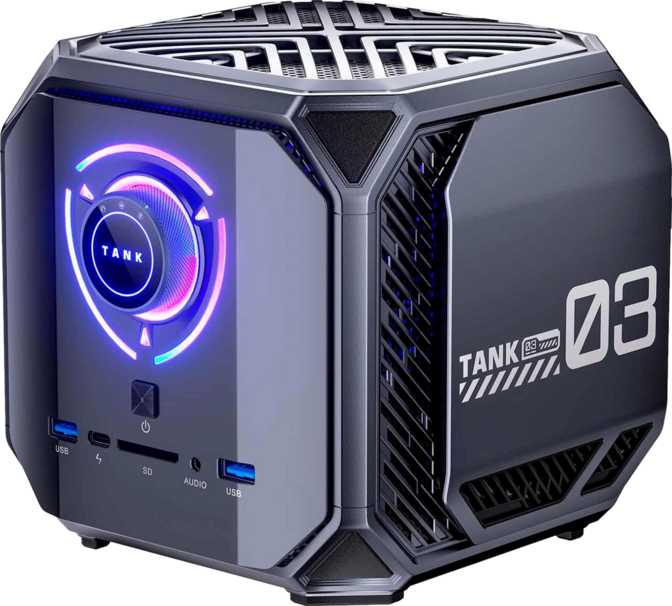
Acemagic M1A Pro Plus Review: A Compact Desktop That Means Business
Mini PCsThe Case for Going Big in a Small Box
The Acemagic M1A Pro Plus doesn't follow the standard compact desktop formula of "adequate performance in a manageable footprint." This machine makes a fundamentally different argument: that a Micro-ATX desktop can carry specifications traditionally reserved for full-sized workstation towers. For buyers who have outgrown conventional compact PCs but refuse to surrender desk space to a mid-tower, the M1A Pro Plus is a direct answer.
The pairing of 128GB DDR5 memory, a 16-core processor with a 5.1 GHz peak frequency, and AMD's RDNA 3.5 integrated graphics architecture is not something you typically encounter outside of high-end professional workstations. Understanding what those capabilities mean in practical daily use — and where the machine's real boundaries sit — is the purpose of this review.
Most compact desktops cap at 32GB or 64GB of RAM. The M1A Pro Plus supports 128GB of DDR5 and pairs it with integrated graphics delivering over 14 teraflops of compute throughput. That combination, in a Micro-ATX chassis, is genuinely uncommon at any price point.
Design and Build: Compact Without Compromise
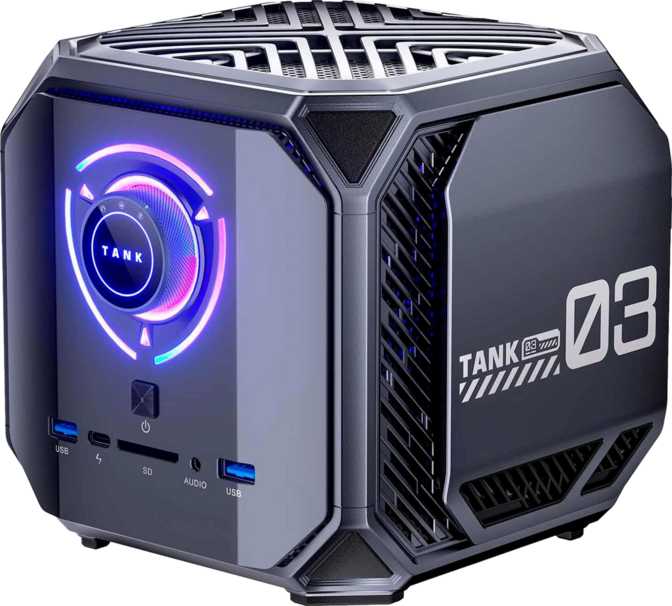
The Micro-ATX form factor sets the M1A Pro Plus apart from true ultra-compact systems. It's physically larger than a standard NUC-style mini PC, but considerably smaller than a mid-tower, and that extra internal volume serves a deliberate purpose: it gives the cooling system the room it needs to manage a sustained 55-watt processor load without resorting to aggressive thermal throttling.
The chassis design prioritizes I/O density. Seven USB connections, four video outputs, a 3.5mm audio jack, and a network port all find space across the rear and front panels without the cramped compromises typical of ultra-compact designs. The aesthetic is clean and understated — appropriate for a professional desk environment without demanding attention.
For installation flexibility, the chassis dimensions support under-desk mounting, shelf placement, or standard desk positioning. It sits where you put it and stays quiet enough for shared office environments under moderate workloads.
Physical and Build Highlights
- Micro-ATX chassis with workstation-class I/O density in a fraction of a tower's footprint
- Seven USB connections distributed across three speed standards for peripheral flexibility
- Four simultaneous video outputs enabling native multi-monitor setups without extra hardware
- 55W thermal design with sufficient chassis volume for effective sustained cooling
- 3.5mm audio jack for direct headphone or speaker connection without a USB adapter
- Dimensions compatible with under-desk mounting and shelf installation
Processing Power: Sixteen Cores, One Purpose
The processor inside the M1A Pro Plus is a 16-core, 32-thread design reaching a peak single-core frequency of 5.1 GHz while operating within a 55-watt thermal budget. That 55W figure is the defining context for understanding this machine's performance character. It sits between the efficiency discipline of a laptop chip and the unrestricted power draw of a full desktop processor — the result is sustained parallel workload capability without demanding industrial cooling or spiking electricity consumption.
The L3 cache totals 64MB allocated at 4MB per core, which means data-intensive operations — database indexing, code compilation, media encoding — rarely stall waiting on data to arrive from main memory. At 32 threads, this chip handles virtual machine deployments, parallel build pipelines, and intensive multitasking with genuine headroom remaining.
In standardized multi-threaded testing, this processor achieves a PassMark score above 54,000 — a result that competitive workstation chips commanded just a few hardware generations ago. The single-thread score of 4,142 reflects the 55W thermal discipline accurately: solid for its class, but not reaching the single-core peaks of uncapped desktop processors. The clock multiplier is locked, so there is no overclocking pathway available.
Graphics: Where Integrated Gets Serious
The Radeon 8060S is not the integrated GPU associated with web browsing and light office tasks. Built on AMD's RDNA 3.5 architecture using a 4-nanometer process, it delivers 14.85 teraflops of compute throughput — a figure that, until recently, required purchasing a separate dedicated graphics card. Its 2,560 shader processors scale from a base clock of 1,295 MHz to a peak of 2,900 MHz, and the texture pipeline processes 464 billion texel operations per second.
The architecture includes hardware-accelerated ray tracing and full DirectX 12 Ultimate support, meaning modern rendering workflows and visualization tools operate at hardware capability — not through software emulation. OpenCL 2.1 and OpenGL 4.6 compatibility covers scientific computing, creative software, and legacy graphics workloads equally.
Because this GPU shares system memory rather than drawing from a dedicated pool, it benefits directly from the M1A Pro Plus's 128GB DDR5 configuration. High-bandwidth memory access keeps the Radeon 8060S well-supplied during intensive workloads. The PassMark G3D benchmark result of 17,936 confirms this advantage — placing it above many entry-level dedicated graphics cards from recent product generations.
| Specification | Radeon 8060S — RDNA 3.5 |
|---|---|
| Architecture and Process | RDNA 3.5 at 4nm |
| Total Compute Throughput | 14.85 TFLOPS |
| Shader Processors | 2,560 units |
| Operating Clocks | 1,295 MHz base / 2,900 MHz boost |
| Texture Throughput | 464 GTexels/s |
| API Support | DirectX 12 Ultimate, OpenGL 4.6, OpenCL 2.1 |
| Ray Tracing | Hardware-accelerated |
| Simultaneous Display Outputs | 4 — three DisplayPort and one HDMI 2.1 |
The HDMI 2.1 output supports 4K at 120Hz and 8K at 60Hz. All four display outputs operate simultaneously — you can drive a 4K high-refresh primary display alongside three additional monitors with no added hardware.
Memory and Storage: Built for Heavy Workloads
The specification where the Acemagic M1A Pro Plus separates itself from virtually every other compact desktop on the market.
Most professional compact desktops offer 32GB or 64GB as their absolute ceiling. The M1A Pro Plus supports 128GB of DDR5 at frequencies reaching 8,000 MHz — a configuration that removes memory exhaustion as a practical concern for almost any workload. Running dozens of active applications, virtual machines, and large datasets in parallel no longer requires managing what stays open and what gets closed.
ECC (Error-Correcting Code) memory support adds a layer of reliability rarely found outside dedicated server hardware. ECC detects and corrects single-bit memory errors in real time, before they can corrupt data or produce unexpected behavior. For financial modeling, scientific simulation, or any workflow where silent data corruption carries real consequences, this matters — and finding it in a compact desktop is genuinely unusual.
A 4TB NVMe solid-state drive provides storage capacity that accommodates years of project files, installed software, and archived work without requiring secondary drives. Most professional users will never come close to this ceiling, making drive management a non-issue from the moment the machine is configured.
The drive runs across a PCIe 5.0 interface — the current-generation interconnect standard. This connection provides bandwidth that traditional SATA SSDs cannot approach and exceeds what most PCIe 4.0 drives fully utilize. The storage subsystem is built with headroom substantial enough that drive speed will not become a bottleneck for years of professional use.
Connectivity: Ports, Wireless, and One Honest Caveat
Wi-Fi 7 (802.11be) is the wireless headline. In a network equipped with a Wi-Fi 7 access point, the multi-link operation capability delivers usable wireless throughput exceeding 2 Gbps — a meaningful step beyond Wi-Fi 6E for large file transfers, network-attached storage access, and high-bandwidth streaming. Backward compatibility with Wi-Fi 6E, Wi-Fi 6, Wi-Fi 5, and older standards means the M1A Pro Plus works in any current network environment while remaining ready for infrastructure upgrades.
The USB lineup covers professional requirements across seven total connections: two USB 3.2 Gen 2 Type-A ports at 10 Gbps each handle fast external drives and capture devices; four USB 3.2 Gen 1 Type-A ports at 5 Gbps each handle peripherals, hubs, and accessories; a single USB 3.2 Gen 2 Type-C port handles modern devices preferring the reversible connector.
Important Limitation to Know
There is no Thunderbolt connectivity and no USB 4 at 40 Gbps. For buyers with Thunderbolt docks, external GPU enclosures, or high-bandwidth capture hardware that specifically requires Thunderbolt bandwidth, this is a genuine constraint to evaluate before purchasing.
| USB 3.2 Gen 2 Type-A — 10 Gbps | 2 ports |
| USB 3.2 Gen 1 Type-A — 5 Gbps | 4 ports |
| USB 3.2 Gen 2 Type-C — 10 Gbps | 1 port |
| DisplayPort Outputs | 3 outputs |
| HDMI 2.1 | 1 output |
| Wired Ethernet (RJ45) | 1 port |
| 3.5mm Audio Jack | Yes |
| Wireless Standard | Wi-Fi 7 (802.11be) |
| Bluetooth | 5.2 |
| Thunderbolt | Not available |
| USB 4 — 40 Gbps | Not available |
Benchmark Performance: By the Numbers
Standardized test results place the M1A Pro Plus in clear performance context and honestly represent where its 55W thermal design creates a ceiling.
CPU Performance
GPU Performance
What the GPU score means in practice
A G3D score above 17,900 puts the Radeon 8060S above the ceiling entry-level dedicated graphics cards from recent product cycles typically reach. For an integrated GPU — one requiring no separate power connection, no PCIe slot, no added heat — this is a significant capability step. It will not satisfy demanding gaming at high settings, but for professional visualization, compute tasks, and content creation it removes the need for a discrete card in most non-gaming workflows.
Who the Acemagic M1A Pro Plus Is Right For
Specifications only tell part of the story. Matching this machine to the right workflow is what determines whether it is the right purchase.
-
Software Developers and DevOps EngineersRunning multiple concurrent VMs or containers where 32GB or 64GB creates constant memory pressure
-
Video Editors and Motion Graphics ArtistsWorking in 4K who prioritize RAM capacity and multi-core CPU throughput over GPU rasterization
-
Data Scientists and ML ResearchersWorking with large in-memory datasets where 32GB or 64GB forces constant paging to disk
-
Multi-Monitor Productivity UsersWho want four simultaneous displays driven from one compact machine without a discrete GPU
-
Home Lab Power UsersWho want ECC memory, serious compute density, and a quiet chassis in one compact package
-
Finance and Engineering ProfessionalsWhere ECC memory's real-time error correction provides meaningful data integrity assurance
-
Dedicated GamersExpecting discrete GPU rasterization frame rates at 1440p or 4K in graphically demanding modern titles
-
Thunderbolt-Dependent UsersWho rely on Thunderbolt 4 for docks, eGPU enclosures, or specialized high-bandwidth production hardware
-
Budget-Focused BuyersThis specification level carries a premium price — budget alternatives exist but with significantly fewer capabilities
-
Overclockers and EnthusiastsThe locked multiplier removes any performance tuning pathway — overclocking is simply not possible here
-
Buyers Requiring Extended WarrantyThe included 1-year coverage is short for a premium machine — extended coverage requires third-party arrangements
How the M1A Pro Plus Stacks Up
A direct comparison against the categories of machines buyers typically evaluate alongside this machine.
| Feature | Acemagic M1A Pro Plus | Entry Compact Desktop | Mid-Range SFF PC | Full-Size Workstation |
|---|---|---|---|---|
| Maximum RAM | 128GB DDR5 | 16–32GB DDR4/5 | 32–64GB DDR5 | 64–128GB DDR4/ECC |
| Graphics Compute | ~14.85 TFLOPS (iGPU) | 2–4 TFLOPS (iGPU) | 6–10 TFLOPS (iGPU) | Discrete GPU |
| Primary Storage | 4TB NVMe (PCIe 5.0) | 256–512GB | 512GB–2TB | 1–4TB NVMe |
| Wireless Standard | Wi-Fi 7 | Wi-Fi 5 / Wi-Fi 6 | Wi-Fi 6 / Wi-Fi 6E | Wi-Fi 6E |
| Display Outputs | 4 (3x DP + HDMI 2.1) | 1–2 | 2–3 | 2–4 |
| ECC Memory | Optional | |||
| Thunderbolt | Varies | Often yes | ||
| PCIe Generation | 5.0 | 4.0 | 4.0–5.0 | 4.0–5.0 |
| Included Warranty | 1 Year | 1–2 Years | 1–2 Years | 1–3 Years |
Competitor figures represent typical category ranges and are not sourced from specific products. The M1A Pro Plus's primary differentiators are its RAM ceiling, ECC support, and TFLOPS figure achieved without a dedicated GPU.
What Works and What Doesn't
Genuine Strengths
The M1A Pro Plus earns its position through a combination of capabilities that are individually unusual and collectively rare in a compact chassis.
- 128GB DDR5 is class-leading capacity for a compact desktop — most competitors cap at 64GB
- 14.85 TFLOPS from integrated graphics removes the need for a discrete card in most non-gaming workflows
- Wi-Fi 7 keeps wireless connectivity a full generation ahead of the compact desktop category norm
- ECC memory support provides enterprise-grade data integrity in a non-server chassis
- 4TB NVMe on a PCIe 5.0 interface eliminates secondary storage requirements for most professionals
- Four simultaneous display outputs including HDMI 2.1 with 4K/120Hz capability
- Hardware ray tracing and DirectX 12 Ultimate for modern rendering and visualization workflows
- 54,000+ multi-thread PassMark result places it among the top tier of current desktop processors
Real Limitations
These are specific, honest shortfalls — not theoretical edge cases. They matter to particular buyers and should be weighed directly against your own workflow requirements.
- No Thunderbolt or USB 4 40Gbps — a hard ceiling for buyers using Thunderbolt docks or eGPU enclosures
- Locked CPU multiplier removes all overclocking and performance tuning pathways entirely
- Only 1-year warranty — notably short for a machine at this performance tier and price point
- Single Ethernet port restricts advanced networking configurations such as link bonding or redundancy
- Integrated graphics, despite its capability, still trails mid-range discrete GPUs in gaming-focused workloads
- 55W thermal ceiling creates a measurable gap versus uncapped desktop CPUs in sustained single-thread tasks
Questions Buyers Ask Before Purchasing
The most common questions we encounter when buyers consider the Acemagic M1A Pro Plus, answered directly.
Final Verdict
The Acemagic M1A Pro Plus is a rare machine: a compact desktop that does not ask for significant hardware compromises in return for saving desk space. The 128GB DDR5 capacity is in a class by itself at this form factor. The RDNA 3.5 graphics remove the need for a discrete card in any workflow that isn't primarily gaming-focused. The 16-core processor handles sustained parallel workloads without complaint, and Wi-Fi 7 with ECC support push it well ahead of the competition on features that matter to professional buyers.
The shortfalls are honest and specific: no Thunderbolt limits a particular set of peripheral workflows; the locked multiplier removes an option enthusiast buyers might want; the 1-year warranty asks for trust in build quality that the specifications warrant but that longer coverage would reinforce. These are real considerations, not theoretical ones.
For professionals, creative users, developers, and power users who need serious computational capability in a compact chassis, the M1A Pro Plus delivers something genuinely difficult to find: workstation-class specifications in a form factor that fits on a shelf.