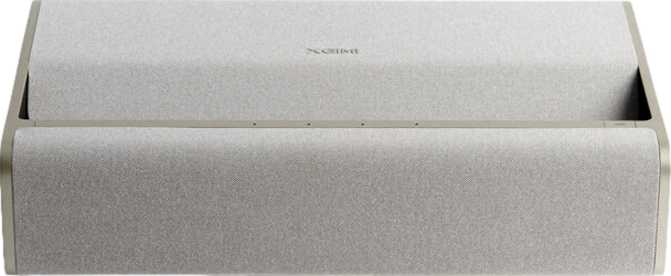
XGIMI Mira 4K Pro Review: A Complete 4K Home Cinema in One Box
ProjectorsProjectors used to come with compromises so predictable you could list them before opening the box: impressive picture quality paired with a need for a separate streaming device, audio so thin a soundbar became mandatory, and a lamp that would need replacing within a few years at considerable cost. The XGIMI Mira 4K Pro takes aim at all three of those problems simultaneously.
This is a native 4K projector with HDR10+ processing, a built-in smart TV platform, both AirPlay and Chromecast support running natively without adapters, and a 36-watt Dolby Atmos stereo system — all assembled into a single unit designed to sit on a media console and replace, rather than supplement, a traditional television arrangement. Whether that combination delivers on its promise without the usual all-in-one trade-offs is precisely what this review examines.
Design and Build: A Projector Built for a Permanent Spot
Physical experience, form factor, and construction quality
Physical Presence and Form Factor
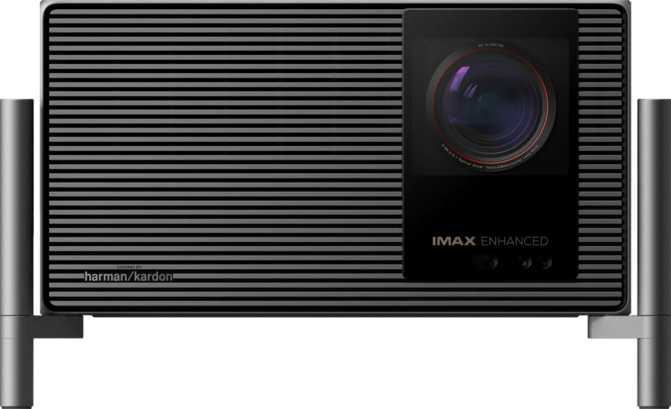
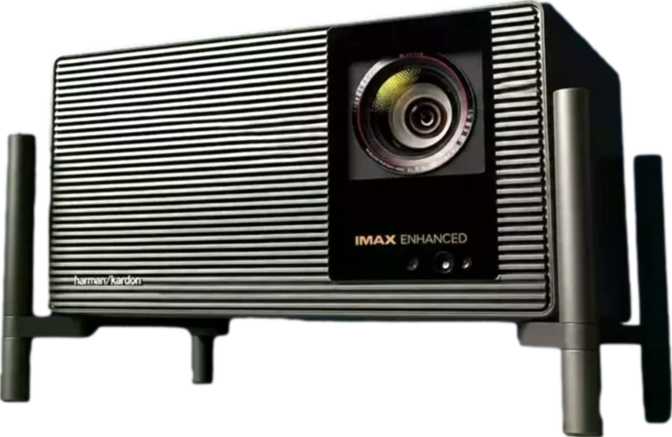
At 5.3 kilograms — roughly the weight of a large laptop alongside its power supply — this projector belongs on a shelf, not in a bag. Anyone imagining relocating it between rooms regularly or taking it outdoors will find the weight a recurring deterrent.
At 430mm wide, 261mm deep, and just 120mm tall, the Mira 4K Pro shares the footprint of a mid-sized AV receiver. On a media console, it looks like it belongs there — its proportions match the components it's designed to live alongside.
What the Build Quality Communicates
The weight signals something about construction. The Mira 4K Pro occupies the density range of products designed for longevity in a fixed position — maintained and eventually upgraded, rather than worn out by casual handling.
The flat, low silhouette allows it to fit under a wall-mounted screen without becoming the dominant object in the room. For buyers who want to set up once and then simply use, this is the right build philosophy.
The Picture: Native 4K and Dynamic HDR Explained
Resolution, dynamic range, and what the specs mean for your room
What the Resolution Difference Actually Looks Like
HDR10 vs HDR10+: A Meaningful Distinction
Applies a single, film-wide brightness mapping. Works well on content with consistent contrast levels and is supported across all major streaming platforms and every 4K disc. Meeting this standard is the category expectation for any 4K projector.
Recalculates brightness mapping scene by scene and frame by frame. A dark cave sequence and a sun-drenched exterior in the same film each receive independently optimized processing. For content encoded in HDR10+ — a growing proportion of major streaming platform productions — the improvement in contrast handling is measurable.
Wireless Connectivity: Every Major Standard, Nothing Missing
AirPlay, Chromecast, Miracast, Bluetooth, DLNA — what each one delivers in daily use
Native Apple ecosystem casting — iPhone, iPad, and Mac users stream directly from their device's built-in screen-sharing controls. No app, no adapter, no friction.
Native Google ecosystem casting — Android phones, Chromebooks, and Google TV devices cast directly. A household running both Apple and Android devices has full coverage with no compromises.
Peer-to-peer wireless display — works without a shared Wi-Fi network. Handles presentations from laptops not signed into your home network, guests who won't join your Wi-Fi, and rooms where no network is available at all.
Pairs with wireless headphones for private late-night viewing, Bluetooth speakers for expanded coverage, or keyboards and controllers for navigation and input. Practical, not decorative.
Streams media from a NAS device or desktop computer on your home network. Personal film libraries and local archives play back directly without cloud subscriptions or file transfers — content streams from where it already lives.
Integrated Wi-Fi powers the smart TV platform and all cloud-based streaming — no Ethernet run required for day-to-day use.
No VGA or S/PDIF optical output — see limitations section for details.
Built-In Smart TV: The Streaming Device You Don't Have to Buy
Integrated platform, remote control, and smartphone app
The Mira 4K Pro includes a fully operational smart TV platform, controlled through both a dedicated remote and a companion smartphone app. There is no second device to power separately, no independent firmware updates to manage on a dongle, and no additional remote to track down when you want to change what's playing.
The smartphone app provides a secondary control option from anywhere in the room — useful when the physical remote has migrated under a cushion, or when you want to queue something without getting up. Both coexist without conflict.
- Separate streaming stick or media box
- Second power adapter and cable
- Independent dongle firmware updates
- Extra remote on the coffee table
- HDMI port occupied by streaming device
Audio: When 36 Watts and Dolby Atmos Make the Soundbar Optional
Output level, Dolby Atmos processing, and honest expectations
Audio Output in Context
What Dolby Atmos Processing Delivers
Dolby Atmos positions sounds as discrete objects in three-dimensional space rather than distributing them across fixed left and right channels. On a two-channel system, full 3D spatial reproduction is physically impossible — but Atmos decoding still produces more accurately rendered audio than standard stereo processing achieves.
For streaming content encoded in Atmos — a growing proportion of major platform libraries — the listening experience is noticeably more dimensional: better left-right spatial imaging and more faithful reproduction of the original sound design intent.
The Honest Ceiling
36 watts through two channels does not replicate the physical immersion of a dedicated multi-speaker surround setup with a subwoofer. Buyers committed to a high-end external audio chain should plan connectivity carefully given the lack of optical audio output.
For buyers who want a single self-contained system that delivers credible, satisfying audio without additional hardware, the Mira 4K Pro's integrated audio sits well above what this category typically offers.
Light Source Longevity: The Cost of Ownership Argument
25,000 hours — what that rating means in real ownership terms
In any realistic ownership scenario, the projector will be upgraded or replaced long before the light source requires attention. A projector with a lower sticker price but a traditional lamp may cost more over five to eight years once two or three lamp replacements are added to the total.
Real-World Usage: Who This Projector Is For
Matched buyer profiles and clear mismatches
- Households wanting large-screen cinema without assembling a multi-device stack or managing multiple remotes
- Homes with both Apple and Android users — dual AirPlay and Chromecast means neither user accommodates the other's ecosystem
- Buyers who value credible audio from a single device without running a dedicated external speaker setup
- Fixed installations — a media console in a living room or a dedicated home cinema space where the projector stays in place
- Buyers who install a device and expect consistent, maintenance-free performance for years
- Portability is a priority — moving between rooms, using outdoors, or transporting to other locations. At 5.3kg, this projector resists those habits
- Your existing AV setup depends on S/PDIF optical audio output to connect to a receiver or processor
- Direct playback from physical memory cards is central to how you access content — no card slot means local media must route through DLNA
- Your viewing space has substantial ambient light — verify brightness output independently for challenging daylight environments
Competitive Positioning: How It Compares
How the Mira 4K Pro stacks up against logical alternatives in the same purchase range
| Comparison Factor | XGIMI Mira 4K Pro | Bare 4K + Streaming Device | 4K Laser Projector | Ultra-Short-Throw 4K |
|---|---|---|---|---|
| Streaming integration | Native — no extras | Requires separate device | Varies by model | Typically built-in |
| Apple + Android casting | Both native | Via attached streaming device | Varies | Varies |
| Built-in audio | 36W Dolby Atmos | Minimal or absent | Minimal or absent | Varies |
| Light source longevity | ~25,000 hours | 3,000–5,000h (lamp) | 20,000h+ | 20,000h+ |
| Setup complexity | Low — single device | Moderate — multiple devices | Moderate | High — wall/screen requirements |
| Room placement | Standard throw | Standard throw | Standard throw | Sits close to wall |
| Relative price tier | Mid-to-high | Budget–mid (+ add-ons) | High to premium | Premium to very high |
The upfront price gap is often smaller than it appears once a quality streaming device, its power requirements, and audio supplementation are added. The integrated approach delivers a cleaner experience at a comparable total outlay.
Laser delivers superior brightness in challenging ambient light. In a controlled, adequately darkened room, that advantage narrows considerably — and the Mira 4K Pro's full feature set makes a stronger relative value argument.
A separate category solving a different problem — placement flexibility at significantly higher cost with specific screen or wall surface requirements. Only relevant if standard throw is impractical in your room.
Strengths and Limitations: The Honest Assessment
A balanced evaluation — both sides examined without qualification
The strengths of the Mira 4K Pro are coherent — they build on each other rather than sitting as isolated marketing points. Native 4K with HDR10+ processing means picture quality is substantive, not approximate. The integrated smart TV platform with dual wireless casting removes a device from the equation and removes no ecosystem from the household.
The 36-watt Dolby Atmos audio system means the projector is genuinely complete as purchased. The extended light source life changes the long-term economics of ownership in ways that upfront price comparisons never capture. These features reflect a unified design philosophy of completeness and daily usability — not a collection of marketing checkboxes.
The limitations are equally real and specific. The weight makes this a committed installation — not a versatile portable tool. This is a deliberate design trade-off that favors the integrated, all-in-one use case, but it closes off a real category of buyers entirely.
The missing optical audio output is a genuine connectivity gap for anyone running a legacy audio chain built around S/PDIF. The absence of a memory card slot requires network routing for local media — workable if you run a NAS, inconvenient if physical card media is part of your daily workflow. None of these are oversights; they are the cost of the design choices that make the strengths possible.
Answers to the Questions Buyers Search for Before Purchasing
The real questions — answered directly
A Clear Recommendation With No Meaningful Qualification
The XGIMI Mira 4K Pro makes a coherent and internally consistent argument: it is the most complete all-in-one 4K home cinema device for buyers who want large-screen projection without component sprawl, setup complexity, or ongoing maintenance costs.
That argument holds up under close examination. The picture quality is substantive — native 4K with HDR10+ is the current premium standard, and the Mira 4K Pro delivers it fully. The audio is not a token effort — 36 watts with Dolby Atmos outperforms most standalone portable speakers and covers the majority of daily audio requirements without external hardware. The wireless connectivity is comprehensive — dual AirPlay and Chromecast, Miracast, Bluetooth, DLNA, and Wi-Fi cover every mainstream household scenario without gaps.
For buyers who want a clean, capable, self-contained 4K cinema setup in a fixed living room position, value having every device in the household cast without friction, and want a projector they can own rather than maintain — this is a confident recommendation.
- Native 4K + HDR10+
- AirPlay + Chromecast native
- 36W Dolby Atmos audio
- 25,000h light source
- Built-in Smart TV platform