Wooting 60HE v2 Full Review: Hall Effect for Competitive FPS
KeyboardsWhat Sets the Wooting 60HE v2 Apart Before You Even Press a Key
Most gaming keyboards compete on the same narrow set of attributes: switch feel, build quality, and backlighting. The Wooting 60HE v2 competes on all of those — and then adds a dimension that most keyboards fundamentally cannot offer: the ability to detect not just whether a key is pressed, but exactly how far down it sits at any given moment. This is not a software trick or a marketing talking point. It is a direct consequence of the magnetic switch technology built into this board, and it unlocks features that measurably change how certain games respond to your input.
This is a keyboard designed specifically for players who want every adjustable hardware variable optimized in their favor. It is built with enough care in its construction that it does not sacrifice the everyday typing experience to get there.
Design and Build: A Compact Board That Earns Its Weight
First Impressions and Physical Presence
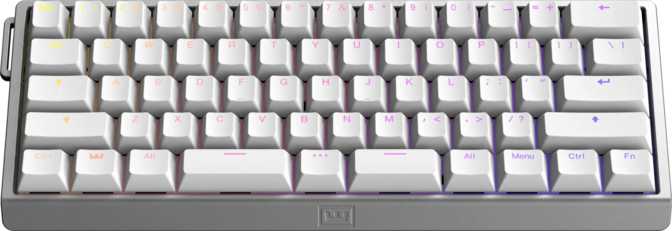
The 60% layout strips the keyboard down to its essential core — the alphanumeric keys and modifiers — eliminating the number pad, function row, navigation cluster, and dedicated arrow keys. The result is a footprint narrow enough to push your mouse considerably closer to your body center, which directly benefits low-sensitivity FPS players who rely on wide arm sweeps. For anyone working in tight desk environments, the compact dimensions make an immediate difference in comfort.
Despite the small size, the board carries noticeable heft. Exceeding 600 grams, it is heavier than most 60% keyboards on the market, which typically land between 400 and 500 grams. That mass comes from the aluminum top case, and it works in the board's favor: during fast, repetitive gaming sessions, the 60HE v2 stays planted. It does not creep or rattle.
Case Construction and Materials
The case uses aluminum for the top and plastic for the bottom — a deliberate pairing that works well in practice. The aluminum provides rigidity and premium tactility where your palms and fingers rest, while the plastic base prevents the weight from climbing further and keeps manufacturing cost from becoming unreasonable. The result feels appropriately premium without tipping into overbuilt excess.
The internal plate is made from FR4, a fiberglass composite most people will recognize as the material inside printed circuit boards. As a keyboard plate, FR4 occupies a useful middle ground: slightly more give than a rigid aluminum plate, which contributes to a more forgiving keystroke feel, and a sharper, more defined acoustic character that pairs well with linear switches.
Build Highlights
-
Aluminum Top CaseRigid, premium feel where your hands rest
-
FR4 Fiberglass PlateFlexible feel with a sharp acoustic character
-
Gasket MountCushioned, fatigue-reducing keystroke experience
-
Detachable CableEasy transport and future cable replacement
-
North-Facing RGBEven legend and edge glow through OEM keycaps
-
Color: Black OnlyNo alternative case color options available
What Gasket Mounting Delivers
Traditional keyboards screw the plate and PCB directly to the case — a rigid, fixed connection. Gasket mounting instead suspends the internal assembly on silicone gaskets. When you reach the bottom of a keypress, the assembly deflects slightly before the gaskets absorb the impact. The result is a softer, cushioned end-of-travel feel and a dramatic reduction in the metallic ping common in cheaper tray-mount boards. It sounds abstract until you type on a well-implemented gasket board and return to a plate-mounted one.
Lighting and Finishing Details
RGB backlighting uses north-facing LEDs that produce even, full coverage through the included OEM-profile keycaps — legends and surrounding edges glow cleanly. The detachable cable benefits both portability and long-term ownership: if the cable wears out, you replace the cable rather than the board. Adjustable feet let you set your preferred typing angle, though no wrist rest is included — worth noting given the board's 38mm height at maximum tilt.
The Lekker Tikken Switches: Why This Keyboard Works Differently
Hall Effect Technology Explained
The Lekker Tikken switches use Hall effect sensing — detecting the position of a magnet embedded in the switch stem without any physical contact between components. Unlike traditional mechanical switches, where a leaf spring or rail must touch a conductor to register a keypress, Hall effect switches read the magnetic field continuously and report an exact position value at all times.
Three consequences follow: there are no contact surfaces to oxidize, wear, or bounce; the keyboard knows precisely where each stem sits at every moment rather than just whether it crossed a threshold; and the actuation point is entirely configurable in software because no physical contact point is hardwired into the design.
Think of a traditional switch as a standard light switch — two states, one fixed crossover point. The Lekker Tikken is more like a dimmer — every position along the travel is distinct, detectable, and meaningful. This is the hardware foundation that makes every advanced feature on this board possible.
Switch Feel in Practice
The switches are linear — smooth, uninterrupted travel from top to bottom with no tactile bump or audible click at actuation. Actuation force sits in a light-to-moderate range comfortable for both gaming and extended typing sessions without fatigue. Full travel depth is consistent with what most mechanical keyboard users expect from a standard switch.
Hot-Swappable Design
The switches pull out and replace without soldering. For Hall effect specifically, this matters because the ecosystem of compatible switches is still growing. If improved variants arrive from Wooting or third parties, they install directly — the board is not locked to its original switches indefinitely.
Switch Specifications
- Type Hall Effect
- Name Lekker Tikken
- Feel Linear
- Min. Actuation 0.1 mm
- Max. Actuation 4.0 mm
- Total Travel 4.0 mm
- Actuation Force 40 g
- Hot-Swappable Yes
Rapid Trigger: The Feature That Defines This Keyboard's Competitive Value
What Rapid Trigger Actually Does
On a conventional keyboard, a key can only re-register after rising above a fixed reset threshold — always a small distance above the actuation point. This gap exists because the physical switch design requires it. Rapid trigger eliminates that fixed reset. The keyboard tracks switch position in real time and re-registers the moment the key begins moving upward, regardless of where that reversal starts. The minimum detection sensitivity here is 0.1 millimeters — smaller than any deliberate finger motion.
Why This Changes Competitive FPS Gameplay
Counter-strafing is a fundamental technique in games like Counter-Strike 2 and Valorant: briefly tapping the opposite directional key to stop momentum and restore shooting accuracy. Its effectiveness depends directly on how quickly the active movement key deregisters when you stop pressing.
On a standard keyboard, the physical reset gap creates a small but measurable delay — consistent and unavoidable, a property of the switch hardware. With rapid trigger, that delay disappears. Movement keys deregister as fast as your fingers naturally lift, with no hardware floor imposed beneath it.
For players who practice counter-strafing, the responsiveness difference is noticeable. For those who do not, it carries no downside — it simply does not slow the input down.
Per-Key Actuation Customization
Every key's actuation point can be set independently anywhere within the full travel range. A key set to fire at the very top of travel responds to the lightest possible touch. A key set near the bottom requires a deliberate, intentional press — making accidental activation under stress much less likely.
Dual Actuation and Analog Input: Features Beyond Binary Keypresses
Dual Actuation
A single physical key can trigger two separate actions at two different press depths. A partial press activates the first assignment; continuing through to full travel triggers the second.
The most intuitive gaming application is movement speed: a light press walks quietly, a full press sprints — two bindings consolidated to one key without requiring a separate modifier.
In productivity contexts, dual actuation enables modifier-like behavior from depth-of-press rather than requiring a two-handed key combination.
Analog Input
The 60HE v2 can present itself to compatible games as an analog input device, delivering continuous position values for individual keys rather than simple on/off states — joystick-quality input from keyboard keys.
In racing and flight simulation titles, throttle can be applied gradually rather than snapped to full; steering can be feathered rather than locked hard in either direction.
Practical value depends entirely on software support in your specific titles — but where it works, it provides a category of control impossible on any standard keyboard.
Input Latency at the Hardware Level
The 60HE v2 reports its state to the connected computer at a rate approximately eight times higher than the polling rate found on standard gaming keyboards. Where a typical keyboard checks in once per millisecond, this board does so every 0.125 milliseconds.
Combined with rapid trigger's hardware-level responsiveness, the 60HE v2 removes or minimizes every controllable variable in the input chain from finger to game engine. Whether the difference between polling rate tiers is perceptible in a live match is debated in competitive circles. What is not debated: the higher rate introduces no instability — it is a strictly one-directional advantage in the input pipeline.
Full N-key rollover ensures every simultaneous keypress registers accurately regardless of how many keys are held at once — a prerequisite for competitive play, implemented correctly here.
Polling Rate Comparison
Keycaps, Layout, and Daily Usability
Keycap Quality: Better Than the Category Standard
The included keycaps are PBT plastic with double-shot legends — a meaningful upgrade over the ABS keycaps that ship with most gaming keyboards at any price point.
-
PBT Plastic: Harder and denser than ABS, resisting the greasy polished sheen that develops on heavily-used keys over months of contact.
-
Double-Shot Legends: Produced by injecting two plastic layers simultaneously — the legend cannot fade or wear off regardless of usage duration.
-
OEM Profile: Moderately tall with a slight forward angle. The most common profile in consumer gaming — no adjustment period for the majority of users.
-
Standard 60% ANSI: Any aftermarket keycap set designed for 60% ANSI boards installs without modification.
60% Layout Trade-offs
The 60% form factor requires a real adjustment for users accustomed to larger layouts. Arrow keys, the function row, and navigation keys are accessible only through Fn key combinations. This is not a flaw in the 60HE v2's implementation — it is the inherent nature of compact keyboards. Most users adapt within days. Some never do.
There is no dedicated volume knob or rotary dial. If immediate hardware-level media access is a priority, this deserves consideration before purchase.
Software and Customization: The Wootility Ecosystem
The 60HE v2 is configured through Wooting's own Wootility software, which handles all rapid trigger parameters, per-key actuation settings, dual actuation profiles, analog input configuration, and RGB lighting control.
Wootility exists because the advanced Hall effect features — particularly rapid trigger and analog input at this precision level — are not natively supported by QMK, ZMK, or VIA, the open-source firmware platforms that many enthusiast keyboard users consider standard. The absence of those platforms is a direct consequence of a technical gap between what they were designed for and what Hall effect hardware makes possible.
For users with no prior QMK or VIA experience, Wootility functions clearly for the use cases this keyboard is built around. Crucially, settings are stored on the keyboard itself — the board does not require the software to be running during use. Configure once, and the preferences persist independently.
Software Support
- Wootility (Proprietary)
- On-board memory
- QMK Support
- VIA Support
- ZMK Support
How the Wooting 60HE v2 Fits Into the Market
The most fundamental comparison is between the 60HE v2 and standard mechanical keyboards in the same price range. The table below shows what the technology difference means at the feature level — capabilities that exist on the Wooting that are physically impossible to replicate on a contact-based platform.
| Capability | Wooting 60HE v2 | Standard 60% Gaming Mechanical |
|---|---|---|
| Adjustable actuation point | Yes — any depth within full travel | Fixed by physical switch design |
| Rapid trigger | Yes — 0.1 mm minimum sensitivity | Not possible |
| Dual actuation | Yes | Not possible |
| Analog input | Yes | Not possible |
| Switch contact wear | None — no physical contacts | Normal degradation over time |
| Hot-swappable switches | Yes | Varies by model |
| Mount type | Gasket | Typically tray or top mount |
| Polling rate | 8000 Hz | 1000 Hz typical |
| QMK / VIA support | No | Often yes |
| Wireless option | No | Varies by model |
Against Hall Effect Competition
The most direct competitor, the SteelSeries Apex Pro Mini, also uses Hall effect magnetic switches and offers adjustable actuation thresholds. However, its implementation stops short: no dual actuation, no full analog input, and no hot-swappable switch design. It also uses tray mounting rather than gasket mounting, producing a harder, less cushioned bottom-out feel.
Both boards use proprietary software, and neither supports QMK or VIA. The 60HE v2 offers greater feature depth at the hardware level and meaningfully better build construction — at a higher price point that reflects it.
Budget Hall Effect Alternatives
A growing number of manufacturers — particularly in the Asian keyboard market — produce Hall effect boards at significantly lower price points. These boards share the underlying switch technology and can offer basic rapid trigger functionality.
The difference in Wooting's implementation lies in software depth, the precision of the rapid trigger sensitivity floor, surrounding build quality, and the breadth of analog features. For those wanting to explore Hall effect at lower cost before committing, budget alternatives exist — but the gap in completeness is visible at closer inspection.
Who Should Buy the Wooting 60HE v2
This Keyboard Is Built For
-
Competitive FPS and battle royale playersWho use technique-dependent mechanics like counter-strafing or bunny-hopping — rapid trigger provides a hardware-level advantage that no firmware update can replicate.
-
Players wanting maximum input optimizationRapid trigger, Hall effect position tracking, and an ultra-high polling rate remove every controllable delay from the hardware input pipeline.
-
Keyboard enthusiastsWho want technically interesting hardware in a premium build — the Hall effect implementation here is mature and thoughtfully developed.
-
Users prioritizing desk compactnessWho want a high-performance board in the smallest practical 60% footprint.
-
Buyers who value long-term ownershipThe four-year warranty and contactless switch design combine for a board built to last — not one that needs replacing in eighteen months.
This Keyboard Is Not For
-
Mac usersNot designed for macOS — modifier layout, key labeling, and Wootility software are Windows-oriented.
-
QMK, VIA, or ZMK-dependent usersThe proprietary software path is non-negotiable — established open-source firmware workflows are incompatible.
-
Anyone who needs wirelessThere is no Bluetooth, no 2.4GHz option, and no battery. Wired only.
-
Users who need dedicated arrow keys60% layout requires Fn-layer access for arrows and navigation — a real lifestyle change for some users.
-
Budget-conscious buyersThis is a premium product at a premium price — if the defining features don't match your use case, the price premium does not follow.
Honest Strengths and Weaknesses
Where the 60HE v2 Genuinely Delivers
The build quality is authentic. Gasket mounting, an aluminum top case, an FR4 plate, and PBT double-shot keycaps in combination produce a physical experience that holds up well against premium enthusiast boards at similar or higher prices. The acoustic character — cushioned, defined, with little unwanted resonance — is the direct result of thoughtful construction choices rather than tuning foam added as an afterthought.
The Hall effect feature set is complete and genuinely functional. Rapid trigger, dual actuation, and analog input are not line items added to a specification list for marketing purposes; they are features built on hardware that actually supports them. The per-key configurability of rapid trigger in particular reflects real product development effort.
The four-year warranty signals genuine confidence in the product's hardware longevity. Most gaming peripherals offer one to two years. The hot-swappable Hall effect switches extend future-proofing further — the board is not locked to its original switch complement as the ecosystem grows.
Where It Falls Short
The absence of QMK and VIA support is a real and meaningful limitation — not a minor footnote. As those platforms have become increasingly standard in the enthusiast space, the trade-off of closed software becomes more visible. Wootility handles what this keyboard needs, but users with established QMK-based workflows will feel the constraint.
Black is the only available case color. Keycap customization addresses part of this visually, but buyers who want a white or alternative-colored board will find no option at the case level.
No USB passthrough is a minor but real inconvenience on compact desks where consolidating cable connections matters. The omission keeps the design clean at the cost of a practical feature.
The 60% form factor's trade-offs are genuine and cannot be overstated. Dedicated arrow keys require a key combination — an adjustment that some users adapt to and others never fully accept. This is a property of the form factor, not an execution flaw, but it belongs in any honest assessment.
Questions Buyers Ask Before Purchasing
Wooting 60HE v2
The Wooting 60HE v2 is one of a very small number of keyboards that can credibly claim to change the quality of your interaction with a game, rather than simply providing a better version of the same interaction. Rapid trigger with precision sensitivity measured in fractions of a millimeter, full analog position tracking across every key, dual actuation, and polling speed that rivals the fastest gaming mice — these features are either unavailable or less fully realized on any other single board at this form factor.
The construction reflects the ambition. Gasket mounting, an aluminum top case, FR4 plate, and PBT double-shot keycaps at this price tier represent deliberate material choices, not minimum-viable engineering. The four-year warranty closes the case on long-term value.
The limitations are genuine: wired only, no QMK or VIA support, one color option, no USB passthrough, and a 60% layout that demands a real lifestyle adjustment. These are not execution failures — they are product decisions that define a focused, specific tool for a specific user.
For competitive first-person shooter players who understand and will use what this keyboard offers — rapid trigger, analog position sensing, and hardware-optimized input latency — the Wooting 60HE v2 is the most complete implementation of those capabilities currently available in a 60% form factor. If you are looking for a general-purpose daily driver or a versatile keyboard, the specialty features here carry a price premium better spent on a different board.