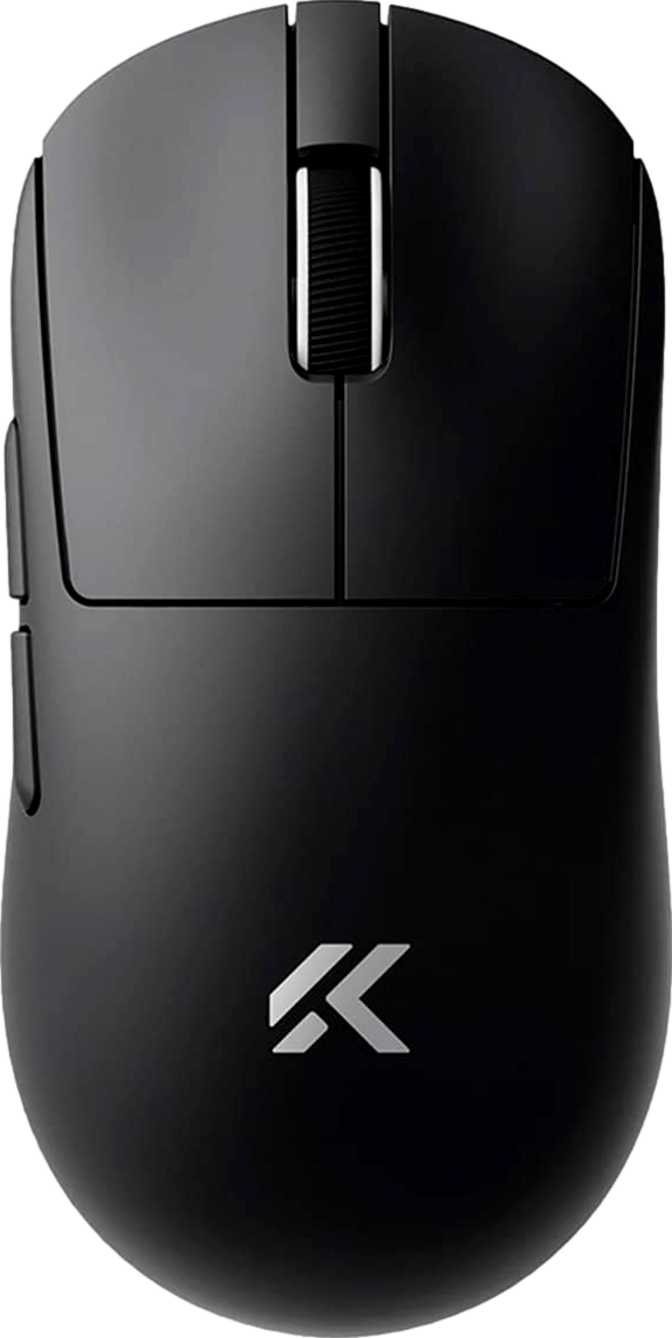
MCHOSE A7 V2 Ultra Full Review: Ultralight Wireless Gaming Mouse

MCHOSE A7 V2 Ultra Full Review: Ultralight Wireless Gaming Mouse

Mice

Editor’s Verdict

4.5/ 5
Recommended

A flagship-tier PixArt sensor, wireless-capable 8,000 Hz polling, and a 59 g ambidextrous body — competitive hardware built for players who want top tracking without the premium brand markup. The one caveat worth repeating: there is no onboard profile memory, so your configuration lives in the software, not in the device.
Sensor

PAW3950 TI

Flagship tier

Polling Rate

8,000 Hz

Wirelessly

Battery Life

~130 Hours

Wireless runtime

Weight

59 Grams

Ultralight class

Connection

Tri-Mode

2.4G + BT5 + USB

Orientation

Ambidextrous

Left & right hand

Design and Build Quality

Shape, ergonomics, weight, and materials

Shape, Ergonomics, and Who It Fits

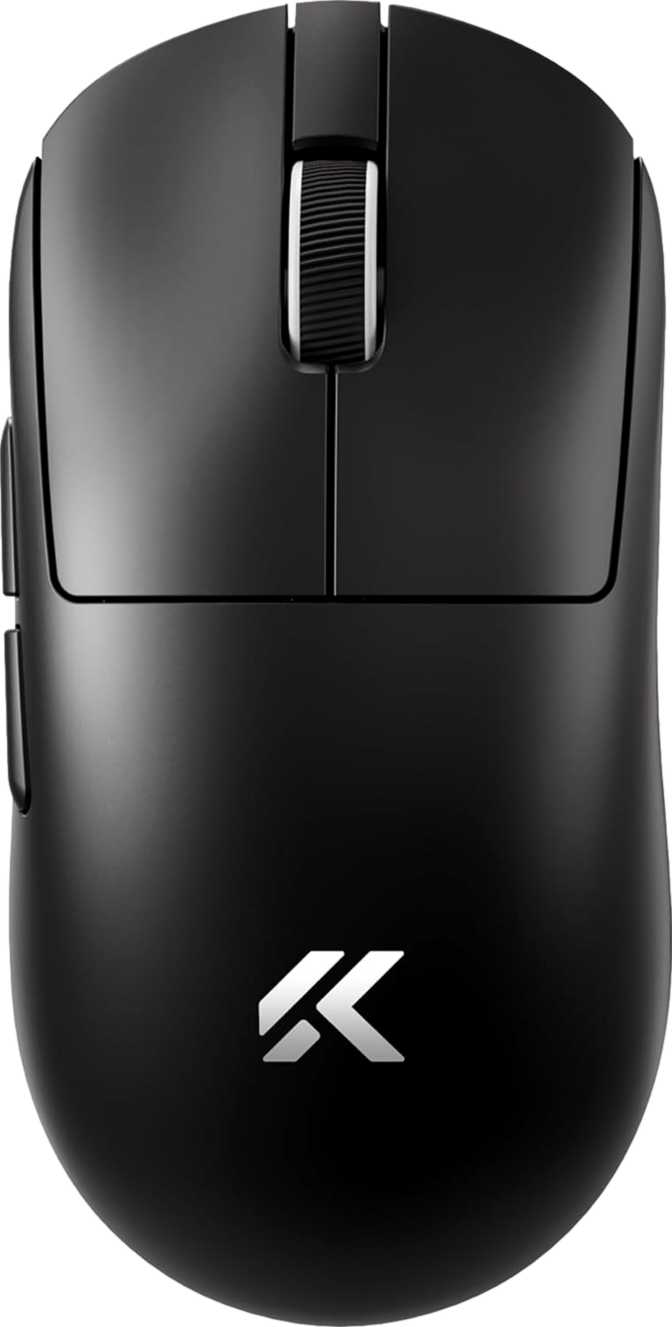
The A7 V2 Ultra is fully symmetrical — the same profile from left to right, with mirrored side buttons on each flank and no asymmetric palm rest that would lock you into a specific hand or grip. At just under 126 mm in length and 63 mm at its widest point, it sits in a medium footprint — compact enough for controlled claw or fingertip work, with enough length for small-to-medium palm grips. The height peaks at roughly 40 mm, a notably flat profile for a full-sized ambidextrous design.

This shape rewards claw and fingertip grip players most. The low hump means your hand rides high with fingertip control rather than resting in a sculpted cradle. Palm grip players with larger hands may find extended sessions less comfortable where a taller hump would otherwise provide support. This is a design priority, not a flaw — the shell is optimized for precision-first play, not passive resting.

Weight as a Performance Specification

At 59 grams, the A7 V2 Ultra qualifies as ultralight — and unlike some mice that achieve low weight through honeycomb shell perforation, this one maintains an unpunctured body. Battery, wireless module, PCB, and sensor all live inside a solid shell that still reaches sub-60 g.

The performance case is direct: lighter objects are moved with greater speed and require smaller corrective forces to stop precisely. Players transitioning from heavier mice notice the difference in the first session. There are no optional weight cartridges — the mass is fixed, and it’s fixed light.

No RGB: A Design Decision, Not an Omission

The A7 V2 Ultra ships without RGB lighting. For competitive players, the absence of LEDs delivers two practical advantages: lower power consumption that contributes to the exceptional battery life, and no light bleed creating visual distraction during late-night sessions.

The mouse looks understated and professional on any desk. Buyers who want a glowing centerpiece should look elsewhere — this product doesn’t pretend to be that, and is more focused for it.

Sensor and Performance

What the PixArt PAW3950 TI means in practice

What Makes This Sensor Significant

The PixArt PAW3950 TI sits at the top of what sensor technology currently offers. PixArt manufactures the tracking components found in the majority of high-performance gaming mice across the industry, and the PAW3950 is their current apex — found inside some of the most respected mice on the market regardless of brand name.

For buyers less familiar with sensor fundamentals: the sensor is the optical component on the underside of the mouse that photographs the surface thousands of times per second and calculates movement between frames. A poor sensor introduces tracking errors — jitter, unintended acceleration, or spin-out at fast speeds. A top-tier sensor eliminates these entirely. What your hand does is exactly what appears on screen.

The PAW3950 TI delivers zero hardware acceleration — the sensor adds no artificial speed curve to your movements. It tracks at native optical resolution without interpolation, handles aggressive direction changes without losing the surface, and at any speed a human hand can generate, it will not fail.

Core Sensor

PixArt PAW3950 TI

Flagship Tier

Zero acceleration · No interpolation · No spin-out at human-achievable speeds

DPI Range

200 minimum — 42,000 maximum

The 42,000 DPI ceiling is technically impressive and practically irrelevant for most users. Professional players virtually universally operate between 400 and 3,200 DPI. What the extreme ceiling signals is that the underlying hardware is built with zero compromise — exceptional precision at the extreme end means exceptional precision at the DPI settings you actually use.

Starting point: 800 DPI is a sensible default. Adjust from there based on your game and sensitivity preference.

8,000 Hz Polling

0.125 ms reports vs. standard 1 ms

Standard gaming mice report their position 1,000 times per second. This mouse reports 8,000 times per second — an eightfold increase that tightens the gap between physical movement and on-screen response. For most players, this is imperceptible in normal gameplay. For elite competitive players in frame-precise scenarios, the difference is measurable and real.

Note: 8,000 Hz draws more battery. Reducing polling rate in software extends wireless sessions with no meaningful loss for typical play.

Speed Ceiling

750 IPS tracking — 50G acceleration

The tracking speed ceiling is so high that no human hand movement during competitive gaming could approach it. Reaching the limit would require a limb moving at mechanically impossible velocity. In practical terms: the A7 V2 Ultra will not spin out or lose the surface during aggressive flick shots or rapid direction changes, regardless of how explosive the movement is.

The sensor headroom exists so that tracking quality is never the limiting factor in your play.

Three Ways to Connect

Understanding when to use each mode

2.4GHz Wireless

Primary Gaming Mode

The recommended mode for all competitive play. Modern 2.4GHz wireless is functionally indistinguishable from a wired connection in terms of latency. The A7 V2 Ultra runs its full 8,000 Hz polling rate over this connection — not a reduced wireless figure.

Keep the USB receiver close to your mouse pad for the strongest, most stable signal.

USB Wired

Tournament & Backup Mode

Plugging in the included 1.8-meter cable switches to wired mode and charges the battery simultaneously — no forced downtime, no interruption to play. The reliable choice in dense wireless environments like LAN events, or for players who prefer the certainty of a physical cable.

The 1.8 m cable length is generous enough to reach floor-mounted PCs from most desk setups.

Bluetooth 5

Productivity & Travel Mode

Bluetooth 5 enables connection to laptops, tablets, and secondary workstations without occupying a USB port. For multi-device users who want one mouse for both a gaming desktop and a work laptop, this is what makes the setup practical and cable-free.

Bluetooth introduces more latency than 2.4GHz — adequate for productivity work, not recommended for competitive gaming.

Battery Life: Removing the Mental Load of Charging

What ~130 hours of wireless runtime actually means day to day

Wireless Runtime

130

hours

Use while charging No pad charging

Runtime Compared to Category Norms

MCHOSE A7 V2 Ultra ~130 hrs
Category average 40–80 hrs
Bars represent relative runtime at typical gaming polling rates

Most wireless gaming mice offer between 40 and 80 hours on a full charge. At 130 hours, a player using the mouse for five hours daily goes three to four weeks between charges. Wireless mice that need charging every few days impose a persistent low-level maintenance overhead. A mouse that runs for weeks removes it entirely from your awareness.

Charging requires the included cable — no wireless pad charging is supported. Given how infrequently that cable is needed, this registers as a minor note rather than a genuine frustration for most users.

Buttons, Programmability, and What the Specs Don’t Tell You

Six programmable buttons — and one critical limitation

Button Configuration

All six buttons are programmable through the companion software: primary left and right clicks, the scroll wheel click, a dedicated DPI toggle, and two side buttons mirrored on both flanks. Six programmable inputs give competitive players meaningful customization without overwhelming complexity.

  • Dedicated DPI Toggle Button Switch instantly between two DPI presets — higher sensitivity for general movement, lower for precise aiming — without opening software or interrupting play. A genuine quality-of-life feature that earns its dedicated button.
  • Fully Mirrored Side Buttons Both side button pairs are equally accessible and equally positioned. Left-handed users have the same four-input advantage as right-handed users — a genuine rarity in ambidextrous mice.
  • Single Centered Scroll Wheel Vertical scroll only — no horizontal tilt, no thumb wheel. Competition-focused: fewer mechanical components means fewer failure points and cleaner click registration.
  • No Profile Switching Button A direct consequence of zero onboard memory. With no profiles stored on the device, there is nothing to switch between.

Who the MCHOSE A7 V2 Ultra Is Built For

A clear picture of the right buyer — and the wrong one

This Mouse Is For You If…

  • You compete in FPS, tactical, or esports titles and want flagship-tier sensor performance without a premium brand surcharge
  • You use a claw or fingertip grip and benefit most from a flat, low-profile, ultralight shell
  • You are left-handed and have been consistently underserved by the market’s right-hand-dominant designs
  • You use a gaming desktop and a work laptop and want one mouse for both via 2.4GHz and Bluetooth
  • You prefer clean, minimalist hardware and have no use for RGB lighting or aesthetic extras
  • You want to charge your mouse once a month rather than once a week

Look Elsewhere If…

  • You compete at LAN events, share a rig, or regularly use your mouse on multiple machines without reliable software access
  • You use a palm grip with medium-to-large hands and need a taller hump for rear support during long sessions
  • You want RGB lighting as part of your setup’s aesthetic — there is none here
  • You prefer heavier mice for the stability feeling they provide at very low sensitivity settings
  • Post-purchase software support and long-term service track record weigh heavily in your purchase decision

Competitive Positioning

Where the A7 V2 Ultra sits in today’s ultralight wireless market

The ultralight wireless gaming mouse segment has become one of the most technically contested categories in peripheral hardware. The A7 V2 Ultra enters with a sensor that matches anything established brands are currently shipping, at a weight competitive with mice from Logitech and Razer costing significantly more. MCHOSE’s proposition is direct: source the same flagship sensor components, eliminate the production overhead of RGB and onboard memory, and pass the difference to the buyer.

Specification MCHOSE A7 V2 Ultra
Sensor PAW3950 TI — Flagship
Maximum Polling Rate 8,000 Hz (over wireless)
Wireless Modes 2.4GHz, USB, Bluetooth 5
Body Weight 59 g — Ultralight
Battery Runtime ~130 hours
Orientation Ambidextrous
RGB Lighting None
Onboard Profile Storage None
Wireless Charging Not supported
Warranty 1 Year

Honest Assessment

What this mouse gets right and where it falls short

Where It Excels

  • Flagship sensor, no compromiseThe PAW3950 TI is PixArt’s current apex. Tracking precision is equivalent to what much more expensive mice offer — brand name changes nothing about the hardware.
  • 8,000 Hz over wirelessSustaining maximum polling wirelessly is technically demanding. This mouse does it natively — not a feature reserved for wired mode only.
  • 59 g without honeycombSub-60g wireless in an unpunctured shell is an engineering achievement. The construction is solid and the weight is real.
  • ~130-hour battery lifeWeeks between charges at typical usage. Not thinking about battery management is a real and persistent daily benefit.
  • True ambidextrous designMirrored side buttons and genuine shape symmetry give left-handed players full feature parity — not a token accommodation.

Where It Falls Short

  • Zero onboard memoryThe most impactful limitation. Configuration portability is nonexistent — your settings live in the software, not in the mouse. Multi-machine users feel this acutely.
  • One-year warrantyAdequate but not generous, particularly from a brand still building its after-sales service reputation in Western markets.
  • No wireless chargingCharging always requires the physical cable. Given how rarely it’s needed, this is minor — but relevant for buyers who rely on pad charging.
  • Flat profile limits palm grip comfortThe low hump leaves large-handed palm grip players without rear support. Not a flaw for its intended user — a real constraint for others.
  • Brand track record unprovenHardware quality is verifiable. Long-term software support, firmware cadence, and customer service from MCHOSE are less established than from major brands.

Questions Real Buyers Ask

Straight answers before you commit

Yes — the A7 V2 Ultra is engineered to run its maximum polling rate over the 2.4GHz wireless connection, not just in wired mode. Sustaining 8,000 Hz reports wirelessly is technically demanding, and achieving it without a wired fallback is a meaningful differentiator at this price point.

It depends on hand size. The flat, low-profile shell suits small-to-medium hands in palm grip reasonably well. Players with larger hands who rely on a tall hump to support the back of the hand may find extended sessions uncomfortable. If your current mouse has an aggressive ergonomic hump, expect a meaningful adaptation period with this shape.

Yes — connect via the 2.4GHz receiver or Bluetooth and it works immediately with hardware defaults. Without the companion software installed, however, custom button assignments, DPI steps, and polling rate preferences cannot be accessed. Your previously saved configuration is unavailable, as the mouse itself holds no memory of your settings.

Immediately and noticeably lighter. Players switching from mice in the 90–120 g range describe the first sessions as slightly disorienting — the mouse offers less resistance than expected, and micro-corrections feel almost effortless. Adjustment typically takes one to three play sessions. Very few players who adapt fully want to return to heavier hardware.

2.4GHz wireless for any gaming scenario where latency matters. It delivers the full 8,000 Hz polling with input latency indistinguishable from wired. Use Bluetooth for productivity on secondary devices where latency is irrelevant. Switch to wired at LAN events where wireless congestion is a concern, or when you want to charge and play simultaneously.

The PAW3950 TI sits above previous-generation flagship sensors in PixArt’s lineup. At the level of tracking precision these sensors offer, differences are largely imperceptible to human reflexes during play. What matters more is how the manufacturer has implemented and tuned the sensor, and whether companion software provides accurate reporting without unwanted jitter-reduction filters interfering with raw tracking.

Yes. The ~130-hour figure reflects operation at a moderate polling rate. Running continuously at 8,000 Hz will reduce the effective wireless runtime, as higher polling draws more power from the wireless radio. Even at a significant reduction from the ceiling figure, real-world battery life remains competitive with or superior to most wireless alternatives in this performance tier. Reducing polling rate in software when maximum responsiveness is not needed is the simplest way to extend sessions.

Final Recommendation

A Strong Buy for the Right Player

4.5 / 5

Performance Hardware — Recommended for Single-Machine Competitive Players

Who Should Buy This

If you compete on a single primary machine, use claw or fingertip grip, and want a sensor that matches much more expensive options — the A7 V2 Ultra earns a strong, unqualified recommendation. Left-handed players especially: the fully ambidextrous design with mirrored side buttons is genuinely rare at this hardware tier.

The One Caveat

The absence of onboard profile storage is the single condition that changes the verdict. If your gaming life extends across multiple machines without consistent software access, the A7 V2 Ultra is the wrong choice regardless of its other merits. Know which group you’re in before purchasing.

For competitive players who game on a single setup and want flagship tracking without flagship pricing, the MCHOSE A7 V2 Ultra is hardware that earns its place on merit alone.

Taavi Leppänen Helsinki, Finland

Linux Hardware Compatibility Reviewer

Open-source developer and Linux hardware compatibility writer who tests laptops, mini PCs, and peripherals for out-of-box Linux support. Documents kernel driver coverage, suspend-resume reliability, and firmware update paths — an essential resource for the Linux desktop community.

Linux Hardware Open Source Computing Driver Compatibility Mini PCs Developer Laptops
  • BSc in Computer Science
  • Linux Foundation Certified Engineer (LFCE)
View Full Profile

