MCHOSE A7 V2 Pro Review: Flagship Sensor, Real Trade-Offs Tested
MiceWhen a lesser-known brand ships a product loaded with the same core components as mice twice its price, the natural response is skepticism. The MCHOSE A7 V2 Pro invites exactly that skepticism — and then answers it with a specification sheet that is difficult to dismiss. This is a wireless gaming mouse carrying a flagship-tier optical sensor, an ultra-high polling rate at the ceiling of what current gaming hardware supports, and a claimed battery life that makes category leaders look restrained. It does all of this in a 59-gram shell with three ways to connect.
The real questions are not whether this mouse looks impressive on paper — it does — but whether the engineering behind those numbers holds up, and whether the compromises required to reach this weight and price are ones that matter to the players most likely to want it.
Design and Build Quality
Shape, Size, and Grip Style Compatibility
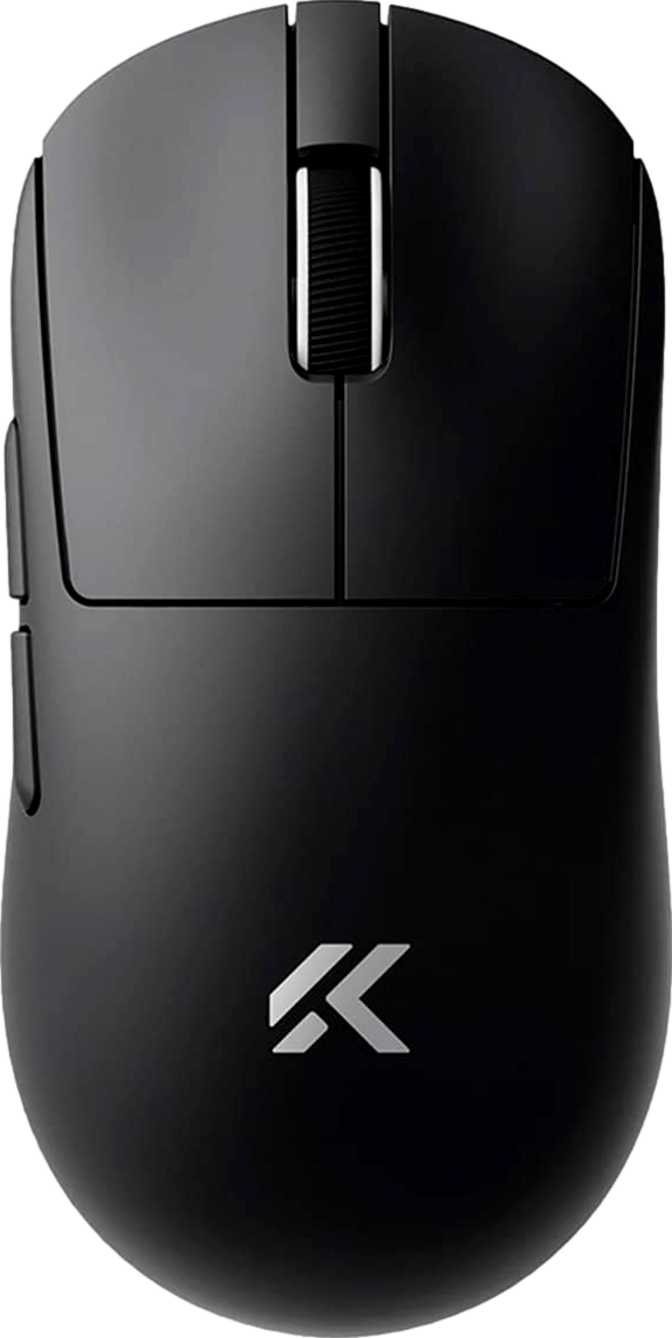
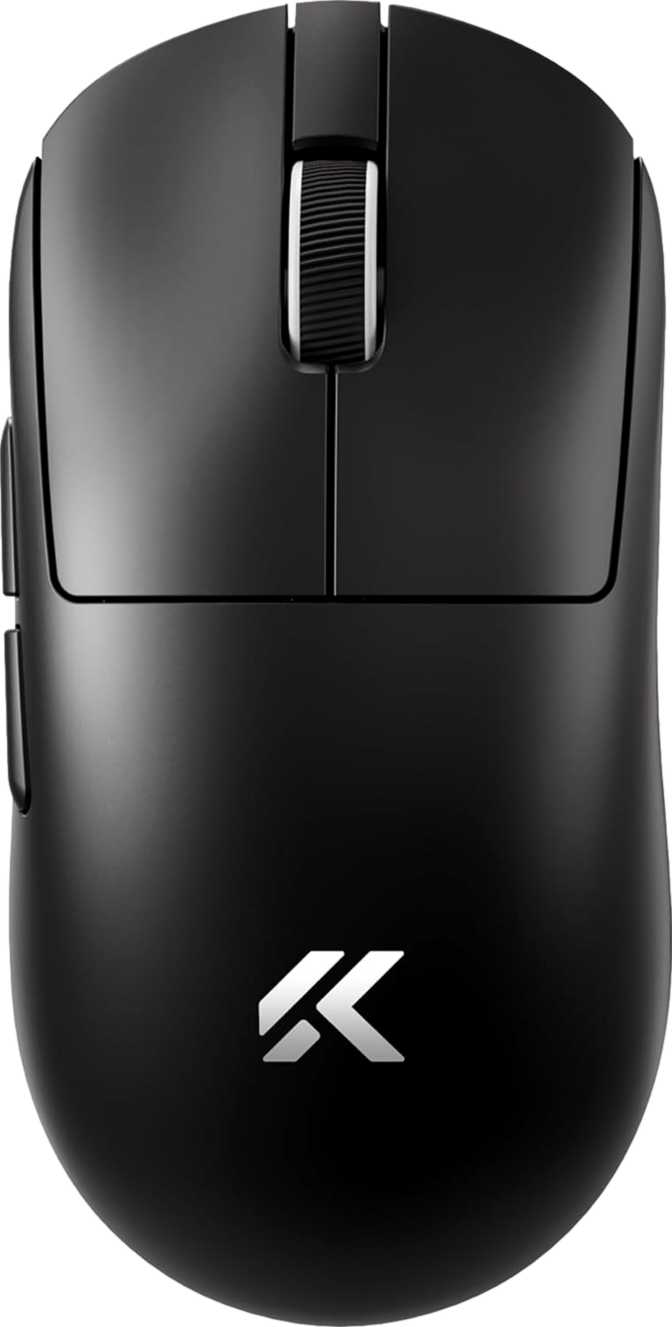
The A7 V2 Pro uses a symmetric, ambidextrous shell with no ergonomic bias toward either hand. At approximately 126mm long and 63mm wide with a profile under 40mm tall, it sits comfortably in medium-to-large territory — well-suited to fingertip and claw grip styles, and workable for the majority of adult hand sizes. Palm grip players with larger hands may find the length slightly short, but the fit is unrestricted for most users.
The symmetric design is the primary advantage for left-handed gamers: unlike most mice sculpted for right-hand use, this shell is genuinely usable in either orientation. The caveat is side button placement — both sit on the left flank only. A right-handed user accesses them naturally with the thumb; a left-handed user reaches them with the ring or index finger instead. For players who rely on side buttons constantly in gameplay, this access difference is worth factoring into the decision before purchase.
Weight: What 59 Grams Means in Practice
The A7 V2 Pro weighs approximately as much as two AA batteries — placing it among the lightest wireless gaming mice available at any price point. Critically, this weight is achieved without a perforated shell. A honeycomb design is the easiest path to shedding grams, but it introduces dust accumulation and a texture some players dislike. A solid exterior at this weight reflects deliberate internal engineering. The practical effects accumulate over extended sessions: less wrist fatigue, faster directional changes, and reduced inertia when correcting aim.
Aesthetic Design: No RGB, by Choice
The A7 V2 Pro ships without any LED lighting. Buyers building setups around synchronized RGB ecosystems will find this mouse visually neutral. For competitive players who view lighting as a power drain or distraction, the clean exterior is exactly right. The absence of lighting hardware almost certainly contributes directly to the mouse's exceptional battery endurance — power that competitors redirect into light arrays is preserved entirely here for sensor operation and wireless transmission. The bundled cable runs nearly two meters, generous for most desk configurations and used primarily for charging rather than active play.
Sensor and Tracking Performance
Zero-Acceleration
No artificial smoothing or prediction — cursor output mirrors hand movement with complete fidelity
200 – 26,000 DPI
Ultra-low floor for precision-focused players up to a ceiling that exceeds all practical gaming applications
8,000 Hz Peak
Eight times standard reporting frequency — interval under one-eighth of a millisecond
Elite Speed Floor
Tracks beyond the fastest possible desk swipe — no skipping or stuttering under any realistic condition
The PixArt PAW3395: Why It Matters
The sensor inside the A7 V2 Pro is the PixArt PAW3395 — the same sensor deployed in flagship mice from established brands that retail for considerably more. Its reputation rests on one central characteristic: it applies no native acceleration or smoothing to cursor movement. The sensor reports exactly what the hand does, with no interpolation between physical motion and cursor output. For everyday users, this means tracking that feels direct and predictable on virtually any surface. For competitive players, it means the hardware will not introduce systematic error into any aiming scenario — the sensor is not a limiting variable in performance.
Sensitivity Range: What the Numbers Mean for How You Play
The sensitivity adjustment spans from an ultra-low floor — practical for players who prefer aim mapped across large arm movements — up to a ceiling so high that no realistic gaming application would approach it. Competitive players work at sensitivities corresponding to a fraction of the upper limit; many operate well below 1,600 DPI for precision-heavy genres. The high DPI ceiling signals sensor capability, not a recommended operating range. The dedicated DPI button near the scroll wheel cycles through configured steps without requiring software to be open.
8,000 Hz Polling Rate: Who Benefits and by How Much
Standard gaming mice report their position 1,000 times per second. The A7 V2 Pro multiplies that frequency eightfold, compressing the reporting interval to a fraction of a millisecond. The tangible benefit is most apparent in high-frame-rate gaming environments — particularly competitive first-person shooters running at 240 frames per second or higher, where the gap between hardware input and on-screen response is already minimized at every other point in the chain. At that level, a mouse reporting more frequently can deliver a marginally smoother and more precise motion response.
At 60 or 144 frames per second, the perceptual difference narrows considerably. The 8,000 Hz specification guarantees the hardware holds nothing back — but its practical impact scales with the rest of the system. One operational note: maximum polling rate requires slightly more from the host processor. On any modern gaming PC this is completely undetectable; on lower-powered systems, it is worth monitoring if stability issues arise.
Three Connection Modes: One Mouse for Multiple Setups
The A7 V2 Pro supports three distinct ways to connect to a host device. This combination is rarer than it might appear — most wireless gaming mice offer only one wireless mode and a wired backup, with Bluetooth conspicuously absent from even premium options.
The dedicated USB dongle creates a low-latency radio connection performing at or near wired levels. For any session where competitive performance matters — this is the correct mode. Always.
Delivers equivalent performance to 2.4GHz while simultaneously charging the battery. Active play during charging is fully supported — a depleted battery never forces a session to pause.
Connects without the dongle — ideal for laptops with limited ports, office machines, or switching between devices. More latency than 2.4GHz: fine for productivity, not optimal for competitive play.
Battery Life and Charging Reality
An Extraordinary Endurance Claim
MCHOSE rates the A7 V2 Pro at 130 hours on a full charge. Applying appropriate real-world skepticism — performance varies with polling configuration, surface type, and movement intensity — even if actual life falls 20 to 30 percent below the rating, this mouse still outlasts the field by a meaningful margin. Most wireless gaming mice in this category top out between 40 and 90 hours under favorable conditions.
The elimination of RGB lighting is the most probable contributor to this result. Power that competitors redirect into light arrays is preserved entirely here for the sensor and wireless transmitter. For a player logging several hours daily, the outcome is charging measured in weeks rather than days — battery management becomes something addressed occasionally, not actively monitored.
Charging: What to Expect
Who the MCHOSE A7 V2 Pro Is Built For
The Ideal Buyer
- Competitive FPS and aim-intensive players who want flagship sensor accuracy and maximum polling rate in the lightest available package
- Left-handed gamers — one of the very few high-specification ambidextrous options genuinely suited to non-right-hand use
- Multi-environment users who want one mouse covering a 2.4GHz gaming rig and a Bluetooth office or travel machine
- Players who find battery management disruptive and want to charge as infrequently as possible
- Anyone who prefers a clean, unlit aesthetic with no interest in RGB lighting effects
Consider Alternatives If...
- You regularly move between computers and need DPI and button settings to persist without reinstalling software each time
- You are left-handed and rely heavily on side buttons — the left-flank-only placement creates an ergonomic compromise in left-hand configuration
- Wireless charging is part of your peripheral routine — there is no dock or pad compatibility on this mouse
- A two-year or longer warranty period is a significant factor — one year is shorter than what many competitors provide
- RGB lighting customization is an aesthetic or thematic requirement for your setup
Competitive Positioning
How the MCHOSE A7 V2 Pro stacks up against the two categories most buyers will consider: high-end flagship wireless mice and mid-range wireless alternatives.
| Feature Area | MCHOSE A7 V2 Pro | Flagship Wireless | Mid-Range Wireless |
|---|---|---|---|
| Sensor Quality | Top-Tier (PAW3395) | Top-Tier | Mid-Tier |
| Weight Class | ~59g Ultralight | ~58–70g | ~80–110g |
| Max Polling Rate | 8,000 Hz | 4,000–8,000 Hz | 1,000 Hz |
| Wireless Modes | 2.4GHz + BT + Wired | Typically 2.4GHz only | Typically one mode |
| Battery Life (Rated) | ~130 hrs | ~60–100 hrs | ~40–80 hrs |
| RGB Lighting | None | Usually included | Usually included |
| Onboard Memory | None | 3–5 profiles typical | 1–3 profiles typical |
| Wireless Charging | No | Select models | Rarely |
| Hand Compatibility | Ambidextrous | Mostly right-handed | Mixed |
What This Mouse Gets Right, and Where It Falls Short
Genuine Strengths
The A7 V2 Pro's case rests in the areas that directly determine gaming performance. The PAW3395 sensor carries no caveats — it is accurate, consistent, and trusted across competitive communities worldwide. The 8,000 Hz polling rate is the real specification, not an asterisked number conditional on specific system configurations. At 59 grams with a solid exterior, the mouse achieves its weight target without the structural compromise of a perforated design. These are genuine engineering outcomes, not marketing approximations.
The 130-hour battery claim, even discounted for real-world conditions, places the A7 V2 Pro in a class of its own for wireless endurance. Tri-mode connectivity — particularly Bluetooth alongside 2.4GHz wireless in a mouse this light — extends the device's practical usefulness beyond the gaming desk in a way that few competitors match. These are features that meaningfully change how the mouse integrates into a daily workflow.
Honest Weaknesses
The absence of onboard memory is the most significant limitation — not a minor inconvenience but a genuine hardware constraint for multi-machine users, and a clear point where established competitors pull ahead. The one-year warranty is a real risk factor: daily gaming peripherals take real punishment, and shorter coverage means users absorb failure costs sooner if something goes wrong in the second year.
The side-button placement works cleanly for right-handed users and imperfectly for left-handed ones — the "ambidextrous" claim does not fully extend to every interaction. The lack of RGB is defensible and measurably beneficial for battery life, but it is a genuine absence for buyers who value it. None of these weaknesses undermine the core performance case; they define the right buyer more precisely.
Common Questions Before You Buy
Final Verdict
The MCHOSE A7 V2 Pro earns a direct recommendation — with one condition stated clearly enough that it cannot be missed.
For competitive players gaming on a dedicated single machine, the A7 V2 Pro delivers a component package that holds up against mice at two or three times its price: a sensor without peer at this price level, a polling rate at the absolute ceiling of what the category currently offers, exceptional battery endurance, and tri-mode wireless connectivity housed in a genuinely ultralight solid shell. These are not approximate advantages — they are specific, measurable characteristics that directly affect the gaming experience in the ways that matter most to players who care about them.
The condition: the absence of onboard memory is a hardware decision, not a firmware oversight. If your workflow involves moving this mouse between machines and expecting settings to follow, this mouse will disappoint. That is not a small inconvenience — it is an architectural constraint that no future software update can change. Buy it with clear understanding of that boundary, and it earns its place on the desk without reservation.
Best suited for single-setup competitive players who want flagship-tier performance without paying for brand heritage. Verify that the onboard memory limitation either applies or does not apply to your use case before purchasing — it is the one factor that makes this mouse the wrong choice for a specific subset of buyers.