Vivo Pad 6 Pro Review: An Honest Look at Its Strengths and Limits
TabletsQuick Verdict
The Vivo Pad 6 Pro is defined by a rare combination of genuine ambition and puzzling restraint. Its display resolution and processing power sit at the top of the Android tablet class. Its Wi-Fi standard and charging technology sit near the bottom. This is a tablet you buy for specific reasons — and should avoid for equally specific ones.
Design and Build Quality
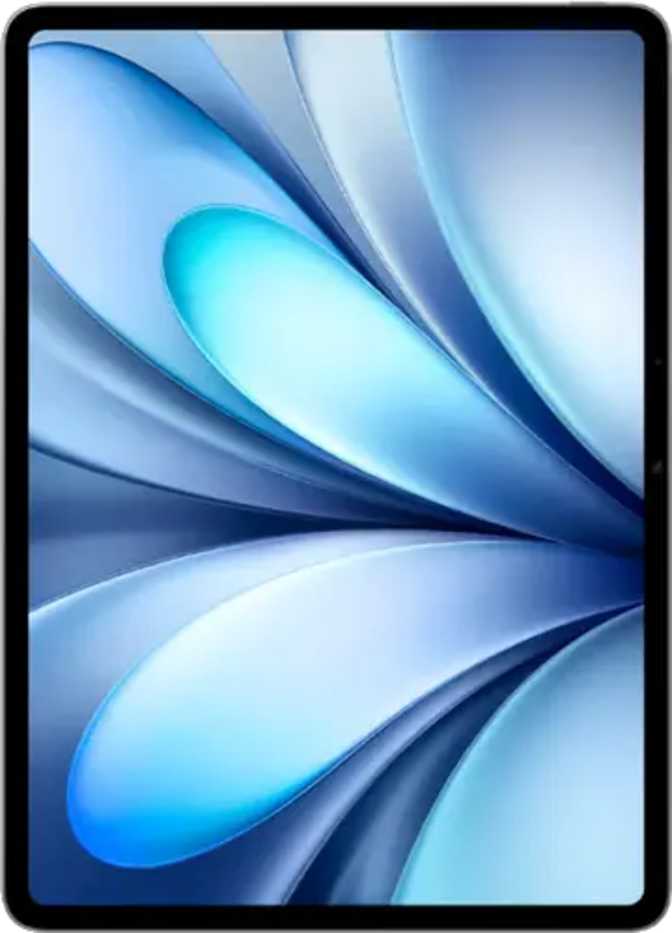
At 6.2mm thick, the Vivo Pad 6 Pro is genuinely slim for a tablet of its class — thinner than most standard pencils. The engineering required to fit a 13,000mAh battery into a chassis this lean is real, and it shows. The footprint mirrors A4 paper in its dimensions, placing it firmly in the laptop-replacement size tier.
At 663 grams, it's lighter than most laptops but heavier than most 11-inch tablets. Extended one-handed use isn't realistic — this is a two-hands or lap device, most naturally held in landscape orientation. Portrait mode works for reading, but landscape is where this tablet lives.
- Thickness6.2 mm
- Dimensions297 × 199.8 mm
- Weight663 g
- Water ResistanceNone
- Damage-Resistant GlassNo
- Anti-Reflection CoatingYes
- Stylus IncludedNo
- Keyboard IncludedNo
- Fingerprint ScannerNo
Display: The Headline Act
Where the Vivo Pad 6 Pro earns its place at the top of the consideration list
Individual pixels are invisible at normal viewing distances. Text renders with print-like clarity — measurably sharper than most competing Android tablets in this size class.
Scrolling, swiping, and gaming feel perceptibly more fluid than on 60Hz or 90Hz panels. Motion is cleaner, response feels tighter, and visual stutter essentially disappears.
A large-format canvas at 3840×2512 resolution. Reading, split-screen productivity, and media consumption benefit genuinely from the additional real estate.
What 3840×2512 Resolution Actually Means
This resolution figure exceeds what many desktop monitors offer. At 348 pixels per inch, text is as sharp as printed ink on paper. Fine UI details — font weights, icon edges, chart lines — render with a precision that lower-resolution panels simply cannot match.
Most competing Android tablets in the large-format category top out around 264–280 ppi. The Vivo Pad 6 Pro's panel is measurably sharper than virtually everything else in its size class. For content creators reviewing high-resolution images or working with detailed documents, the difference is immediately visible.
Where the Display Falls Short
In dark room viewing, blacks appear as very dark gray rather than true black. High-contrast movie scenes reveal this compared to OLED alternatives. The difference is visible and consistent.
HDR10, HDR10+, and Dolby Vision are all absent. Premium streaming content tone-maps to standard dynamic range — the expanded brightness and color volume HDR formats deliver simply don't apply here.
Under overhead lighting the screen stays readable without becoming a mirror. A practical benefit for office and brightly lit indoor environments.
Performance: The Processor Is Not the Bottleneck
Flagship-tier silicon with exceptional memory speed — this tablet handles anything Android can throw at it
Chipset and CPU Analysis
Built on a 3-nanometer manufacturing process — the same generation used in current top-tier smartphones — the processor pairs two performance cores running at 4.6GHz with six efficiency cores at 3.62GHz. This split-cluster design delivers maximum output under load and restrained power consumption during lighter tasks.
The 8.2W thermal design power rating is remarkably modest for a 3nm chip. In practice, this means sustained performance tasks generate less heat than equivalent processors from previous generations — extended gaming or processing sessions are unlikely to cause the visible throttling that older flagship tablets sometimes exhibited.
Single-Core Score — Individual App Responsiveness
Multi-Core Score — Parallel Workload Capacity
Bars scaled relative to ~15,000 as reference ceiling for visual context
- RAM
- 16 GB DDR5
- RAM Speed
- 5,300 MHz
- Internal Storage
- 512 GB
- MicroSD Expansion
- No
- Max Memory
- 24 GB
- Memory Bandwidth
- 85.1 GB/s
- GPU
- Adreno 830
- GPU Clock
- 1,200 MHz
- Shading Units
- 1,536
- DirectX
- DirectX 12
- OpenGL ES
- 3.2
Key Features in Real-World Context
Running Android 16 out of the box, the Vivo Pad 6 Pro delivers the latest platform iteration. On-device machine learning enables features like offline voice recognition and Live Text without requiring a cloud connection — meaningful for privacy-conscious users and those in low-connectivity environments.
- Split-screen multitasking and picture-in-picture
- Dynamic theming and full dark mode
- Multi-user profiles with fully separate app environments
- On-device ML with offline voice recognition
- Live Text — extract selectable text from images
- Granular camera and microphone privacy controls
- App tracking restrictions and clipboard warnings
- Child lock and per-user account management
The camera hardware is functional rather than impressive — the appropriate choice for a 13-inch tablet. Tablet cameras exist primarily for video calls and document scanning, and the Vivo Pad 6 Pro handles both without complaint. Nobody should choose or avoid this device based on camera performance.
Supported: Touch AF, continuous AF in video, manual ISO, white balance, exposure, and focus.
Not supported: Optical stabilization, optical zoom, slow-motion, HDR capture, burst shooting, or panoramas.
- Stereo speakers present — physical separation in landscape orientation provides reasonable stereo width for media consumption.
- No 3.5mm headphone jack — wired headphone users need a USB-C adapter.
- No premium Bluetooth audio codecs — aptX HD, LDAC, and aptX Adaptive are all absent. High-fidelity wireless headphones won't operate at full capability.
Battery Life: Huge Capacity, Slow Recovery
The Capacity Advantage
The battery inside the Vivo Pad 6 Pro is genuinely substantial. Under typical mixed workloads — browsing, streaming, document work, some gaming — most users can realistically reach the end of the day and into the evening without charging. Light-to-moderate users could stretch to multi-day intervals between charges.
For a display that runs at this resolution and refresh rate, that kind of endurance is a real practical advantage. The fact that it's engineered into a 6.2mm chassis makes it all the more impressive.
Fast Charging Is Not Supported
This is the most significant practical limitation for active users. A 13,000mAh battery at standard charging rates requires a multi-hour recharge window. If you drain the battery heavily during travel or a full work session, you are committed to a lengthy tethered recovery period.
Wireless charging is also absent. For a device built around flagship specifications, the absence of fast charging is an inconvenience that surfaces repeatedly. Plan all charging sessions for overnight or long stationary periods.
- Battery Capacity
- 13,000 mAh
- Fast Charging
- Not Supported
- Wireless Charging
- Not Supported
- Removable Battery
- No
- Battery Health Monitoring
- Yes
Connectivity: A Serious Concern
The connectivity profile deserves direct and honest treatment — several of these gaps affect daily use in ways that specs charts don't capture
Wi-Fi 4 (802.11n) — A Decade-Old Standard
This is not a minor footnote. The wireless standard on the Vivo Pad 6 Pro is over a decade old. The current baseline for tablets in this performance tier is Wi-Fi 6, with many competitors offering Wi-Fi 6E or Wi-Fi 7. In congested environments — apartments, offices, coffee shops with many connected devices — Wi-Fi 4 delivers measurably more interference and lower real-world throughput than modern-standard devices on the same router.
Pairing a flagship 3nm processor with Wi-Fi 4 is an architectural mismatch that will age poorly. As Wi-Fi 6 and 6E become universal, the gap will only grow wider.
| Wi-Fi Standard | Max Theoretical Speed | Frequency Bands | Assessment |
|---|---|---|---|
| Wi-Fi 4 (802.11n) This Device |
~600 Mbps | 2.4 GHz, 5 GHz | Outdated |
| Wi-Fi 6 (802.11ax) Typical Competitor |
~9,600 Mbps | 2.4 GHz, 5 GHz | Current Standard |
| Wi-Fi 6E Upper-Tier Competitor |
~9,600 Mbps+ | 2.4 GHz, 5 GHz, 6 GHz | Premium Standard |
Other Connectivity Limitations
Who Is This Tablet For?
- Fixed-location productivity users who primarily work within a reliable home or office Wi-Fi network, where the Wi-Fi 4 limitation matters less under light network traffic conditions.
- Resolution-focused content consumers — for reading, digital content review, and browsing, the sharpness advantage over most competitors is real, visible, and immediately apparent.
- Developers and power users who need genuine flagship CPU and GPU performance in a large-format Android device for testing, emulation, or computation-heavy workflows.
- Students and readers — the large sharp display makes annotating PDFs, reading research papers, and reviewing slides noticeably more comfortable than smaller tablets.
- Multi-user households where full multi-user profile support and the child lock feature provide genuine daily value for families sharing one device.
- Frequent travelers — no cellular option, no GPS, and aging Wi-Fi technology combine into a set of limitations that significantly reduce usefulness away from a reliable Wi-Fi network.
- Mobile creatives with tight schedules — the absence of fast charging makes managing battery levels between shoots, sessions, or travel legs genuinely difficult.
- Media purists and cinephiles — those for whom OLED blacks, HDR10, or Dolby Vision are non-negotiable for streaming will find competing tablets more satisfying.
- Wireless audio enthusiasts — the absence of premium Bluetooth codecs means high-fidelity wireless headphones won't perform at their designed capability level.
- Long-term software support prioritizers who want guaranteed, regular OS updates delivered directly from the vendor will find this an uncertain proposition.
Competitive Positioning
How the Vivo Pad 6 Pro stacks up against logical alternatives in the large-format Android tablet space
| Feature | Reviewed Vivo Pad 6 Pro |
Large-Format Competitor A | Large-Format Competitor B |
|---|---|---|---|
| Display | Best-in-Class Resolution 13.2" IPS LCD 3840×2512 / 144Hz |
12.4–13" OLED or LCD ~2800×1752 / 120Hz |
13" LCD 2560×1600 / 144Hz |
| Processor Tier | Current Flagship (3nm) | Current Flagship (3nm) | Previous-Gen Flagship |
| RAM | 16 GB DDR5 | 8–12 GB | 8–12 GB |
| Wi-Fi Standard | Wi-Fi 4 (802.11n) | Wi-Fi 6 or 6E | Wi-Fi 6 |
| Fast Charging | Not Supported | Yes — 45–65W typical | Yes |
| Stylus Included | No | Sometimes | Sometimes |
| HDR Support | None | Often (HDR10 / Dolby Vision) | Sometimes |
| Cellular Option | No | Often Available | Sometimes Available |
Competitor specifications represent typical configurations in the large-format Android tablet category and are illustrative of the competitive landscape rather than tied to specific named models.
Honest Assessment
The Vivo Pad 6 Pro is built around its display and its processor — and in both dimensions, it delivers something genuinely excellent. A 3840×2512 pixel panel at 13.2 inches with a 144Hz refresh rate is not a specification combination you find everywhere. The display is best-in-class for resolution sharpness in this size category, and it's immediately apparent every time you use it.
Combined with current-generation flagship silicon, the device handles anything Android can throw at it and renders the output on a screen that makes the results look exceptional. For reading, editing, and content review, the visual quality is consistently and genuinely impressive.
The 16GB of DDR5 RAM at impressive memory speeds means multitasking is fluid without the background-app reload cycles that slower devices impose. For productivity workflows that keep many apps active simultaneously, this matters every single day.
The contradictions emerge when you look at what surrounds those headline features. A flagship-tier processor paired with Wi-Fi 4 is an architectural mismatch that will age poorly. Routers are increasingly Wi-Fi 6 and 6E native, and the real-world throughput gap will only become more visible over time.
A 13,000mAh battery without fast charging is a genuine daily inconvenience for any user without the luxury of an overnight charging window. For active users, this is felt on every travel day and every heavy use session — not just noted as a specification comparison.
The IPS LCD panel, while exceptional in resolution and refresh rate, cannot compete with OLED alternatives for dark room viewing or HDR content. The absence of biometric authentication, water resistance, and any bundled accessories adds friction that more balanced competitors don't impose.
Questions Buyers Ask Before Purchasing
Final Recommendation
The definitive purchase verdict for the Vivo Pad 6 Pro
The Vivo Pad 6 Pro earns its place in the large-format Android tablet conversation on the strength of two things: a display that outclasses the competition in pixel density, and a processor that has no ceiling for current Android workloads. Those are not minor achievements — they define the daily visual and performance experience of using this device.
The Wi-Fi 4 limitation and the absence of fast charging are not minor specification gaps. They are choices that affect daily use in ways that resolution benchmarks don't capture. Pairing a 3nm flagship chip with a decade-old wireless standard is an incongruity that is difficult to justify, and it will only become more apparent as Wi-Fi 6 and 6E become universal infrastructure.
- Display sharpness and resolution are your top priority
- You work primarily in a stable Wi-Fi environment
- Overnight charging fits naturally into your routine
- You want flagship-tier performance in a large-format Android device
- You need reliable connectivity on the move
- Fast charging is a baseline requirement for your use
- OLED display quality or HDR support matters to you
- You want a guaranteed long-term OS update pipeline
Bottom line: Buy it for the screen and the processor. Go in with full awareness of the connectivity and charging trade-offs. If those trade-offs fit your lifestyle and usage patterns, there is a genuinely impressive large-format tablet here. If they don't, the alternatives deliver a more balanced experience across the board.