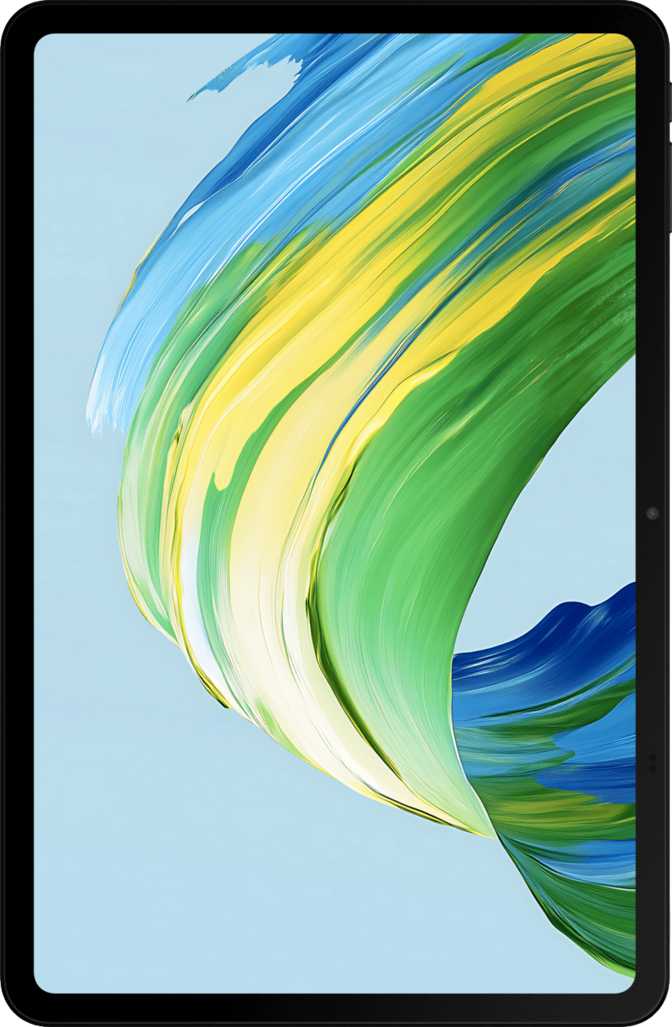
TCL NxtPaper 11 Gen 2 Review: Built for Readers, Not Just Specs
TabletsKey Specifications at a Glance
10.95" NxtPaper
IPS LCD · 1920×1200
8,000 mAh
Fast Charging Supported
8 GB RAM
128 GB + Up to 1 TB MicroSD
IP54 Rated
Splash & Dust Resistant
Android 15
Wi-Fi Only · Bluetooth 5
500 g · 7.3 mm
Slim Mid-Range Build
Most tablets compete on processor speed, camera systems, or premium finishes. The TCL NxtPaper 11 Gen 2 enters the conversation from a completely different angle: it was designed primarily around the experience of staring at a screen for hours. That single-minded focus on eye comfort and sustained reading gives this tablet a genuinely distinct identity in a crowded segment.
Before judging its numbers against flagship rivals, you need to understand what it was actually built to do — and for whom. The standard spec-sheet comparison is largely beside the point here, and that itself tells you something important about who should be seriously considering this device.
The NxtPaper Display: Eye Comfort as a Design Goal
What NxtPaper Technology Actually Means
The defining feature here is TCL's proprietary NxtPaper display system — and it requires a proper explanation, because it is easy to misread the spec sheet. This is not an e-ink screen. It is a full-color IPS LCD panel roughly 11 inches diagonally, running at a standard 60 Hz refresh rate with a resolution of 1920 × 1200 pixels. At that size, the pixel density lands comfortably above 200 pixels per inch, which means text is sharp and clean, and images do not look pixelated at normal reading distances.
What makes it "NxtPaper" is a stack of optical treatments applied on top of the LCD — including a matte anti-reflection coating and display modes that aggressively reduce blue light output while adjusting contrast to simulate the flatter, lower-luminance look of printed paper. A paper-simulation mode desaturates the screen and reduces harshness; a reading mode preserves most color while cutting the eye-fatiguing frequencies. This is fundamentally different from a software blue-light filter: the hardware treatment changes how the panel scatters and reflects ambient light.
Brightness and Outdoor Usability
The panel's typical brightness sits at 400 nits — entirely adequate for indoor environments including well-lit offices and rooms with overhead lighting. Under direct sunlight, performance is marginal. The anti-reflection coating helps significantly compared to glossy panels, but this tablet will never be the ideal outdoor companion in full sun. In shade or partial shade, it performs better than its brightness figure alone would suggest, because the matte surface eliminates the glare that makes glossy screens effectively unusable outdoors even at higher brightness levels.
Who Gains Most From This Screen
If you read e-books, long-form articles, digital textbooks, or PDFs for more than an hour or two daily, this display is more relevant to your comfort than any high-refresh OLED on a competing device. People who experience eye strain, headaches, or disrupted sleep from standard tablet screens are exactly who this hardware was designed for.
If your primary use is media consumption — streaming video, gaming, or photo editing — the display's paper-simulation modes will feel like unnecessary limitations, and competing tablets with OLED panels will serve you better.
Design and Build Quality
Dimensions and Weight
At just over 7 mm thin, the NxtPaper 11 Gen 2 is genuinely slim for a device carrying this battery capacity. The weight comes in at 500 grams — honest mid-range tablet territory. It is comfortable to hold in landscape with two hands and does not feel heavy resting on a lap or desk. Anyone expecting ultra-lightweight should consider 8-inch alternatives instead.
Ports, Controls, and Notable Gaps
The USB-C port handles both charging and data transfer, though it operates at USB 2.0 speeds — fine for everyday use but not ideal for regularly moving large video files. There is no 3.5 mm headphone jack; wireless audio is the expected route. No stylus ships in the box, and no detachable keyboard is included.
Notably absent: a fingerprint scanner and NFC. Device unlock relies on software-based face recognition or a PIN. Security-conscious users or those who frequently authenticate to payment apps will notice the gap, though for a tablet used primarily at a desk or reading stand, it rarely becomes a meaningful friction point in practice.
Covered by IP54
- Splashing water from any direction
- Dust particles that could impair operation
- Use near a sink, pool area, or wet countertop
Not Covered
- Submersion in water at any depth
- Prolonged exposure to heavy rain
For a tablet at this price point, IP54 is a meaningful inclusion — many competitors at similar prices carry no water resistance rating at all.
Processing Performance: Built for Endurance, Not Sprinting
The Processor in Real Terms
The processor inside the NxtPaper 11 Gen 2 uses an eight-core design split between two higher-performance cores and six efficiency cores — a big-core/little-core arrangement manufactured on a 12-nanometer process. This is a mainstream mid-range configuration. Web browsing, document editing, PDF annotation, video streaming, and most productivity apps all run smoothly. Multitasking between two apps in split-screen works without significant lag in typical use.
Games from the mainstream catalog — casual titles and mid-complexity 3D games — run acceptably. Graphically intensive titles may require reduced quality settings to stay smooth. This is not a creative workstation or a video editing platform; the efficiency-core architecture is designed to prioritize battery longevity during sustained lighter tasks, which is exactly the right trade-off for a reading and productivity-focused device.
Memory and Storage Flexibility
8 GB of RAM is genuinely useful on Android 15. More apps stay loaded in the background before the system starts closing them, and switching between a browser, an e-book app, a note-taking tool, and a video call app feels fluid without reloading delays. The 128 GB of built-in storage handles a substantial library, and the microSD card slot allowing expansion up to 1 terabyte effectively removes storage as a concern for any user loading offline content, managing document archives, or storing a large media collection.
Single-Core Score
Multi-Core Score
Bars shown relative to typical mid-range tablet benchmarks. Flagship devices reach 800+ single-core and 3,000+ multi-core.
Storage Configuration
Battery Life: The Real Competitive Advantage
The 8,000 mAh battery is the strongest purely practical argument for this tablet. In reading and moderate productivity use, that capacity realistically supports multiple full days between charges for typical users. Heavy streaming or gaming will shorten that window considerably, but for the person who uses this as a reading device with occasional video calls and web browsing, charging every two or three days is a realistic expectation.
Fast charging eliminates the frustration of a large battery paired with a slow charger — a combination that would significantly undermine the device's endurance advantage. Wireless charging is not included, consistent with the price point and positioning. The built-in battery health monitoring tool lets long-term users track capacity degradation over time — useful for anyone planning multi-year ownership, which the battery capacity and durability features suggest is the intended lifespan.
8,000 mAh
Large-Capacity Cell
2–3
Days typical use
Fast Charging
Camera Capabilities: Functional, Not Aspirational
Tablet cameras are inherently constrained by physics — the form factor does not allow for the lens depth that produces quality optics. This camera system serves functional needs rather than photographic ambitions, and it should be evaluated accordingly.
Handles document scanning, whiteboard capture, reference photos, and video calls from behind. Records full HD 1080p video at 30 frames per second. Manual controls — including ISO, exposure, white balance, and focus — are available for users who want them.
- Touch and continuous autofocus during video
- Manual ISO, exposure, and white balance
- Full HD 1080p video at 30fps
- No optical image stabilization
- No slow motion, burst mode, or optical zoom
Positioned for video calls — which is where front cameras on tablets spend most of their working lives. At typical video conferencing resolutions, it produces acceptable quality in good lighting. No front flash means it will struggle in dim environments.
Audio: Functional Stereo, No Audiophile Pretensions
Stereo speakers are present and produce genuine left/right separation in landscape orientation — a meaningful convenience that makes a real difference when watching content or on a video call. Two microphones allow for basic noise pickup separation and clearer audio input during calls.
Bluetooth 5 handles wireless audio reliably. No high-resolution Bluetooth codecs — aptX HD, LDAC, or similar — are supported, which matters only to users with high-end wireless headphones that depend on those protocols for lossless-quality audio. For everyday Bluetooth earbuds and headphones, the standard codec support is entirely sufficient.
The absence of a 3.5 mm headphone jack will be a genuine inconvenience for users who rely on wired headphones without a USB-C adapter. It is worth knowing before purchase, even if it is not a deal-breaker for most tablet users.
Audio Summary
- Stereo dual speakers
- Dual microphones
- Bluetooth 5 audio output
- No 3.5 mm headphone jack
- No aptX or LDAC codec support
Connectivity and Software Features
Wireless and Networking
Wi-Fi supports both the older 802.11n and the more capable 802.11ac (Wi-Fi 5) standard — fast enough for streaming, large file downloads, and video calling without congestion on modern home networks. This is a Wi-Fi-only device; there is no cellular module, meaning it requires a Wi-Fi connection or a phone hotspot to access mobile data. For home and office users, this is irrelevant. Frequent travelers who need always-on connectivity away from Wi-Fi will find it a significant constraint.
Bluetooth 5 provides stable pairing with keyboards, earbuds, and headphones. Built-in GPS with Galileo satellite navigation works with mapping apps even on this Wi-Fi-only device — particularly useful with offline maps for travel. NFC is absent, ruling out tap-to-pay functionality entirely.
Android 15 Software Highlights
The software package includes split-screen multitasking, picture-in-picture, full-page screenshots, widget support, and multi-user profiles. A child lock with parental controls makes it well-suited to household sharing. Android 15's privacy controls are comprehensive: per-app camera and microphone permissions, clipboard access warnings, app tracking controls, and location privacy options.
One important gap: guaranteed direct OS updates from TCL are not confirmed for this device, meaning long-term software support depends entirely on TCL's own update policy. Buyers planning multi-year ownership should research this track record before committing.
- Wi-Fi 4 and Wi-Fi 5 (802.11ac)
- Bluetooth 5
- GPS + Galileo Satellite Navigation
- USB-C Port (Charging and Data)
- Gyroscope and Accelerometer
- No Cellular or 5G Support
- No NFC
- No Fingerprint Scanner
- USB 2.0 Transfer Speed Only
Who Should Buy the TCL NxtPaper 11 Gen 2?
This tablet earns a clear recommendation — but only for a specific kind of buyer. Knowing which camp you fall into is the most important step before purchasing.
- You read for extended periods and want a screen that actively reduces eye fatigue
- Your primary use is e-books, textbooks, long-form articles, or PDF documents
- You want a durable everyday tablet with multi-day battery endurance
- You need a family-friendly device with multi-user profiles and parental controls
- You value generous storage expandability over premium build finishes
- You are primarily on Wi-Fi and do not need built-in cellular data
- Your primary use is high-fidelity video streaming where OLED contrast and color depth are paramount
- You need a stylus for active note-taking or drawing included in the purchase
- You play graphically demanding games and want consistent high-frame-rate performance
- You need always-on cellular data without relying on a phone hotspot
- You require a fingerprint scanner for quick biometric authentication
- You edit photos or video and need accurate color reproduction and processing headroom
How It Compares to the Competition
Standard head-to-head comparisons do not fully capture where the NxtPaper 11 Gen 2 wins and loses. The table below maps its objective advantages and gaps against its most logical alternatives.
| Feature | TCL NxtPaper 11 Gen 2 | Typical Android Rival | iPad Entry Level |
|---|---|---|---|
| Display type | Matte NxtPaper LCD | Glossy IPS LCD | Glossy Liquid Retina |
| Eye-comfort focus | Primary design goal | Secondary or absent | True Tone only |
| Battery capacity | Very large (8,000 mAh) | Moderate | Moderate |
| Water resistance | IP54 rated | Often none at price | Often none at price |
| Storage expansion | Up to 1 TB MicroSD | Varies (often yes) | None |
| Cellular option | Wi-Fi only | Often available | Available (extra cost) |
| Stylus included | No | Varies | No |
| Biometric security | Face unlock only | Often fingerprint | Touch ID |
| Operating system | Android 15 | Android | iPadOS |
Honest Assessment: Where It Shines and Where It Falls Short
Where It Shines
The NxtPaper 11 Gen 2's strengths are coherent and purposeful. The eye-comfort display technology is not a marketing label — it delivers a genuinely different visual experience for sustained reading, and it is the clearest reason to choose this device over a generic mid-range tablet. Battery endurance removes charging anxiety for multi-day use. IP54 protection adds real durability confidence in everyday environments.
The combination of 8 GB RAM with expandable storage up to 1 terabyte makes this a capable everyday workhorse without arbitrary limitations. The multi-user profile system and child lock turn it into a genuinely household-friendly device that earns its place in the school bag, on the nightstand, or at the kitchen table.
Where It Falls Short
The processor performs exactly where the target use case requires — and no further. Heavy creative work, sustained gaming, or video editing will expose its limits quickly. The camera system serves documentation needs, not photography. The absence of a headphone jack and fingerprint scanner reflects cost decisions that will frustrate some buyers, even if they do not matter to most in this category.
The most significant long-term consideration is the uncertain OS update trajectory. A device built for daily sustained use over several years needs software support to remain secure and compatible. Buyers planning multi-year ownership should research TCL's actual update history and policy before committing.
Common Questions Before You Buy
Final Verdict
Editor's Rating
4 out of 5 — Recommended for the Right Buyer
The TCL NxtPaper 11 Gen 2 earns a clear recommendation — but only for the right buyer. Its eye-comfort display technology is not a gimmick: it delivers a measurably different reading experience compared to standard LCD panels, and that difference matters for anyone spending hours in front of a screen each day.
Best For
Readers, students, and document professionals
Standout Features
Eye-comfort display and multi-day battery life
Watch Out For
No cellular, no fingerprint, uncertain OS update policy
If your vision of tablet life is reading books, annotating documents, and staying connected on Wi-Fi — and you want a device that treats your eyes with genuine care — this is one of the most thoughtfully positioned options at its price. If you want a media powerhouse or a creative workhorse, look elsewhere.