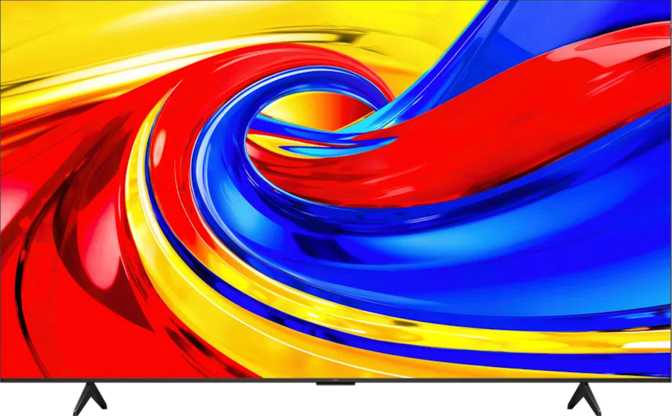
TCL 43P7L 43-Inch QLED TV: A Complete and Honest Review
TCL 43P7L — Reviewer Score
Assessed across six key performance and value categories
Overall Score
Display Quality
Smart Features
Connectivity
Audio
Gaming Performance
Value for Money
There are very few 43-inch televisions that pack QLED technology, every major HDR format, and a fully integrated smart platform into a price bracket that doesn't require a long internal debate. The TCL 43P7L is one of them. It's the kind of TV that looks generous on paper, and for the most part, it delivers on that promise — but it comes with a small number of genuine trade-offs that certain buyers absolutely need to know about before committing. This review breaks all of it down in plain terms, whether you're buying your first 4K TV or upgrading from a set you've had for years.
Build Quality and Physical Presence
At just under a metre wide and weighing around 6.7 kilograms, the TCL 43P7L is light enough to move without help and compact enough to feel at home in a bedroom, kitchen, or smaller living room without dominating the space. The 43-inch class is often underestimated — in practice, at typical viewing distances of 1.5 to 2.5 metres, it fills your field of view comfortably without the eye-scanning fatigue that larger panels can cause in tighter rooms.
The depth of the chassis sits at around 72 millimetres. That's not an ultra-slim profile — this isn't trying to be a statement piece hanging flat against a wall — but it's perfectly acceptable for a TV in this tier. It won't protrude awkwardly on a stand, and VESA compatibility is built in for wall mounting, giving you full flexibility over how and where it lives.
The build materials feel consistent with the segment. TCL hasn't tried to fake a premium finish here, but nothing feels cheap or fragile either. This is a well-proportioned, practical television built to serve without drawing attention to itself.
- Width
- 956 mm
- Height
- 559 mm
- Depth
- 72 mm
- Weight
- 6.7 kg
- VESA Mount
- Supported
- Operating Temp.
- 5 °C – 35 °C
Display Performance: The QLED Advantage at This Price
Panel Technology and Colour
The 43P7L uses a QLED panel — Quantum Light Emitting Diode technology layered in front of an LED-backlit LCD screen. QLED isn't the same as OLED: OLED panels produce their own light at the pixel level, while QLED enhances a traditional LCD backlight using a quantum dot filter. The result is significantly more saturated, accurate colour compared to standard LED LCDs, without the burn-in risk associated with OLED.
In real-world terms, this means noticeably richer reds, deeper greens, and more vibrant blues — particularly visible in nature documentaries, animated content, and sports with brightly coloured kits or courts. The panel renders over a billion individual colour shades, and its 10-bit colour depth ensures that gradients and transitions look smooth and natural rather than banded or patchy.
Resolution and Pixel Density
The full 4K resolution — 3840 by 2160 pixels — spread across a 42.5-inch screen produces a pixel density of 104 pixels per inch. At normal viewing distances, the image is sharp enough that individual pixels are invisible to the naked eye. Text on screen looks clean, fine detail in 4K source material is fully resolved, and upscaled HD content benefits from the extra headroom the panel provides.
Brightness, Contrast, and HDR
The panel's typical brightness sits at 400 nits — adequate for most indoor environments, but not a figure that will overpower bright ambient light or produce the eye-catching peak highlights that higher-end HDR displays achieve. For HDR content to truly make an impact, you generally want 600 nits or more. At 400 nits, HDR is visible and beneficial, but the full dynamic range that premium content is mastered for won't reach its ceiling.
Where the 43P7L compensates is in its contrast ratio. A 5000:1 contrast ratio is a meaningful advantage for an LED-backlit LCD — it means deeper blacks relative to bright whites in the same frame, more visible shadow detail in dark scenes, and a more cinematic overall image. Combined with QLED colour output, scenes with both dark shadows and bright highlights hold together far more convincingly than entry-level LED panels at this size.
4K UHD
3840 × 2160 px
400 nits
Typical Brightness
5000:1
Contrast Ratio
10-bit
Colour Depth
HDR format support is comprehensive — all four major standards are covered:
HDR10 and HLG are the broadcast and streaming staples; HDR10+ (used by Amazon Prime Video) and Dolby Vision (used by Netflix, Apple TV+, and Disney+) are the premium dynamic metadata formats that adjust brightness and colour on a scene-by-scene or frame-by-frame basis. Supporting all four means this TV won't reject HDR content regardless of where it comes from.
Viewing Angles and Reflections
The 178-degree horizontal and vertical viewing angles are excellent for an LCD panel. Practically, the image remains accurate and colour-consistent for anyone sitting anywhere across a wide arc in front of the screen — no colour shifting or contrast loss from off-axis positions. Families watching together, or a screen positioned at a slight angle in an open-plan space, won't notice image degradation from seating positions that aren't dead-centre.
The anti-reflection coating and built-in ambient light sensor work together to maintain image quality as room lighting changes. The sensor adjusts the backlight automatically so you're not squinting at an overly bright screen in a dark room or straining to see a dim picture in a bright one.
Refresh Rate: Understanding the 60Hz Reality
Gaming households should read this carefully.
Console players on a PlayStation 5 or Xbox Series X who play fast-paced games at 120fps will find that this TV cannot display those frames — it caps at 60. There is also no adaptive synchronization technology: no VRR, no FreeSync, no G-Sync.
The 43P7L runs at a native 60Hz refresh rate. For the majority of viewing — streaming, broadcast TV, casual gaming at standard frame rates, and all films — 60Hz is entirely sufficient. Cinema content runs at 24fps; most broadcast content runs at 50 or 60fps; 60Hz handles all of it cleanly.
If gaming is a secondary or casual activity, the 60Hz limit is a complete non-issue. If fast-paced competitive gaming or variable frame rate content is the primary use case, this is a real constraint worth factoring into your decision before committing.
Smart TV Platform and Voice Control
The 43P7L runs a full smart TV platform with an integrated browser, giving access to all major streaming services directly from the TV. Chromecast is built in natively, allowing you to cast content from a phone, tablet, or laptop without any additional hardware. AirPlay is also included — iPhone, iPad, and Mac users can mirror or cast content wirelessly.
Voice control covers both Google Assistant and Amazon Alexa. Either ecosystem integrates naturally, and smartphone remote control is supported for those who prefer using their phone as a remote. USB recording allows you to plug in a USB storage device and record live broadcast content directly — a useful and increasingly rare feature at this price point.
Chromecast Built-in
Cast from any device
AirPlay Support
iOS and macOS compatible
Google Assistant & Alexa
Dual voice ecosystems
USB Recording
Record live broadcasts
Note: Siri and Apple HomeKit are not supported. Apple users get AirPlay for content casting, but this TV will not integrate into a HomeKit smart home setup.
Audio: Honest About Its Limits
The built-in speaker system delivers 20 watts total across two channels. The inclusion of Dolby Atmos and DTS:X decoding means spatially encoded audio from streaming services and Blu-ray will be processed and presented with the surround sound metadata intact — even if two built-in speakers can only approximate the full spatial effect.
Dolby Digital, Dolby Digital Plus, and Dolby Audio are all supported. For listeners without a dedicated sound system, this is a capable setup for dialogue-heavy content, news, and standard streaming. For cinematic soundtracks, action films, or music, the 43P7L will benefit considerably from a soundbar or external audio system.
The presence of both HDMI ARC and HDMI eARC makes connecting a soundbar entirely straightforward. eARC in particular supports lossless and object-based audio passthrough to compatible soundbars, so a quality audio upgrade is fully accessible without compromise. A 3.5mm headphone output and digital audio out round out the options.
Connectivity: Practical and Well-Considered
Three HDMI 2.0 ports cover a games console, a streaming stick or Blu-ray player, and a third device simultaneously — useful for households with multiple connected devices. HDMI 2.0 supports 4K at 60Hz, which matches the TV's native capabilities perfectly. Wi-Fi 5 support means the TV connects to modern dual-band routers efficiently with better range and stability than older single-band setups, and Bluetooth 5.4 enables reliable wireless headphone or keyboard connections.
The full suite of DVB tuner standards — terrestrial, cable, and satellite — means this TV works with virtually any broadcast signal globally without a separate set-top box. One notable absence: there is no external memory card slot. USB storage is the only option for local media playback or recording.
| Connection Type | What's Included |
|---|---|
| HDMI | 3 × HDMI 2.0 — includes ARC and eARC |
| USB | 2 ports (media playback and recording) |
| Ethernet (RJ45) | 1 port for wired network connection |
| Wi-Fi | Wi-Fi 4 and Wi-Fi 5 (802.11n / 802.11ac) — dual-band capable |
| Bluetooth | Version 5.4 — headphones, keyboards, peripherals |
| Headphone Output | 3.5mm audio jack |
| Wireless Display | Miracast supported |
| Broadcast Tuners | DVB-T, DVB-T2, DVB-C, DVB-S, DVB-S2 |
| Memory Card Slot | Not available |
Who This TV Is For — and Who Should Look Elsewhere
- You want a 43-inch 4K QLED TV with comprehensive HDR support at a competitive price
- Your primary uses are streaming, broadcast TV, and casual gaming
- You have or plan to add a soundbar via HDMI eARC
- You want Chromecast and AirPlay built in without buying a separate streaming stick
- You're setting up a bedroom, home office, or secondary living room screen
- High-frame-rate or competitive gaming — 120fps and VRR — is a priority
- You live in an exceptionally bright room and need maximum brightness for HDR impact
- Apple HomeKit smart home integration is a firm requirement
- You need a primary living room TV for a large space — consider 55-inch or larger
How It Compares in Its Class
| Feature | TCL 43P7L | Budget 43" LED | Mid-Range OLED |
|---|---|---|---|
| Panel Type | QLED LCD | Standard LED LCD | OLED |
| HDR Formats | HDR10, HDR10+, Dolby Vision, HLG | HDR10 only | Dolby Vision, HDR10 |
| Refresh Rate | 60Hz | 60Hz | 60Hz or 120Hz |
| Peak Brightness | 400 nits | 300–350 nits | 450–800 nits |
| Adaptive Sync | None | None | Often present |
| Chromecast Built-in | Yes | Rarely | Sometimes |
| AirPlay | Yes | Rarely | Sometimes |
| HDMI eARC | Yes | Rarely | Yes |
| Burn-in Risk | None | None | Present over time |
Strengths and Weaknesses, Plainly Stated
Where It Excels
The 43P7L's strongest asset is the comprehensiveness of what it includes. QLED colour, 10-bit depth, every major HDR format, dual-platform voice control, Chromecast, AirPlay, eARC, and a full broadcast tuner package — at 43 inches, this combination is hard to match without spending significantly more. The wide viewing angles make it a genuinely social screen, not just a single-viewer set.
Where It Falls Short
The 400-nit brightness ceiling means HDR performance is functional rather than spectacular — buyers expecting the visual drama of a high-brightness HDR display will find it understated. The 60Hz panel with no adaptive sync is a real restriction for gaming-forward households in a generation where 120fps and VRR are increasingly standard on current consoles. The one-year warranty also offers less long-term reassurance than the two-year or three-year coverage some competitors provide.
The audio system is competent for everyday use but practically calls for a soundbar if serious home cinema listening is the goal — worth factoring into your total budget if audio quality matters to you.
Common Questions Before You Buy
Final Verdict
The TCL 43P7L 43-inch is a well-constructed, genuinely capable television for the buyer who wants 4K QLED quality, comprehensive HDR support, and a fully loaded smart platform without entering premium pricing territory. Its colour performance is the standout quality — the QLED panel and 10-bit depth produce images that standard LED sets at this size simply cannot match.
The 60Hz refresh rate and absent adaptive sync are real limitations for gaming households, and the brightness level keeps HDR from reaching its full visual potential. These are known trade-offs at this tier, and whether they matter depends entirely on your use case.
For streaming, broadcast viewing, and general family use in a room up to medium size, the 43P7L earns a straightforward recommendation. It covers more ground — in features, formats, and connectivity — than most of its direct competition. Add a decent soundbar over eARC, and you have a complete, polished home entertainment setup that punches meaningfully above its price.
Reviewer's Verdict
4.0/5
RecommendedBest for streaming and family use. Not for high-frame-rate gaming.