NZXT Capsule Mini: An Honest Review for Streamers and Gamers

NZXT Capsule Mini: An Honest Review for Streamers and Gamers

Microphones

Overall Score

3.8

out of 5.0

Monitoring Quality 4.5
Build Quality 4.0
Sound Quality 3.5
Value for Money 3.8
Feature Set 3.0

At a Glance

A compact USB-C condenser built for solo streamers and gamers on Windows and Mac. Clean design, quality headphone monitoring, and a notable gap where the mute button should be.

USB-C, Plug and Play

Windows and Mac — no driver installation

Cardioid Pattern

Focused pickup for solo voices

Real-Time Headphone Monitor

3.5mm jack with a clean 100dB signal path

Pop Filter Included

Ready to record out of the box

2-Year Warranty

Beats the one-year category standard

No Hardware Mute

Meaningful omission for live streamers

Design and Build

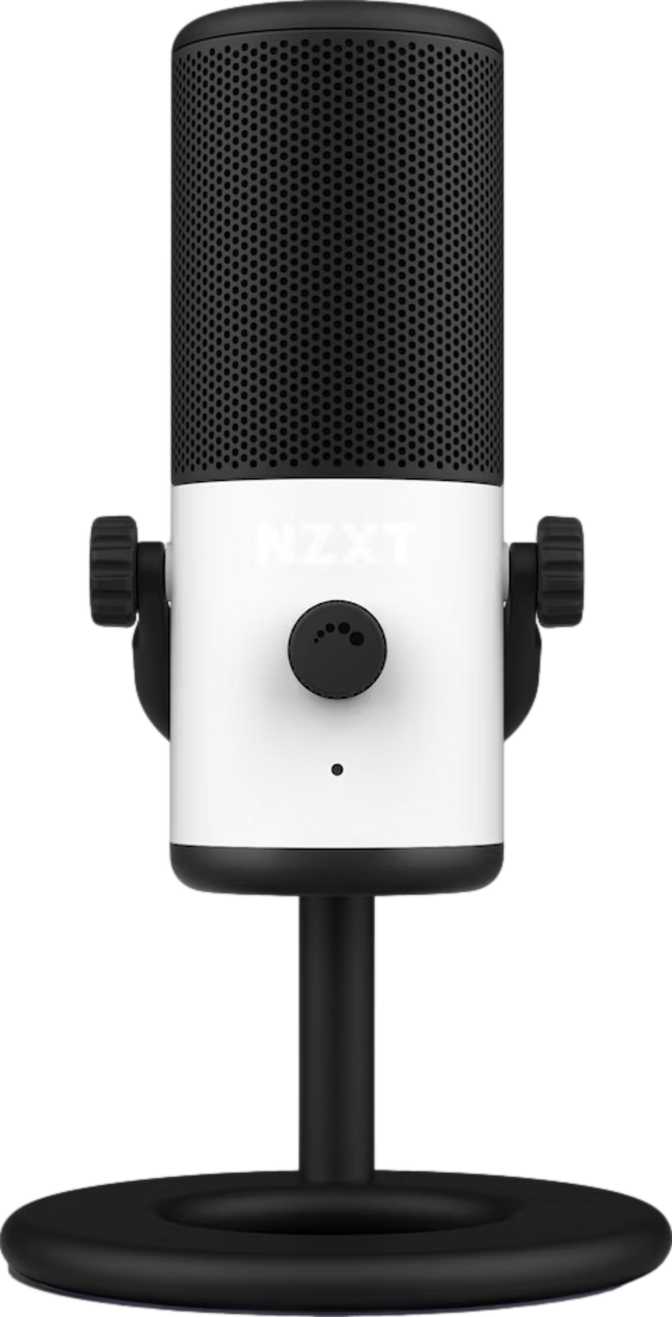
Compact, understated, and deliberately minimal. The Capsule Mini earns its name.

Size and Weight

Standing just under 7.5 inches tall with a nearly square footprint of about 4 inches per side, the Capsule Mini is genuinely compact. At approximately 545 grams — just over a pound — it stays planted on your desk without a heavy dedicated base while still feeling like real hardware, not a lightweight toy.

Aesthetic Choices

No RGB lighting, no glow. The Capsule Mini commits to a clean, understated look designed to blend into a workspace rather than light it up. Physical controls sit directly on the device body, meaning fundamental audio adjustments require no software — you adjust with a hand on the hardware and move on.

USB-C Connection

A USB-C port handles both power and audio in a single reversible cable — no wall adapter required. This is a dedicated desktop microphone for Windows and Mac only. Android and iOS devices are not supported, and any expectation of mobile use needs to be set aside before purchasing.

What Is Included

  • Pop Filter

    Factory-installed plosive protection for hard "p" and "b" consonants. Removes an immediate accessory purchase and makes the mic genuinely ready to use on day one.

  • On-Device Physical Controls

    Controls on the microphone body itself handle basic audio adjustments without requiring you to open a software panel mid-session.

  • USB-C Cable

    Powers and connects the microphone through a single cable. No separate power supply, no additional clutter on your desk.

What Is Not Included

  • Shock Mount

    No vibration isolation from desk impacts. Keyboard clatter, table bumps, and hardware vibration can bleed into recordings — a real concern for active gaming desks.

  • Hardware Mute Function

    No physical mute button exists anywhere on the device. Audio control during live sessions falls entirely to software shortcuts and streaming application settings.

  • Mobile Compatibility

    Not compatible with iOS or Android. Connection to smartphones or tablets is not supported regardless of adapter or cable used.

Sound Performance

Professional recording format, a focused pickup pattern, and one frequency response characteristic worth understanding before you buy.

Recording Format

The Capsule Mini records at 48 kilohertz with a 24-bit signal depth — the same format used in professional broadcast, video production, and podcast distribution. This is not a baseline specification; it is what streaming platforms and distribution services are built around. The format ceiling is high enough that it will never be the weakest link in your signal chain.

48kHz
Sample Rate
Broadcast Standard
24-bit
Bit Depth
Wide Dynamic Range

Peak Loudness Handling

The microphone capsule handles peaks of up to 110 decibels of sound pressure before the signal begins to clip or distort. At normal speaking distances, this is more headroom than any realistic desktop use scenario demands. Enthusiastic gaming reactions, raised voices, and surprise moments mid-session will not push the capsule into distortion territory.

What this means for gaming

Win celebrations, loud co-op sessions, and competitive commentary are well within the operating range without distortion at normal mic-to-mouth distances.

Frequency Response: The Specification That Matters Most

The range of sound the microphone capsule faithfully captures runs from approximately 100 Hz at the low end to 10,000 Hz at the upper limit. This single characteristic shapes what voices actually sound like through this microphone more than any other specification, and it warrants careful attention before you commit.

Voice Frequency Capture Map

Below 100Hz
Captured by the Capsule Mini
Above 10kHz
Sub-bass & room rumble
Voice fundamentals, warmth, presence & upper mids (100Hz to 10kHz)
Air & high detail

100Hz Floor — An Asset

Everything below this threshold — HVAC hum, computer hardware vibration, and low-frequency room noise — is naturally attenuated. This built-in rolloff acts like a permanent gentle high-pass filter on the background clutter common in desktop environments.

Core Voice Range — Fully Covered

The fundamentals of human speech — the pitch, warmth, and mid-range character of a voice — sit between roughly 100Hz and 4kHz. Everything needed for intelligibility and presence is captured comfortably and without compromise.

10kHz Ceiling — Know Before You Buy

The "air" and crispness that give voices a sense of openness — sibilant consonants, upper presence, detail above 8kHz — are truncated. Side by side with a mic extending to 16–20kHz, voices through the Capsule Mini will sound noticeably darker and less crisp.

Practical implication: For gaming chat and Discord calls, compressed voice codecs discard high-frequency detail before it reaches listeners anyway — the limitation is largely academic. For recorded podcast audio or streaming where raw voice quality is part of your audience experience, the narrower tonal character is worth evaluating against full-range alternatives before deciding.

Cardioid Pickup Pattern

The Capsule Mini uses an exclusively cardioid pickup pattern — a heart-shaped arc that focuses capture on whatever faces the front of the microphone while rejecting sound arriving from behind and to the sides.

For a single speaker at a desk, cardioid is the correct and only pattern needed. Your voice is captured; the room behind you is pushed into the rejection zone. There is no pattern switching available, which also means this microphone is not suited to shared recording. Two people seated across from each other cannot share it effectively. Each person in a multi-speaker format needs their own microphone.

Pattern: Cardioid Only

  • Solo streaming and gaming
  • Single-speaker podcasting
  • Voice-over work
  • Two-person desk recordings
  • Group or room recordings

The Headphone Monitoring Output

A 3.5mm monitoring jack built into the microphone — and one of the better-implemented features in this category.

Signal Quality Through the Monitor

The digital-to-analog conversion driving the headphone output achieves a signal-to-noise ratio that makes the monitoring circuit itself essentially inaudible. The noise floor of this path is low enough that it will not be what you hear when the room goes quiet.

The monitoring frequency response covers virtually the entire range of human hearing — so what you hear through your headphones is an accurate, full-fidelity representation of what the microphone is capturing, not a narrowed or processed version of it.

The practical value is immediate. You can hear yourself in real time without software, without delay, and without guesswork. This lets you catch yourself drifting off-axis from the optimal position in front of the capsule, detect background noise bleeding into the pickup zone, and adjust positioning mid-session rather than discovering problems in post-production.

Headphone Compatibility

  • Gaming headsets

    All consumer-level headsets work at comfortable volume

  • Everyday earbuds

    Standard low-impedance in-ear monitors work without issue

  • High-impedance studio headphones

    150+ Ohm audiophile headphones play too quietly — the output is not built for that load

  • Quarter-inch (6.35mm) connectors

    No large-format jack — professional headphones with quarter-inch plugs need an inexpensive passive adapter cable

The Missing Mute Button

The NZXT Capsule Mini does not have a hardware mute button. No single press to cut your audio signal. No physical LED to confirm you are silent. This needs its own section because it will affect some users significantly and others not at all.

Software-managed audio: no problem

Users who route audio entirely through OBS Studio, streaming software with keyboard shortcuts, or Discord's push-to-talk system may never notice the absence. Software muting works reliably, and the Capsule Mini gives those users nothing they fundamentally lack.

Live streamers: real daily friction

Users who reach instinctively for a mute button during a cough, a conversation in the room, or a sudden background noise event will feel this absence every session. The certainty of pressing a physical button is qualitatively different from trusting a keyboard shortcut registered in time.

There is no design philosophy where removing a mute button improves a streaming microphone. For the gaming and streaming audience this microphone targets, hardware mute is a standard category expectation. Its absence is the single most consequential gap in the feature set.

Who Should Buy This Microphone?

A clear-eyed look at who the Capsule Mini was built for — and who should keep shopping.

A Strong Match For

  • Solo streamers and gamers on PC or Mac who want to step up from a headset microphone to a dedicated condenser without major desk disruption

  • Content creators in controlled acoustic environments — a quiet bedroom or home office — where the cardioid pattern handles background noise management adequately

  • Minimalist desk setups where RGB glow and visual clutter are actively unwanted, and clean hardware design is a deliberate priority

  • Software-first audio managers who route muting, mixing, and routing through streaming or communication software and do not depend on physical hardware controls

  • Anyone prioritising a zero-fuss setup — plug in, be recognized by the operating system, and start recording without driver installation or proprietary software

Consider Alternatives If

  • You need iOS or Android compatibility — the Capsule Mini does not connect to smartphones or tablets, full stop

  • You co-host podcasts or record two voices — the cardioid-only pattern means each speaker in a multi-person format requires their own dedicated microphone

  • A hardware mute button is part of your live workflow — if you reach instinctively for physical mute during sessions, the absence of this feature creates persistent daily friction

  • Audio quality is a core production value — music vocalists, voice-over artists, and high-production podcasters who need full-range voice capture should evaluate alternatives with a wider frequency response

  • Your desk generates significant vibration — without a shock mount in the box, heavy keyboard users will need to source one separately to prevent desk rumble in recordings

How It Compares to the Competition

Where the Capsule Mini leads, where it matches the field, and where alternatives pull ahead.

Strengths and Weaknesses

An honest assessment — the good, the genuinely great, and the gaps that matter.

Where the Capsule Mini Delivers

The recording format is a genuine strength — 48kHz and 24-bit capture is the professional broadcast standard, and the Capsule Mini fully meets it. The format ceiling is high enough that it will never be the limiting factor in your signal chain.

The headphone monitoring output is one of the better-implemented features in this price category. A clean signal path, full-spectrum monitoring response, and compatibility with everyday consumer headphones make real-time feedback a practical, not theoretical, advantage.

The pop filter inclusion removes a day-one accessory purchase and the physical on-device controls mean fundamental adjustments require no software context-switching during a live session. Small details, but they add up to a cleaner user experience.

The two-year warranty is a meaningful differentiator. Most competitors in this price tier cover one year. The extra coverage reduces the risk of an early hardware failure becoming an out-of-pocket cost.
Where It Falls Short

The microphone's frequency response ceiling is the most technically significant limitation. Voices captured through the Capsule Mini have a darker, narrower tonal character than full-range alternatives. Not broken — functional — but audibly different from a microphone that captures the upper presence and air frequencies that make recordings feel open and crisp.

The absent hardware mute function is the most consequential missing feature for the target audience. No physical toggle, no confirmation LED. For streamers with live audiences who depend on fast audio control, this is a daily friction point that software solutions cannot fully replicate in terms of immediate certainty.

The lack of a shock mount places vibration isolation entirely on the user. In an active gaming environment with a mechanical keyboard and a desk that sees regular contact, desk rumble in recordings is a realistic problem — one that requires an additional purchase to solve.

Questions Real Buyers Ask

The most common questions before purchasing — answered directly.

Yes. The Capsule Mini connects via USB-C and is recognized as a standard audio input device on Windows and Mac without proprietary driver installation. Setup is plug-and-play for basic recording and communication use — the operating system handles device recognition automatically.

The physical dimensions and weight are consistent with desk stand or boom arm use. However, confirm the threading specification of any arm you are considering before purchasing — not all compact microphones share a universal thread. Check the mount point compatibility with your specific arm model before committing.

Consumer headphones, gaming headsets, and standard earbuds will work without issue — the output is designed for the low-impedance standard of virtually all everyday audio gear. The exception is high-impedance audiophile studio headphones (150 Ohms and above), which will play too quietly for comfortable monitoring on this output. Professional studio headphones using a quarter-inch connector need an inexpensive passive adapter cable.

The Capsule Mini draws power directly from the USB connection — no separate power supply, no hub required. A single USB-C port on a computer is sufficient. If your laptop has only USB-A ports, a USB-C to USB-A cable or adapter handles the connection without any reduction in audio quality.

For standard streaming and podcasting use at typical speaking distances, the included pop filter addresses the core plosive problem adequately without an additional purchase. For music vocal recording at very close distances, where plosive management becomes more demanding, an external pop filter provides additional protection — but for the primary streaming and gaming use case, the included filter is sufficient.

No onboard DSP modes, built-in EQ, or tone shaping features are present. The signal goes from capsule to converter without any internal processing applied. What the capsule captures is what gets recorded — any EQ or processing happens downstream in your recording or streaming software, not inside the microphone itself.

The confirmed compatibility is Windows and Mac only. Console USB audio compatibility depends on whether a given console's operating system recognizes external USB audio class devices, which varies by platform and firmware version. Connecting to a gaming console is not a stated use case for this microphone — contact NZXT directly for confirmation before relying on console connectivity.

Our Verdict

Who Should Buy the NZXT Capsule Mini

The NZXT Capsule Mini is a genuinely capable, well-built compact USB condenser that serves its primary audience — solo desktop streamers and gamers on Windows or Mac — without unnecessary complexity. Its recording format is fully professional. Its headphone monitoring is one of the better implementations at this price tier. The physical design prioritises a clean, minimal desk presence that a real segment of buyers actively wants.

Two specific gaps prevent it from being a clear recommendation for everyone in the category. The microphone's frequency response produces voices with a darker, narrower tonal character than full-range alternatives — not dramatically enough to make recordings sound bad, but enough to be audible against competitors that capture the full presence and air range of human voice. And the absent hardware mute function creates persistent daily friction for anyone who depends on fast, tactile audio control during live sessions.

The Capsule Mini is not a flawed microphone. It is a specific one — and the value of that specificity is that it makes the purchase decision straightforward. Know these two things going in, and the decision almost makes itself.

Buy It If...

  • You manage audio through streaming software
  • You want a compact, clean, no-RGB desk presence
  • You value quality headphone monitoring
  • You record solo in a relatively quiet space

Look Elsewhere If...

  • A hardware mute button is non-negotiable
  • You need mobile device compatibility
  • Crisp, airy voice capture is a production priority
3.8
out of 5

Recommended for solo streamers and gamers on Windows or Mac who manage audio through software and value a clean, compact desk setup.