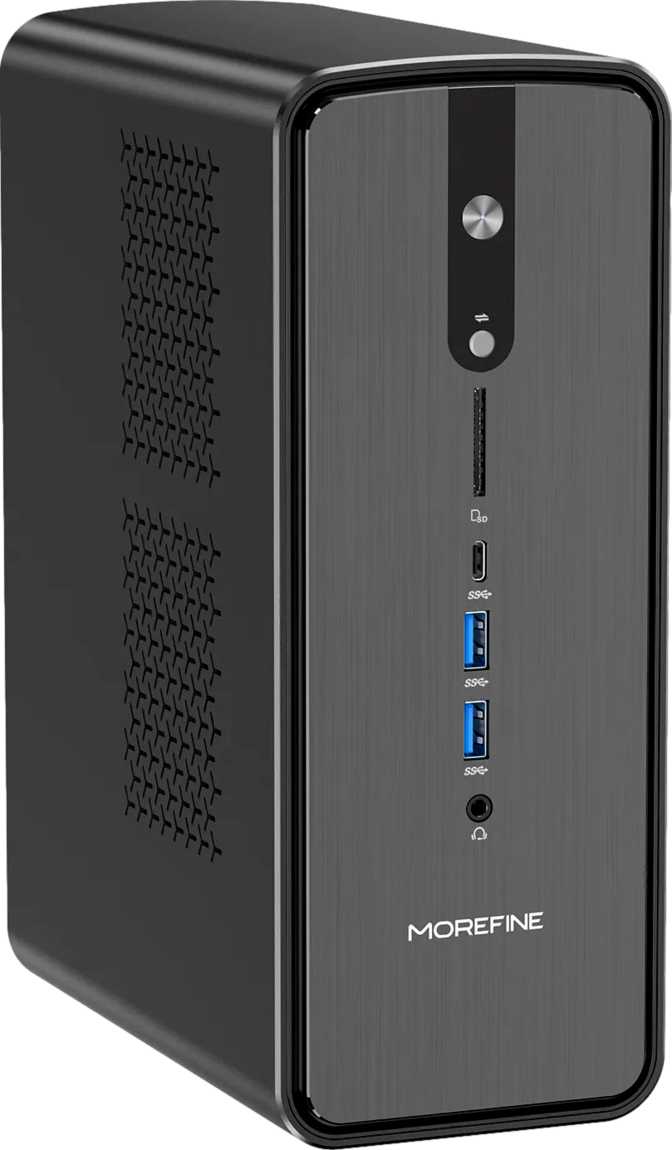
Morefine M900 Mini Review: An Honest Look at This Compact Powerhouse
Mini PCsMost compact desktops ask you to make a choice: accept limited memory, sacrifice display output versatility, or give up the network flexibility that serious workloads demand. The Morefine M900 Mini declines that negotiation. It pairs an eight-core hybrid processor — the kind previously reserved for high-end laptops — with a memory configuration that genuinely surprises at this form factor, then layers in four simultaneous display outputs, dual ethernet, and Thunderbolt 4. The result is a machine that punches so far above what "mini PC" implies that the category label almost undersells it.
Key Specifications at a Glance
Processor
8-Core · 16-Thread
5.0 GHz Turbo
Memory
96 GB DDR5
5,600 MHz Dual-Channel
Storage
1 TB NVMe SSD
PCIe Gen 4
Display Outputs
4 Simultaneous
HDMI · DP · 2× USB-C
Design and Build: Compact, but Not Cramped
The M900 Mini occupies the Micro-ATX class of compact desktops — a step up in physical footprint from the palm-sized ultra-mini PCs that have flooded the market, but still a fraction of the volume of a conventional tower. That extra room is not wasted space; it is deliberate engineering. A larger internal cavity allows for a more capable thermal solution, which matters when you are asking a processor to sustain 28 watts of continuous output rather than the more cautious 15-watt budget that governs the smallest mini PCs.
The chassis aesthetic is workmanlike rather than decorative — a professional box built for desk placement or VESA mounting behind a monitor, not for display on a shelf. For buyers who want their computing hardware to disappear into the workspace and let the work speak, this is exactly the right priority.
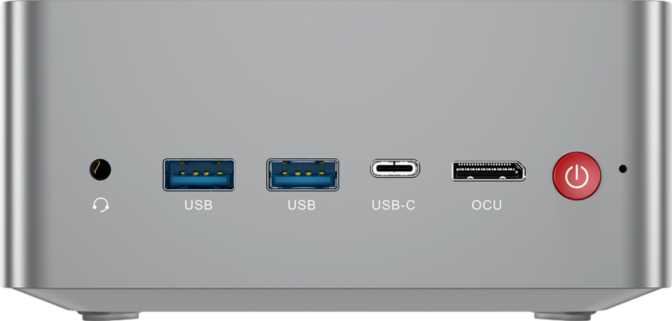
Port placement takes full advantage of the form factor. Nothing is squeezed or doubled up. Every connection category has its own physical space, and the total port count would embarrass many full-sized business desktops released only a few years ago.
The Processor: Eight Cores, Two Distinct Jobs
The chip powering the M900 Mini uses a hybrid core architecture — four high-performance cores and four efficiency cores running simultaneously under a shared power budget. This design allows the processor to be genuinely intelligent about what it tasks to which cores, rather than distributing all work uniformly regardless of priority.
Four high-performance cores accelerate to 5.0 GHz under burst conditions. Each supports simultaneous multi-threading, making application launches, code compilation, browser rendering, and frame generation feel sharp. Across both core types, the processor exposes sixteen total threads to the operating system — a wide pool for demanding parallel workloads.
The four efficiency cores handle background activity — software updates, antivirus scans, browser tab preloading — so these tasks never steal cycles from your primary workload. Without them, background processes create the inconsistent, stuttery experience familiar from older single-design processors. With them, the performance cores stay focused on what you are actively doing.
The 28-watt thermal design point sits above the constrained 15-watt ceiling of ultra-portable chips. The processor operates safely up to 100°C before throttling engages. General productivity and multitasking stay well below that ceiling. One important note: the multiplier is fixed — manual overclocking is not supported on this platform.
Processor Specifications
- Architecture
- Hybrid (big.LITTLE)
- Total Cores
- 8 cores
- Total Threads
- 16 threads
- Turbo Frequency
- 5.0 GHz
- L3 Cache
- 16 MB
- L2 Cache
- 8 MB
- Thermal Envelope
- 28 W TDP
- Max Safe Temp.
- 100 °C
- Overclockable
- No — fixed multiplier
- 64-bit Support
- Yes
Modern Instruction Set Support
This processor supports a comprehensive stack of modern instruction extensions, enabling hardware-accelerated AI inference, cryptographic operations, and advanced vector processing in compatible software:
Memory: The Specification That Changes the Conversation
Ninety-six gigabytes of DDR5 is not a typical configuration for a compact desktop. Most mini PCs ship with 16 or 32 gigabytes — sufficient for everyday productivity but a hard ceiling for virtual machines, large datasets, in-memory databases, or the kind of browser-heavy workflow where dozens of tabs and web applications are all expected to stay resident simultaneously.
The M900 Mini's configuration clears those ceilings entirely. Running in a dual-channel configuration at 5,600 MHz, the memory also delivers the bandwidth that the integrated GPU needs to operate properly — graphics on this platform share system memory rather than drawing from a dedicated pool, and the speed of that memory directly affects graphics throughput, especially when driving multiple displays at high resolutions.
The platform itself supports up to 256 gigabytes total. The 96 GB configuration is already generous; the headroom to go further exists for anyone building a machine around memory-intensive server workloads, large-scale data processing, or extensive virtualisation. DDR5 is the current standard, which means software optimizations targeting modern memory interfaces will benefit this platform as those optimizations mature.
- Installed Capacity96 GB
- DDR GenerationDDR5
- Operating Speed5,600 MHz
- Maximum Supported256 GB
- Memory ChannelsDual-Channel
- Platform Max Speed8,000 MHz
- ECC SupportNo
Storage: Fast Access, Zero Waiting
A one-terabyte NVMe solid-state drive ships as the standard configuration, running over the PCIe 4.0 interface. The practical meaning of that combination: storage operations that previously took seconds now complete in fractions of one. Operating system startup, application launches, large file transfers — all happen at a pace that makes the distinction between "opening" and "having" something feel negligible.
To put it in concrete terms: at PCIe 4.0 speeds, moving a full 4K video project or installing a large software suite takes less time than it takes to get a cup of coffee. SATA-based SSDs, still common in budget and older machines, operate at roughly one-sixth of this interface's peak throughput. The difference is not theoretical — it is felt in daily use.
A terabyte is practical storage for most primary-use scenarios: the operating system, core applications, an active project library, and a working media collection all fit comfortably. Users with archival needs or large media libraries will want to supplement with external storage. The USB 3.2 Gen 2 and USB4 ports make fast external SSDs a viable, permanent extension of the system — not just occasional accessories.
- Capacity1 TB
- InterfaceNVMe PCIe Gen 4
- TypeNVMe SSD
- External Card SlotNone
Graphics and Displays: Four Screens, One Machine
The integrated Radeon 860M handles all graphics output on the M900 Mini. Built on a 4-nanometer fabrication process — the same process node used for the most advanced dedicated graphics cards of the recent era — it brings 512 shader processors to the task, with a peak operating frequency of 3,000 MHz. This is among the stronger integrated GPU configurations currently available in compact desktop platforms.
Simultaneous Displays
4
HDMI · DP · 2× USB-C/TB4
Shader Processors
512
4 nm GPU architecture
Peak GPU Clock
3 GHz
Turbo from 400 MHz base
The Radeon 860M supports DirectX 12, OpenGL 4.6, and OpenCL 2.1 — the full set of APIs that modern creative applications use for GPU acceleration. Photo editing, basic video color work, 3D viewport rendering at preview quality, and AI-assisted features in creative tools all benefit from hardware acceleration on this platform. You are not replacing a dedicated workstation GPU, but you are getting genuine, functional acceleration — not the bottleneck that integrated graphics used to represent.
Connectivity: A Port for Every Purpose
The M900 Mini's connectivity layout is comprehensive enough to be genuinely unusual at this form factor. The port selection covers every peripheral category without compromise, and the high-speed options — Thunderbolt 4 in particular — give the machine an upgrade path through its connected accessories even as computing needs evolve over time.
| Connection Type | Quantity | Speed / Standard | Best Use Case |
|---|---|---|---|
| USB4 / Thunderbolt 4 Fastest | 2 ports | 40 Gbps | Docks, external GPUs, high-res displays, daisy-chaining |
| USB 3.2 Gen 2 Type-A | 4 ports | 10 Gbps each | External NVMe drives, high-speed hubs, fast peripherals |
| USB 2.0 Type-A | 2 ports | 480 Mbps | Keyboards, mice, and legacy accessories |
| HDMI Output | 1 port | HDMI | Primary monitor or TV connection |
| DisplayPort Output | 1 port | DisplayPort | Second high-resolution monitor |
| RJ45 Ethernet Dual | 2 ports | Gigabit | Link aggregation, WAN/LAN routing, redundancy |
| 3.5mm Audio Jack | 1 jack | Analog | Headphones and desktop speakers |
| Wi-Fi | Built-in | Wi-Fi 6 (802.11ax) | High-throughput wireless in dense environments |
| Bluetooth | Built-in | 5.2 | Wireless peripherals and audio devices |
Two separate ethernet ports enable two distinct capabilities not achievable with a single connection:
- Link aggregation: treat both ports as one logical channel on a compatible switch, doubling effective throughput for high-volume data transfers.
- WAN + LAN routing: connect one port to your modem and one to a switch, making the M900 Mini a capable host for lightweight firewall or routing software — no separate hardware required.
A single Thunderbolt 4 connection unlocks a full desk setup:
- A single TB4 dock adds USB, ethernet, display outputs, and audio while simultaneously powering the machine — one cable from the desk.
- External GPU enclosures connect through these ports, extending graphics performance beyond the integrated ceiling when heavy creative workloads demand it.
- Having two TB4 ports means two such setups can run simultaneously.
Performance in Practice: What the Benchmarks Show
The M900 Mini's measured results place it clearly in the upper tier of compact desktop performance. These figures confirm the processor is performing to its architectural potential rather than being throttled by thermal limits or memory bandwidth constraints — a meaningful distinction for a compact chassis that can, in lesser implementations, compromise throughput through inadequate cooling or slow memory pairing.
Progress bars show relative standing on a compact and mainstream desktop performance scale. Actual benchmark scores are displayed alongside each bar.
PassMark CPU Benchmark
Mainstream business laptops typically score 8,000–18,000 in this test
Single-core score directly drives perceived day-to-day snappiness
Geekbench 6 CPU Benchmark
Reflects varied cross-platform workload performance
Consistent with full factory-tuned potential — no thermal throttle observed
Who Should Buy the Morefine M900 Mini
-
Developers and engineersRunning local environments, containers, or virtual machines that consume memory and threads rapidly — 96 GB means running several VMs simultaneously without hitting the ceiling that forces constant compromises on cheaper hardware.
-
Multi-monitor power usersFinancial analysts, content creators, traders, and designers who want four independent display outputs from one clean, compact machine without a tower on the desk.
-
Home lab enthusiastsThose needing a capable headless server or network appliance with dual ethernet for WAN/LAN segmentation, link aggregation, or running lightweight routing and firewall software without additional hardware.
-
Small business workstation deploymentsWhere desk space matters, ambient noise matters, and capability cannot be sacrificed for compactness.
-
Media center buildersWanting 4K output, flexible display options, and the processing power to handle streaming, light gaming, and local media playback without a dedicated entertainment PC.
-
Gaming is your primary use caseModern AAA titles at high settings, or any competitive game where frame rate consistency is the priority — a machine with even an entry-level discrete graphics card will deliver a materially better experience.
-
Heavy creative production is the workflow8K video grading, complex 3D rendering for commercial projects, or large-format motion graphics production — integrated graphics and a mobile-class processor will become a bottleneck faster than a purpose-built workstation with a dedicated GPU.
-
Extended warranty is a procurement requirementThe one-year warranty is shorter than the two-year coverage offered by several competing brands at comparable price points. For business deployments where extended factory coverage is a standard requirement, this is a genuine consideration against purchase.
How It Compares to the Competition
The M900 Mini's differentiation is not primarily in the chip itself — it is in the memory configuration shipped by default, the four-display output, and the dual ethernet. These features individually appear in competing products. Finding them together at the same performance tier in one machine is the M900 Mini's real value proposition.
| Feature | This Review Morefine M900 Mini | Intel-Based Mini PC | Competing AMD Mini PC |
|---|---|---|---|
| Default Memory | 96 GB DDR5 | 16–32 GB DDR5 | 16–64 GB DDR4/5 |
| Memory Ceiling | 256 GB | 64–96 GB | 64–128 GB |
| Simultaneous Displays | 4 | 2–3 | 2–3 |
| Dual Ethernet | Yes | Rare | Rare |
| Thunderbolt 4 | Yes — 2 ports | Common | Less common |
| GPU Architecture | Radeon 860M RDNA, 4 nm |
Intel Xe / Arc | Radeon (varies) |
| GPU Display Acceleration | Strong integrated | Moderate integrated | Comparable |
| Processor TDP | 28 W | 15–65 W | 15–54 W |
| Wi-Fi Generation | Wi-Fi 6 | Wi-Fi 6 / 6E | Wi-Fi 6 / 6E |
| Warranty Period | 1 year | 1–2 years | 1–2 years |
Honest Assessment: Strengths and Weaknesses
Where the M900 Mini Excels
The most defensible advantage is the memory configuration. Ninety-six gigabytes of DDR5 extends the machine's practical useful life as software grows more demanding, opens virtualisation workloads that most compact desktops cannot handle at all, and eliminates the frustration of memory pressure across complex workflows. Buyers who have owned a 16 or 32 GB mini PC and repeatedly hit its limits will understand the value immediately — not as an abstract specification, but as time saved and frustration avoided.
The dual ethernet is similarly underrated. It looks like a specification footnote until you need it, and when you need it, it transforms what the machine can do at the network level without purchasing additional hardware. The USB connectivity stack reinforces this pattern: two Thunderbolt 4 ports, four USB 3.2 Gen 2 Type-A ports, and two legacy ports cover essentially any peripheral on the market without compromise.
The Thunderbolt 4 ecosystem gives the M900 Mini an upgrade path for its connected accessories — docks, external GPU enclosures, high-resolution displays — all through a single cable per port. A machine's useful life often extends well beyond the year of purchase when its connectivity evolves alongside it, and Thunderbolt 4 makes that evolution possible here.
Where It Falls Short
The one-year warranty creates a risk profile that competing brands have already addressed with two-year coverage. A machine positioned as a professional workstation replacement, purchased for a business environment, reasonably expects longer factory coverage. Buyers should factor extended warranty options into the cost comparison from the start — not after the purchase decision.
The integrated GPU is excellent for what integrated graphics can be — and that ceiling still arrives sooner than some buyers expect. Anyone who has read "integrated graphics" and thought "that's fine for my use case" should verify that their most demanding graphical workload falls within what the Radeon 860M handles at an acceptable performance tier, rather than discovering the ceiling post-purchase during the first heavy rendering session.
The absence of an external memory card slot creates a friction point for photographers, videographers, and content creators who routinely move media from cards. A USB hub adapter solves it, but it is one more accessory on the desk. Similarly, internal storage expansion capability is unconfirmed by the specification data — verify this with the seller if adding a secondary internal drive is part of your setup plan.
Common Buyer Questions, Answered Directly
These are the questions real buyers search for before committing to a compact desktop purchase. Each has a direct answer grounded in what the M900 Mini's specifications actually support — not what the marketing suggests.
Final Verdict
Our considered recommendation on the Morefine M900 Mini
The Morefine M900 Mini earns its purchase recommendation for a specific and clearly defined buyer — and for that buyer, it is among the most capable compact desktops in its class.
The combination of a well-implemented eight-core hybrid processor, an exceptional default memory configuration, four simultaneous display outputs, Thunderbolt 4 connectivity, and dual ethernet in a compact form factor is genuinely unusual. These features individually appear in competing products. Finding them together, at this performance tier, in one machine is the M900 Mini's actual value proposition — and it is a strong one.
The caveats are real but narrow. The one-year warranty is a genuine concern for business buyers. The integrated graphics ceiling matters for anyone who plays demanding modern games or runs heavy GPU-accelerated creative workloads. Both are worth weighing honestly against the purchase price and against what competing machines in the same range actually offer at an equivalent configuration.
Buy It If You Need...
- Exceptional memory headroom in a compact form factor
- Three or four monitors driven from one machine
- Dual ethernet for a home lab or network-intensive setup
- Thunderbolt 4 for docks or future external GPU connectivity
- More capability than a standard 16–32 GB mini PC can provide
Skip It If You Require...
- Dedicated GPU performance for AAA gaming or demanding renders
- 8K video grading or complex commercial 3D production
- Factory warranty coverage longer than one year
For the developer, the multi-screen professional, the home lab builder, and the power user who refuses to surrender desk space to a full tower — the Morefine M900 Mini is a machine that overdelivers on what the compact desktop category normally promises.