Morefine H1 Review: Compact Power for AI and Professional Workflows
Mini PCsThere is a specific type of buyer who has spent years making an uncomfortable compromise: accept the bulk of a full tower for serious processing muscle, or accept the limitations of a true mini PC for the sake of desk space. The Morefine H1 challenges that compromise directly. Built around a sixteen-core processor paired with integrated graphics measuring in console-beating teraflops, a 128-gigabyte memory pool running at extraordinary speed, and a port selection that would not embarrass a professional workstation, this compact system targets users who want genuine capability without committing floor space to a tower chassis. The specifications are striking on paper — what matters is what the engineering decisions behind them mean for an actual workflow.
Design and Physical Experience
Form Factor: Compact Tower, Not a True Mini PC
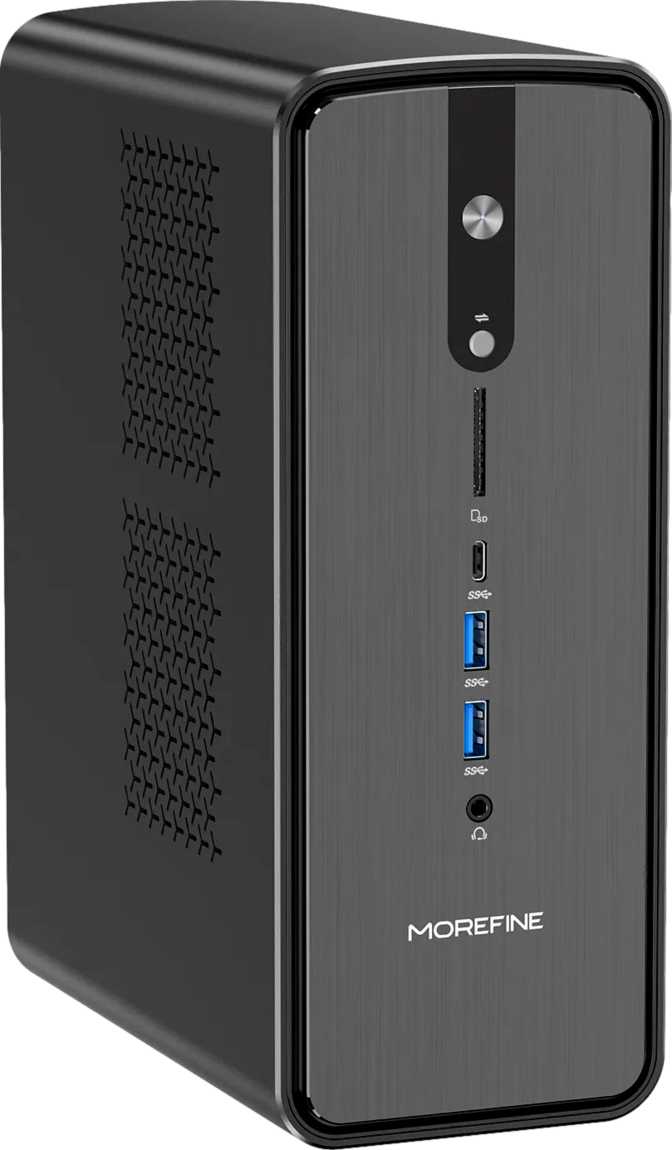
Precision matters here: the Morefine H1 is not the palm-sized cube that defines most people's image of a mini PC. At roughly 249mm tall, 97mm wide, and 188mm deep — with a weight of three kilograms — this is closer in character to a slim compact tower. It will not disappear behind a monitor or tuck under a keyboard. It demands real desk real estate, and buyers should plan their workspace accordingly before purchasing.
That additional volume is not waste. It is a thermal decision. The processor inside this machine runs at 55 watts — a power level that requires sustained airflow to maintain peak frequencies across long sessions. The chassis size directly enables the cooling headroom that keeps performance consistent through a three-hour video render or a full workday of compilation. Machines that compromise on chassis volume at this performance tier tend to throttle; the H1's designers chose not to make that trade-off.
The three-kilogram weight suggests a metal internal structure and a substantial cooler — both positive indicators for long-term durability in a machine intended for continuous professional use.
- Height248.5 mm
- Width97.5 mm
- Depth188.4 mm
- Weight3,000 g
- Volume4,565 cm³
- TDP55W
Processing Power: Sixteen Cores That Work as One
Core Configuration and Real-World Speed
The processor running the H1 operates across sixteen identical cores at a base frequency of 3 GHz, accelerating individual threads up to 5.1 GHz when single-task speed is prioritized. With simultaneous multithreading active, the operating system sees thirty-two logical processors — meaning heavily parallelized software can keep every thread occupied simultaneously. Video editors, 3D renderers, software compilers, and AI inference runtimes all belong to that category.
The homogeneous core architecture — every core the same design rather than a mix of performance and efficiency cores — simplifies scheduling and benefits unpredictable workloads. Virtualization environments, real-time audio processing, and applications that spawn irregular thread patterns all run more consistently on a uniform-core design.
Cache Architecture: Why 64MB Matters
The 64-megabyte L3 cache keeps significantly more of a working dataset in fast local storage than typical consumer chips, which commonly carry 16 to 32MB. For developers compiling large codebases, analysts iterating through simulation parameters, or anyone processing data that doesn't fit neatly in smaller buffers, fewer trips to main memory translate into measurably faster results — particularly sustained results over long runs, not just brief benchmark spikes.
Thermal Headroom and Efficiency
The 55-watt thermal design rating positions this processor as a high-performance chip running at its full operational profile inside a chassis designed to accommodate it. At this power level with proper airflow, the processor can maintain its clocks under continuous pressure. The 100°C maximum junction temperature is standard for modern AMD designs; in a well-ventilated environment this ceiling should remain comfortably out of reach during normal operation.
| Specification | Value | What It Means |
|---|---|---|
| Cores / Threads | 16 Cores / 32 Threads | Handles heavily parallelized workloads with all threads occupied simultaneously |
| Base / Boost Clock | 3.0 GHz / 5.1 GHz | Consistent baseline with strong single-thread burst for responsive apps |
| L3 Cache | 64 MB | Roughly 2–4x typical consumer chips; reduces main memory trips |
| L2 Cache | 16 MB (1 MB/core) | Per-core allocation keeps frequently accessed data extremely close |
| TDP | 55W | High-performance mobile profile running at full envelope in adequate chassis |
| Multithreading | Yes | OS sees 32 logical processors for parallel task distribution |
| Architecture | Uniform cores | Consistent scheduling for unpredictable or irregular workloads |
The GPU: Where the Morefine H1 Genuinely Surprises
Integrated Graphics That Compete With Dedicated Cards
The Radeon 8060S is not the kind of integrated graphics that exists for browser rendering and display output. It carries 2,560 shader processors built on AMD's RDNA 3.5 architecture — the same fundamental design language as standalone graphics cards — fabricated at the 4-nanometer process node used in current high-performance hardware. The resulting compute throughput reaches approximately 14.85 teraflops.
Console Comparison Context
The PlayStation 5 delivers roughly 10 teraflops from its dedicated custom GPU; the Xbox Series X produces around 12. The H1's integrated Radeon 8060S surpasses both of those purpose-built gaming processors while sharing a unified memory pool with the CPU — and sits within reach of current entry-level discrete graphics cards.
Why This GPU Performs as Well as It Does
Most integrated graphics units are bandwidth-starved. They share comparatively slow system memory with the CPU, and no matter how capable the shader array, it cannot operate at full throughput without data moving fast enough to keep it fed. The H1 addresses this by pairing its GPU with a four-channel DDR5 memory subsystem running at 8,000 MHz. The resulting bandwidth — competitive with what dedicated mid-range graphics cards achieve through their own dedicated video memory buses — means the GPU gets what it needs quickly. That is the difference between theoretical teraflop claims and actual performance that shows up in frame rates and render times.
Feature Set for Professionals and Enthusiasts
Memory: The Specification That Changes the Entire Use Case
128GB and What It Actually Unlocks
The Morefine H1 ships with 128 gigabytes of DDR5 memory operating across four channels at the platform's maximum rated speed of 8,000 MHz. For most computers, memory is a supporting player. Here, it is central to the machine's identity and determines what categories of work become possible.
ECC Support: A Professional-Grade Detail
ECC memory — error-correcting code — is almost never found in consumer hardware. It detects and corrects the single-bit memory errors that occur rarely but unpredictably in DRAM. For scientific computation, financial modeling, or any workload where a random bit-flip could produce a wrong answer rather than a visible crash, this is a meaningful assurance. For general users, it is a quiet safety net associated with professional compute infrastructure — one that costs nothing extra in practice.
Storage and the Port Situation
2TB NVMe: A Functional Starting Point
The 2-terabyte NVMe SSD provides fast, direct-access storage for the operating system, active project files, and installed applications. For a workstation positioned at creative and AI workloads, 2TB is workable as primary storage — enough for an active project library alongside system files. Users dealing with large raw video archives or multi-hundred-gigabyte model collections will find supplemental external storage worthwhile. The NVMe connection ensures sequential speeds suitable for demanding workflows.
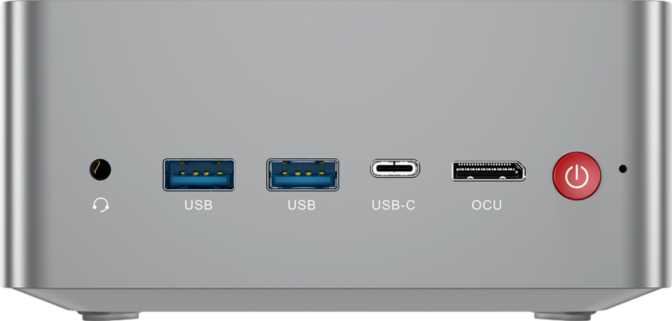
Port Selection With Professional Credentials
| Port | Count | Use Case |
|---|---|---|
| USB 4 (40 Gbps) / Thunderbolt 4 | ×2 | eGPU enclosures, ultra-fast storage, daisy-chaining |
| USB 3.2 Gen 2 (10 Gbps) Type-A | ×2 | High-speed external NVMe enclosures |
| USB 2.0 Type-A | ×2 | Keyboard, mouse, low-bandwidth devices |
| HDMI 2.1 | ×1 | 4K@120Hz or 8K display output |
| DisplayPort | ×1 | Second direct display connection |
| Gigabit Ethernet (RJ45) | ×1 | Wired network — 1 GbE maximum |
| 3.5mm Audio Jack | ×1 | Headphones, speakers, audio interfaces |
Notable Limitation: The single Gigabit Ethernet port feels underspecced for the intended audience. A 2.5Gbps wired port has become common at lower price points, and users operating on multi-gigabit home networks or transferring large files from a NAS will encounter this as a ceiling regularly.
Wireless Connectivity
Wi-Fi 7 — the current leading wireless standard — supports multi-gigabit theoretical throughput and operates across the less congested 6GHz band. For users on older routers, it falls back gracefully through Wi-Fi 6E, Wi-Fi 6, and Wi-Fi 5 without configuration. Bluetooth 5.4 handles wireless peripherals with current-generation efficiency and connection stability.
Wi-Fi 7's inclusion is a forward-looking choice. Most buyers will not saturate it today, but it means this machine will not require replacement simply because wireless infrastructure has advanced in two or three years. The wireless subsystem matches the premium positioning of the rest of the hardware.
- Primary StandardWi-Fi 7 (802.11be)
- Backward Compat.Wi-Fi 4 / 5 / 6 / 6E
- Bluetoothv5.4
Benchmark Reality Check
A multi-core CPU score exceeding 52,000 on PassMark places the H1's processor in the same performance tier as high-end desktop chips that consume two to three times the power. The single-core result confirms that single-threaded workloads — including legacy CAD software, certain audio plugins, and serialized applications — also perform well. The GPU PassMark G3D result approaching 18,000 validates what the teraflop figures imply: performance at or above entry-to-mid discrete card territory.
Scores reflect standard and automatic-boost operation. The locked multiplier means manual overclocking is not available; the optimized result uses the processor's own boost and memory optimization behavior.
Who This Machine Is For — and Who Should Look Elsewhere
- AI Researchers and Developers Running Local InferenceThe combination of 128GB unified high-bandwidth memory and a compute-capable GPU creates working conditions where locally hosted models become practical for day-to-day development — eliminating per-token API costs and latency for inference-heavy workloads.
- Creative Professionals With Space ConstraintsVideographers, motion graphics artists, and photographers who need a machine capable of color grading, multi-stream editing, and encoding without committing floor space to a full tower will find the H1 a compelling option.
- Compact Workstation UsersECC memory, multi-core throughput, and virtualization capability make this a reasonable alternative to traditional tower workstations for developers running multiple VMs, DevOps engineers, and QA teams testing across environments.
- Casual-to-Moderate Gamers Who Prioritize FootprintThe Radeon 8060S handles a wide range of current games at 1080p and many at 1440p with appropriate quality settings — competently, as a secondary function alongside primary productivity use.
- Sustained 3D Rendering or Model Training WorkloadsAnyone whose primary job is training large machine learning models from scratch or running 24/7 GPU rendering queues needs a dedicated high-end graphics card. The integrated Radeon 8060S cannot match a flagship discrete GPU in these sustained throughput scenarios.
- 4K High-Settings GamersThis is not a machine built for 4K gaming at maximum quality settings. The GPU is capable but not in the same tier as purpose-built gaming desktops. External GPU enclosures partially address this, with overhead and cost implications.
- Intensive Wired Networking UsersNetwork engineers, heavy NAS users, or anyone regularly transferring tens of gigabytes over local Ethernet will find the Gigabit maximum a recurring friction point that the rest of the hardware deserves better than.
- Buyers Who Need Internal ExpandabilityThere are no internal PCIe expansion slots. If adding components inside the chassis is a firm requirement, a traditional tower workstation remains the only path.
Competitive Positioning
The H1's position is clear: it surpasses the entire mini PC category on raw performance while accepting the same lack of internal expandability that defines the segment. Against compact desktops with discrete GPUs, it competes on CPU terms and offers unique advantages in AI memory capacity, while discrete GPU builds win on sustained GPU-heavy throughput.
| Criteria | Morefine H1 | Typical Mini PC (NUC Class) | Compact Desktop (Discrete GPU) |
|---|---|---|---|
| CPU Performance | Very High (16c/32t, ~52K PM) | Moderate (4–8 cores typical) | Varies by configuration |
| GPU Performance | ~14.85 TFLOPS integrated | Low (typical Intel integrated) | High (dedicated card) |
| RAM Capacity | 128GB DDR5, 4-channel | 16–64GB DDR4/5 | 16–64GB DDR5 |
| AI / Local Inference | Excellent (large model capacity) | Severely limited | Depends on VRAM |
| Chassis Volume | ~4,565 cm³ (compact tower) | ~800–1,200 cm³ | Much larger |
| ECC Memory | Yes | Rarely | Rarely |
| Thunderbolt 4 | Yes (×2) | Sometimes | Rarely |
| Wi-Fi Generation | Wi-Fi 7 | Usually Wi-Fi 6E | Often add-in card required |
| Internal Expansion | None | None | Full PCIe / RAM slots |
| Wired Networking | 1 GbE only | 1–2.5 GbE | 1–10 GbE (build-dependent) |
Strengths and Honest Weaknesses
Where It Excels
The H1's most compelling quality is integration — the convergence of capabilities that typically require separate, larger machines. Workstation-class CPU thread count, a GPU competing with entry-level discrete cards, 128GB of high-bandwidth memory with ECC support, Thunderbolt 4, and Wi-Fi 7, all in a chassis that fits on a standard shelf.
Each of these individually would be unremarkable. Together, they form a specific and unusual machine. The ECC memory support in particular signals a design philosophy oriented toward reliability over spec-sheet marketing — it adds almost nothing to a consumer benchmark but matters considerably for professional-grade data integrity.
Wi-Fi 7 is similarly thoughtful. Most buyers will not need its peak capabilities immediately, but including it means the wireless subsystem will not constrain this machine's useful service life as networking infrastructure improves.
Where It Concedes Ground
The Gigabit Ethernet port is underspecced for the intended professional audience. A machine with 40 Gbps USB 4 ports and Wi-Fi 7 that tops out at 1 Gbps on wired networking is an inconsistency that stands out on close inspection and will frustrate users in high-throughput local environments.
The one-year warranty is short for a machine positioned at professional users who depend on it for income-generating work. Supplemental coverage should be budgeted at the time of purchase — this should be treated as a line item in the total cost of ownership, not an afterthought.
The locked CPU multiplier means performance tuning is bounded by what the manufacturer enables through firmware and automatic boost behavior. The automatic system is effective, and the benchmark figures confirm headroom is accessible through it, but manual ceiling-pushing is not available. Enthusiasts who expect to tune beyond factory limits will be constrained.
Questions Real Buyers Ask Before Purchasing
Final Verdict
The Morefine H1 is a machine with a clearly defined purpose: delivering workstation-class multi-core processing, AI-ready memory capacity at a scale unavailable in conventional mini PCs, and capable integrated graphics — all in a chassis that fits into a constrained workspace. It fulfills that purpose with unusual conviction.
For AI developers who want to run large models locally, for creative professionals who need serious performance without a tower footprint, and for power users who demand multi-threaded CPU capability without investing in a discrete GPU, the H1 makes a strong case. The 128GB DDR5 memory configuration alone elevates it beyond what most compact systems can even theoretically accommodate, and the GPU performance backed by that bandwidth frequently surprises users who arrive expecting integrated-graphics limitations.
The Gigabit Ethernet ceiling is a real frustration for the target audience, and the one-year warranty demands budgeting for extended coverage. These are not dealbreakers — they are friction points on an otherwise well-considered machine.
Bottom Line: The Morefine H1 is one of the few compact systems that genuinely earns the word "workstation." Its limitations are real but narrow. Its strengths are substantial and, for the right buyer, rare to find elsewhere at this form factor.