Minix ER939 Review: A Compact Desktop With Workstation-Level Power
Mini PCsThere is a distinct category of computer buyer who has long been told they must choose between compact and capable. They want serious multi-core processing power for demanding workloads, enough memory headroom to run virtual machines or large in-memory datasets without constantly swapping, an integrated GPU that handles professional creative applications, and a port selection that keeps the desk clear of hubs and adapters. The Minix ER939 is a direct bid to serve that buyer. It puts sixteen processor cores, 128 gigabytes of DDR5 memory, a two-terabyte NVMe drive, and a port lineup anchored by Thunderbolt 4 and USB4 into an enclosure slim enough to tuck beside any monitor. This review works through whether that configuration performs as promised, and who should—or should not—build their setup around it.
Design and Build: Professional Intent in a Compact Chassis
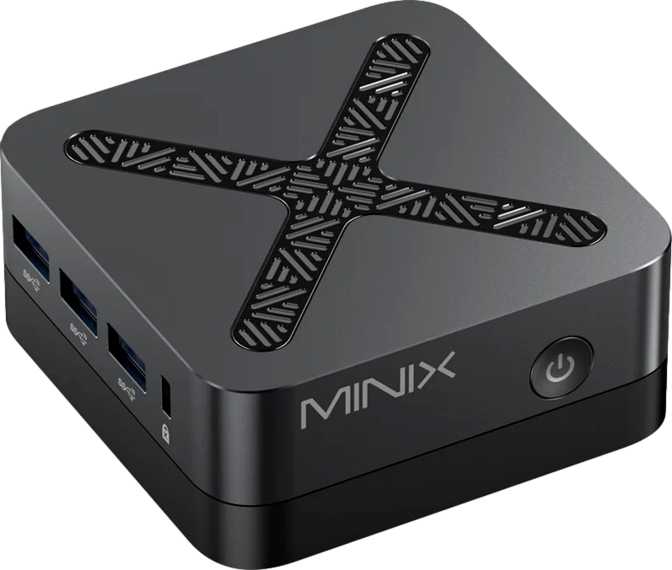
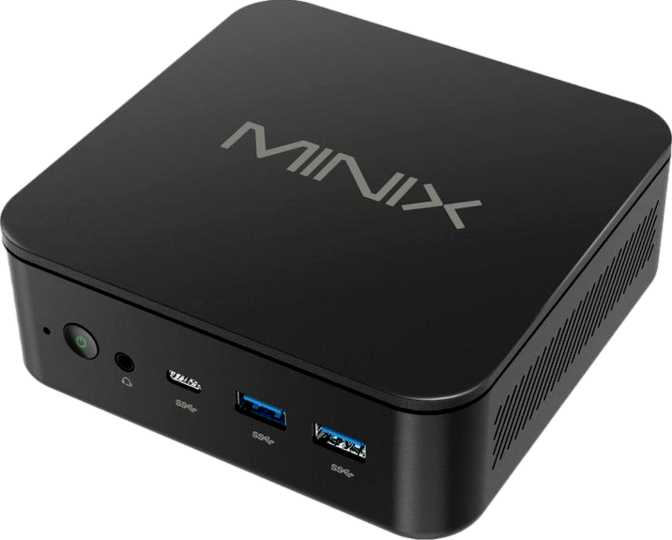
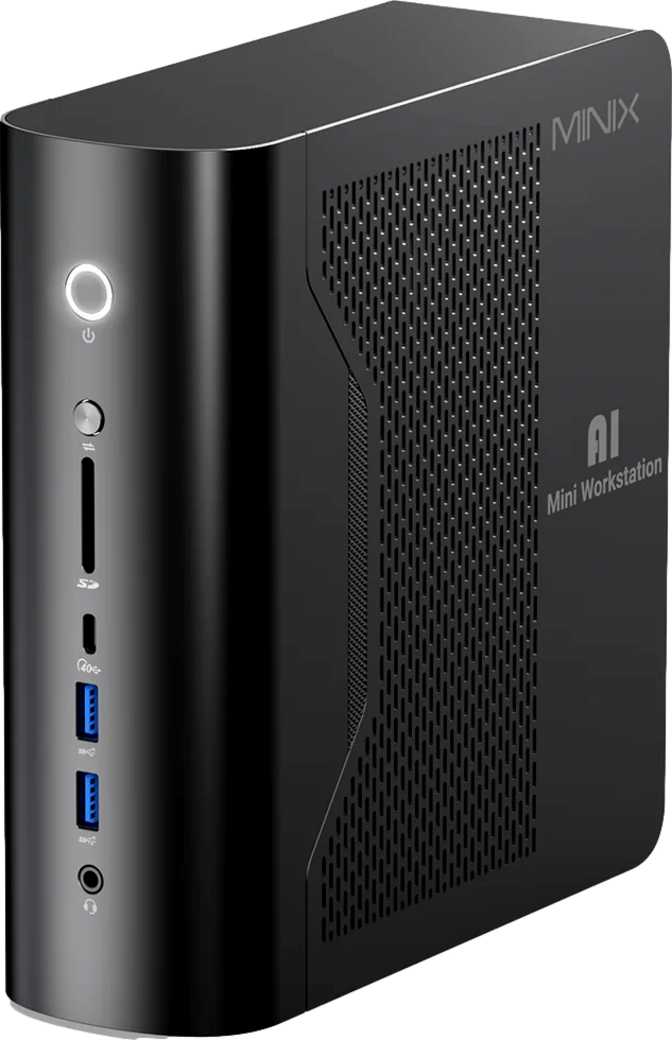
The first thing that registers about the ER939 is its dimensions. At 70 mm wide, 192 mm deep, and just over 200 mm tall, the unit is roughly the size of a thick hardback stood on its spine—you could carry it under one arm without effort. Its total volume sits just under 2.8 liters, placing it firmly in the compact mini desktop category. This is not a product designed to look impressive on a shelf; it is designed to disappear on a desk while delivering the workload it promises.
The chassis construction reflects the seriousness of the hardware inside. Mini PCs that house high-output processors in limited space live or die on thermal management, and the ER939’s physical layout suggests engineering attention to airflow rather than aesthetic minimalism. Exhaust venting and structural proportions are organized around heat dissipation—a practical necessity when the processor inside operates at the upper end of mobile thermal envelopes.
Port placement is methodical. Every connection type is positioned for practical access rather than visual symmetry, a small quality-of-life detail that matters when connecting or disconnecting devices without close attention. The overall impression is purposeful and utilitarian: a machine that knows what it is and does not try to look like something else.
Physical Dimensions
- Width
- 70 mm
- Depth
- 192 mm
- Height
- 205 mm
- Total Volume
- ~2.8 Liters
The Processor: Sixteen Cores in a Controlled Power Budget
Core Count and Threading in Plain Terms
The processor carries sixteen physical processing cores, each capable of handling two simultaneous instruction streams, giving the system thirty-two concurrent threads to allocate across active workloads. To anchor that number: most everyday consumer desktops operate on four to eight cores. A machine with thirty-two active threads can simultaneously handle a video export, a database operation, a background compile, and a browser with dozens of open tabs without any of those tasks noticeably degrading the others.
Base clock speed across all sixteen cores sits at three gigahertz, with individual cores capable of reaching 5.1 GHz under burst demand. Most real workloads alternate between these states constantly, and the processor manages that transition dynamically. Notably, all sixteen cores operate at the same performance tier—there is no split between performance and efficiency classes as found in some competing architectures. Every core is equal in capability, which simplifies scheduling and produces predictable performance distribution in professional applications.
Thermal Envelope: The Trade-Off That Defines Everything
The processor operates within a 55-watt thermal ceiling—the same power range as high-performance mobile chips in premium laptops, rather than the 65–200-watt territory of unconstrained desktop processors. This is both the reason the ER939 can exist in its compact chassis and the boundary that defines its limits.
At 55 watts, the cooling system has a manageable thermal load, keeping noise reasonable and allowing sustained operation without aggressive fan curves. The trade-off is a sustained multi-core ceiling lower than an unconstrained desktop chip. For development, multitasking, interactive applications, and moderate rendering, the practical gap is small—and the advantages in space, noise, and power consumption are large.
Cache Architecture and Instruction-Level Advantages
The processor carries 64 MB of L3 cache alongside 16 MB of L2 cache distributed one megabyte per core—a deep last-level cache that directly benefits tasks like in-memory database queries, software compilation, and machine learning inference. When the processor can hold more working data at close proximity without fetching from main memory, latency drops and sustained throughput increases on those workloads.
At the instruction-set level, hardware-accelerated operations translate into measurable gains for professional software built to exploit them: hardware AES for cryptographic workloads, AVX2 and FMA3 for scientific computing and AI inference, and a full 64-bit instruction set for unrestricted memory addressing.
The Radeon 8060S: Rethinking What Integrated Graphics Can Do
A GPU Worth Treating Seriously
The integrated Radeon 8060S is not the kind of integrated graphics found in most compact desktops. Its 2,560 shader processors, built on a four-nanometer fabrication process—the same node used by current high-end discrete graphics cards—represent a generational leap beyond what previous-generation integrated GPUs could offer. The GPU’s boost clock reaches 2,900 MHz, backed by 160 texture mapping units and 64 render output units handling geometry throughput and pixel fill at rates well above typical integrated GPU norms.
DirectX 12 support covers the full range of modern games and graphics engines. OpenGL 4.6 ensures compatibility with professional creative applications. OpenCL 3.0 makes GPU compute available to applications that offload image processing, video encoding, and AI inference to the graphics hardware—reducing CPU load and accelerating those operations considerably. The GPU communicates with the system via PCIe 4.0, preventing the memory interface from becoming a bottleneck on large datasets.
Four-Monitor Output Without a Discrete Card
The 8060S supports four simultaneous display outputs, and the ER939’s port infrastructure is built to deliver them. HDMI 2.1 handles resolutions up to 4K at 120Hz, the DisplayPort output adds a second high-resolution channel, and the Thunderbolt 4 and USB4 ports extend display connectivity further for additional monitors.
A four-screen workflow—common in financial trading, video production, software development, and data monitoring—is achievable from this single compact unit without any external graphics hardware. For buyers who previously needed a tower with a discrete card specifically to drive multiple displays, this changes the configuration options available to them.
Gaming Capability: An Honest Assessment
The 8060S handles modern titles at 1080p and moderate quality settings better than most integrated GPUs. For users who game occasionally alongside a primary professional workflow, this removes the need for a separate gaming machine. For dedicated gaming at 1440p or 4K with high frame rate targets, the integrated GPU reaches its ceiling. The ER939 is not positioned as a gaming machine—buyers who want high-frame-rate gaming alongside productivity features will need to factor in an external GPU enclosure via Thunderbolt 4, or consider a different system entirely.
Memory and Storage: Configured for Heavy, Long-Term Workloads
128 GB of DDR5: More Than a Headline Number
The ER939 ships at the maximum memory capacity its platform supports—128 gigabytes of DDR5. Memory capacity is the one hardware specification that determines which workflows are possible, not just comfortable. At 128 GB, the system can host multiple simultaneous virtual machines with generous allocations, carry large in-memory database tables without paging to storage, run memory-intensive machine learning experiments, and hold complex CAD assemblies fully in RAM—without any of those workloads forcing compromises.
The memory operates across four channels, delivering higher aggregate bandwidth than the dual-channel configurations common in most mini PCs. For the Radeon 8060S—which draws its video memory from the shared system RAM pool rather than dedicated VRAM—higher memory bandwidth translates directly into better GPU performance on bandwidth-sensitive tasks. Maximum memory speed reaches 8,000 MHz, providing substantial headroom over DDR4 platforms.
ECC Memory: Enterprise Reliability in a Desktop Package
Error-correcting code memory detects and silently corrects single-bit memory errors in real time, preventing the silent data corruption that can crash databases, corrupt files, or introduce subtle bugs in long-running computations. Its presence in the ER939 signals design intent beyond consumer use—particularly meaningful for users running financial software, database applications, or scientific computations where silent memory errors are unacceptable and work cannot be easily verified against a corrupted baseline.
2 TB NVMe Drive: Fast Storage That Won’t Fill Quickly
The included two-terabyte NVMe solid-state drive communicates with the processor over a high-bandwidth direct interface rather than the slower SATA pathway used by budget SSDs. In practice, this means faster application loading, quicker virtual machine boot times, and more responsive behavior when working with large project files. Two terabytes of this performance tier accommodates a complete operating system, a full professional application suite, multiple virtual machine images, and significant media project libraries without requiring an immediate external drive.
Connectivity: A Port Selection Built for Professional Use
The ER939’s port selection is one of its strongest attributes, and the quality and type of each connection define how useful the machine remains over time. The combination of Thunderbolt 4 and USB4 40 Gbps ports is uncommon at any price point in the compact desktop category.
| Port Type | Qty | Speed & Key Capability |
|---|---|---|
| Thunderbolt 4 | 2 | 40 Gbps • Display output, PCIe tunneling, eGPU support, daisy-chaining |
| USB4 40 Gbps | 2 | 40 Gbps • Full USB4 open specification, display and storage support |
| USB 3.2 Gen 2 (USB-A) | 3 | 10 Gbps each • External SSDs, capture cards, high-bandwidth peripherals |
| USB 2.0 (USB-A) | 2 | Standard speed • Keyboards, mice, dongles, low-bandwidth devices |
| HDMI 2.1 | 1 | Up to 4K at 120Hz or 8K with compatible displays |
| DisplayPort | 1 | High-resolution display output |
| RJ45 Ethernet | 1 | Wired network connectivity |
| 3.5 mm Audio | 1 | Headset or speaker output |
Wireless and Wired Networking
Wi-Fi 7 (802.11be) is the current top wireless standard. Its practical advantage over Wi-Fi 6E extends beyond raw throughput: Wi-Fi 7 introduces multi-link operation, allowing simultaneous data transmission across multiple frequency bands. In congested wireless environments—dense apartment buildings, offices with many access points—multi-link operation reduces latency and improves connection reliability. The ER939 supports full backward compatibility with earlier Wi-Fi standards while being positioned for Wi-Fi 7 access points as they become widespread.
Bluetooth 5.4 handles wireless peripherals at the latest specification level, with improved connection stability and reduced power overhead compared to earlier versions. The single RJ45 port provides wired Ethernet connectivity for environments where a cabled connection is preferred for stability and consistency.
Benchmark Performance in Context
Benchmark scores are most useful when anchored to familiar reference points. A competitive mainstream desktop configuration typically scores in the 20,000–35,000 range on PassMark Multi-Core—the ER939’s result is substantially above that, placing it in the performance tier occupied by high-end desktop processors. The locked CPU multiplier limits tuning to system-level configuration; the difference between stock and an optimized profile is approximately 5%, driven by memory and system adjustments rather than manual frequency control.
Who the Minix ER939 Is Built For—and Who It Is Not
The Right Fit
- Multi-screen professionals who need four displays driven from a single compact unit—traders, video editors, developers, and data analysts—without requiring a discrete GPU or tower case.
- Software developers and DevOps engineers running containerized environments, virtual machines, or local Kubernetes clusters where CPU thread count and memory capacity determine what is feasible.
- Content creators doing video editing, audio production, and motion graphics who need GPU-accelerated pipelines in a compact, quiet machine without a dedicated graphics card.
- Data scientists and analysts working with large in-memory datasets, running local ML experiments, or operating memory-heavy Jupyter environments that exceed what most systems can provide.
- IT administrators and power users who value ECC memory reliability and benefit from enterprise-grade I/O in a machine sized for a compact desk or home lab environment.
- Home lab operators running self-hosted services, home automation platforms, and media servers who need sustained concurrent workloads at low noise levels.
Not the Right Fit
- Dedicated gamers prioritizing high frame rates at 1440p or 4K will find the integrated GPU limiting, with no direct path to an internal discrete card.
- Budget-conscious buyers: the 128 GB DDR5, 2 TB NVMe, and Thunderbolt 4 configuration reflects premium pricing. This is not a cost-competitive general-purpose desktop.
- Legacy equipment users who depend on VGA video output or S/PDIF optical audio will find neither available on this device.
- Multi-gigabit wired Ethernet users who need high-speed LAN natively will require a USB4-based adapter to reach speeds beyond the built-in port.
- Maximum sustained compute users running CPU-saturating workloads for hours will extract higher raw multi-core output from a full desktop tower with an unconstrained 125+ watt processor.
How It Compares to the Competition
The compact high-performance desktop market has grown significantly, and the ER939’s specification places it at the premium end. This comparison uses broad category labels rather than specific product names, as this segment evolves rapidly and individual configurations vary considerably within each tier.
| Feature | Minix ER939 | Mid-Range Mini PC | Premium Mini PC | ARM Compact Desktop |
|---|---|---|---|---|
| CPU Cores / Threads | 16 / 32 | 8–12 / 16–24 | 12–16 / 16–24 | 8–16 / varies |
| Maximum RAM | 128 GB DDR5 | 32–64 GB | 64–96 GB DDR5 | Up to 192 GB unified |
| Included NVMe Storage | 2 TB | 512 GB–1 TB | 1 TB | 256 GB–2 TB |
| Thunderbolt 4 Ports | 2 ports | Rare / 0–1 | 1–2 ports | Architecture-dependent |
| USB4 40 Gbps Ports | 2 ports | Rarely present | 0–1 ports | Varies |
| Wi-Fi Standard | Wi-Fi 7 | Wi-Fi 6E | Wi-Fi 6E | Wi-Fi 6E–7 |
| ECC Memory Support | Yes | No | Occasionally | No |
| Simultaneous Displays | 4 | 2–3 | 3–4 | 2–3 |
| GPU Architecture | RDNA 4nm (2,560 SPs) | Previous-gen iGPU | Current-gen iGPU | Unified architecture |
The ER939’s clearest differentiation from mid-range competitors is the 128 GB memory ceiling, ECC support, and the pairing of Thunderbolt 4 with USB4 40 Gbps—features largely absent at lower price points. Against premium compact competitors, the AMD GPU architecture and four-channel memory bandwidth stand out. Against ARM-based compact desktops, x86 software compatibility and broader professional application support are the key differentiators, though single-core power efficiency tends to favor ARM designs at equivalent thermal envelopes.
Strengths and Limitations: The Complete Picture
Where It Excels
Memory configuration that stands alone in its category. 128 GB of DDR5 with four-channel access and ECC support is a workstation specification that most compact desktops cannot approach. It arrives fully configured—nothing to upgrade or compromise from day one.
A port selection that eliminates the hub. Four high-bandwidth ports—two Thunderbolt 4 and two USB4 40 Gbps—anchor a full professional desk setup without expansion accessories. Most compact desktops make this impossible.
Integrated GPU that changes the conversation. The Radeon 8060S delivers four-screen output and hardware-accelerated creative pipelines from a chip that costs nothing extra and draws no additional power connector.
Benchmark results that match the specification. High-end desktop PassMark performance from a 55-watt compact enclosure is a meaningful engineering achievement, not specification inflation.
Forward-looking connectivity. Wi-Fi 7 and Thunderbolt 4 ensure the machine remains relevant as peripheral and network infrastructure advances—and the two-year warranty provides appropriate coverage for that longevity.
Real Limitations to Know
The performance ceiling is fixed. The locked CPU multiplier means no overclocking path exists. The stock-to-optimized performance difference is modest, driven by system-level adjustments rather than frequency tuning.
Sustained heavy compute has a thermal ceiling. The 55-watt power envelope, while commendable for noise and size, means prolonged peak multi-core workloads run at a lower sustained ceiling than an unconstrained full-power desktop chip.
No internal GPU expansion path. The chassis does not accommodate a PCIe add-in graphics card. Discrete GPU expansion requires an external Thunderbolt enclosure, adding cost and a larger desk footprint.
Legacy outputs are absent. No VGA eliminates compatibility with older monitors. No S/PDIF audio output restricts compatibility with certain receivers and professional audio interfaces.
No native multi-gigabit wired Ethernet. The built-in Ethernet port covers standard speeds. Buyers relying on high-speed LAN natively will need a USB4-based adapter.
Questions Buyers Ask Before Purchasing
Final Verdict: Who Should Buy the Minix ER939
The Minix ER939 is a well-considered answer to a specific but genuine market need. It delivers high-tier multi-core processing, workstation-level memory with ECC reliability, fast and spacious NVMe storage, and a port lineup that supports a full professional desk setup—all from a chassis that occupies less space than most desktop speakers.
The benchmark results confirm that the performance is real. High-end desktop PassMark territory from a 55-watt compact system represents genuine engineering achievement. The Radeon 8060S changes the integrated GPU conversation, delivering four-screen output and creative pipeline acceleration without a discrete card. Wi-Fi 7 and Thunderbolt 4 ensure the device remains relevant as peripheral and network infrastructure continues to advance. The two-year warranty provides appropriate coverage for the investment.
The limitations are genuine but bounded: no manual overclocking, a gaming ceiling below discrete GPU performance, no internal expansion slot for graphics, and the absence of legacy audio and video outputs. Buyers who need any of those specifically should consider a workaround or a different machine. For the professional user who wants serious computing capability without the space, noise, and power footprint of a tower—the developer, the data analyst, the content creator, the multi-monitor power user—the Minix ER939 earns its position on the desk.