Machenike Mini GTS Full Review: Maximum Performance, Minimum Footprint
Mini PCsKey Specifications at a Glance
A Compact Desktop That Refuses the Usual Compromises
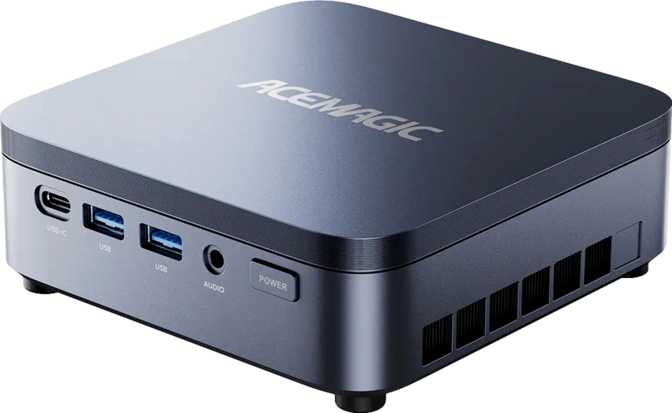
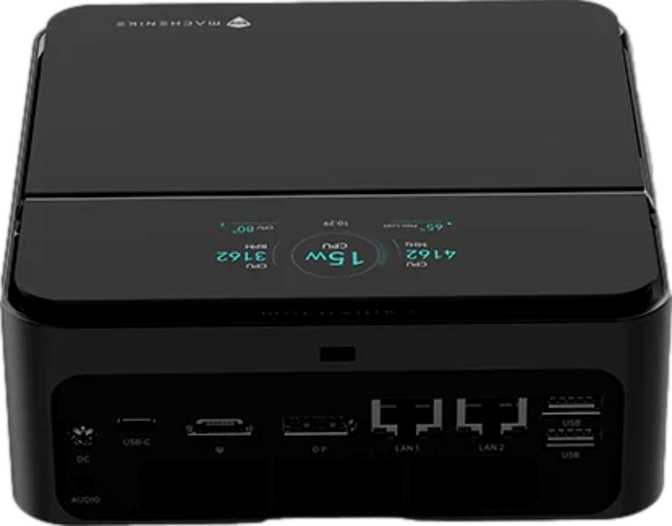
The mini PC category has matured quickly, and the Machenike Mini GTS represents where it now stands — not where it started. Its chassis measures roughly 12.7 centimeters on each side and stands just 5 centimeters tall, approximately the footprint of a dense hardback novel lying flat. Everything else about it refuses the limitations that form factor once implied.
The standard configuration ships with more memory than most professionals' tower desktops carry, a multi-core processor whose benchmark scores sit in workstation-adjacent territory, and a connectivity array that includes features many manufacturers reserve for flagship products. This machine is worth examining carefully because it challenges a foundational assumption: that a computer this small must perform like one.
Design and Build: What That Size Actually Means
The Machenike Mini GTS occupies an internal volume of roughly 800 cubic centimeters — approximately equivalent to four stacked paperback books. It disappears from a desk, mounts invisibly behind a monitor via a standard VESA bracket arrangement, or slides unobtrusively into a media cabinet without consuming meaningful space.
That extreme compactness creates an engineering tension running through every other aspect of this review: fitting a 45-watt processor inside a chassis this tight, maintaining reliable temperatures across sustained workloads, and routing a significant connectivity array through a small panel are challenges the design must solve simultaneously. How well those tensions are managed defines the real-world experience.
For professionals whose workspace is defined by their displays and their work rather than by the hardware sitting next to them, the Mini GTS simply removes the machine from the visual equation — and that functional invisibility has genuine value.
| Width | 127 mm |
| Depth | 127 mm |
| Height | 50 mm |
| Volume | ~806 cm³ |
| Form Factor | Micro-ATX Mini PC |
| Warranty | 2 Years |
The Processor: Multi-Core Performance That Earns Serious Attention
Hybrid big.LITTLE Architecture · 45 W TDP · 24 MB L3 Cache · BGA 2049 Socket
Core Architecture Explained
The processor uses a hybrid big.LITTLE architecture where separate clusters of cores handle different types of work. Six performance-focused cores — clocked at a base of around 2.9 GHz with a boost ceiling reaching 5.4 GHz — deal with demanding, latency-sensitive operations: loading applications, compiling code, processing frames during a video export, executing complex database queries.
Eight efficiency-oriented cores running at approximately 2.7 GHz handle sustained parallel workloads — the kind that benefits from many threads working simultaneously — while drawing less power per unit of output. Two additional low-power efficiency cores manage ambient background tasks, minimizing draw during routine desktop use and keeping the machine quiet at idle.
The combined configuration produces 16 processing threads with no simultaneous multithreading overlay — every thread corresponds to a dedicated physical core. A 24 MB shared L3 cache serves as a fast-access pool, reducing the frequency of slower main memory lookups under heavy parallel workloads.
Benchmark Scores in Context
The PassMark overclocked result (34,411) is nearly identical to the base score — consistent with a locked processor multiplier. The platform performs at its rated specification without hidden overhead.
What the Multi-Core Score Means
Running multiple browser profiles, an active development server, containerized services, and standard communication tools simultaneously is well within this processor's comfortable range. The parallel throughput also makes audio post-production, large-scale code compilation, demanding data analysis pipelines, and video encoding viable without compromise.
What the Single-Core Score Means
A significant portion of real software — business productivity tools, scripting environments, and legacy applications — cannot distribute work across multiple cores and runs entirely on the single-thread ceiling. That 4,472 single-core result means these tasks complete quickly and the machine feels responsive moment-to-moment, not just under parallel workloads.
Integrated Graphics: Intel Arc 140T — Capable and Honest About Its Limits
Intel Arc 140T · 3 nm Process · 1,024 Shaders · DirectX 12 Ultimate · PCIe 5.0
What the Arc 140T Brings to the Table
The Arc 140T is not the integrated graphics solution that earned the category a poor reputation in earlier generations. Built at a 3-nanometer process and containing nearly 18 billion transistors, it is a significant piece of silicon by any contemporary measure. Its boost speed reaches 2,350 MHz — competitive with entry-level discrete cards — and its 1,024 shader processors handle compute-heavy tasks with meaningful throughput.
DirectX 12 Ultimate certification indicates hardware-level support for ray tracing, variable-rate shading, and mesh shader pipelines. For video work, the Arc 140T provides hardware-accelerated encode and decode including the increasingly common AV1 codec — meaning these operations complete faster and free the CPU to handle other work in parallel.
OpenCL 3.0 support extends the GPU's usefulness to scientific computing tools, AI inference workloads, and professional applications that leverage GPU compute. OpenGL 4.6 ensures compatibility with the full range of applications that rely on that API for rendering.
By combining the HDMI port, the DisplayPort output, and the two Thunderbolt 4 connections — each capable of carrying a video signal — the system supports four independent monitors simultaneously with no external dock required.
Arc 140T Technical Specifications
| Process Node | 3 nm |
| Transistors | 17.8 Billion |
| Shading Units | 1,024 |
| Execution Units | 128 |
| Texture Units (TMUs) | 64 |
| Render Outputs (ROPs) | 32 |
| Base / Boost Clock | 300 MHz / 2,350 MHz |
| Bus Interface | PCIe 5.0 |
| API Support | DX12 Ultimate · OGL 4.6 · OCL 3.0 |
| Simultaneous Displays | 4 |
- Four independent displays without docking hardware
- Hardware AV1 encode and decode acceleration
- DirectX 12 Ultimate with ray tracing support
- AI-accelerated features in modern creative software
- OpenCL 3.0 for GPU compute workflows
- Current-generation AAA gaming at quality settings
- Complex real-time 3D scene rendering
- Local ML model training at large scale
- VFX work with dense geometry or heavy particle systems
- No dedicated VRAM — shares system memory bandwidth
Memory and Storage: Configured Ahead of the Curve
DDR5-4800 · Dual-Channel · 128 GB Maximum · 1 TB NVMe SSD
The standard 64 GB DDR5 configuration is the Mini GTS's most striking specification relative to what the mini PC market typically offers. Most compact desktops in this category ship with 16 GB, sometimes 32 GB. Sixty-four gigabytes changes what the machine can handle comfortably.
Large virtual machine deployments, in-memory databases, complex development environments, extensive browser sessions, and RAM-intensive data analysis tools all depend on memory capacity rather than just processing speed. At this configuration, none of those workloads require deliberate memory management during routine operation.
The dual-channel architecture also directly benefits the Arc 140T GPU, which draws on system memory rather than dedicated video RAM. Dual-channel bandwidth provides a meaningful uplift to integrated GPU performance compared to single-channel operation.
| Installed Capacity | 64 GB |
| Memory Standard | DDR5 |
| Current Speed | 4,800 MHz |
| Peak Supported Speed | 8,400 MHz |
| Memory Architecture | Dual-Channel |
| Maximum Capacity | 128 GB |
| ECC Support | Not Supported |
The 1 TB NVMe solid-state drive uses a PCIe interface, delivering transfer speeds that make the storage subsystem effectively invisible for most operations. Opening large applications, moving sizeable project files, installing software, and reading from large working datasets all happen at speeds that don't create waiting.
One terabyte handles a full operating system installation, a professional application suite, and an active project library without requiring immediate management. Users who archive extensive media collections or maintain deep project histories will find pairing the internal drive with external fast storage over Thunderbolt 4 a practical expansion path — external NVMe enclosures connected via the high-bandwidth USB-C ports can perform near-identically to the internal drive.
Connectivity: A Port Lineup That Redefines Mini PC Expectations
8 Physical Ports · Thunderbolt 4 · Dual Ethernet · Wi-Fi 6E · Bluetooth 5.3
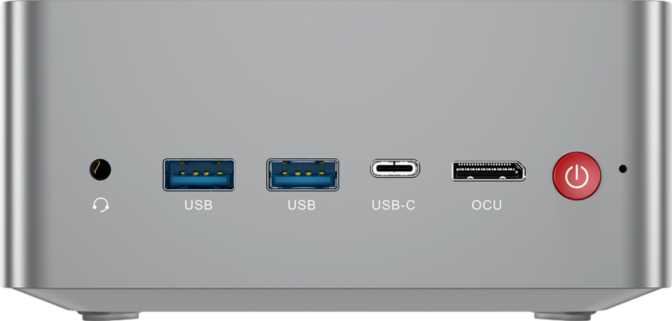
Physical Port Overview
| Port | Standard | Speed / Signal | Qty | Best For |
|---|---|---|---|---|
| USB-CThunderbolt 4 | TB4 / USB4 | 40 Gbps | 2 | Data · Display · Power |
| USB-AFull-Size | USB 3.2 Gen 1 | 5 Gbps | 3 | Peripherals & Drives |
| HDMIHDMI 2.0 | HDMI 2.0 | 4K @ 60 Hz | 1 | Display Output |
| DPDisplayPort | DisplayPort | High-Res | 1 | Display Output |
| LANEthernet | RJ45 | Wired Network | 2 | Network (Dual) |
| 3.5Audio Jack | 3.5 mm Combo | Analog | 1 | Headphones / Mic |
Both USB-C ports carry full Thunderbolt 4 certification and simultaneously support data transfer, video signal, and power delivery through a single cable connection.
Wireless Features
Wi-Fi 6E adds access to the 6 GHz band, which carries higher throughput and significantly less interference than congested 5 GHz networks. In dense office environments or apartment buildings, this difference shows in video call stability and large file transfers.
Two independent ports enable simultaneous access to two network segments, software-defined routing, redundant network paths, or concurrent connections to production and test environments. Network engineers and home lab users will recognize the value of this immediately.
Thermal Reality: What to Expect Under Load
A 45-watt mobile processor inside a compact chassis reaches operating temperatures faster than a desktop chip in an open-air tower. Always ensure the machine has open airflow around it. Placing it inside an enclosed cabinet or stacking objects against its ventilation points will reduce cooling effectiveness and may cause the processor to reduce its performance to stay within safe thermal limits.
During light desktop use — browsing, communication tools, documents, media playback — the cooling system operates well within its capacity and fan noise should be low or effectively absent. Under sustained heavy workloads, the system will generate more noise as the fan works harder to remove heat. This is not a flaw specific to the Mini GTS; it is physics applied to compact thermal engineering.
Users who intend to run processor-intensive workloads continuously for extended periods — automated data pipelines, overnight compilation jobs, continuous media encoding — should treat adequate ventilation as a functional requirement rather than a preference. For demanding, occasional use punctuated by regular rest, the thermal design is well-suited to the machine's performance tier.
Who the Machenike Mini GTS Is For
- Software developers running complex local environments with multiple services, databases, and containers simultaneously
- Data analysts processing large in-memory datasets where RAM capacity determines what can run without disk swapping
- Video editors working with modern compressed formats who depend on CPU throughput and hardware codec acceleration
- Multi-monitor business professionals managing demanding productivity suites across up to four simultaneous displays
- Small business operators who need a lightweight local server, routing capability, or always-on compact workstation
- Home lab enthusiasts who value dual Ethernet, strong multi-core processing, and compact form factor in a single machine
- All-in-one upgraders who want to separate their compute unit from their display for more flexible, modular setups
- Dedicated GPU gaming — current-generation AAA titles at quality settings require discrete graphics the Mini GTS cannot provide
- Complex 3D rendering or VFX production — integrated graphics will be the bottleneck, regardless of CPU strength
- Local ML model training with large model sizes — GPU memory and compute ceiling will be limiting
- Growing GPU requirements — the processor and GPU are permanently fixed at purchase with no hardware upgrade path
Competitive Positioning: Where the Mini GTS Sits in Its Market
The Mini GTS competes directly with other mini PCs deploying high-performance mobile processors in compact form factors. Its memory configuration is the most visible differentiator — shipping with two to four times the RAM found in comparable machines removes the common frustration of buying a capable machine only to spend immediately on an upgrade. Against ARM-based alternatives, the x86 platform runs the full existing desktop software library natively without compatibility layers — a practical advantage for anyone whose professional software ecosystem was built for standard PC hardware.
| Feature | Machenike Mini GTS | Typical Compact Desktop | Higher-Priced Alternative |
|---|---|---|---|
| Standard RAM | 64 GB DDR5 | 16–32 GB DDR4/DDR5 | 16–32 GB DDR5 |
| Primary Storage | 1 TB NVMe | 512 GB NVMe | 512 GB – 1 TB NVMe |
| Simultaneous Displays | 4 | 2–3 | 3–4 |
| Ethernet Ports | 2 (Dual Independent) | 1 | 1–2 |
| High-Speed USB-C | Thunderbolt 4 × 2 | Absent or 1 USB4 | 1–2 Thunderbolt |
| Wireless Standard | Wi-Fi 6E | Wi-Fi 5 or Wi-Fi 6 | Wi-Fi 6E |
| CPU Thermal Envelope | 45 W | 15–35 W | 28–45 W |
Strengths and Honest Weaknesses
- 64 GB DDR5 as standard — Two to four times the RAM most comparable mini PCs ship with, eliminating the immediate post-purchase upgrade cost most buyers face
- Dual Thunderbolt 4 ports — Opens the full TB4 ecosystem: external docks, storage enclosures, display connectivity, and future eGPU options via a single cable
- Dual Ethernet — A genuine capability differentiator enabling dual-network configurations, routing, and home lab use cases not possible with single-port designs
- Four-display support — Without any external dock or adapter chain; covers professional multi-monitor setups completely
- Strong multi- core benchmark results — Workstation-adjacent scores suggest comfortable longevity for CPU-bound workflows
- 128 GB maximum RAM — Real future-proofing for workloads that scale with memory rather than requiring a full hardware replacement
- Wi-Fi 6E with 6 GHz band — Noticeably more reliable in congested wireless environments compared to Wi-Fi 5 or standard Wi-Fi 6 systems
- Integrated GPU ceiling — Arc 140T is capable for display and media work, but it is a hard stop for GPU-intensive gaming, 3D rendering, and ML training. This is not a nuanced constraint; it is a category limit
- Non-upgradeable processor — The chip is permanently soldered to the board; CPU and GPU performance cannot be improved through any future upgrade
- No straightforward discrete GPU path — External GPU enclosures via Thunderbolt 4 are theoretically possible but add significant cost and bulk, undermining the compact premise
- Fan noise under sustained heavy load — Audible cooling activity during extended processing-intensive sessions is unavoidable in a chassis this small
- USB-A limited to USB 3.2 Gen 1 (5 Gbps) — The three full-size ports top out at 5 Gbps; no 10 Gbps or 20 Gbps USB-A options are present
Frequently Asked Questions
Real questions buyers search for before purchasing — answered directly.
Final Verdict
The Machenike Mini GTS is a machine with a clearly defined audience and a coherent value proposition for that audience. Its 64 GB DDR5 standard configuration is the most impactful single specification: it eliminates the frustrating and all-too-common experience of purchasing an otherwise capable machine and immediately confronting memory constraints.
Dual Thunderbolt 4, dual Ethernet, and four-display support from a chassis smaller than most desktop speakers are features you'll look hard to find together elsewhere in this form factor. The processor's benchmark performance places it in territory associated with dedicated workstations, not palm-sized enclosures.
The limits are real and worth stating plainly: integrated graphics are a fixed ceiling for GPU-intensive workflows, the processor cannot be upgraded, and the compact chassis means noise under sustained heavy load requires attention. If any of those constraints describes your primary workflow, a different platform is the right answer. For everyone else — the Mini GTS resolves the usual mini PC compromises rather than asking you to accept them.