Kamrui Hyper H2 Review: A Mini PC That Overdelivers on Connectivity
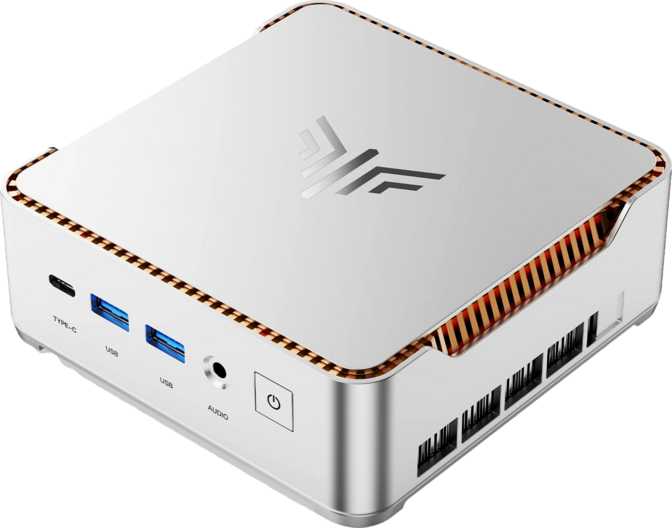
Mini PCsMost desktop computers are still, essentially, boxes — metal towers or wide slabs that claim a permanent spot on or under a desk. The Kamrui Hyper H2 proposes a different arrangement: a fully specified modern PC shrunk to a footprint smaller than a hardback novel, ready to sit behind a monitor, on a shelf, or tucked against a wall. This is not a stripped-down appliance or a browser box — it is a complete computing platform that happens to take up almost no space.
What makes the Hyper H2 worth examining closely is not just its size but the specific features included at this scale. Thunderbolt 4 connectivity, DDR5 memory with ECC support, Wi-Fi 6 wireless, a full terabyte of fast NVMe storage, and a port lineup with eight USB connections — these are features that typically appear at higher price points or on more specialized hardware. The central question is not whether the Hyper H2 is impressive for its size, but whether those features translate into daily value. That is what this review works through.
Review Summary
How the Kamrui Hyper H2 scores across key categories
Very Good
Overall Score
Category Ratings
Where It Shines
- Thunderbolt 4 and USB 4 at this price tier
- ECC memory support — rare in consumer mini PCs
- Drives up to four simultaneous displays
- Eight USB ports across four distinct speed tiers
- DDR5 platform with generous expansion headroom
Where It Disappoints
- Intel UHD 710 cannot handle gaming or GPU workloads
- Processor is integrated — no future upgrade path
- One-year warranty is shorter than key competitors offer
Design and Physical Footprint
The Kamrui Hyper H2 measures approximately 128mm along each side — a square footprint not much larger than a CD jewel case, though meaningfully taller to accommodate the internals. Set it on a desk and it occupies less surface area than most external hard drives. Slide it behind a compatible monitor using a VESA mounting kit and it practically disappears from view. For anyone managing a small office, a cluttered desk, or a shared workspace where hardware footprint matters, this physical profile is a primary selling point.
At this scale, build materials are a practical mix of plastic and metal. Ventilation slots allow airflow to the compact cooling system. Under light workloads — browsing, documents, video calls — the machine sits quietly. Under sustained computational load such as extended compilation or long video exports, the fan will become audible. This is a predictable characteristic of compact PC design and not a fault specific to this unit, but users requiring silent operation under heavy workloads should factor it in.
The footprint is small enough to mount on the back of a VESA-compatible monitor, keeping the desktop entirely clear. For media rooms, reception desks, classrooms, or offices where aesthetics and clutter control matter, this near-invisible installation option is a genuine functional advantage.
Physical Snapshot
- Footprint
- ~128 × 128 mm
- Form Factor
- Compact Desktop (Mini PC)
- VESA Mount
- Compatible (verify mount kit)
- Cooling Type
- Active fan cooling
- Idle Noise
- Near silent
- Load Noise
- Audible fan under sustained use
- Typical Placement
- Desk, shelf, or monitor-mounted
- Warranty
- 1 year
Processor Performance: What It Actually Means
Hybrid Architecture in Practice
The processor uses a heterogeneous core design: a cluster of performance-tuned cores handles demanding tasks while a second cluster of efficiency-oriented cores manages lighter background work simultaneously. Ten total cores across these two types produce sixteen concurrent processing threads — meaning the machine can handle a video call, a browser with many open tabs, a code editor, and background downloads at the same time without any of them noticeably slowing the others.
Clock Speed and Daily Responsiveness
The performance cores run at a steady base clock for sustained workloads and can boost to exactly twice that speed for brief, demanding moments — opening an application, loading a large file, or handling sudden activity spikes. That peak boost speed means the machine feels quick and reactive day to day. Supporting this is a substantial 20-megabyte on-chip cache that sits between the processor and main memory, reducing wait times and keeping the experience smooth across browsers, office software, and development environments.
Instruction Sets That Add Practical Value
The processor includes hardware-accelerated AES encryption, AVX and AVX2 vector instructions, and FMA3 floating-point support. Hardware AES means encrypted drives and VPN tunnels run faster. AVX2 and FMA3 improve real-world performance in video encoding, machine learning inference, and financial modeling tools — software that exploits these paths runs meaningfully faster than on a processor without them. The multiplier is locked, so overclocking is not available — expected and not a practical limitation in a thermally constrained compact chassis.
Performance by Use Case
| Use Case | Expected Result |
|---|---|
| Web browsing, email, and office applications | Excellent |
| Video calls and screen sharing | Excellent |
| Heavy multitasking across many open applications | Very Good |
| Software development and code compilation | Good |
| 1080p video editing, light timeline work | Good |
| 4K video editing with effects and color grading | Marginal |
| One to two lightweight virtual machines | Capable |
| Modern 3D gaming | Poor |
Benchmark Context
Ahead of budget office machines and mainstream productivity laptops; well below high-end workstation or gaming CPUs
Solid for everyday single-threaded tasks; not exceptional for specialized workloads that depend on raw single-core speed
Integrated Graphics: Display Power, Not Rendering Power
The Hyper H2 uses Intel’s UHD Graphics 710 — an integrated solution built into the processor itself, sharing the system’s main memory rather than drawing on dedicated video RAM. Built for display output and video playback, not creative or gaming workloads, it covers the essentials reliably and stops at the edge of its design intent.
Handles Without Issue
- 4K video playback via hardware decode (streaming and local files)
- Driving up to four simultaneous external monitors
- Video conferencing and shared screen output
- Photo browsing and light image editing in consumer tools
- All standard office applications and web browsers
Will Struggle or Fail
- Modern gaming titles at any meaningful setting or resolution
- GPU-accelerated video effects and color grading
- 3D rendering and GPU compute workloads
- Any application requiring dedicated video memory
Display Output Capabilities
Up to four simultaneous displays supported — a meaningful differentiator at this price point.
Memory and Storage: More Headroom Than Expected
DDR5 RAM — A Platform Built to Scale
The Hyper H2 ships with 16 gigabytes of DDR5 memory running in dual-channel configuration. Dual-channel means the two modules work in parallel, roughly doubling the bandwidth compared to a single-module setup — a meaningful benefit for integrated graphics, which rely on system memory bandwidth for GPU tasks. For most home office, student, and light professional workloads, this is entirely comfortable. Running a full browser session alongside productivity tools, communication apps, and background services will not push this to its limits under normal conditions.
The platform supports memory capacities far beyond what any personal computing workload would realistically require, making the Hyper H2 credible in home lab, lightweight virtualization, and server contexts. The current shipping configuration runs DDR5 at a conservative speed, leaving headroom for users who install faster modules — an upgrade that can improve performance particularly in graphics-intensive tasks where the integrated GPU benefits directly from higher memory bandwidth.
ECC Memory Support
ECC — Error-Correcting Code — memory automatically detects and corrects single-bit memory errors in real time, preventing data corruption from ever reaching applications or files. This feature is standard in server and workstation hardware and essentially absent from consumer mini PCs at this price.
Why This Matters
For home lab users, file servers, financial record systems, or any always-on machine where data integrity is critical, ECC support moves from a nice-to-have to a genuine hardware differentiator. It is rare to find it in a consumer mini PC at this price.
1TB NVMe Storage — Fast From Day One
A one-terabyte NVMe solid-state drive connects directly to the processor’s high-speed interface rather than the slower SATA channel used by older SSDs, delivering significantly faster read and write speeds. Windows boots in seconds, application launches are near-instant, and large file operations complete without the wait that characterizes older storage. One terabyte comfortably accommodates an operating system, a full software suite, a substantial media library, and years of documents for most users — a solid starting point with room to spare.
Connectivity: The Hyper H2’s Clearest Strength
Eight USB ports on a device this compact is not common. The Hyper H2’s lineup spans four distinct performance tiers, making the count practical rather than padded. Add Wi-Fi 6, Thunderbolt 4, and four-display output, and the connectivity profile here routinely appears only at higher price points.
USB Port Breakdown
Keyboards, mice, standard USB drives, and everyday peripherals
External SSDs, high-speed flash drives, and audio interfaces
Extreme-speed external storage and high-bandwidth docking stations
Docks, eGPU enclosures, and Thunderbolt-certified storage
Why Thunderbolt 4 Changes the Daily Experience
A Thunderbolt 4 dock connects to this single port and simultaneously handles monitor output, USB hubs, high-speed storage, and peripheral power — reducing a full workstation setup to one cable on the desk. Thunderbolt 4 also opens compatibility with external GPU enclosures and the highest-speed external storage currently available. For users building a clean, minimal desk setup, this port alone is a compelling feature at this price.
Wireless and Additional Connections
Current-generation wireless — faster and more stable than Wi-Fi 5 in crowded wireless environments with many connected devices
Stable, lower-latency wireless peripherals — mice, keyboards, headphones, and speakers without dongles
Wired network connection essential for server roles, NAS access, and reliable media streaming
Direct headphone and speaker output — no USB audio adapter required
Who the Kamrui Hyper H2 Is For — and Who It Is Not
The Right Buyer
-
Home and Remote Office WorkersA capable, full-featured PC without desk bulk, cable complexity, or a tower footprint
-
Multi-Monitor Productivity SetupsFour-display ceiling and eight USB ports cover complex dual and triple-monitor desk configurations
-
Students and EducatorsReliable, capable computing for research, writing, software development, and video calls
-
Developers and Technical UsersCode editors, local dev servers, containers, and developer toolchains all run comfortably here
-
Home Lab and NAS EnthusiastsECC memory support, high memory ceiling, and Ethernet port suit always-on server roles better than most consumer mini PCs
The Wrong Buyer
-
Gamers at Any LevelIntegrated graphics cannot run modern titles at any meaningful quality setting — this is a hard hardware limit, not a configuration issue
-
Professional Video Editors4K editing with color grading and layered effects will exhaust integrated GPU capabilities; a machine with discrete GPU VRAM is necessary
-
Users Needing Maximum Single-Core SpeedSingle-threaded benchmarks are solid but not exceptional; faster processors exist at this price tier for specialized single-threaded workloads
-
Buyers Planning Processor UpgradesThe CPU is integrated into the platform — this machine’s performance ceiling is set at purchase and cannot be upgraded later
Competitive Positioning
The compact desktop market includes machines from Beelink, Minisforum, ASUS NUC successors, and Acemagician, among others. The Hyper H2 is differentiated primarily by connectivity depth and memory platform features, rather than raw CPU or GPU performance.
| Feature | Kamrui Hyper H2 | Typical Budget Mini PC | Category Midrange |
|---|---|---|---|
| Memory Generation | DDR5 | DDR4 | DDR4 or DDR5 |
| ECC Memory Support | Yes | No | Rarely |
| Thunderbolt 4 | Yes | No | Occasionally |
| USB 4 (40 Gbps) | Yes | No | Occasionally |
| Total USB Ports | 8 | 4–6 | 6–8 |
| Wireless Standard | Wi-Fi 6 | Wi-Fi 5 or 6 | Wi-Fi 6 |
| Max Simultaneous Displays | 4 | 2 | 2–3 |
| Integrated GPU Tier | Entry (Intel UHD) | Entry | Entry to Mid (AMD Radeon) |
| Included Storage | 1TB NVMe | 256–512 GB | 512 GB–1 TB |
Where the Hyper H2 Leads
Connectivity package and platform capability: Thunderbolt 4, USB 4, Wi-Fi 6, ECC support, DDR5, and four-display output represent a specification level rarely seen in this price range. Most competing mini PCs omit several of these features entirely.
Where It Trails Higher-Tier Rivals
Integrated graphics performance. AMD-platform mini PCs from Minisforum and Beelink offer Radeon integrated graphics with substantially more execution units, producing noticeably better graphical performance for anyone with GPU-dependent workloads or casual gaming needs.
The Honest Picture
The Hyper H2 earns its recommendation primarily through connectivity and platform features that exceed what its price tier typically delivers. Eight USB ports spanning four speed tiers — including both Thunderbolt 4 and USB 4 — four-display output, Wi-Fi 6, ECC-capable DDR5 memory, and a terabyte of fast NVMe storage are all above-par inclusions for this class of machine.
The processor handles productivity, development, and multitasking without complaint. Its hybrid architecture manages varied task types efficiently, and the large on-chip cache keeps daily interactions feeling fluid. Instruction set support for hardware-accelerated encryption and vector operations adds practical value for specific technical workflows including encrypted storage, video encoding, and machine learning inference tasks.
Real Strengths
- Connectivity package punches well above its price. Thunderbolt 4 and USB 4 together in a mini PC at this tier is unusual and practically useful for both professionals and power users.
- DDR5 with ECC is a platform differentiator. Finding ECC support in a consumer compact desktop at this price is uncommon; it raises the floor for data-sensitive deployments.
- Four-display support is legitimately rare here. Most competing mini PCs stop at two monitors; this machine scales to complex multi-display setups without adapters or workarounds.
- Complete 1TB NVMe out of the box. Many competitors ship 256–512 GB in the same price bracket, requiring an immediate storage upgrade.
Real Limitations
- Integrated graphics is the clear ceiling. UHD 710 with sixteen execution units serves displays and video only. The gap between user expectations and what this GPU actually delivers is large enough to define purchase suitability.
- Locked-in processor. No upgrade path through the CPU means the performance ceiling is set permanently at purchase, as is typical for this form factor.
- One-year warranty is shorter than peers. For always-on deployments in server or home lab roles, several competing brands offer longer coverage at comparable prices.
- RAM ships at conservative DDR5 speeds. The default configuration leaves performance headroom untapped — users who need it should factor a memory upgrade into the total cost.
Questions Buyers Search Before Purchasing
Kamrui Hyper H2 — A Compact Desktop That Gets the Important Things Right
A focused, well-specified mini PC that earns its price through connectivity depth and platform thoughtfulness, with one clear limitation you should weigh before buying.
Buy the Kamrui Hyper H2 If…
- You need a fully connected compact desktop for office productivity or multi-monitor work
- You want Thunderbolt 4 and USB 4 without paying a premium laptop price
- You’re building a home lab or lightweight server where ECC memory matters
- You’re replacing aging hardware and want a significant upgrade in a small package
Look Elsewhere If…
- Gaming at any level is part of your plan — this GPU will not deliver it
- You edit professional video or rely on GPU-accelerated creative tools
- You want stronger graphics — AMD Radeon mini PCs outperform at this price tier for GPU tasks
Best for: Home offices, multi-display setups, developers, home labs