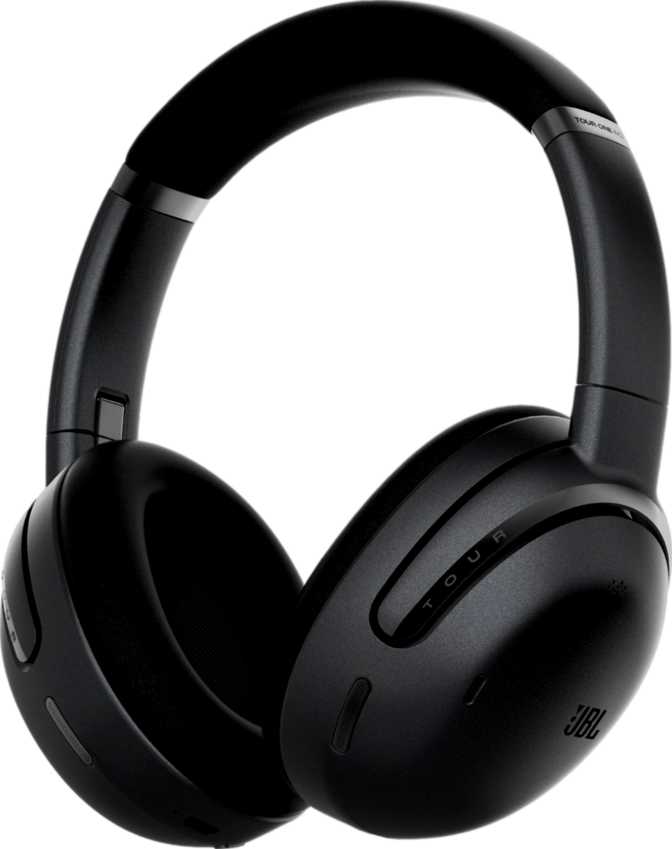
JBL Tour One M3 Review: An Honest Look at Sound and Battery Life
HeadphonesChoosing a pair of over-ear headphones for daily commuting, long flights, or hours-long work sessions usually comes down to one frustrating trade-off: the headphones that sound incredible run out of battery by lunchtime, and the ones that last forever feel like an afterthought on sound. The JBL Tour One M3 is built around closing that gap. It pairs a genuinely large amount of battery endurance with a feature set aimed squarely at people who wear headphones for hours at a stretch — commuters, frequent flyers, hybrid workers bouncing between a laptop and a phone, and anyone who has ever had to choose between noise cancellation and getting through the day. Before you decide whether it earns a spot on your head, here's everything the spec sheet actually means once you take it out of marketing language and into real life.
Design, Build Quality, and the Physical Wearing Experience
How It Feels on Your Head
At 278 grams, the Tour One M3 sits on the heavier side of the over-ear category. That weight isn't a flaw by itself — over-ear headphones distribute pressure across the whole head and ears rather than concentrating it in one spot, the way a heavy in-ear or on-ear design would — but it does mean you'll notice this is a substantial piece of hardware, not a featherweight travel companion. If you've previously found heavier headphones uncomfortable after two or three hours, pay attention to how the clamping force and padding feel in person, because the chassis weight is the one physical spec you can't change with a firmware update.
Built for Travel, Not for the Gym
JBL includes a travel bag with the Tour One M3, which is a meaningful inclusion rather than a throwaway accessory — over-ear headphones are bulky, and a dedicated case protects the ear cups and headband from getting crushed in a backpack. The headphones also fold down, which combined with the included bag makes this a far easier pack than a fixed, non-folding design.
What you don't get is any water resistance rating at all. There's no splash protection, no sweat resistance, nothing. Treat the absence of water resistance as a firm rule, not a suggestion.
The Cable Situation
The Tour One M3 ships with a detachable cable that's tangle-free and measures 1.2 meters — sized for plugging into a phone, laptop, or an airplane's seatback entertainment system, not for stretching across a room to a home amplifier. Because it detaches, a frayed or lost cable doesn't mean replacing the whole headphone. And since the control panel lives on the ear cup itself rather than on the cable, you get the same physical buttons for volume and playback whether you're connected wirelessly or by wire.
Sound Quality: How the Tour One M3 Actually Performs
Driver Technology and Frequency Range
Each ear cup houses a 40mm driver, which is a large driver for a headphone and one of the reasons over-ear designs tend to produce fuller, more physical bass than smaller in-ear formats — bigger drivers move more air. The frequency range JBL lists stretches from 10 Hz up to 40,000 Hz, both ends of which extend beyond what human ears can actually perceive (commonly accepted as roughly 20 Hz to 20 kHz). That extended range isn't about hearing the extremes yourself; it's about giving the driver more headroom so the audible range in the middle sounds cleaner and less strained, and it pairs naturally with hi-res wireless codec support.
The headphones are rated at 18 Ohms of impedance, which is low. In practical terms, that means the Tour One M3 is easy to drive at full volume straight from a phone or laptop — you won't need a separate headphone amplifier to get a strong signal. Combined with a sound pressure level of 122 dB/mW, a measure of how loud the headphones get for a given amount of power, these will get plenty loud on weak source devices. That's good news if you've ever had headphones that sounded thin and underpowered plugged into a phone — but it also means you should be deliberate about not cranking the volume too high for too long, since there's clearly no shortage of headroom here.
Noise Cancellation and Isolation
The Tour One M3 combines active noise cancellation (ANC) with passive noise isolation. Passive isolation comes from the physical seal the ear cups create against your head, simply blocking outside sound, while active cancellation uses internal microphones and electronics to generate opposing sound waves that cancel out consistent background noise like engine hum or HVAC systems. Having both means you get a baseline of quiet even before the electronics kick in, which generally produces a more natural-feeling cancellation than ANC alone. An ambient sound mode is also built in, intentionally letting outside noise through when you need to hear a flight attendant, a coworker, or traffic without removing the headphones entirely.
Spatial Audio
Spatial audio support means the Tour One M3 can render multichannel or object-based audio so that sound appears to come from specific points in space around you, rather than just left and right. This is most noticeable with supported movies, shows, and some music mixed for immersive formats, though the effect depends entirely on whether your content and source app actually support it. One small technical note: JBL doesn't list a neodymium magnet in this driver's construction. Their absence doesn't tell you much on its own — plenty of well-tuned drivers use other magnet types successfully.
Connectivity and Codec Support
Bluetooth 5.3 and the Wireless Foundation
The Tour One M3 runs on Bluetooth 5.3, the current mainstream Bluetooth standard, which generally brings better power efficiency and more stable connections than older versions. Maximum range is rated at 10 meters, which is standard for Bluetooth headphones — expect that range to shrink somewhat with walls or obstructions in between. It also supports Bluetooth LE Audio and Auracast, a broadcast feature built on top of LE Audio that lets compatible headphones tune into a public broadcast audio stream — a gym's TV audio, an airport gate announcement, or an Auracast-enabled venue — without a traditional one-to-one pairing.
Codec Support: Where It Helps and Where It's Limited
This is the area where buyers should pay close attention, because it directly affects sound quality depending on what device you're pairing with.
| Codec / Feature | Supported | What It Means |
|---|---|---|
| LDAC | Hi-res wireless audio, primarily relevant on Android devices that support it | |
| AAC | Standard codec used by iPhones and most Apple devices | |
| LE Audio | Newer low-power Bluetooth audio standard | |
| Auracast | Broadcast audio streaming in supported public or private settings | |
| aptX family (standard, HD, Adaptive, Low Latency, Lossless) | Common on many Android phones, especially Samsung devices | |
| LDHC | Alternative hi-res codec used by some Android manufacturers | |
| NFC Pairing | No tap-to-pair shortcut | |
| Fast Pair | No instant pairing prompt on supported Android phones |
If you're on an iPhone, AAC is the best Apple natively supports anyway. If your Android phone supports LDAC, you're in great shape for hi-res wireless sound — but if it relies on the aptX family instead, common on several Samsung and other Android devices, you'll fall back to a more basic codec.
Staying Connected to Two Devices at Once
Multipoint support lets the Tour One M3 stay connected to two devices simultaneously — a laptop and a phone, for example — and switch between them without manually disconnecting and reconnecting. This means a call coming in on your phone can interrupt music playing from your laptop without you touching any settings.
Battery Life and Charging: The Tour One M3's Strongest Argument
This is where the spec sheet stops being a list of numbers and starts being the actual reason to buy this headphone.
| Usage Scenario | Rated Endurance | What That Looks Like Day to Day |
|---|---|---|
| ANC turned off | 70 hours | Roughly a full week or more of multi-hour daily listening before a single recharge |
| ANC turned on | 40 hours | Still well over a typical work week's worth of daily commuting and office use |
| Full recharge | 2 hours | A lunch break or an evening at your desk gets you back to full |
Charging happens over USB-C, the now-standard connector that means you're not hunting for a proprietary cable. The headphones also include a battery level indicator, so you're not left guessing how much runtime you have left.
The 850 mAh battery is sealed inside and rechargeable, but not swappable — a fairly standard approach for this category, though it does mean that years down the line, battery degradation is a fixed-hardware issue rather than something you can fix with a spare part.
Everyday Features That Actually Affect How You Use These
A few features sit outside the headline specs but shape daily use more than people expect.
- Eight built-in microphones combined with a noise-canceling microphone for calls is a high count for this category, generally translating to clearer voice pickup on calls even with background noise.
- No in/on-ear detection means the Tour One M3 won't automatically pause your music when you take the headphones off — a habit you'll need to retrain manually.
- Headset functionality is built in, meaning these work properly for voice calls and video meetings, not just music playback.
- Stereo drivers in each ear cup deliver genuine left-right channel separation, standard for headphones but worth confirming isn't compromised by any mono fallback mode.
Who the JBL Tour One M3 Is Actually For
Great Fit For
- Frequent travelers and commuters who need ANC and isolation for hours without recharging mid-day
- Hybrid workers moving between a laptop for meetings and a phone for everything else
- Android users with LDAC-compatible phones wanting noticeably better wireless sound
- Anyone tired of charging headphones every night
Not the Right Fit For
- Gym-goers or runners, given the complete absence of water or sweat resistance
- Samsung and other Android owners whose phones rely on aptX rather than LDAC
- Weight-sensitive buyers wanting the lightest possible over-ear option
- Parents shopping for a child's headphone — this is an adult-oriented design
How the Tour One M3 Stacks Up Against the Competition
In the premium wireless ANC over-ear category, most competing flagships from major audio brands position themselves around a similar core promise: strong noise cancellation, solid sound, and increasingly capable companion features. Where the Tour One M3 distinguishes itself most clearly is battery life — a 70-hour total rating, and 40 hours even with ANC active, comfortably outpaces what's typical in this segment, where many competitors land meaningfully lower on ANC-engaged endurance.
Where it's more competitive than dominant is codec flexibility. JBL's choice to support LDAC but skip the entire aptX family is a real trade-off — some rival headphones cover both LDAC and aptX variants, giving them broader hi-res compatibility across both Android ecosystems. If you already know your phone leans on aptX rather than LDAC, that's a legitimate point in a competitor's favor.
On convenience pairing, the lack of NFC and Fast Pair puts the Tour One M3 a step behind rivals that offer instant tap-to-pair, though this affects only the initial setup experience, not day-to-day sound or comfort. And the absence of any water resistance rating is worth flagging directly against competitors that do offer at least light splash protection, since that's a binary capability you either have or don't.
The Honest Strengths and Weaknesses
What Stands Out
The clearest strength here is endurance — JBL has built a headphone that genuinely changes how often you think about charging, and that's not a small thing for anyone who's been caught with a dead headphone mid-commute. The combination of a low-impedance, high-sensitivity driver setup means these will sound loud and full on basically any device you own, no amplifier required, and the dual ANC-plus-passive-isolation approach gives a layered, natural quiet rather than an artificial-feeling cancellation.
Where It Falls Short
The honest weaknesses sit in two specific places. First, the codec story is incomplete — supporting LDAC while skipping the entire aptX family leaves a real gap for the large number of Android users who don't have an LDAC-compatible phone. Second, there's zero water or sweat resistance, which is an unusual omission at this level and immediately rules out workout use. Neither is a dealbreaker for the right buyer, but both should factor directly into your decision.
Frequently Asked Questions
Final Verdict: Should You Buy the JBL Tour One M3?
If your daily life involves long stretches of headphone wear — commuting, traveling, working from a laptop and phone in the same afternoon — the JBL Tour One M3 is built specifically around that pattern, and it delivers on it convincingly. The battery life alone is enough to justify a serious look, and the combination of strong driver power, layered noise cancellation, and genuinely useful extras like multipoint connectivity make it a well-rounded daily driver rather than a headphone built around one flashy spec.
The decision gets more specific if you're an Android user: check whether your phone uses LDAC or relies on aptX before buying, since that single detail determines whether you get the full wireless sound quality this headphone is capable of. And if any part of your routine involves sweat, rain, or the gym, this isn't the headphone for that.
For everyone else — travelers, commuters, hybrid workers, and anyone who wants to stop thinking about charging headphones every single night — the JBL Tour One M3 earns a genuine recommendation. It's not the lightest, and it's not the most codec-flexible option on the shelf, but it's one of the most dependable for the specific job most buyers actually need it to do.