Cubot Tab KingKong Mini Full Review: A Rugged Tablet Built to Survive
TabletsBuilt Tough for the Real World
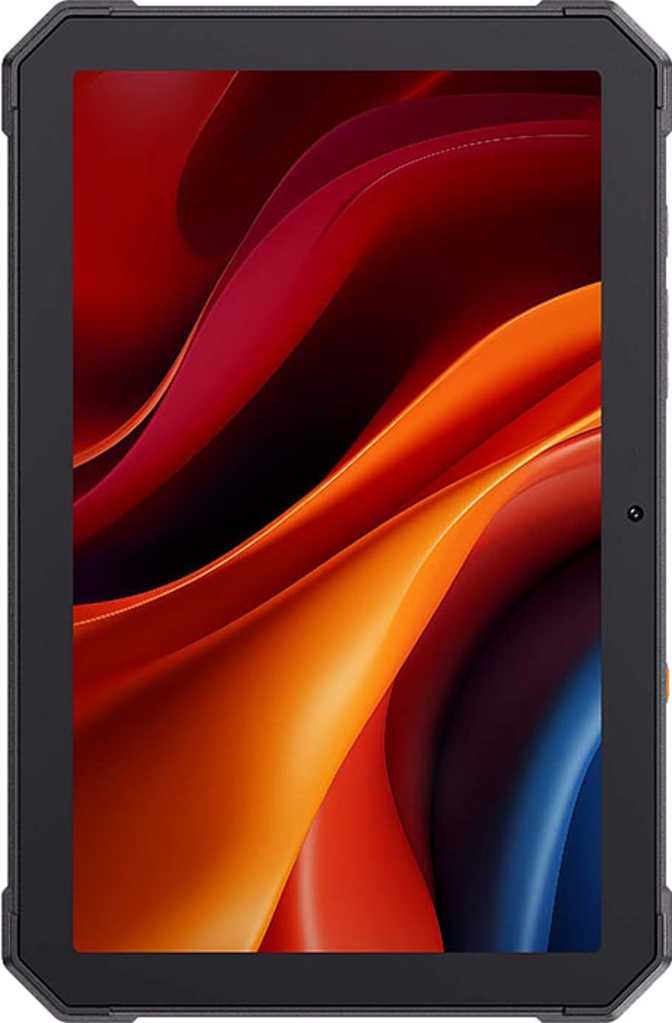
Most tablets treat water as an enemy and dust as a death sentence. The Cubot Tab KingKong Mini approaches those same conditions as design requirements. This is an 8.68-inch rugged Android tablet built specifically for environments where a standard consumer tablet would not survive — job sites, workshops, kitchens, outdoor adventures, or households where children are the primary operators.
Understanding that framing is critical before evaluating anything else. Judge it as a premium media tablet and you will always be disappointed. Judge it as a durable, purpose-built field companion running a modern operating system, and the picture changes considerably.
Category Scores at a Glance
Design and Build Quality: Substance Over Style
Physical Dimensions and Heft
The KingKong Mini occupies a footprint slightly larger than a piece of A5 paper — about 217mm wide and 142mm tall — putting it squarely in the compact tablet category rather than the full-sized slab territory. At just under 15mm thick, it is noticeably chunkier than any mainstream consumer tablet at this screen size, and at 642 grams, it is a meaningful weight to hold one-handed for extended periods.
That bulk is not accidental. The reinforced chassis and thick rubberized bumper construction are what earn this device its IP68 certification — the highest standard ingress protection rating available on consumer electronics. In practical terms, this means the tablet can be submerged in up to 1.5 meters of fresh water for 30 minutes without sustaining damage. It is also fully sealed against dust intrusion, which matters enormously on construction sites, workshops, and outdoor environments.
Physical Specifications
- Width
- 217.4 mm
- Height
- 142.4 mm
- Thickness
- 14.6 mm
- Weight
- 642 g
- IP Rating
- IP68
- Water Depth
- Up to 1.5 m
Build Philosophy
The KingKong Mini is purpose-engineered to absorb punishment. Reinforced corners, sealed ports, and an impact-resistant housing are designed with drops, vibrations, splashes, and dirt exposure in mind — not as afterthoughts.
There is no stylus support and no provision for a detachable keyboard. This tablet wants to be grabbed with a gloved hand, mounted in a vehicle, propped up in a workshop, or handed to a child without a protective case.
Display: Functional Clarity, Not Visual Luxury
The 8.68-inch IPS LCD panel delivers a resolution of 1340 x 800 pixels. At a calculated density of 180 pixels per inch, text and interface elements are reasonably clear, though noticeably softer than the high-resolution displays found on mainstream mid-range and flagship tablets at comparable sizes. For reading documents, browsing websites, watching standard-definition video, or running Android apps, the sharpness is adequate.
The inclusion of a 90Hz refresh rate is genuinely useful here. Scrolling through apps and navigating the Android interface feels smoother than what you get on standard 60Hz tablets, adding a layer of perceived responsiveness that benefits day-to-day use even on a budget-tier panel.
What the Display Does Not Do
The panel does not support HDR10, Dolby Vision, or any advanced wide-color or high-dynamic-range standard. There is also no anti-reflection coating, which is a genuine limitation for a device positioned for outdoor use.
The display is protected by branded damage-resistant glass — a meaningful inclusion that guards against the incidental contact and minor impacts a rugged tablet will regularly encounter in field use.
Performance: Capable for the Mission, Not Beyond It
The Chipset and What It Means
The Cubot Tab KingKong Mini is powered by the Unisoc T615, an octa-core processor built on a 12-nanometer manufacturing process. This chip is designed for efficiency and sustained reliability rather than raw speed — think of it as the diesel engine of mobile processors: measured, dependable, and well-suited to tasks that run for long hours.
The configuration pairs two higher-performance cores running at 1.8GHz with six efficiency-focused cores at 1.6GHz. This architecture allows the tablet to handle responsive bursts — opening apps, loading pages, switching between tasks — while keeping power draw low during less demanding operations.
- Chipset
- Unisoc T615
- Process Node
- 12 nm
- Core Config
- 2x1.8 + 6x1.6 GHz
- Thread Count
- 8 threads
- GPU
- Mali G57
- GPU Clock
- 850 MHz
- OpenGL ES
- 3.2
- RAM
- 6 GB
- Max Addressable
- 12 GB
- RAM Speed
- 1866 MHz
- Storage
- 128 GB
- Storage Type
- eMMC 5.1
- Expandable
- microSD
Benchmarks in Context
On Geekbench 6, the KingKong Mini posts a multi-core score in the low-to-mid 1400s and a single-core score around 437. This places it clearly in the entry-level tablet performance tier. Tasks like web browsing, document editing, video calls, form-filling, barcode scanning, and light media consumption run without issue.
Software: Android 15
Running Android 15 out of the box, the KingKong Mini offers modern OS features that many budget tablets are still two or three versions behind on. Multi-user configuration supports shared deployment, and child lock functionality is included for family use.
Camera System: More Than You'd Expect
The 48-megapixel main camera, for a device in the rugged tablet category, represents genuine effort. Rugged tablet cameras are rarely destination photography tools — they are workhorses for documenting job sites, scanning QR codes, photographing damage or progress for field reports, and video calling. For all of those tasks, this camera is well-equipped.
- CMOS sensor with touch autofocus
- Continuous autofocus during video
- Built-in HDR mode
- Manual ISO, white balance & exposure
- LED flash & video light
- No optical zoom or OIS
- No slow-motion or burst mode
A 16-megapixel front camera supports video calls with strong resolution. For field use, remote work, team check-ins, or telemedicine scenarios, this is a genuine asset.
- High-resolution video calling
- Touch autofocus
- No front-facing flash — low-light calls depend on ambient lighting
Battery Life and Charging: The Standout Advantage
The KingKong Mini carries a 10,200mAh battery — one of the most substantial capacities available in a compact tablet at any price point. Light to moderate daily use — a few hours of app work, video streaming, and communication — can comfortably stretch across two full days between charges. Even under heavier sustained use, a full working day is never a concern.
For field deployment scenarios where reliable access to charging is not guaranteed — outdoor sites, remote locations, extended shifts — this battery capacity is one of the most compelling reasons to choose this tablet over alternatives.
Up to 2+ days of moderate daily use
Full charge in approximately 1.5 to 2 hours
Also retains 3.5mm headphone jack
Connectivity: Where Choices Were Made
The KingKong Mini connects via Wi-Fi 4 and Wi-Fi 5 standards, delivering stable connections on both 2.4GHz and 5GHz networks. For a tablet operating on facility Wi-Fi or a home network, this is fully adequate. Bluetooth 5.0 supports reliable, low-energy connections to peripherals, headsets, and input devices. The tablet also accommodates two physical SIM card slots.
- Wi-Fi 4 (802.11n) + Wi-Fi 5 (802.11ac)
- Bluetooth 5.0
- USB Type-C port
- 3.5mm headphone jack
- Dual SIM card slots (physical)
- Accelerometer
- Galileo satellite support
- No cellular modem — Wi-Fi only despite dual SIM slots
- No GPS hardware — location tracking not available
- No NFC
- No gyroscope or compass
- No fingerprint scanner
- No Wi-Fi 6 support
- No stereo speakers
Who Should Buy This Tablet — and Who Should Not
- Tradespeople and field workers who need a tablet that survives job site conditions — splashing water, dust, accidental drops — and can run work apps and capture documentation through a full day without a charger.
- Parents with young children who want a tablet that can survive bathroom drops and outdoor use without a protective case — child lock, multi-user support, and IP68 certification cover the chaos.
- Light industrial and warehouse environments where shared device deployment is common and physical durability is prioritized over processing power.
- Budget-conscious buyers who want a larger-screened, modern Android device and need durability more than media performance.
- Cellular data or GPS — the absence of both is a hard stop for many true field deployment use cases.
- Gamers and media enthusiasts who will notice the modest display resolution, mono speaker audio, and limited GPU performance as genuine constraints on entertainment quality.
- Productivity power users who need a stylus, physical keyboard, or high-performance processing for demanding professional software.
- Security-sensitive enterprise deployments that require direct OS vendor update guarantees.
Competitive Positioning: How It Stacks Up
The KingKong Mini's strongest differentiators in its category are the IP68 waterproofing depth, the battery capacity, and the Android 15 software. Its most notable competitive gaps are the absence of GPS and cellular connectivity, areas where rugged-category competitors at similar or slightly higher price points often deliver.
| Feature | Cubot Tab KingKong Mini | Typical Budget 8" Tablet | Entry Rugged Competitor |
|---|---|---|---|
| IP Rating | IP68 (1.5m) | None | IP67 or IP68 |
| Display Refresh | 90Hz | 60Hz | Typically 60Hz |
| Battery Capacity | 10,200mAh | 4,000–6,000mAh | 7,000–8,000mAh |
| Storage | 128GB + expandable | 32–64GB | 64–128GB |
| Android Version | Android 15 | Android 11–13 | Android 11–13 |
| Cellular | Wi-Fi only | Wi-Fi or LTE options | Often LTE available |
| GPS | No | Sometimes | Usually yes |
| Weight | 642g | 350–450g | 600–750g |
| Fast Charging | 33W | 10–18W | Varies |
Honest Assessment: Strengths and Weaknesses
The KingKong Mini's physical resilience is its headline achievement. Few tablets at this price point offer true IP68 protection — most budget ruggedized devices stop at IP67 or offer splash resistance that is not independently rated. The 1.5-meter submersion capability here is real, not aspirational.
The battery capacity is the second standout. Ten thousand-plus milliamp-hours in a compact tablet is unusual at any price, and it fundamentally changes the device's usability calculus for field deployment and family scenarios where charging access is inconsistent.
Android 15 is a genuine advantage over much of the competition at this tier. Users get modern privacy controls, current security standards, and software features that budget tablets from other brands are still running two or three versions behind on.
The display's pixel density is modest. Users who read fine print for extended periods or review detailed images as part of their work will notice. The mono speaker is a real limitation for shared media playback.
The absence of GPS removes an entire category of utility that many people assume a rugged outdoor-positioned tablet would include. Without cellular connectivity, the tablet is tethered to Wi-Fi in ways that limit true untethered field deployment.
The performance tier is honest for the price but will not impress anyone who has used a mid-range or flagship tablet recently. It handles workloads without stumbling; it does not handle them with speed.
Questions Real Buyers Ask Before Purchasing
Final Verdict
A Purpose-Built Tool That Knows What It Is
The Cubot Tab KingKong Mini is a highly specific solution to a specific set of problems. If your priorities include physical survivability in wet or dirty environments, all-day-and-beyond battery endurance, generous storage, and a current operating system — at a price point well below what purpose-built rugged devices from enterprise vendors command — this tablet delivers on all of those fronts.
The gaps are real: no GPS, no cellular, a modest display, mono audio, and mid-tier performance. But those are not failures of the product's design philosophy — they are the deliberate trade-offs that make the IP68 rating, the 10,200mAh battery, and the 128GB storage achievable at this price.
Buy This If
- You need a durable Android tablet for physically demanding environments
- Battery life across multiple days is critical to your workflow
- Connectivity is Wi-Fi-based and GPS is not required
- You need rugged durability at a budget price point
Pass on This If
- Cellular data or GPS navigation are essential to your use case
- High-resolution media consumption is a primary activity
- You need stylus input or a physical keyboard
- Guaranteed long-term OS updates are a requirement