Brother MFC-L3760CDW Review: A Color Laser That Earns Its Desk Space
PrintersMost color laser printers operate on a quiet compromise: print black-and-white pages at full speed, then brake hard when color enters the picture. The Brother MFC-L3760CDW doesn't accept that compromise. It prints color pages at exactly the same rate as monochrome — 26 pages per minute — and for offices where color documents are a routine part of the day rather than an occasional exception, that single characteristic reshapes the calculus of what this machine is worth.
This is a three-function printer: print, copy, and scan. The "MFC" label might suggest fax capability — it doesn't exist in this model. What you get is a network-connected, laser-quality workhorse aimed at small teams, professional home offices, and dedicated workspaces where output quality and speed matter, but where monthly page count stays within a manageable ceiling. Whether it fits your workflow depends on a few honest questions — and this review works through all of them.
Color & Mono Speed
Monthly Volume
Input Capacity
Operating Noise
Design and Physical Footprint
Build quality, dimensions, and the day-to-day physical experience
Size, Weight and Placement
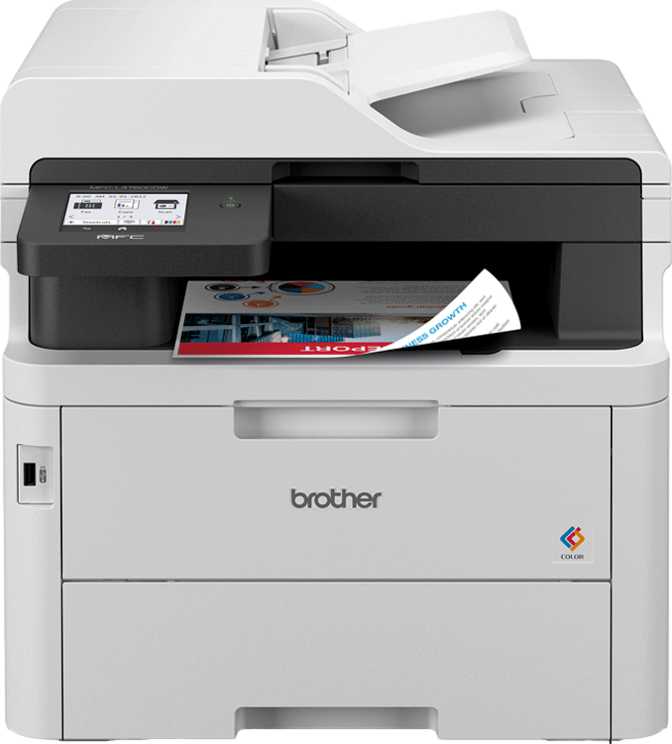
The MFC-L3760CDW is a genuinely large machine — roughly 410mm wide, 401mm deep, and 444mm tall. At just over 20 kilograms, it requires a dedicated, structurally confident surface: a purpose-built printer stand or a reinforced shelf. A precarious desk corner won't do. Moving it after initial setup is a two-person task. The physical scale is appropriate for what it contains: a full laser print engine, a flatbed scanning glass, and an automatic document feeder stacked vertically into a single tower.
Paper Handling and Trays
A single 250-sheet input tray handles paper feeding. For a small team printing within the machine's recommended monthly ceiling, this works comfortably — load it at the start of the week and it largely takes care of itself.
The limitation surfaces when you need to run two paper types concurrently, or when print runs grow long enough that mid-job refill interruptions become a pattern. There is no second tray and no specialty bypass slot. The output tray collects up to 150 finished pages before requiring clearance.
Controls and Interface
A color touch screen panel anchors the front of the machine, handling copy configuration, scan destinations, network status, and basic settings. Touch-based control is a practical upgrade over older button arrays — common tasks require fewer menu steps, and the interface reduces the need to memorize function sequences. The screen is workmanlike rather than impressive, but it completes the job without friction.
Print Performance: Speed, Color, and Volume
Color parity, duplex output, and monthly capacity explained
PPM Monochrome
PPM Color
Identical print speeds regardless of whether your document is monochrome or full color — a rare parity at this price tier.
The Equal-Speed Advantage
Color and monochrome output both land at 26 pages per minute. That number matters most when you understand what alternatives typically offer: many color laser printers at comparable prices print color at roughly half their monochrome rate or less, creating a predictable bottleneck whenever a job involves color pages.
For offices where color printing is daily business, that gap accumulates quickly. The practical implication is straightforward: you don't need to factor in whether a job is color or monochrome when estimating print time. The answer is the same either way.
Duplex Printing Speed
Automatic two-sided printing is supported and runs at 10 pages per minute for both color and monochrome duplex jobs. The slowdown relative to single-sided output is expected — the printer physically re-routes pages through the mechanism to print the second side, adding mechanical time to every sheet.
For contracts, bound reports, or any document where paper reduction matters, the automatic duplex capability is genuinely useful. For very high-volume duplex jobs, plan for roughly double the time you'd budget for single-sided work at the same page count.
Monthly Volume and Practical Limits
The printer is designed around a recommended monthly print volume of 3,000 pages — the range in which components wear at expected rates and print quality remains consistent. Translated to a working month of roughly 22 days, that's approximately 135 pages per day: a meaningful but not extreme output for a small team.
Running consistently above 3,000 pages per month accelerates wear on imaging components, leading to more frequent toner and drum replacements and a shorter overall service life than rated specifications would suggest.
Laser Output Quality
Laser printing delivers sharp, clean-edged text — the defining advantage over inkjet for professional documents. The MFC-L3760CDW produces crisp monochrome text and accurate, consistent color for charts, branded graphics, and presentation handouts.
What laser color printing does not do is replicate photographic nuance. Skin tones, subtle gradients, and image detail in photographs look serviceable on plain paper — not impressive. The absence of borderless printing support reinforces the point: this is a document printer built for office output, not creative or photographic work.
Scanning and Copying: Capable, with Caveats
Flatbed, ADF, resolution — and the limitations that matter in practice
Flatbed and ADF Combination
The scanner combines a full flatbed glass bed with an automatic document feeder sitting above it. This covers the two core scanning scenarios cleanly: fragile documents, books, and items that can't go through a feeder stay flat on the glass; multi-page standard documents run through the ADF for faster processing.
The optical scanning resolution is high enough to archive printed text with clarity and to capture graphics, charts, or diagrams at a level of fidelity suitable for professional records. For office archiving and documentation tasks, the scan quality itself is not the weakness here.
Copying Performance
For copying tasks — the third function — the laser engine and ADF combination handles short to medium document copy runs quickly and with clean output. Multi-page documents benefit from ADF feeding rather than requiring page-by-page manual placement on the glass.
Color copying performs at the same parity speed as color printing, meaning color copies don't introduce a disproportionate time cost. For a small office making regular copies of mixed-format materials, the copying performance is straightforward and dependable.
The Duplex Scanning Gap — A Significant Limitation
The ADF does not scan both sides of a page automatically. If you load a stack of two-sided documents — contracts, double-sided invoices, printed correspondence — the ADF processes the top side only. Capturing the reverse requires manually re-feeding the stack face-down and running a second pass, then combining results in software. For offices where double-sided document scanning is a standard daily task, this is a sustained drag on productivity that compounds over weeks. Printers with duplex ADF scanning handle this in a single unattended pass — if your workflow regularly involves two-sided documents, that capability is worth prioritising above most other features.
No Native Scan-to-PDF or On-Device OCR
Two workflow features are absent from the device itself: direct scan-to-PDF output and optical character recognition. The scanner produces digital captures of documents but doesn't generate a finished PDF file in a single button press from the machine's panel, and it doesn't convert scanned text into searchable or editable content on-device. For users who need PDF output or searchable archives, the practical path is routing scans through software on a connected computer — which works, but adds a step compared to machines that handle these natively. There is also no auto scan mode; each job requires manual initiation.
Connectivity: Well-Covered Where It Counts
Network options, mobile printing support, and what's missing
Included Connectivity
- Wi-Fi Wireless Networking
- Ethernet Wired Network
- Wi-Fi Direct (No Router Required)
- AirPrint (iPhone, iPad, Mac)
- Mopria (Android Devices)
- Dedicated Brother App (iOS & Android)
- Color Touch Screen Control Panel
Not Included
- Bluetooth
- NFC Tap-to-Print
- USB Drive / Memory Card Slot
- Alexa Voice Integration
- Google Assistant Integration
- Borderless Printing
- Fax Capability
Network and Wi-Fi Options
Wired Ethernet and Wi-Fi are both present, covering the two standard network connection scenarios. For a shared office printer serving multiple users, a wired Ethernet connection is generally preferable — more stable, faster, and less susceptible to interference under sustained multi-user print loads. Wi-Fi Direct allows devices to connect and print without going through the office router — useful for guests, contractors working on-site, or situations where the main network is temporarily unavailable.
Mobile Printing Support
AirPrint enables iPhones, iPads, and Macs to print directly to this machine over a shared Wi-Fi network, with no driver installation or additional software required. Android devices access the same capability through Mopria certification, built into modern Android phones. Printing from a mobile device requires nothing more than connecting to the same network and selecting the printer.
The dedicated Brother app extends control beyond what native print dialogs offer, covering scan initiation, print job management, and device settings — available for both platforms.
Power Consumption and Operating Noise
Running costs and acoustic profile in real-world context
Operating Power Draw
In the range of a small kitchen appliance at full load. In an office running the printer for a few hours daily, the contribution to electricity costs is noticeable but not alarming. At sustained high-volume use throughout the working day, the cumulative power cost adds up and is worth factoring into total running cost calculations — not just the purchase price.
Standby Power Draw
A sensible idle figure for a machine that spends most of its time waiting between jobs. The dramatic drop from active to standby means total energy consumption depends heavily on actual daily print volume rather than simply being powered on. Light users will find the real-world energy footprint much smaller than the operating wattage figure alone implies.
Operating Noise Level
Sits between a quiet library and a normal conversation. Clearly audible in a small private office during print jobs, but it blends into background noise in an open-plan environment without demanding attention. The noise profile is typical for laser printing — a combination of motor and airflow sounds that stop cleanly when the job ends.
Who This Printer Is For — and Who Should Look Elsewhere
Matching the right buyer to the right machine
Ideal Users
- Teams printing a meaningful proportion of color documents — presentations, client reports, branded materials — who refuse to accept slower color output as the price of entry
- Small offices sharing one printer across two to five network-connected users, mixing desktop computers with mobile devices
- Professional home offices needing reliable laser quality for contracts, correspondence, and mixed-format professional documents
- Workspaces printing between 50 and 130 pages per day consistently throughout the working week
- Users who value clean network integration and mobile printing breadth over walk-up self-service features
Consider Alternatives If
- Scanning two-sided documents is a routine daily task — the absent duplex ADF scanning will create recurring friction that compounds over weeks
- You need native scan-to-PDF output or on-device OCR without routing scans through separate computer software
- Monthly print volume regularly exceeds 3,000 pages — a higher-capacity machine will cost less in the long run
- Photo printing quality is any part of the requirement — color laser is the wrong technology category for photographic output
- Self-service printing from USB flash drives or NFC tap-to-print is expected day-to-day functionality
How It Compares to Typical Alternatives
Positioning the MFC-L3760CDW across the color laser MFC category
In the color laser MFC category at this price point, the standard trade-off is between low cost per page and print speed, with scan features often acting as a secondary differentiator. The MFC-L3760CDW carves out a distinct position through its color-speed parity — a feature many alternatives in the same tier still don't offer. Buyers who print predominantly in black and white may find alternatives optimised for cost per page serve them better; buyers where color output is frequent will find the parity genuinely valuable.
| Feature | MFC-L3760CDW | Budget Color Laser | Advanced MFC |
|---|---|---|---|
| Color Print Speed | Equal to Mono | Significantly slower | Equal to mono |
| Duplex ADF Scanning | No | Typically no | Yes |
| Native Scan-to-PDF | No | Rarely included | Yes |
| Ethernet + Wi-Fi | Both | Wi-Fi only typical | Both |
| AirPrint & Mopria | Both | Varies by model | Both |
| Monthly Volume Rating | 3,000 pages | Typically lower | Higher |
| Input Tray Capacity | 250 sheets, 1 tray | Often less, 1 tray | 500+ sheets, 2+ trays |
| NFC / USB Drive Print | No | Varies | Often included |
| Touch Screen Interface | Yes | Typically no | Yes |
Competitor columns represent typical feature profiles across market tiers — not specific named models.
Buyers who prioritise scan workflow depth should compare the cost delta of stepping up to a model with duplex ADF scanning and native scan-to-PDF against the productivity value those features would deliver in their specific office context. The MFC-L3760CDW wins on print speed parity and network breadth; it concedes ground on document workflow depth.
Honest Assessment
A balanced look at where the MFC-L3760CDW delivers and where it falls short
What It Does Well
The speed parity between color and monochrome output is the most commercially meaningful thing about this printer. For offices where color is a daily routine, this alone can justify the purchase over slower alternatives that still treat color as a second-class mode. A 40-page color report shouldn't take materially longer than a 40-page black-and-white one, and here it doesn't.
Build quality for a printer in this class is solid. Laser printers are inherently more mechanically reliable over time than inkjets, and this machine's profile places it firmly within the reliable-workhorse category for its intended volume range. No ink-drying concerns, no printhead maintenance cycles, no humidity sensitivity.
Connectivity is well-rounded for core use cases — network printing from computers and mobile devices, with multiple wireless protocols covered. Wired Ethernet, Wi-Fi, AirPrint, and Mopria together cover virtually every device in a modern mixed office without requiring additional configuration work or driver management.
Where It Falls Short
The scanning feature set has real gaps. No duplex ADF scanning, no scan-to-PDF, and no OCR mean the MFC-L3760CDW functions as a printer that also scans, rather than a true document management hub. Buyers who need a comprehensive scan workflow should either factor in the additional software setup required or look at a model that handles these natively — the difference in daily friction is not trivial in document-heavy offices.
Single-tray paper input limits flexibility. Most small offices manage fine with one input drawer, but the inability to load two paper types simultaneously — or to draw from a larger reserve without manual refilling — becomes a noticeable constraint as print frequencies climb toward the monthly ceiling.
The operating power draw is higher than average for this category and will matter for cost-conscious buyers running the machine heavily. Budgeting for total cost of ownership — not just the purchase price — is more important here than with lower-draw alternatives in the same tier.
Frequently Asked Questions
Answers to what real buyers search for before purchasing
Fast, Focused, and Worth the Space
The Brother MFC-L3760CDW earns its place in offices where color laser printing is a practical daily need — not a luxury — and where sharing a printer across a small team on a reliable network is the primary requirement. The equal speed for color and monochrome output separates it from a congested field of alternatives that still treat color as a slower afterthought.
Buy It If
- Color printing is a daily routine across your team, not a rare exception
- A small team needs one network-connected printer that serves every device type
- Monthly volume comfortably stays within 3,000 pages
- Clean network integration matters more than walk-up self-service features
Skip It If
- Scanning two-sided documents is a daily workflow requirement
- Native scan-to-PDF or built-in OCR are expected, not optional
- Monthly volume regularly pushes past the 3,000-page ceiling
- Photo output quality or borderless printing is any part of the requirement
At its best, the MFC-L3760CDW is a fast, reliable, network-ready color laser printer that does exactly what it promises. That's a shorter list than some alternatives offer — but the things on that list are done well, and for the right office, that's exactly enough.