Brother DCP-L2665DW Review: Reliable Mono Laser for Home Office Use
PrintersThe home office printer market is full of compromises. Color lasers consuming expensive toner on jobs that only ever need black text. Inkjets that dry out between uses and streak when you actually need them. Multi-function devices that technically scan, copy, and print but do none of those things particularly well.
The Brother DCP-L2665DW takes a different position: it prints, copies, and scans — all in monochrome — and does each with a speed and consistency that makes day-to-day printing feel like a solved problem rather than a recurring frustration.
This is a machine built for steady, workhorse use. If your output is primarily text — contracts, reports, invoices, correspondence, forms — and you need it fast, reliably, and without the drama of inkjet maintenance, the DCP-L2665DW was designed with your workflow specifically in mind.
Design and Build Quality
Physical experience, form factor, and build materials
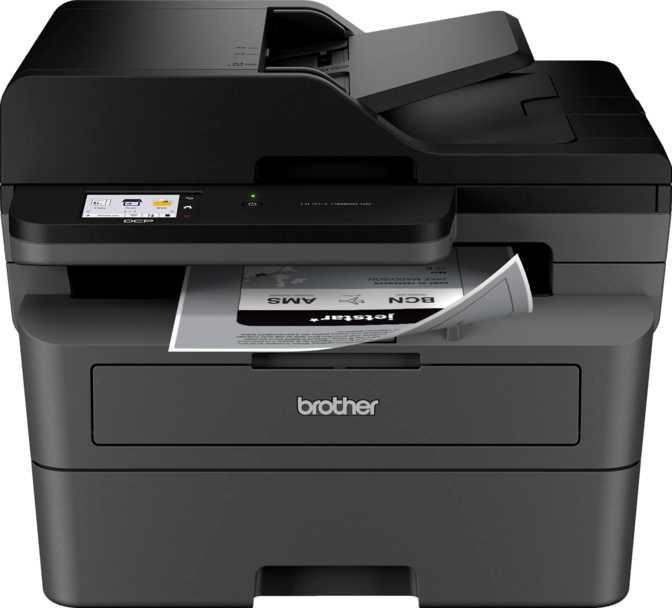
The DCP-L2665DW occupies a footprint roughly equivalent to a large microwave — about 40 cm in each horizontal direction and standing just over 41 cm tall. It fits comfortably on a desk or shelf without dominating the space, though it won't disappear into a corner either.
At just over 11 kilograms, it's a printer you set down in one spot and leave there. That weight reflects the internal build quality of a device with actual metal components and a fuser assembly that generates real heat. Lightweight office printers tend to feel plasticky and unstable; this one feels planted.
The exterior uses matte black plastic throughout, which wears well and doesn't attract fingerprints or dust the way glossy surfaces do. The design is purely utilitarian — a tool rather than a decorative object, and it looks the part without apology.
The front panel touch screen is a genuine everyday upgrade over the physical button arrays found on cheaper alternatives. Navigating menus, adjusting copy density, setting copy quantities, and launching scan jobs all happen faster when tapping a responsive interface rather than cycling through button-based option trees. Users interacting with this printer multiple times a day will appreciate it quickly.
- Dimensions (W × D × H) 399 × 319 × 410 mm
- Weight 11.4 kg
- Input Tray Capacity 250 sheets
- Output Tray Capacity 120 sheets
- User Interface Touch Screen
Print Performance
Speed, resolution, and what the numbers mean in daily practice
A 10-page document completes in roughly 18 seconds of active printing. A 50-page report takes under two minutes. If you have lived with an inkjet, the first time you see this in practice will feel almost implausible.
Small fonts, fine legal print, dense tables, detailed forms, and barcodes all render with crisp, clean edges — well beyond the threshold where quality becomes visible to the naked eye.
First Page Out: 8.5 Seconds from Cold Start
The first page from a cold start takes approximately 8.5 seconds while the laser's fuser unit heats to operating temperature. After that initial warmup, every subsequent page flows out at full speed. For anyone printing multi-page documents rather than isolated single pages, this warmup period is entirely inconsequential.
The specification data includes a throughput figure for two-sided output, implying some dual-side capacity. However, fully automatic duplex — where the printer mechanically flips and re-feeds pages without user intervention — is not confirmed in the available specifications. Buyers who regularly produce double-sided documents should verify this directly with Brother before committing.
Monthly Volume: Matching the Machine to Your Workload
This machine is rated for up to 2,500 pages per month — the throughput it's engineered to handle sustainably. A typical knowledge worker printing 20 to 30 pages a day, five days a week, sits comfortably within this range.
Scanning Capabilities
Two input paths, and where each one fits your workflow
The flatbed glass handles single sheets, bound documents, booklets, photographs, and anything too fragile or rigid for the feeder. It captures at 1,200 dpi optical resolution — high enough to reproduce fine text and document detail accurately. Scan-to-PDF is built in as a direct output destination.
- Books, booklets, and bound materials
- Photographs and fragile originals
- Single-sheet documents
- Direct scan-to-PDF with no conversion step
Load a stack of pages, press scan, and walk away. The ADF is what separates a genuinely useful office scanner from a frustrating one. Digitizing contracts, archiving printed reports, capturing receipts for expense accounting — all become low-effort tasks rather than manual, page-by-page processes.
- Multi-page documents scanned unattended
- Handles typical multi-page document stacks
- Direct scan-to-PDF output
- Single-sided only — no duplex scan pass
The ADF scans one face per page. Double-sided source documents require running the stack twice, flipping between passes. For occasional jobs this is manageable. For large volumes of two-sided originals, the added time is real and should factor into the decision.
Scans produce image-based PDFs — text is captured as a picture, not as selectable characters. Making scanned PDFs text-searchable requires a separate OCR application. Free and paid options are widely available, but this adds a step to the workflow for anyone who needs searchable archives.
Connectivity at a Glance
Broad compatibility across every common device and platform
What Is Not Included
- Bluetooth
- NFC tap-to-print
- External memory card slot
- Voice assistant integration
For a document-focused office laser, none of these represent meaningful gaps. They are conveniences that belong to different product categories rather than features this printer's users are likely to miss.
AirPrint for Apple devices, Mopria for Android, Wi-Fi Direct for any device without a network, Ethernet for wired setups, USB for direct connection, and Brother's own app — virtually any device and network configuration is covered without workarounds. For a printer at this price tier, that is an unusually complete picture.
Power Use and Operating Noise
Energy behaviour and acoustic footprint across a typical day
Power Consumption
The 470-watt active draw is characteristic of laser printers — the fuser unit that permanently bonds toner to paper generates sustained heat. In absolute terms it is comparable to a modest electric heater at low setting, but since print jobs last seconds rather than hours, the cumulative energy per job is small.
The near-zero standby figure (under one watt) is the more meaningful number. A device that spends the vast majority of its life waiting between jobs costs almost nothing to keep powered. The steep contrast between active and idle draw rewards users who print in discrete bursts rather than sustained continuous runs.
Operating Noise
Calibrated against everyday sounds, 49 decibels is roughly equivalent to a relaxed conversation taking place a few feet away — clearly audible in a quiet room but unremarkable in most office settings.
Users in genuinely quiet home offices, shared workspaces with strict noise etiquette, or rooms where audio recording occurs will notice it. For the majority of home and small office environments, it fades into the background quickly.
Is This the Right Printer for You?
Matching the machine to its ideal buyer — and flagging who should look elsewhere
A Good Fit For
- Home office workers who print text documents regularly and want speed without the recurring cost of inkjet cartridges or color toner
- Small teams sharing a single print device for correspondence, forms, invoices, contracts, and internal documentation
- Remote workers and students with moderate-to-high volume needs — enough that speed and reliability genuinely matter
- Anyone migrating from inkjet and frustrated by clogging, warm-up waste cycles, and expensive color cartridges on a printer that never actually prints color
Not the Right Fit For
- Anyone whose workflow includes color output regularly — marketing materials, presentations, photos, or client-facing documents where color matters
- High-volume environments regularly exceeding 2,500 pages per month, where a higher duty-cycle device is the appropriate choice
- Users who need scanned documents to be text-searchable or directly editable without post-processing through separate software
- Creative professionals, photographers, or designers whose output requirements extend beyond black-and-white document reproduction
Where It Fits in the Market
The DCP-L2665DW occupies the working midpoint of the monochrome laser MFP category
| Feature | Budget Mono MFP | Brother DCP-L2665DW | High-Volume Mono MFP |
|---|---|---|---|
| Print Speed | Moderate | 34 ppm — Fast | Very Fast |
| Scan Inputs | Usually one type | Flatbed + ADF both | Flatbed + ADF both |
| Mobile Printing | Partial coverage | AirPrint, Mopria, Wi-Fi Direct | AirPrint, Mopria, Wi-Fi Direct |
| User Interface | Physical button array | Touch screen | Touch screen / keypad |
| Monthly Volume | Lower ceiling | Up to 2,500 pages | Higher ceiling |
| Duplex Scanning | Often included | ||
| Built-in OCR | Varies | ||
| Color Output | Some models | Mono only | Some models |
Category descriptions reflect general tier characteristics and are not based on any specific competing product's specifications.
Honest Assessment
Where it earns trust, and where it asks for patience
What It Gets Right
The print speed advantage is the single most transformative thing about owning this machine day-to-day. Printing stops being something you wait for and becomes something that simply happens. That is harder to communicate in a spec sheet than it is to feel in practice.
At 1,200 dpi, everything a document-focused office produces — small type, barcodes, dense tables, fine legal print — renders cleanly. This is output that holds up under close inspection, not just casual viewing.
Both flatbed and ADF scanning are included, meaning you are never forced to choose between scan input types depending on the source material. Having both is worth more than the spec sheet makes it appear.
AirPrint, Mopria, Wi-Fi Direct, a dedicated app, Ethernet, and USB means virtually any device and network configuration is covered without workarounds. For a printer at this tier, the breadth of connectivity is genuinely impressive.
Under one watt on standby means keeping it powered between sessions costs almost nothing across a year of electricity bills. A meaningful advantage in energy-conscious environments.
Genuine Limitations
Monochrome-only output is not a tradeoff — it is a fundamental limitation with no upgrade path or workaround. This must be accepted fully before purchasing, not rationalized as an acceptable sacrifice.
The 2,500-page monthly recommendation is right for the target user but will register as a stressor in genuinely busy shared environments. Sustained overuse accelerates wear on the drum unit and internal components.
No automatic duplex scanning means double-sided source documents require two passes. A manageable inconvenience for occasional jobs; a genuine friction point for anyone digitizing large volumes of two-sided originals.
Text-searchable PDFs require a separate application. Not a dealbreaker for most users, but a real gap for workflows that depend on searchable, editable document archives.
Automatic two-sided printing is not confirmed in the available specifications. Buyers who regularly produce double-sided output should verify this directly with Brother before committing to purchase.
Common Questions from Real Buyers
Answers to what people actually search for before purchasing
Our Verdict
The Brother DCP-L2665DW earns a confident recommendation for the user it is actually designed for: someone who prints text documents regularly, values speed and reliability over color capability, and wants a scanner that handles both single pages and multi-page document stacks without forcing a choice.
Its speed advantage over inkjet and lower-tier laser alternatives is the single most transformative thing about owning it day-to-day. That is harder to communicate in a spec sheet than it is to feel in practice — printing stops being something you wait for and becomes something that simply happens.
The constraints are real and should be taken seriously rather than rationalized away. No color output is a fundamental limitation, not a tradeoff. The recommended monthly volume ceiling, the single-sided scanner, and the absence of OCR all define a specific user profile rather than disqualifying the device. They are honest edges, not hidden ones.