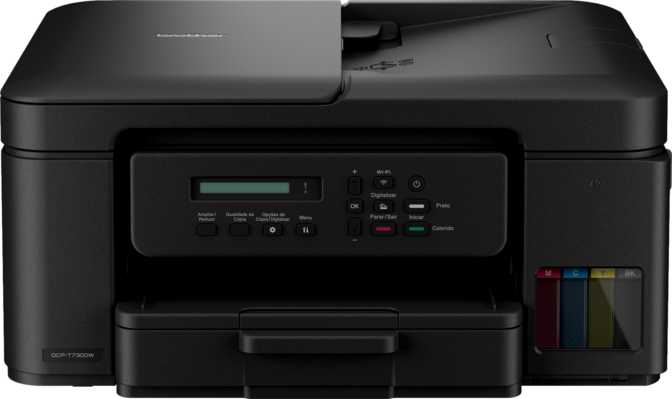
Set the Brother DCP-T730DW on a desk and the first thing you notice is how unassuming it is. This review breaks down exactly what you get for print quality, scanning, connectivity, and everyday running costs, so you can decide with confidence whether it belongs on your desk.
First Impressions: Design and Build Quality
At roughly 15.4 inches wide, 13.5 inches deep, and just over 7 inches tall, the DCP-T730DW occupies a low, compact footprint that slides comfortably onto a corner desk, a small shelf, or a home office cart without dominating the space. Weighing close to 17.4 pounds, it's substantial enough to feel stable when paper feeds through it, but light enough that one person can reposition it without help.
15.4 x 13.5 x 7"
Desktop Footprint
17.4 lb
Total Weight
100 sheets
Input Tray Capacity
50 sheets
Output Tray Capacity
There's no touchscreen here, and no preview display either. Control happens through physical buttons and a basic readout, which means the interface leans utilitarian rather than flashy. For some buyers that's a non-issue; for anyone coming from a smartphone-style touch panel, it will feel like a step back in polish, even if the underlying functionality is unaffected.
Because there's only one input tray, switching between plain paper and photo stock means manually swapping what's loaded rather than keeping both ready at once. On top, a flatbed scanner bed sits beneath an automatic document feeder (ADF), giving you two distinct ways to digitize paper: the flatbed for books, ID cards, or anything that isn't a loose single sheet, and the ADF for feeding multi-page stacks through automatically.
Print Performance: Speed, Resolution, and Everyday Output
This is an inkjet-based all-in-one rather than a laser model, which shapes what to expect from it. Inkjet engines generally trade some raw speed for stronger color output and the ability to print borderless photos, and that trade-off shows up clearly here.
16 ppm
Black & White Speed
15 ppm
Color Speed
600x1200 dpi
Print Resolution
128MB
Onboard Memory
Rated output sits at 16 pages per minute in black and white and 15 pages per minute in color, an unusually small gap between the two, meaning color documents won't slow you down nearly as much as they do on many budget machines. Treat these numbers as best-case figures measured under simplified test conditions; dense text, mixed graphics, or anything printed in duplex will typically run slower than the rated ceiling, which is true of virtually every printer at this price point.
Print resolution lands at 600 x 1200 dpi, sharp enough for crisp text, line art, and everyday graphics, but a step below engines built specifically for photo printing. If you want gallery-quality prints of family photos, this isn't the tool built for that job; it's a document-and-light-graphics printer that happens to also handle color reasonably well.
Two features worth calling out: automatic duplex printing, which lets the printer flip pages on its own to print double-sided without manual feeding, and borderless printing, which lets photos and graphics print edge-to-edge instead of leaving a white margin. Onboard memory sits at 128MB, plenty for typical home or small-office documents, though very large graphics-heavy files or long queues can occasionally process more slowly.
Scanning and Copying: Strengths and Real Limitations
The scanning side of this machine is genuinely capable in some respects and noticeably limited in others, and buyers should understand both before purchasing.
Optical scan resolution reaches up to 2400 x 1200 dpi, well beyond what's needed for everyday document capture and high enough to do a respectable job digitizing old photographs or detailed artwork. Combined with built-in Optical Character Recognition (OCR), the printer can read the text within a scanned image and convert it into editable, searchable content through the companion software, a meaningful feature for anyone digitizing a filing cabinet's worth of paperwork into something searchable later.
Despite duplex printing being fully automatic, duplex scanning is not supported. If you regularly digitize double-sided originals, you'll be manually flipping pages partway through the job. This asymmetry is easy to assume works both ways, so factor it in before you buy.
- There's no automatic multi-feed detection in the document feeder, meaning the machine won't catch it if two sheets accidentally pull through at once; fanning stacks before loading matters more here than on machines with that safeguard built in.
- There's no auto scan mode that automatically detects document type and adjusts settings on its own; you'll set scan parameters manually for best results.
- The control panel doesn't offer a dedicated one-touch "scan to PDF" shortcut. Scanning workflows run through the connected computer or mobile app, where you can select PDF as the output format and apply OCR from there.
On the copying side, adjustable copy density lets you darken or lighten copies on the fly, genuinely useful when duplicating faded receipts, light pencil notes, or documents with colored backgrounds.
Standout Features That Matter in Daily Use
Optical Character Recognition
Turns scanned paper into editable, searchable digital text rather than a static image, the difference between a scanned receipt you can search by keyword and one you have to scroll through manually.
Borderless Printing
Lets photos and graphics print to the very edge of the page with no white margin, useful for school projects or printed photos that look finished rather than framed by white space.
Automatic Duplex Printing
Saves paper and manual effort by printing both sides of a sheet without you flipping it yourself, one of the more practically valuable features on this spec sheet for regular printing.
Dedicated Mobile App Support
A companion smartphone app lets you print and scan directly from your phone over your wireless network as more day-to-day documents start their life on a phone screen.
What's notably absent: there's no page preview screen, so you won't get a visual check before a scan or print job runs, and there's no skip-blank-page function during scanning, meaning blank sheets accidentally fed through won't be automatically discarded from your scanned file.
Connectivity: How It Fits Into Your Wireless Setup
Connectivity here is built around Wi-Fi first, with a single USB port as the wired fallback. There's no Ethernet port, so environments that depend on a stable wired network connection won't be accommodated directly.
| Connection Type | Supported | What It Means for You |
|---|---|---|
| Wi-Fi (802.11n / Wi-Fi 4) | Yes | Connects to your home or office wireless network; an older generation, but sufficient for printer-level data transfer. |
| Ethernet | No | No wired network option; you're tied to Wi-Fi or a direct USB cable. |
| USB | Yes (1 port) | Direct cable connection from a single computer. |
| AirPrint | Yes | Print straight from iPhones and iPads with no extra drivers needed. |
| Mopria | Yes | Print from most Android devices without installing manufacturer-specific software. |
| Wi-Fi Direct | No | No direct device-to-printer connection without a router or access point in between. |
| Bluetooth | No | No proximity pairing from phones or tablets. |
| NFC | No | No tap-to-print functionality. |
| External Memory Slot | No | No card slot for printing directly from a memory card. |
| Voice Assistant | No | Not designed for Alexa or Google Assistant voice commands. |
For most home networks, router-connected phones, laptops, and tablets all on the same Wi-Fi, this setup works without friction. Where it gets limiting is in scenarios needing a direct peer-to-peer connection without a router, or environments requiring wired Ethernet reliability.
Print Volume, Longevity, and Running Costs
Two numbers define how hard this printer is built to work: a recommended monthly print volume of around 1,000 pages, and a maximum duty cycle of 2,500 pages. The recommended volume is the sustainable, comfortable range; the duty cycle is the absolute upper limit the hardware can survive in a given month, not a target to consistently hit.
Maximum rated duty cycle: 2,500 pages per month
In practical terms, this machine is sized for home use, a home office, or a small workgroup printing a few hundred to around a thousand pages a month, well outside the territory of a high-volume business printer. One thing the spec sheet doesn't directly cover is ongoing ink cost; because this is an inkjet system rather than laser, it's worth checking current ink pricing and expected page yields before buying if cost-per-page is a deciding factor for you.
Who Should (and Shouldn't) Buy the Brother DCP-T730DW
Right For
- Home users and students needing print, copy, and scan without paying for fax capability they'll never use.
- Light home-office workers whose monthly print volume sits in the hundreds-to-low-thousands range.
- Wireless-first households where every device already connects over Wi-Fi.
- Anyone digitizing paperwork regularly, thanks to the flatbed/ADF combo and built-in OCR.
- Occasional photo or borderless print jobs like flyers, cards, and school projects.
Look Elsewhere If You Need
- Fax capability, since it isn't included at all by design.
- A wired Ethernet connection for office IT or network reliability requirements.
- Automatic duplex scanning for regularly digitizing double-sided originals.
- A touchscreen interface or print/scan preview screen.
- High-volume output beyond roughly a thousand pages a month, or professional photo resolution.
How It Compares to Other All-in-Ones in Its Class
Positioned against the two common alternative types of budget all-in-one printer, here's where the DCP-T730DW lands.
| Factor | DCP-T730DW (Inkjet) | Typical Budget Laser AIO | Typical Higher-Tier Inkjet AIO |
|---|---|---|---|
| Color printing | Yes | Often limited or mono-only | Yes |
| Borderless printing | Yes | Rarely supported | Usually yes |
| Black & white speed | 16 ppm | Often faster | Comparable or slightly faster |
| Duplex scanning | No | Sometimes on business models | Often included |
| Touchscreen | No | Varies | Frequently included |
| Wired Ethernet | No | Often included | Varies |
| Best suited for | Color documents, photos, light volume | High-volume monochrome text | Feature-rich home offices |
Laser engines built for this price tier typically print plain text faster and cheaper per page at volume, but usually sacrifice color quality or omit it. Inkjet machines like this one trade some raw text speed for stronger color and photo handling. Against pricier inkjet competitors with touchscreens and duplex scanning, the DCP-T730DW gives up some interface polish and scanning flexibility in exchange for a simpler, more affordable package.
Honest Strengths and Weaknesses
Strengths
The strongest case for this printer is its balance of practical, everyday-relevant features at an accessible price point. Automatic duplex printing, borderless output, a genuinely high optical scan resolution, and built-in OCR are not small conveniences; they're the features that actually get used week after week, included without inflating the machine into something more complex or expensive than it needs to be. Wireless setup is simple, and AirPrint plus Mopria support mean phone-based printing works out of the box for both iOS and Android.
Weaknesses
The honest weaknesses center on a handful of asymmetries that buyers can easily overlook. Duplex printing is automatic, but duplex scanning isn't, a gap that matters if double-sided document digitization is part of your routine. There's no Ethernet, no touchscreen, no preview screen, and no multi-feed detection in the document feeder, all of which place this firmly in budget-conscious territory rather than premium home-office territory. None of these omissions are dealbreakers individually, but stacked together, they describe a printer built to do the essentials well rather than impress with extras.
Frequently Asked Questions
Final Verdict
The Brother DCP-T730DW earns its place as a sensible, no-nonsense choice for home users, students, and light home-office setups that need dependable color printing, solid scanning resolution, and genuine conveniences like automatic duplex printing and borderless output, without paying for fax capability or premium extras most people won't use. It handles the fundamentals competently and wirelessly, with broad phone compatibility across both iOS and Android.
Where it falls short is equally clear: no duplex scanning, no Ethernet, no touchscreen, and a print engine sized for moderate volume rather than heavy daily output. If your needs match the basics, wireless printing, decent-quality scanning, occasional photo or borderless jobs, and monthly volume in the hundreds rather than thousands, this is a confident recommendation. If double-sided scanning, wired networking, or high-volume business printing are non-negotiable for your workflow, you'll want to look at a model built specifically around those features instead.